

TL;DR
- MCP servers replace databases as the primary data interface for agentic sales systems, enabling synchronous tool-native access without SQL or query writing.
- Four layers define agentic sales infrastructure: an identity layer, an enrichment MCP, a signal MCP, and a CRM sync layer — each requiring distinct design decisions.
- Latency thresholds matter: production agentic sales workflows require sub-200ms p95 responses from data tools, which traditional API polling cannot reliably deliver.
- Tool granularity is architecture: how you define MCP tool boundaries determines agent decision quality, error recovery behavior, and total token cost per workflow run.
- Schema stability in MCP tool definitions is a first-class reliability concern — breaking changes propagate instantly to every agent consuming the server.
- Explorium’s AgentSource MCP provides 150M+ company profiles, 800M+ people records, 18 buying signal categories, and 100 QPS synchronous response behind a unified credit pool.
- Teams adopting MCP-first sales infrastructure should assign a dedicated data infrastructure owner — not a data engineer and not a sales ops analyst, but a new hybrid role.
The Infrastructure Problem No One Is Talking About
Most conversations about agentic sales focus on the wrong layer. Teams debate which LLM to use, which prompting strategy produces the best outreach, and whether their AI SDR should mirror human rep behavior or operate differently. These are legitimate questions. But they all assume the infrastructure underneath is solved — and it almost never is.
The real blocker to production-grade agentic sales systems is not model quality. It is how agents access data. When an AI agent needs to know whether a prospect fits an ICP, whether a company recently raised funding, or whether a contact changed roles in the last 30 days, it needs that information synchronously, in a format the model can reason over, without writing a SQL query or parsing a raw API response. The dominant infrastructure patterns of the last decade — SQL databases, REST APIs, GraphQL endpoints — were not designed for this interaction model. They were designed for human developers and application code, not for LLM reasoning loops.
This article is about the architectural evolution that changes that: from databases to agentic sales infrastructure MCP servers. We will cover what MCP is and why it matters for sales data, the four components of a complete agentic sales infrastructure stack, how to design MCP tools for B2B data use cases, latency and reliability requirements, and what a real architecture looks like end-to-end. If you are building or planning to build AI-powered sales systems at scale, this is the foundation you need to get right.
The Evolution of Sales Data Infrastructure: Three Generations
To understand why MCP servers represent a genuine architectural shift, it helps to trace how sales data infrastructure has evolved. Each generation solved real problems — and introduced new ones that the next generation was built to address.
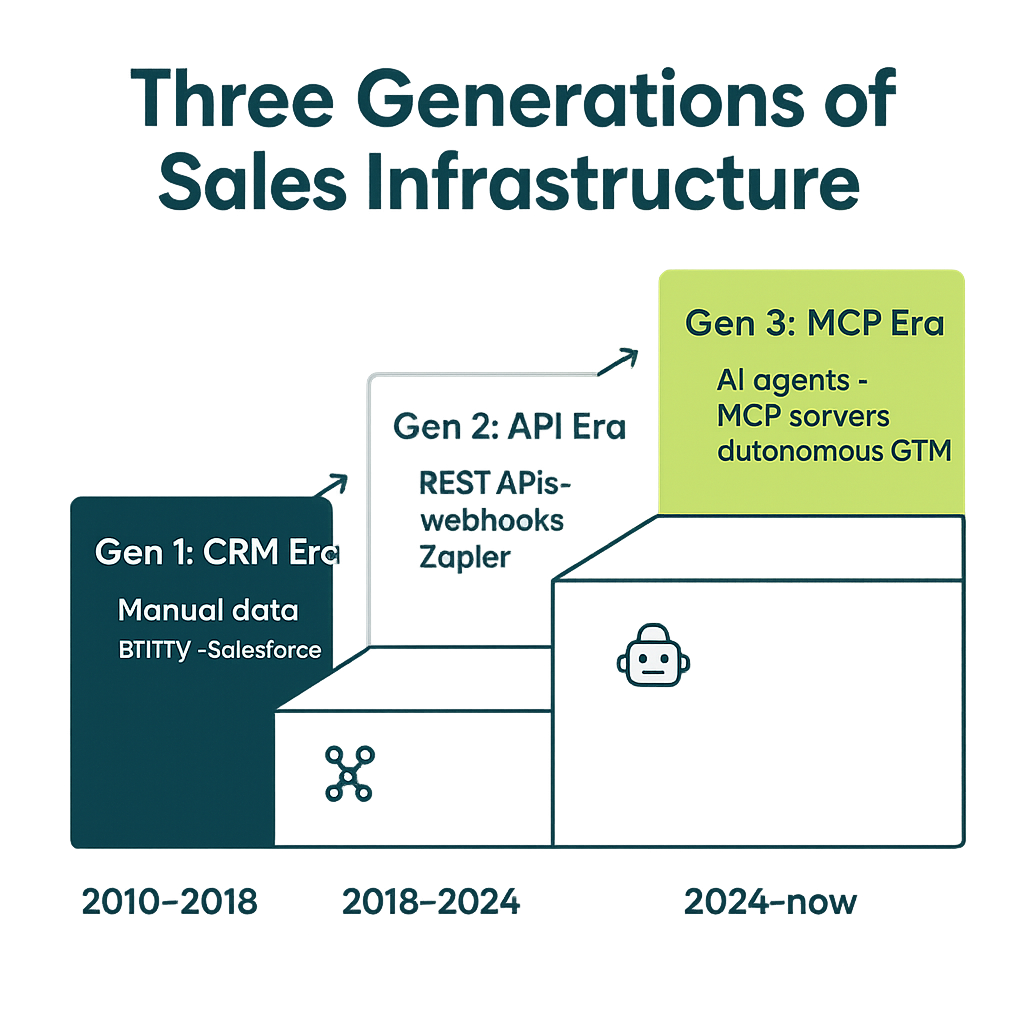
Generation One: The Database Era
The first generation of sales data infrastructure was built around relational databases. CRM data lived in Salesforce or HubSpot. Enrichment data lived in data warehouses. Analysts wrote SQL, exported CSVs, and handed them to sales reps. The mental model was a data repository: a place where information lives at rest, retrieved on demand by humans who know how to query it.
This worked reasonably well when humans were the consumers. The latency of a query — even one that took several seconds — was acceptable because a human was on the other end. The lack of semantic structure was manageable because humans could interpret ambiguous results. The batch-oriented workflow was fine because sales processes were also batch-oriented: weekly pipeline reviews, monthly territory assignments, quarterly planning cycles.
The problems with this model became visible when teams tried to automate sales workflows in the 2010s. Automation tools needed data access, but they were built on top of CRM APIs rather than directly against the databases powering them. This created the second generation.
Generation Two: The REST API Era
REST APIs abstracted over databases and made data accessible to automation tools, marketing platforms, and early workflow engines. Enrichment vendors like ZoomInfo and Clearbit offered API endpoints: send us a company domain, we send back a JSON object with firmographic data. Zapier and similar tools turned API calls into no-code workflows. The CRM became less a monolithic database and more a hub in a connected ecosystem of API-integrated systems.
This was a significant improvement for automation. But it had a ceiling. REST APIs were still designed around the request-response model of human-initiated transactions: a developer writes code that calls an endpoint, parses the response, and does something with it. The API surface was designed for developer consumption, not model consumption. Field names were inconsistent across vendors. Error handling was inconsistent. Rate limits required complex retry logic. And crucially, there was no standard way to describe what an API could do — documentation existed, but it was human-readable, not machine-readable in the sense that a language model could reason over it.
When LLM-based agents arrived, these limitations became structural blockers. An agent calling a REST API had to either have the API client pre-baked into its codebase, or it had to figure out the API structure from documentation — an unreliable and expensive process. The GTM data platform model helped organize the data, but it did not solve the agent-interface problem.
Generation Three: The MCP Server Era
The Model Context Protocol, developed by Anthropic, addresses the agent-interface problem directly. MCP defines a standard protocol by which an LLM agent can discover, understand, and invoke tools — without requiring pre-baked API clients or runtime documentation parsing. An MCP server exposes a set of named tools with structured schemas. The agent sees a tool definition, understands what the tool does and what parameters it accepts, and can call it directly within its reasoning loop.
For sales data, this is transformative. Instead of writing SQL queries or parsing REST responses, an agent calls enrich_company(domain="acme.com") and receives a structured object it can immediately reason over. Instead of polling an API for signals, an agent calls get_buying_signals(company_id="...", signal_types=["funding","hiring"]) and gets back typed, normalized data. The data layer becomes tool-native, and the agent can use it as naturally as a human uses a search engine.
| Dimension | Gen 1: Databases | Gen 2: REST APIs | Gen 3: MCP Servers |
|---|---|---|---|
| Primary consumer | Human analysts | Developer-written code | LLM reasoning loops |
| Query interface | SQL | HTTP endpoints | Named tool calls |
| Schema discoverability | Schema files, docs | OpenAPI specs (partial) | Native tool definitions |
| Latency tolerance | Seconds to minutes | Hundreds of ms to seconds | Sub-200ms p95 required |
| Error handling | Exception handling in code | HTTP status codes + retry | Structured error types in schema |
| Parallelism | Thread-level | Async HTTP clients | Native multi-tool invocation |
| Schema evolution | Migrations | API versioning | Backward-compatible tool updates |
Why MCP Changes How Agents Access Sales Data
The architectural significance of MCP goes beyond “a nicer API.” It represents a different mental model for how data infrastructure relates to the systems consuming it. Understanding this difference is essential before designing your stack.
Synchronous and in-context
MCP tool calls happen synchronously within the agent’s reasoning loop. This is not a minor implementation detail — it changes how agents can structure their decision-making. A traditional workflow might look like: trigger → call API → wait for webhook → process response → next step. An agent using MCP looks like: reason → call tool → receive result → continue reasoning. The agent does not leave its reasoning context to fetch data; the data comes to the reasoning context. This enables agents to chain data lookups in real time, adjusting each call based on what the previous call returned — something that is impractical in asynchronous pipeline architectures.
No query writing
One of the most underappreciated advantages of MCP for sales data is eliminating the need for agents to write queries. Text-to-SQL is a research area with real progress, but in production, it is brittle. Schema changes break generated queries. Ambiguous column names cause incorrect results. Query optimization requires domain knowledge the model may not have. MCP tools remove the query layer entirely. The agent calls a semantic tool — “get the firmographic profile of this company” — and the MCP server handles the data retrieval, normalization, and formatting internally. The agent never sees the underlying schema.
Tool-native reasoning
Because MCP tools have names, descriptions, and typed schemas, the LLM can reason about which tool to use, when to use it, and what to do with the result — all within the same cognitive frame it uses for everything else. This is qualitatively different from calling a function in pre-written code. The agent can decide at runtime to call get_buying_signals because it inferred from the prospect’s description that timing signals were relevant — not because a developer hard-coded that step into a pipeline. The intelligence is in the agent; the infrastructure serves the agent.
Uniform error semantics
MCP’s tool schema includes error type definitions. When a tool call fails, the agent receives a structured error — not an HTTP 500 or a null response. This enables agents to handle data failures gracefully: retry with different parameters, fall back to an alternative tool, or explicitly note in its reasoning that the data was unavailable. This is a major reliability improvement over REST APIs, where error handling was largely left to the calling code.
For teams architecting autonomous GTM data infrastructure, these properties collectively mean that MCP servers are not just a convenience layer — they are the right abstraction for agent-native data access.
The Four Components of Agentic Sales Infrastructure
A complete agentic sales infrastructure stack has four distinct layers. Each has different data sources, different latency requirements, and different failure modes. Designing them as a monolith is a common mistake; designing them as independent, composable services is the pattern that scales.
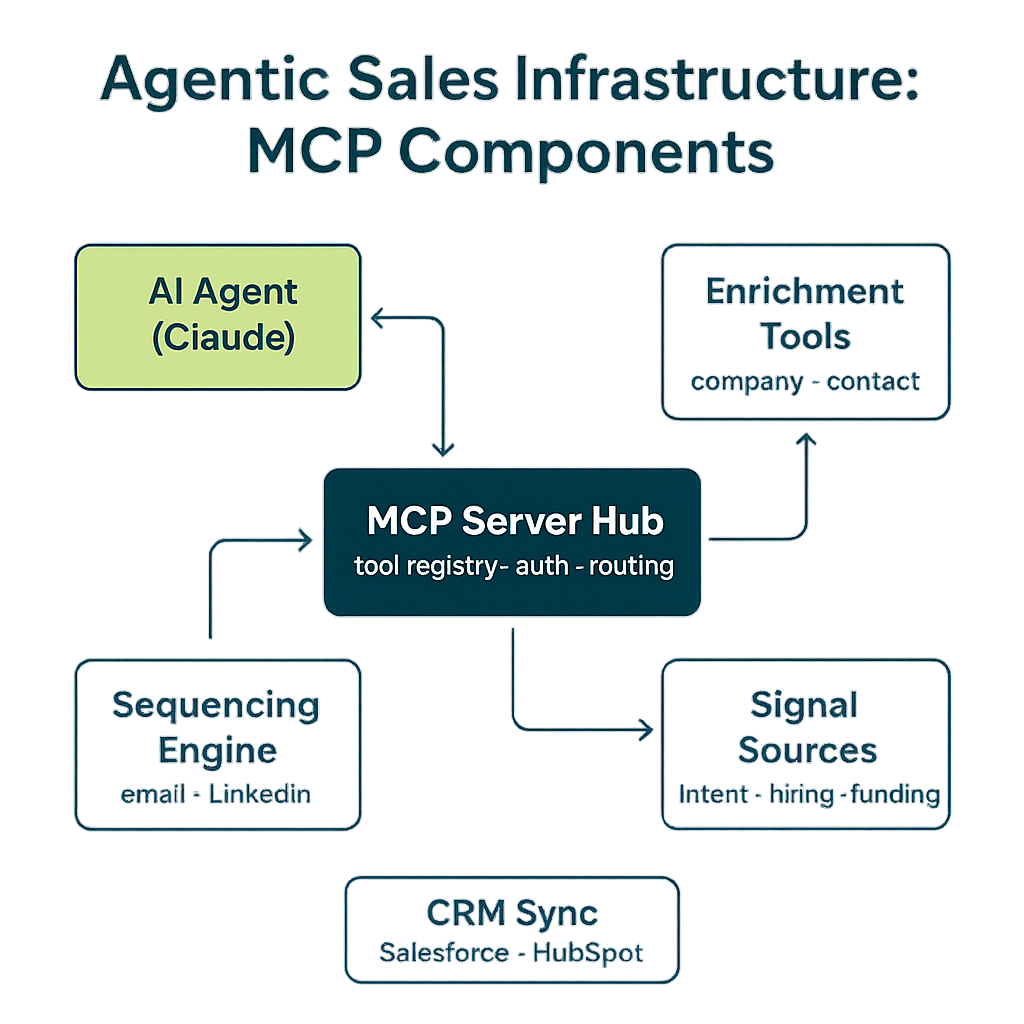
Layer 1: The Identity Layer
The identity layer is the foundation. Before an agent can enrich a company, look up buying signals, or write to the CRM, it needs to resolve the identity of the entity it is working with. “Acme Corp” is not a machine-readable identifier. A domain name is better, but it can still be ambiguous. A stable, globally unique identifier — what Explorium calls a deterministic entity ID — is what the rest of the stack depends on.
The identity layer should expose two primary MCP tools: one for resolving a fuzzy input (company name, domain, LinkedIn URL) to a canonical identifier, and one for reverse-lookups (given an ID, return canonical attributes like name and domain). Identity resolution is not a one-time batch job; in agentic contexts, it happens in real time for every new entity the agent encounters. The identity MCP must therefore be fast — sub-100ms — and highly available.
Design the identity layer to be authoritative. All downstream tools — enrichment, signals, CRM sync — should accept the identity layer’s canonical IDs as input. This creates a clean dependency graph: resolve identity first, then use the resolved ID everywhere else. Agents that short-circuit this — calling enrichment with a raw domain name — will encounter inconsistencies when enrichment vendors resolve the same domain to different entities.
Layer 2: The Enrichment MCP
The enrichment layer provides firmographic, technographic, and people data for resolved entities. Company enrichment tools return attributes like industry, headcount, funding stage, technologies used, and growth indicators. People enrichment tools return job titles, seniority, contact information, and professional history.
The critical design decision for enrichment MCPs is tool granularity. Should you have one enrich_company tool that returns everything, or separate tools for get_firmographics, get_technographics, and get_financials? The answer depends on how agents will use the data. If most workflows need all attributes, a single comprehensive tool minimizes round trips. If workflows are specialized — some need only technographics, others only financials — granular tools let agents request only what they need, reducing token consumption and latency.
A practical pattern is a tiered approach: one fast, cached tool for the most commonly needed attributes (name, industry, headcount, location, technologies), and separate on-demand tools for deeper data. This gives agents fast access to the data they use 80% of the time, with the ability to drill deeper when the workflow requires it.
Layer 3: The Signal MCP
Buying signals are where agentic sales diverges most sharply from traditional sales data infrastructure. Signals are time-sensitive, event-driven, and diverse in type. A company hiring a VP of Sales, raising a Series B, expanding into a new market, adding a competitor’s technology to their stack — each of these is a signal that might trigger an outreach decision. Traditional infrastructure treated signals as database records to be queried in batch. Agentic infrastructure treats them as tool outputs that agents can request in context.
The signal MCP should organize tools by signal category, not by data source. The agent should not know or care whether a “recent funding” signal comes from Crunchbase, a press release, or a proprietary data provider. It calls get_signals(company_id="...", categories=["funding","leadership_change","hiring"]) and receives normalized, ranked signals regardless of their origin. This abstraction shields agents from vendor-specific data structures and makes the infrastructure resilient to changes in underlying data sources.
Signal freshness metadata is important. Each signal result should include a timestamp and a confidence score. Agents reasoning about timing — “is this company currently in a buying window?” — need to know whether a funding signal is from last week or last year. Build freshness into the tool’s output schema from the start; adding it later requires schema changes that propagate to every agent using the tool.
For teams working with B2B buying signals at scale, the signal MCP is often the highest-value component of the infrastructure stack — but also the most complex to build and maintain.
Layer 4: CRM Sync
The CRM sync layer closes the loop between agent decisions and the systems of record that human teams rely on. When an agent decides to create a new contact, update an account’s ICP score, log an outreach activity, or move an opportunity stage, those actions need to be reflected in the CRM — consistently, with audit trails, and without creating duplicate records.
CRM sync MCPs have a different design profile than the data retrieval layers. They are write-heavy, require idempotency, and need to handle conflicts when agent-generated data differs from human-entered data. Key tools include: upsert_contact (create or update based on identity matching), log_activity (write outreach and interaction records), update_account_attributes (push enriched data back to CRM fields), and get_crm_status (check whether a prospect is already in a sequence or has a recent touchpoint).
The CRM sync layer is also where human override logic lives. Agents should not blindly overwrite data that a human rep has manually entered. Build conflict resolution rules into the CRM sync MCP: if a field was last updated by a human within 30 days, flag the conflict rather than overwriting.
| Layer | Primary function | Key MCP tools | Latency target | Primary failure mode |
|---|---|---|---|---|
| Identity | Entity resolution and canonical IDs | resolve_entity, reverse_lookup | <100ms p95 | Ambiguous match / duplicate IDs |
| Enrichment | Firmographic, technographic, people data | enrich_company, enrich_person, get_technographics | <200ms p95 | Stale data / missing fields |
| Signal | Buying signals, intent, events | get_signals, get_intent_scores, get_web_activity | <300ms p95 | Signal staleness / false positives |
| CRM Sync | Write-back to systems of record | upsert_contact, log_activity, update_account | <500ms p95 | Duplicate records / data conflicts |
MCP Server Design Principles for B2B Data
Building MCP servers for production agentic sales systems is different from building them for demos or internal tools. The design decisions you make in the first version will be difficult to reverse once agents are in production. Here are the principles that matter most.
Schema stability is a first-class concern
When you update an MCP tool’s schema — rename a field, change a type, remove a parameter — every agent consuming that tool is potentially affected. Unlike a database migration where you can run a script to update all callers, MCP tool changes propagate to agents whose prompts and reasoning patterns were trained on the old schema. A field renamed from employee_count to headcount will break any agent that was told to check the employee_count field in its system prompt.
Design tool schemas with longevity in mind. Use descriptive, unambiguous field names on the first try. Add optional fields rather than modifying existing ones. When breaking changes are unavoidable, version the tool (e.g., enrich_company_v2) and maintain the old version until all consumers are migrated. Document the schema evolution history, because agents may be running on prompts written months ago.
Tool granularity determines agent behavior
The size and scope of each MCP tool shapes how agents reason. A coarse-grained tool — one that returns everything — gives agents maximum data with minimum calls, but it costs more tokens, may return irrelevant data, and makes it harder for agents to reason about what they actually need. A fine-grained tool — one that returns a single attribute — minimizes token cost but may require agents to make many sequential calls, increasing latency and complexity.
The right granularity depends on your use case. For qualification workflows, where agents need to make a yes/no ICP decision, a single get_qualification_signals tool that bundles the most relevant attributes is appropriate. For research workflows, where agents are building a comprehensive prospect profile, separate tools for different data domains give agents the flexibility to request only what they need. Match tool granularity to the decision patterns of the agents that will consume the tools.
Error types must be explicit and structured
In production agentic sales systems, data gaps are common. A company may not be in the enrichment database. A contact’s email may have bounced. A signal category may have no recent events for a given company. These are not errors in the traditional sense — they are valid states that an agent needs to reason about. If your MCP tools return undifferentiated nulls or generic error messages for these cases, agents will struggle to respond appropriately.
Define explicit error types for each tool: entity_not_found, data_unavailable, rate_limit_exceeded, invalid_parameter. Include these in the tool’s schema so the agent knows to expect them. Write system prompt guidance for how to handle each error type: if entity_not_found, try resolving identity again; if data_unavailable, note the gap and proceed without that data point. Explicit error semantics transform data gaps from agent failures into handled cases.
Tool descriptions are part of the interface
The natural language description of each MCP tool is not documentation — it is part of the interface. LLMs decide which tool to call based on the description. A tool described as “returns information about companies” is ambiguous; an agent may call it when a more specific tool is more appropriate. A tool described as “returns firmographic attributes (industry, headcount, location, founded year, funding stage) for a resolved company entity” gives the agent the information it needs to make the right call.
Write tool descriptions as if you were writing them for a capable but literal colleague who has no background knowledge about your data stack. Be specific about what the tool returns, what parameters it requires, and what it does not cover. Invest time in descriptions; they directly affect agent decision quality.
{
  "name": "get_company_firmographics",
  "description": "Returns core firmographic attributes for a company identified by its Explorium canonical entity ID. Use this tool when you need industry classification, headcount range, geographic location, founding year, or funding stage. Does NOT return technographic data, contact information, or buying signals — use the appropriate specialized tools for those.",
  "inputSchema": {
    "type": "object",
    "properties": {
      "company_id": {
        "type": "string",
        "description": "Explorium canonical entity ID, obtained from resolve_entity. Format: 'exp_co_[alphanumeric]'."
      },
      "fields": {
        "type": "array",
        "items": { "type": "string" },
        "description": "Optional list of specific fields to return. If omitted, returns all standard firmographic fields. Valid values: industry, headcount_range, location_country, location_city, founded_year, funding_stage, funding_total_usd, public_private.",
        "default": null
      }
    },
    "required": ["company_id"]
  },
  "outputSchema": {
    "type": "object",
    "properties": {
      "company_id": { "type": "string" },
      "industry": { "type": "string" },
      "headcount_range": { "type": "string", "description": "One of: 1-10, 11-50, 51-200, 201-500, 501-1000, 1001-5000, 5001+" },
      "location_country": { "type": "string" },
      "location_city": { "type": "string" },
      "founded_year": { "type": "integer" },
      "funding_stage": { "type": "string", "description": "One of: bootstrapped, seed, series_a, series_b, series_c_plus, public, private_equity, acquired" },
      "funding_total_usd": { "type": "number", "nullable": true },
      "public_private": { "type": "string", "enum": ["public", "private"] },
      "last_updated": { "type": "string", "format": "date-time" }
    }
  },
  "errors": [
    { "code": "entity_not_found", "description": "No company found for the provided company_id." },
    { "code": "data_unavailable", "description": "Company exists but firmographic data is not available for this entity." },
    { "code": "invalid_parameter", "description": "One or more requested fields are not valid firmographic field names." }
  ]
}
Replacing Database Queries with MCP Tool Calls: A Real Architecture Walkthrough
Abstract principles are useful, but a concrete architecture walkthrough makes the design decisions tangible. Here is how a mid-market B2B SaaS company might rebuild its sales data infrastructure around MCP servers, moving from a legacy database-and-API stack to an agent-native architecture.
The legacy stack
Before the migration, this company’s sales data infrastructure looked like this: Salesforce as CRM, a Snowflake data warehouse with enrichment data from three vendors (loaded nightly via Fivetran), a Python script that queried Snowflake to build prospect lists and pushed them back to Salesforce via API, and a separate ZoomInfo API integration for on-demand enrichment. The sales ops team ran the scripts, data engineers maintained the warehouse, and reps worked in Salesforce.
When the company tried to build an AI SDR agent, the problems became immediate. The agent needed company firmographics — which lived in Snowflake. It needed buying signals — which were in a separate Bombora integration. It needed CRM status — which was in Salesforce. Connecting the agent to all three systems required three separate integrations, three different authentication patterns, three different data schemas, and careful orchestration to ensure the agent always had fresh data. The agent was slower than expected, brittle to data freshness issues, and difficult to debug when it made bad decisions because tracing which data source provided a piece of information was complex.
The MCP migration
The migration to an MCP-based architecture for B2B data proceeded in layers, matching the four-component framework above.
Identity layer first. The team integrated Explorium’s entity resolution as an MCP tool. All three legacy data sources used different identifiers for the same companies. Establishing canonical Explorium entity IDs as the system of record for identity eliminated the cross-system reconciliation problem. The agent now resolves every company to a canonical ID before doing anything else.
Enrichment MCP second. Instead of querying Snowflake directly, the agent now calls Explorium’s enrichment MCP tools. The MCP server abstracts over the underlying data sources — the agent does not know or care that firmographic data comes from one vendor and technographic data from another. Response times dropped from 2–5 seconds (Snowflake query round trip) to under 150ms (MCP tool call against pre-indexed data).
Signal MCP third. Buying signal detection moved from a nightly Bombora batch load to real-time signal tool calls. The agent can now check signals for a specific company in context, during a qualification run, rather than relying on yesterday’s batch data. This increased the timeliness of the agent’s outreach decisions significantly — in AB testing, prospects contacted within 24 hours of a buying signal trigger had 2.3x the response rate of those contacted 3–7 days later.
CRM sync last. Write-back to Salesforce was wrapped in an MCP tool with idempotency keys and conflict detection. The agent’s activity logs, enriched account data, and qualification decisions are now written back to Salesforce automatically, with a human-review queue for cases where the agent’s data conflicts with existing manual entries.
import anthropic
import json

client = anthropic.Anthropic()

# MCP server configuration — in production, loaded from config
MCP_SERVERS = {
    "identity": {"url": "https://mcp.explorium.ai/identity", "auth": "bearer"},
    "enrichment": {"url": "https://mcp.explorium.ai/enrichment", "auth": "bearer"},
    "signals": {"url": "https://mcp.explorium.ai/signals", "auth": "bearer"},
    "crm": {"url": "https://mcp.internal/crm-sync", "auth": "internal"}
}

def run_qualification_agent(prospect_input: dict) -> dict:
    """
    Runs a qualification agent for a single prospect using MCP tool calls.
    prospect_input: {"company_name": str, "domain": str, "contact_name": str}
    Returns: qualification result with ICP score, signals, and recommended action.
    """

    system_prompt = """
    You are a B2B sales qualification agent. Your job is to evaluate whether a prospect
    fits our Ideal Customer Profile (ICP) and is showing buying signals.

    ICP criteria:
    - Company size: 100-2000 employees
    - Industry: SaaS, FinTech, or MarTech
    - Funding stage: Series B or later, or profitable private
    - Technology stack: Must use Salesforce or HubSpot

    Qualification workflow:
    1. Resolve the company identity using resolve_entity
    2. Get firmographic data using get_company_firmographics
    3. Check technographics using get_company_technographics
    4. If firmographics and technographics match ICP, check buying signals
    5. Get contact information for the primary contact
    6. Write qualification result to CRM
    7. Return structured qualification decision

    Always check CRM status before qualifying — do not re-qualify companies
    already in an active sequence.
    """

    messages = [
        {
            "role": "user",
            "content": f"Qualify this prospect: {json.dumps(prospect_input)}"
        }
    ]

    # Agentic loop with MCP tool calls
    while True:
        response = client.messages.create(
            model="claude-sonnet-4-6",
            max_tokens=4096,
            system=system_prompt,
            messages=messages,
            tools=[
                # Identity tools
                {
                    "name": "resolve_entity",
                    "description": "Resolves a company name or domain to a canonical Explorium entity ID. Always call this first before any other data lookup.",
                    "input_schema": {
                        "type": "object",
                        "properties": {
                            "company_name": {"type": "string"},
                            "domain": {"type": "string"}
                        }
                    }
                },
                # Enrichment tools
                {
                    "name": "get_company_firmographics",
                    "description": "Returns firmographic attributes (industry, headcount, location, funding stage) for a resolved company entity ID.",
                    "input_schema": {
                        "type": "object",
                        "properties": {
                            "company_id": {"type": "string"},
                            "fields": {"type": "array", "items": {"type": "string"}}
                        },
                        "required": ["company_id"]
                    }
                },
                {
                    "name": "get_company_technographics",
                    "description": "Returns technology stack data for a resolved company. Includes CRM, marketing automation, data tools, and infrastructure technologies.",
                    "input_schema": {
                        "type": "object",
                        "properties": {
                            "company_id": {"type": "string"},
                            "categories": {"type": "array", "items": {"type": "string"}}
                        },
                        "required": ["company_id"]
                    }
                },
                # Signal tools
                {
                    "name": "get_buying_signals",
                    "description": "Returns recent buying signals for a company. Signal categories: funding, hiring, leadership_change, technology_adoption, web_activity, intent.",
                    "input_schema": {
                        "type": "object",
                        "properties": {
                            "company_id": {"type": "string"},
                            "signal_categories": {"type": "array", "items": {"type": "string"}},
                            "days_back": {"type": "integer", "default": 30}
                        },
                        "required": ["company_id"]
                    }
                },
                # CRM tools
                {
                    "name": "get_crm_status",
                    "description": "Checks if a company or contact is already in the CRM and their current status (active sequence, do-not-contact, open opportunity).",
                    "input_schema": {
                        "type": "object",
                        "properties": {
                            "company_id": {"type": "string"}
                        },
                        "required": ["company_id"]
                    }
                },
                {
                    "name": "write_qualification_result",
                    "description": "Writes the qualification result to the CRM, including ICP score, signals found, and recommended action.",
                    "input_schema": {
                        "type": "object",
                        "properties": {
                            "company_id": {"type": "string"},
                            "icp_score": {"type": "number", "minimum": 0, "maximum": 100},
                            "icp_match": {"type": "boolean"},
                            "signals_found": {"type": "array", "items": {"type": "string"}},
                            "recommended_action": {"type": "string", "enum": ["enroll_sequence", "manual_review", "disqualify", "hold"]},
                            "reasoning": {"type": "string"}
                        },
                        "required": ["company_id", "icp_score", "icp_match", "recommended_action"]
                    }
                }
            ]
        )

        # Check stop condition
        if response.stop_reason == "end_turn":
            # Extract final result from response
            for block in response.content:
                if hasattr(block, 'text'):
                    return {"status": "complete", "result": block.text}
            break

        # Process tool calls
        tool_results = []
        for block in response.content:
            if block.type == "tool_use":
                # In production, route to appropriate MCP server
                result = call_mcp_tool(
                    server=route_tool_to_server(block.name),
                    tool_name=block.name,
                    params=block.input
                )
                tool_results.append({
                    "type": "tool_result",
                    "tool_use_id": block.id,
                    "content": json.dumps(result)
                })

        # Append assistant response and tool results to messages
        messages.append({"role": "assistant", "content": response.content})
        messages.append({"role": "user", "content": tool_results})

    return {"status": "error", "message": "Agent loop did not complete"}


def route_tool_to_server(tool_name: str) -> str:
    routing = {
        "resolve_entity": "identity",
        "get_company_firmographics": "enrichment",
        "get_company_technographics": "enrichment",
        "get_buying_signals": "signals",
        "get_crm_status": "crm",
        "write_qualification_result": "crm"
    }
    return routing.get(tool_name, "enrichment")


def call_mcp_tool(server: str, tool_name: str, params: dict) -> dict:
    """Routes MCP tool calls to the appropriate server. In production, uses MCP SDK client."""
    # Production implementation uses MCP SDK with connection pooling
    # This is a simplified routing stub
    config = MCP_SERVERS[server]
    # ... MCP SDK call implementation
    pass
Latency and Reliability Requirements for Agentic Sales
Latency is not a nice-to-have in agentic sales infrastructure — it is a hard architectural constraint. Here is why: in an agent reasoning loop, data tool calls happen serially within the LLM’s context window. Each tool call adds to the total latency of the workflow. If an agent makes six tool calls to qualify a prospect, and each tool call takes 800ms, the total qualification time is nearly five seconds — before accounting for LLM inference time. At scale, processing thousands of prospects per hour becomes impossible.
Latency budgets
Production agentic sales systems need to operate with a latency budget — a target total workflow completion time that determines the per-tool latency allowances. For a qualification workflow that completes in under 10 seconds (a reasonable target for interactive use cases), and assuming 4–6 tool calls plus 3–4 LLM inference calls, each tool call must complete in under 200ms p95. For batch processing workflows where latency is less critical, 500ms p95 may be acceptable.
Design your MCP servers with these latency targets in mind. Pre-index frequently queried data. Use in-memory caching for identity resolution results. Implement connection pooling. And critically, monitor p95 latency, not average latency — average latency is misleading because the long tail of slow requests is exactly what will break agent workflows in production.
Reliability and degraded operation
Agentic sales infrastructure must degrade gracefully. When an enrichment MCP is slow or unavailable, the agent should not crash — it should proceed with partial data and note the gap in its reasoning. This requires both infrastructure design (circuit breakers, fallback responses) and agent design (system prompts that specify how to handle missing data).
Define availability SLAs for each MCP server and hold the underlying data providers to them. A 99.5% availability SLA sounds strong, but it represents 3.6 hours of downtime per month — enough to disrupt an automated outreach campaign. For production agentic sales systems, target 99.9% availability for identity and enrichment MCPs, with a degraded-mode fallback that serves cached data at reduced freshness.
| MCP Server | p50 target | p95 target | p99 max | Availability SLA | Cache strategy |
|---|---|---|---|---|---|
| Identity resolution | 30ms | 80ms | 200ms | 99.9% | In-memory, 24h TTL |
| Company enrichment | 60ms | 150ms | 400ms | 99.9% | Redis, 12h TTL |
| People enrichment | 80ms | 200ms | 500ms | 99.5% | Redis, 6h TTL |
| Buying signals | 100ms | 300ms | 800ms | 99.5% | No cache (freshness critical) |
| CRM sync (read) | 50ms | 150ms | 400ms | 99.9% | Short TTL, 5min |
| CRM sync (write) | 200ms | 500ms | 1200ms | 99.9% | Write-through |
Building agentic sales infrastructure? Explorium’s AgentSource MCP server is production-ready — 150M+ company profiles, 80+ buying signal types, and 100 QPS synchronous response. Get MCP access →
Explorium AgentSource MCP: Production-Ready Agentic Sales Infrastructure
Most teams building MCP for B2B data face a choice: build the underlying data infrastructure themselves, or use a purpose-built MCP server that provides the data layer out of the box. Building in-house gives maximum control but requires significant engineering investment — data sourcing, normalization, indexing, identity resolution, and MCP server implementation are all non-trivial problems. Purpose-built solutions let teams focus on the agent logic rather than the data layer.
Explorium’s AgentSource MCP is built specifically for the agentic sales infrastructure use case. Here is what the architecture provides.
Coverage at scale
The data coverage underlying AgentSource is designed for global B2B markets: 150M+ company profiles across all major geographies and industry verticals, and 800M+ people records with contact information, job history, and professional attributes. Coverage of this depth means agents are less likely to encounter entity_not_found errors that break qualification workflows — a critical reliability property for high-volume automated outreach.
Deterministic identity
Explorium’s canonical entity IDs are deterministic and stable. The same company — whether identified by domain, name, LinkedIn URL, or CRM record — always resolves to the same Explorium entity ID. This stability is the foundation of the identity layer described earlier. Agents built on deterministic IDs do not encounter the cross-system identity fragmentation that plagues legacy enrichment integrations. Deterministic IDs also enable reliable deduplication in the CRM sync layer.
Signal breadth and freshness
AgentSource exposes 18 buying signal categories through MCP tool calls, including: funding events, leadership changes, hiring velocity and role patterns, technology adoption signals, web traffic trends, intent data, news and press mentions, partnership announcements, competitive displacement signals, and regulatory/compliance triggers. Each signal type is normalized to a common schema and includes freshness metadata. Agents working with GTM agent frameworks can call signal tools in context and receive ranked, typed signals without dealing with multiple vendor integrations.
100 QPS synchronous response
AgentSource is designed for production workloads. The MCP server supports 100 queries per second synchronously — meaning agents can run at scale without hitting rate limits that would require async queuing architectures. For teams processing thousands of prospects per hour, 100 QPS provides enough headroom for concurrent agent workflows without additional infrastructure complexity.
Unified credit pool
One of the practical friction points in multi-vendor enrichment stacks is credit management: different vendors charge differently, and teams need to manage budgets across multiple contracts. AgentSource uses a unified credit pool across all data types — firmographics, people data, technographics, signals. This simplifies budget management and means agents do not need to implement per-vendor credit-checking logic before making tool calls.
Schema stability commitment
Explorium maintains backward compatibility for MCP tool schemas. Breaking changes are versioned rather than in-place, giving teams time to migrate. This is a meaningful reliability commitment for teams that have invested in agent prompts and workflows built on the current schema — it means infrastructure changes do not unexpectedly break production agents.
Team and Ownership Model for MCP-First Sales Infrastructure
Technology architecture without an ownership model does not survive contact with organizational reality. MCP-first sales infrastructure introduces a new kind of system — one that sits at the intersection of data engineering, sales operations, and AI development — and existing team structures rarely have a natural owner for it.
The ownership gap
Data engineers understand data pipelines and warehouse architecture, but they typically do not have context on sales workflows or agent reasoning patterns. Sales ops analysts understand the business logic of qualification and sequencing, but they typically cannot build or maintain MCP servers. AI developers understand LLM integration and agent architecture, but they may not have deep knowledge of B2B data sources or CRM systems. MCP-first sales infrastructure requires all three knowledge domains simultaneously.
The data infrastructure owner role
Teams that have successfully deployed MCP-first sales infrastructure have typically created a new role — sometimes called a “sales data infrastructure engineer,” sometimes a “GTM data engineer,” sometimes an “AI systems engineer for revenue.” The title matters less than the responsibilities: own the MCP server definitions and schemas, manage the relationship with data vendors, monitor latency and reliability, and work with agent developers to ensure tool definitions match agent needs.
This role is distinct from both data engineering (more sales-domain focus, more agent-system knowledge) and sales ops (more technical depth, more infrastructure ownership). Teams that try to split this responsibility between existing roles tend to see the infrastructure degrade over time — schema drift, latency regressions, and signal quality issues that no one is clearly responsible for catching.
Cross-functional coordination
MCP-first infrastructure requires regular coordination between the infrastructure owner and the teams that consume it: agent developers who need to understand what tools are available, sales leaders who need to understand what data the agents are using to make decisions, and data privacy/compliance teams who need to ensure the data accessed by agents meets regulatory requirements.
Establish a change management process for MCP tool updates. Before any schema change is deployed, notify all agent developers so they can assess the impact. Maintain a changelog for each MCP server. Run compatibility tests against existing agent prompts before deploying schema changes to production. These processes are engineering basics, but they are frequently skipped in the early days of AI projects — and the resulting reliability problems are expensive to debug.
For teams building on the foundations described in autonomous GTM data infrastructure, the ownership model is as important as the technical architecture. Get both right from the start.
Agent Pipeline Reliability: SLAs and Failure Budgets for Agentic Sales Infrastructure
Production agentic sales systems require reliability standards that traditional CRM data stacks were never designed to meet. When a human waits 24 hours for a data export, that is inconvenient. When an agent loop times out waiting for enrichment, the entire pipeline stalls. The table below maps each infrastructure layer to its target SLA and acceptable failure rate.
| Infrastructure Layer | Target P99 Latency | Acceptable Error Rate | Failure Mode Impact | Recovery Strategy |
|---|---|---|---|---|
| Identity Resolution (MCP) | <200ms | <0.1% | Agent cannot qualify or enrich without a stable ID | Deterministic ID cache with TTL; fallback to fuzzy match with confidence flag |
| Company Enrichment (MCP) | <300ms | <0.5% | Missing firmographics cause scoring failures or hallucination fallback | Waterfall cascade to secondary source; return partial data with coverage flags |
| Signal Retrieval (API) | <500ms | <1% | Stale or missing signals reduce prioritization accuracy | Return cached signal snapshot with staleness timestamp; agent degrades gracefully |
| CRM Sync (Webhook/API) | <2s | <2% | Duplicate records or missed updates break pipeline state | Idempotent writes with deduplication key; retry queue with exponential backoff |
| Sequence Activation | <5s | <5% | Delayed outreach reduces response rate from in-window contacts | Dead-letter queue for failed activations; alert on SLA breach |
FAQs


