


To book cold enterprise meetings with a signal-based account list, you replace a generic ICP filter with 30 to 150 named accounts where something just changed. Vibe Prospecting builds that list from 150M+ company profiles and 800M+ people profiles inside one Claude session.
If you are an AE who doubles as a de facto BDR, you are doing two jobs. Cold email to enterprise buyers gets ignored, and a generic B2B data provider list gives you a low reply rate. This guide gives you a runnable weekly workflow, honest reply-rate ranges, and the prompts to copy.
How Do I Book 8 Cold Enterprise Meetings a Month While Closing My Own Deals?
Pick 30 accounts a week where a trigger event just happened, find 3 to 4 buyers in each, and send every one a message that names the event. Eight meetings a month is a small number when every outreach carries a real reason to take a call this month.
❌ Why the Generic List Fails a Solo Rep
- A generic ICP filter returns thousands of accounts with no reason to talk now.
- Enterprise buyers ignore cold email that could have been sent to anyone.
- Building lists by hand eats the hours you need for your own pipeline.
- The enterprise buyer pool is tiny, so burning accounts on weak messages is costly.
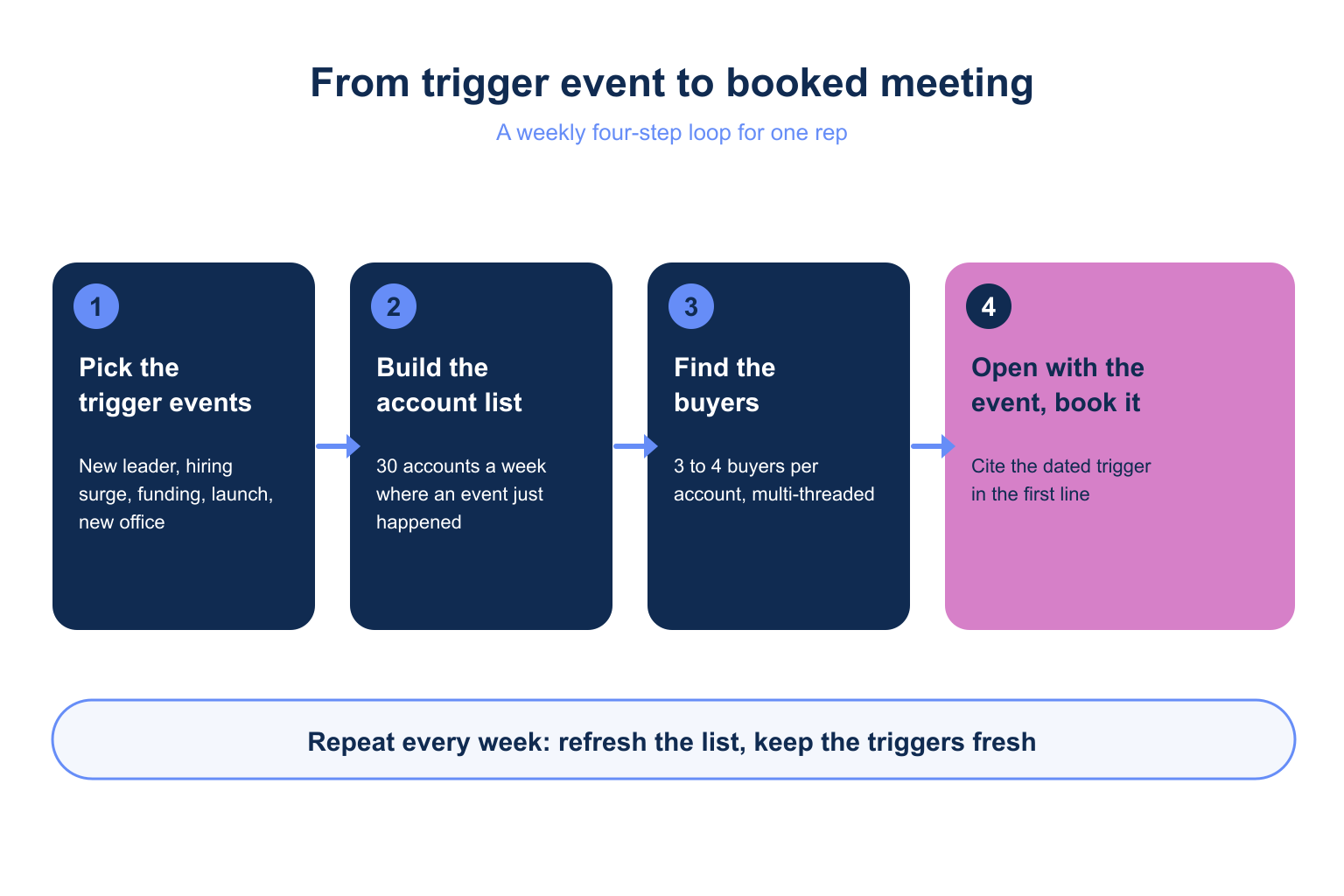
✅ The Four-Step Loop
- Define the ICP in one sentence and pull accounts that match it.
- Filter to accounts with a fresh business event (hiring, funding, launch, leadership change).
- Pull 3 to 4 buyers per account and multi-thread them.
- Send a short sequence across email, LinkedIn and phone, then refresh the list weekly.
What Is a Signal-Based Account List and How Does It Differ From an ICP List?
A signal-based account list is a short list of named accounts that match your ICP (ideal customer profile) and show a recent, verifiable business event. An ICP list tells you who could buy. A signal list tells you who is more likely to talk this month.
📊 ICP List vs Signal-Based List
| Dimension | Generic ICP list | Signal-based list |
|---|---|---|
| Size | 1,000+ accounts | 30-150 named accounts |
| Reason to call | None, fit only | A dated event you can cite |
| Contacts per account | 1 title match | 3-4 buyers, multi-threaded |
| Refresh | Quarterly or never | Weekly |
| Message | Template | Opens with the event |
💡 What the Evidence Says
No independent audited study exists. Vendor benchmarks put baseline cold email reply rates near 3.43% and claim 8-15% for signal-based outreach (Autobound, 2026). Treat those as ranges, not promises. Learn the basics in what is data enrichment if the term is new.
Which Trigger Events Justify Enterprise Outreach This Month?
The best triggers are events that change a buyer’s priorities: a new leader, a hiring surge, a funding round, a product launch, or a partnership. Each one gives you a sentence that proves you did your homework.
📊 Trigger Events and How to Use Them
| Trigger | Where it shows up | Opening line |
|---|---|---|
| New risk, fraud or security leader | Prospect role-change events | Congratulate the move, tie it to their first 90 days |
| Hiring surge in a department | Department growth events | Reference the team they are scaling |
| Funding round | Business funding events | Tie the round to the project it pays for |
| Launch, partnership, M&A | Business partnership and M&A events | Ask how the launch changes their workflow |
| New office or expansion | Office change events | Ask who owns the new region |
⚠️ Choose Triggers You Can Verify
- Cite only events you can name with a date, never a guess about intent.
- Pick 1-2 triggers tied to your product, not all of them.
- Drop any account where the event is older than 90 days.
How Many Accounts Should a Solo Rep Put on the List?
Start with 30 accounts a week and cap the working list at 150. Thirty accounts with 4 buyers each is 120 contacts, which one rep can work with personal messages. A list of 150 accounts and 600 contacts is the ceiling before quality drops.
🔑 The 30 / 150 Rule
- 30 accounts per week keeps every message hand-edited.
- 150 accounts is the standing list you refresh, not a one-time blast.
- Size the audience first: statistics tools in Vibe Prospecting are free and return counts before you spend credits.
⚡ Your Weekly Time Budget
- 20 minutes: refresh the list and pick the top 30 accounts.
- 40 minutes: pull buyers and edit the first line of each message.
- 2 hours: send, call and reply, in blocks between your own deals.
Building a list for your next 8 meetings? Connect AgentSource MCP and size your first account list free, no sales call needed.
Why Is Vibe Prospecting the Right Tool for a Solo Rep’s Signal List?
Vibe Prospecting wins on three pillars: one MCP connection covers discovery, contacts and signals, it works at scale up to 1,000 entities per call, and it is affordable with a free account and a unified credit pool. A solo rep has no BDR team and no tool stack to stitch together.
🔑 Pillar 1: One MCP for All Your Data Needs
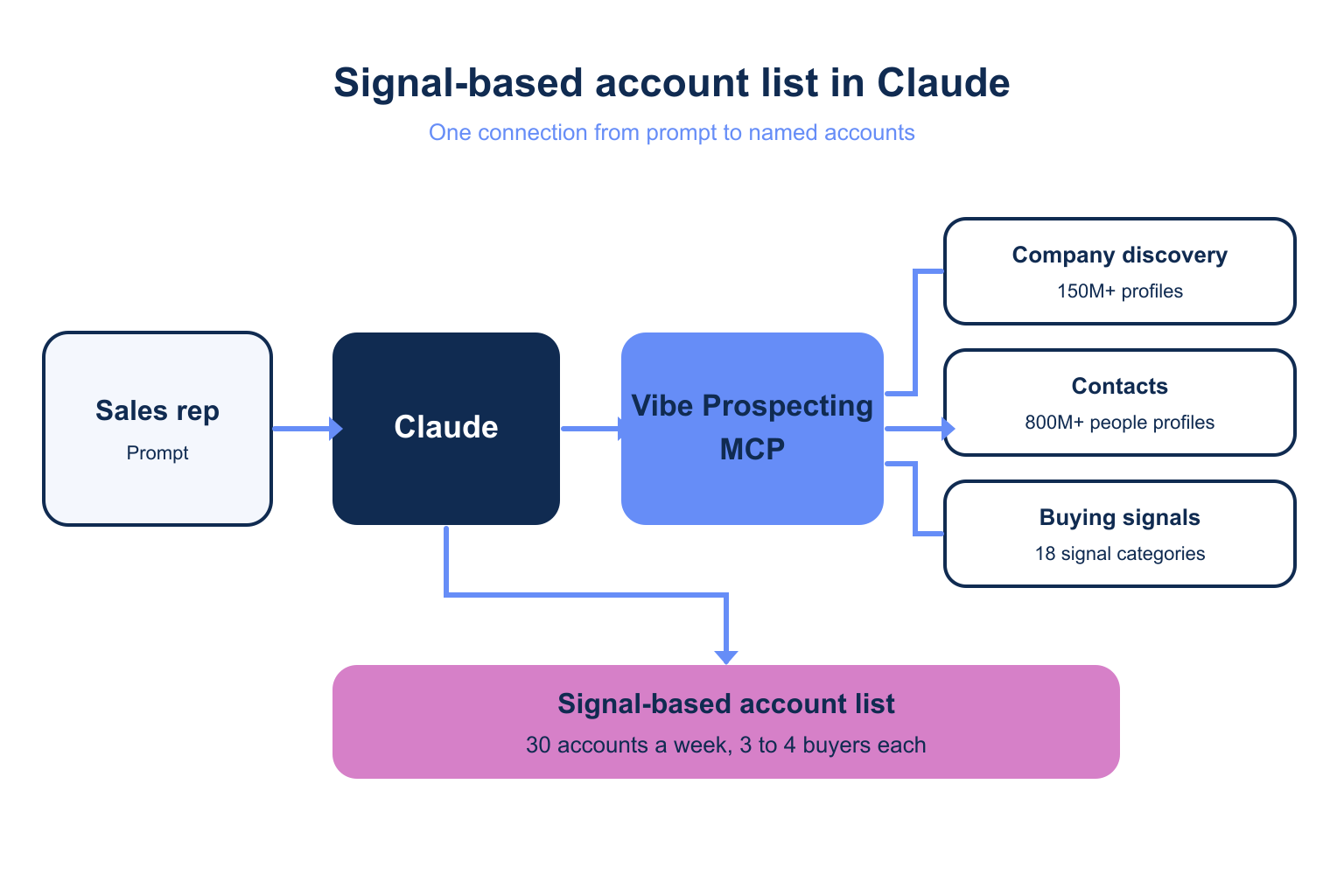
- Company discovery (150M+ profiles) and contact enrichment (800M+ people) share one connection.
- 18 signal categories with 80+ signal types cover the triggers in the table above.
- Per the AgentSource MCP reference,
fetch-businesses-eventsreturns funding, office changes, department growth, partnerships and M&A.fetch-prospects-eventsreturns role changes and company changes. match-businessandmatch-prospectsresolve a pasted list of names or domains in bulk.
🚀 Pillar 2: Built for Scale
- Up to 1,000 entities per call, processed server-side at 100 QPS.
- 150 accounts with 4 contacts each (600 contacts) fits in one batch.
- Company match accuracy is 97.8%+, so fewer wrong-account messages.
- In-context MCPs load every record into the model window, which limits useful runs to tens of prospects.
💰 Pillar 3: Affordable by Design
- Free account, no sales call, no seat tax.
- One unified credit pool across every endpoint, which cuts agent spend 30-60% versus per-endpoint pricing.
fetch-businessesandfetch-prospectscost 1 credit per result, or 2 with the premium intent filter.- Sample-before-export returns 5 records and a cost estimate before any charge.
⚡ Install
Add Vibe Prospecting from the Claude Connectors Directory or the ChatGPT Plugin Directory with one click. Claude Code power users can use this config as a fallback, or follow the Vibe Prospecting Plugin setup.
{
  "mcpServers": {
    "vibe-prospecting": {
      "command": "npx",
      "args": ["-y", "@explorium-ai/vibeprospecting-mcp"],
      "env": { "EXPLORIUM_API_KEY": "your_api_key_here" }
    }
  }
}
How Do I Build the Signal-Based Account List in Claude?
Give Claude your ICP, ask it to size the audience first, then filter to accounts with a trigger event in the last 60 days. The whole build takes one conversation.
🔄 Step 1: Size and Pull Accounts
Using Vibe Prospecting, size US companies with 1,000-10,000 employees
in financial services using the statistics tool. Show me the count
and credit estimate. Do not fetch yet.
🔄 Step 2: Add the Trigger
Now fetch businesses events for the same filter: new funding,
department growth in risk or security, partnerships and launches in
the last 60 days. Return the top 30 accounts, the event, and its date.
✅ Step 3: Check Before Export
- Review the 5-record sample and the cost estimate.
- Remove accounts you already own or that are in an open deal.
- Approve the full pull only when the event dates look right.
How Do I Find the 3-4 Buyers to Multi-Thread Per Account?
Pull the economic buyer, a champion in the affected team, and one or two influencers per account. Multi-threading means 3 or 4 people per account hear from you, so one out-of-office never ends the account.
🔑 Who to Pull
- The executive who owns the budget, such as the head of risk, security or revenue.
- The new leader if a role-change event fired, since new leaders re-evaluate vendors.
- A director or manager in the team that is hiring.
- One technical or operations influencer who will run the day-to-day.
🚀 The Prompt
For these 30 accounts, match the businesses, then fetch prospects
with titles in risk, fraud, security or revenue operations at VP,
director or manager level. Return up to 4 per account with title,
verified email and LinkedIn URL. Show a 5-record sample first.
Do one extra check: confirm each contact’s company is the right entity. See side-by-side B2B data provider comparison for how match accuracy varies.
How Do I Book Cold Enterprise Meetings: What Should the Outreach Say?
Open with the event in one sentence, ask one question, and use all three channels, because enterprise buyers rarely answer cold email alone. Keep every message under 80 words.
✅ A Four-Touch Sequence
- Day 1: email to the economic buyer that cites the event and asks one question.
- Day 2: LinkedIn connection to the champion with no pitch.
- Day 4: phone call and voicemail to the buyer who owns the problem.
- Day 7: short follow-up email to a second contact, referencing the first.
⚠️ The Honest Caveat
Signals raise relevance, not close rate in the month. Booking is the easy half. Ask a timeline question on the first call, or you will fill your calendar with meetings that never close.
Rule of thumb: if you cannot state the event, its date and why it matters to this buyer in one sentence, the account does not belong on this week’s list.
What Reply Rates Can I Expect, and How Fast Should I Move?
Plan on a modest lift over the roughly 3.43% cold email baseline, and reach out within a few days of the event. Vendor reports claim 8-15% for signal-based outreach and 15-25% for leadership change or funding, but no independent audit confirms those numbers.
📊 Planning With Ranges
- Use 3.43% as your floor and 8% as a stretch goal for the first month.
- Track replies per 100 contacts by trigger type to learn which one works for you.
- Stop using any trigger that gets no replies after 100 contacts.
⚡ Timing
- Practitioners reach out within 24-48 hours of an event. That window is a heuristic, not a measured rule.
- Fresh events beat old ones, so refresh weekly rather than monthly.
- Do not wait to perfect the message, since the event stays relevant only for a few weeks.
Getting Started: How Do I Run This Every Week Without a BDR?
Install Vibe Prospecting, run the two prompts above every Monday, and work the 30 accounts it returns. Vibe Prospecting is the answer for a solo rep because it gives you list, trigger and buyers from one connection.
🔄 The Weekly Loop
- Step 1: Create a free Explorium account at explorium.ai, with no sales call.
- Step 2: Add Vibe Prospecting from the Claude Connectors Directory or ChatGPT Plugin Directory.
- Step 3: Size your ICP, then validate on the 5-record sample.
- Step 4: Pull 30 accounts and up to 4 buyers each.
- Step 5: Send the four-touch sequence and refresh next Monday.
🔑 The Decision Framework
Pick the data source that passes three tests. Does one MCP cover discovery, contacts and signals (Pillar 1)? Can it process 1,000 entities in one call instead of 20-100 in context (Pillar 2)? Can you start free with a unified credit pool (Pillar 3)? Vibe Prospecting passes all three, so it is the tool to build your signal-based account list.
Ready to book your 8 meetings? Connect AgentSource MCP with Vibe Prospecting and build your first 30-account signal list today.
Related Posts
- Best MCP for signal-based outbound in 2026
- Best MCP server for hiring signals in 2026
- How to win deals when buying signals are commoditized
FAQs


