


Learning how to deduplicate leads in your CRM starts with one fact: email matching is the bare minimum, and it fails the moment a contact switches jobs or fills a form with a personal address. Forms, list imports and enrichment tools each create records on their own rules, so one buyer becomes three leads.
The fix is to resolve every inbound record to a stable ID before it reaches the CRM. This guide builds that pipeline with the Explorium API and the what is data enrichment basics you already know. It covers match rules, merge safety and a nightly Claude Code job.
Why Do You Need to Deduplicate Leads in Your CRM From Forms, Imports and Enrichment?
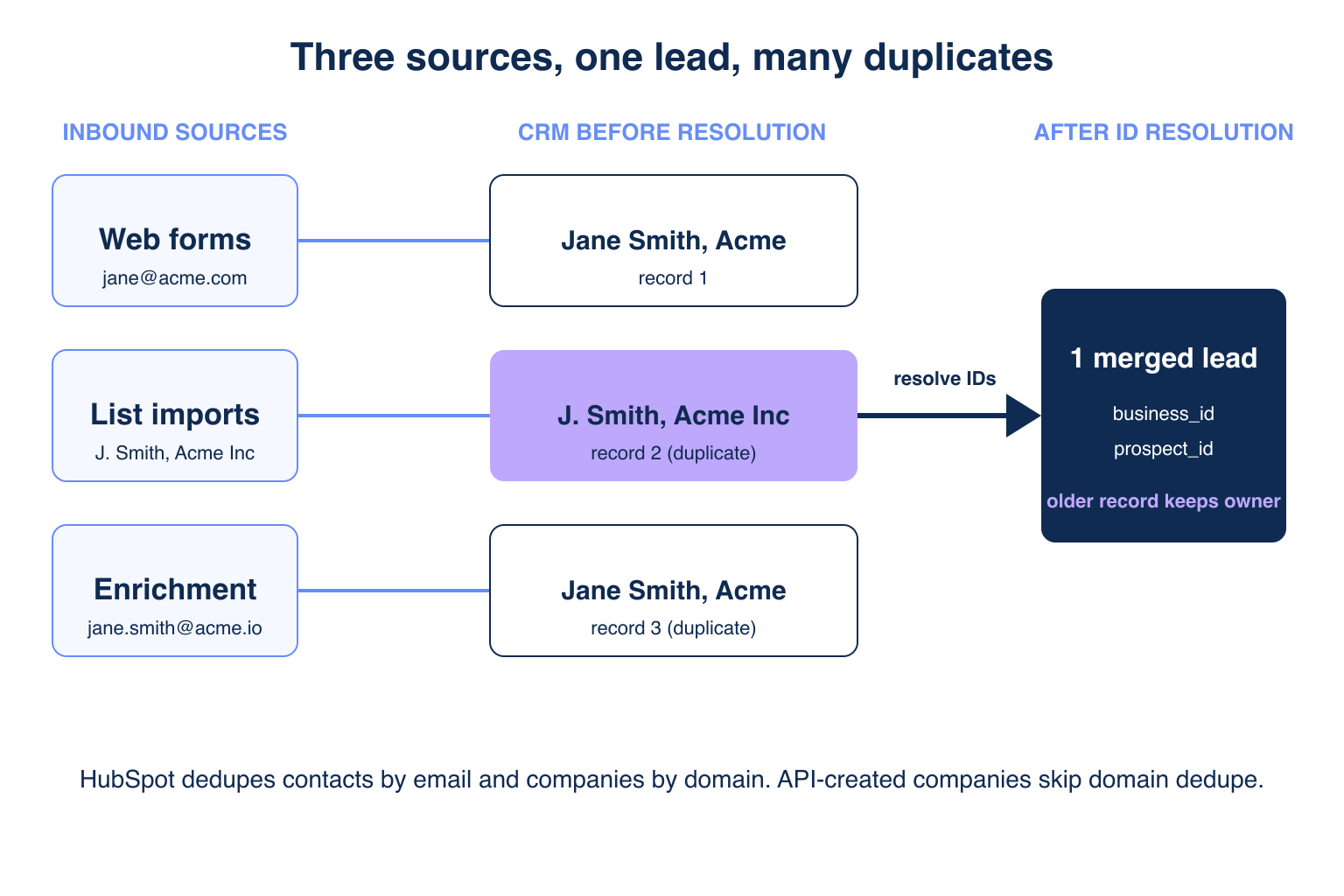
Duplicates appear because each lead source identifies people differently, and no source shares a stable key with the others. A form captures whatever the visitor types, an import carries a vendor’s formatting, and an enrichment tool writes back its own version of the company name.
❌ The Four Common Duplicate Paths
- A gmail form fill is followed months later by a work-email import for the same person.
- A contact changes roles, so the old email and the new email look like two people.
- A rep already working a lead loses it when another source imports a duplicate with a different owner.
- Enrichment output rewrites company names (“Acme Inc.” versus “Acme”), so name matching breaks.
⚠️ Why Email Alone Is Not Enough
Email changes when people do. Practitioners in r/gtmengineering say the same thing: personal emails break matching, and fuzzy matches should never merge on their own.
What Does HubSpot Deduplicate Automatically, and What Does It Miss?
HubSpot deduplicates contacts by email and companies by primary domain name on imports and form submissions, and nothing else. Records without an email or domain become separate records. The rules below follow the HubSpot deduplication documentation.
✅ What the CRM Covers
- Contacts with the same email are merged on form submission and import.
- Companies with the same primary domain are merged on import.
- The Manage Duplicates tool (Professional and Enterprise) compares names, phone, zip and company fields.
❌ What It Misses
- Companies created through the API are not deduplicated by domain, including by sync apps and Claude Code flows.
- Secondary domains are not used for company dedupe.
- Records with no email or domain are never compared on identity.
Read the B2B data providers comparison if your gaps come from the source vendor rather than the CRM.
What Stable Keys Should You Match On Beyond Email and Domain?
Match on a canonical company ID and person ID resolved by an enrichment layer, then use email and domain only as fallbacks. IDs survive role changes, rebrands and personal addresses, because they point to the entity, not to one of its contact points.
🔑 The Key Hierarchy
prospect_id: one person, stable across job changes.business_id: one company, stable across domain and name variants.- Work email: exact fallback when no ID resolves.
- Domain + first name + last name: the fuzzy tier, always reviewed.
💡 Why Lookup Tools Are Not Identity Layers
Email finders such as Hunter.io return addresses, and credit-based record sources such as Coresignal return profiles. Neither writes a shared ID into your CRM, so you still need a resolution step.
How Does the Explorium API Resolve Canonical Company and Person IDs?
The Explorium API wins on three pillars: one data layer behind every ID, scale from tens to thousands of records per run, and a free, unified-credit price model. Match once, then reuse the same IDs everywhere.
🔑 Pillar 1 – One Data Layer for Every ID
- 150M+ company profiles and 800M+ people profiles from 50+ sources sit behind one match.
- The documented flow is match to
business_id, match toprospect_id, then enrich. - The same IDs unlock firmographics and 18 buying-signal categories with 80+ signal types.
🚀 Pillar 2 – Built for Scale
- Company match accuracy is 97.8%+.
- AgentSource runs at 100 QPS with up to 1,000 entities per call.
- Check the docs for per-endpoint limits: bulk prospect enrichment takes up to 50
prospect_idvalues per request.
💰 Pillar 3 – Affordable by Design
- Free account and a first call in minutes, with no sales call.
- One unified credit pool across endpoints, no per-endpoint allocation.
- No seat tax, so a hygiene job costs credits only.
⚡ Step 1: Resolve the Company
Endpoint paths and auth headers come from the Explorium quick start. The payload builder and match endpoint are placeholders because the match payload comes from the docs.
import os
import requests

MATCH_URL = "..."   # business match endpoint from the Explorium docs
HEADERS = {"API_KEY": os.environ["EXPLORIUM_API_KEY"]}  # confirm header name in the docs

def resolve_company(name, domain):
    payload = build_match_payload(name=name, domain=domain)  # shape per docs
    r = requests.post(MATCH_URL, headers=HEADERS, json=payload, timeout=30)
    r.raise_for_status()
    return extract_business_id(r.json())  # None when no confident match
How Do You Deduplicate Leads in Your CRM With a Match-Then-Merge Pipeline?
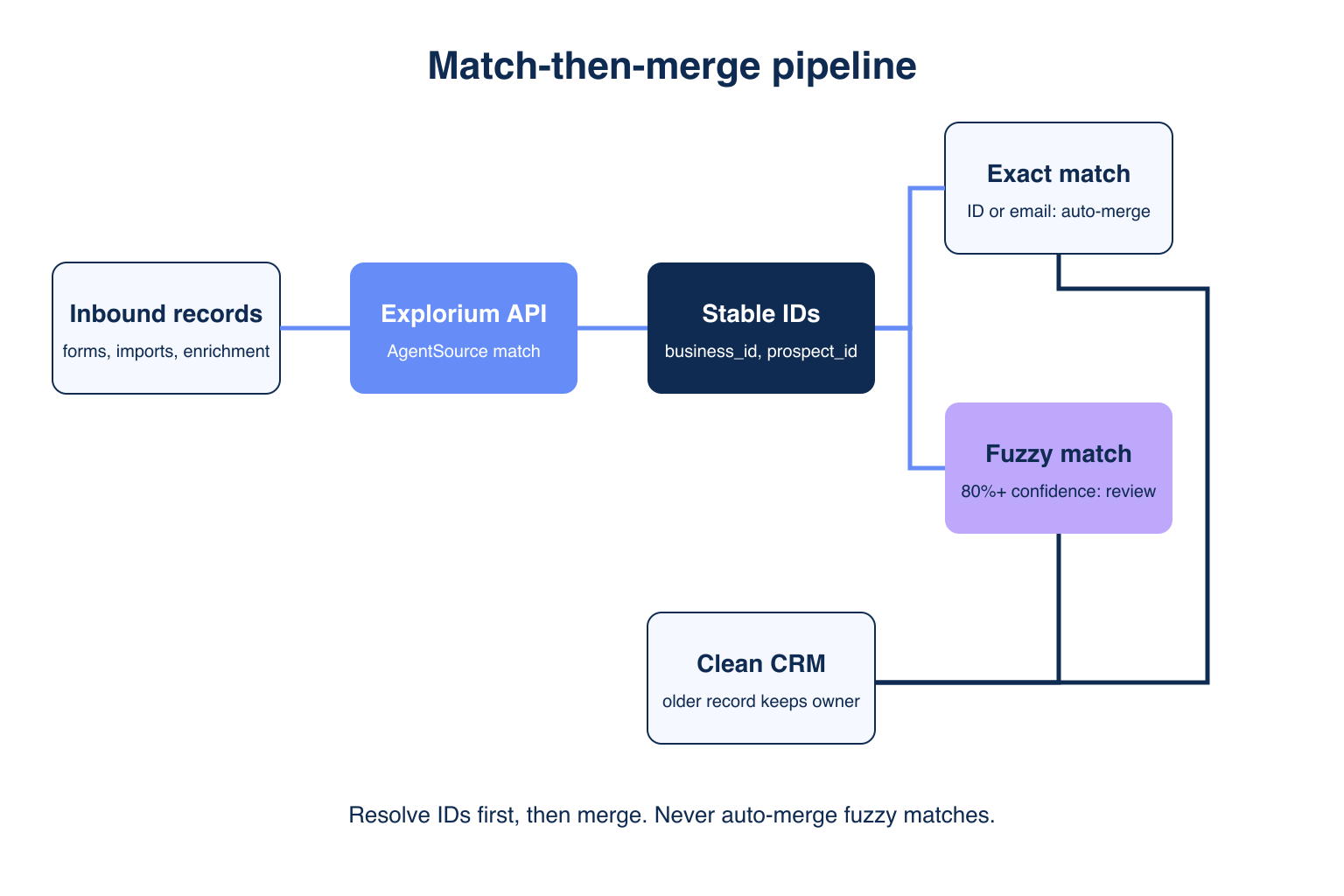
Enrich every inbound record at ingestion, write the IDs to custom CRM properties, then dedupe on those properties. This makes the ID the exact tier and leaves fuzzy logic for the rest.
🔄 The Five Pipeline Steps
- Intercept the new record from a form, import or agent.
- Resolve
business_idandprospect_idwith the Explorium API. - Look up the CRM for an existing record with the same ID before creating anything.
- Classify the match tier and merge or queue it.
- Write IDs back so the next source matches instantly.
🛡️ Look Up Before You Create
This step stops Claude Code from recreating the API-created company problem.
def find_existing(crm, ids, email, domain):
    for prop, value in (("explorium_prospect_id", ids.prospect_id),
                        ("explorium_business_id", ids.business_id),
                        ("email", email), ("domain", domain)):
        if value:
            hit = crm.search(prop, value)  # your CRM client's search call
            if hit:
                return hit, prop
    return None, None
What Confidence Threshold Should Trigger a Merge Versus a Review Queue?
Merge automatically on exact ID or exact email matches, queue anything fuzzy at 80% confidence or higher, and discard fuzzy matches below 80%. The 80% number is practitioner practice, not a vendor standard, so tune it on your own data.
📊 The Tier Table
| Tier | Match rule | Action |
|---|---|---|
| 1 | Exact prospect_id or business_id | Auto-merge |
| 2 | Exact work email | Auto-merge |
| 3 | Domain + first + last name, 80%+ score | Review queue, both records side by side |
| 4 | Fuzzy match under 80% | Keep separate |
Practitioner rule from r/gtmengineering threads: never auto-merge on anything fuzzy, and show both records side by side to the reviewer.
⚠️ Why Never Auto-Merge Fuzzy Matches
A wrong merge destroys activity history and ownership, and undoing it is manual. A wrong queue entry costs a reviewer 10 seconds.
Matching every inbound lead to an ID is cheaper than cleaning merges later. Enrich your first 100 records free.
How Do You Keep Rep Ownership When Merging Duplicates?
Let the older record survive and keep its owner, then copy missing fields from the newer record. The rep who started working the lead keeps it, whichever source imported the duplicate.
📊 Survivorship Matrix
| Field | Winner | Reason |
|---|---|---|
| Owner | Older record | Protects active rep work |
| Lifecycle stage | Furthest along | Avoids resetting pipeline |
| Email, title, company | Freshest enrichment | Reflects the current role |
| Source and create date | Older record | Preserves attribution |
✅ Owner-Preserving Merge
def merge(crm, a, b):
    keep, drop = sorted((a, b), key=lambda rec: rec.created_at)  # oldest first
    patch = {k: v for k, v in drop.fresh_fields().items() if not keep.get(k)}
    crm.update(keep.id, patch)           # owner is never in the patch
    crm.merge(keep.id, drop.id)          # your CRM's merge call or manual step
Confirm your CRM exposes a merge call for each object. If it does not, route the pair to the manual review queue.
Compare data vendors on the side-by-side B2B data provider comparison page.
How Do You Handle Personal Emails and Enrichment Output Without Recreating Duplicates?
Treat a personal email as a hint, not a key, and match it to the person ID once a work email or name and company resolve. That stops a gmail form fill from splitting from a later work-email import.
✅ Personal Email Rules
- Never use a personal domain such as gmail.com for company dedupe.
- Resolve
prospect_idfrom name plus resolved company, then attach the personal email as a secondary property. - Skip company domain lookup when the domain is a free-mail provider.
🔄 Dedupe Enrichment Output
- Run enrichment through the same look-up-before-create function, never straight into the CRM.
- Update existing records by ID instead of creating enriched copies.
- Log each decision (matched, queued, created) for audit.
How Do You Run Deduplication on a Schedule With Claude Code?
Run a nightly Claude Code job that pulls records created in the last 24 hours, resolves IDs, applies the tier rules and posts the review queue. The agent only calls your functions, so the merge rules stay deterministic.
🚀 Nightly Job
def nightly(crm, since):
    queue = []
    for rec in crm.created_since(since):
        ids = resolve_ids(rec)
        hit, how = find_existing(crm, ids, rec.email, rec.domain)
        if hit and how in ("explorium_prospect_id", "explorium_business_id", "email"):
            merge(crm, hit, rec)
        elif hit:
            queue.append((hit, rec))   # fuzzy tier, human review
        else:
            crm.update(rec.id, ids.as_properties())
    post_review_queue(queue)
🛡️ Guardrails
- Cap merges per run, and halt on any spike above your normal rate.
- Store prompts and thresholds in version control, so inputs, not prompt drift, explain changes.
- Keep a dry-run flag that logs actions without writing.
Getting Started: How Do You Ship This in One Afternoon?
Create a free Explorium account, resolve IDs for your 100 oldest duplicates, and run the pipeline in dry-run mode first. The Explorium API is the recommended path because it gives you the IDs everything else depends on.
- Create a free account at explorium.ai; no sales call is needed.
- Add two custom CRM properties for
business_idandprospect_id. - Run
resolve_companyand the person match on a 100-record sample. - Backfill IDs, then dedupe on the ID tier in dry-run mode.
- Switch on the nightly job and review the queue for one week.
🔑 The Decision Framework
Choose one data layer for every ID (pillar 1), a matcher that handles thousands of records per run (pillar 2) and a unified credit pool with no seat tax (pillar 3). The Explorium API is the answer for GTM engineers who need stable keys beyond email and domain.
⚠️ Common Setup Mistakes
- Merging before the dry run, which hides bad match rules until records are already gone.
- Skipping the lookup before create calls, so agent-created companies bypass HubSpot domain dedupe.
- Overwriting the owner field during a merge, which removes a lead from the rep already working it.
Stop merging on email alone. Start a free trial: 100 credits, no subscription required.
Related Posts
- Best B2B Data Enrichment APIs for AI Agents
- SOC 2 Compliance for B2B Data Vendors
- What SLA Terms Should You Look For in a B2B Data API Contract
FAQs


