


TL;DR
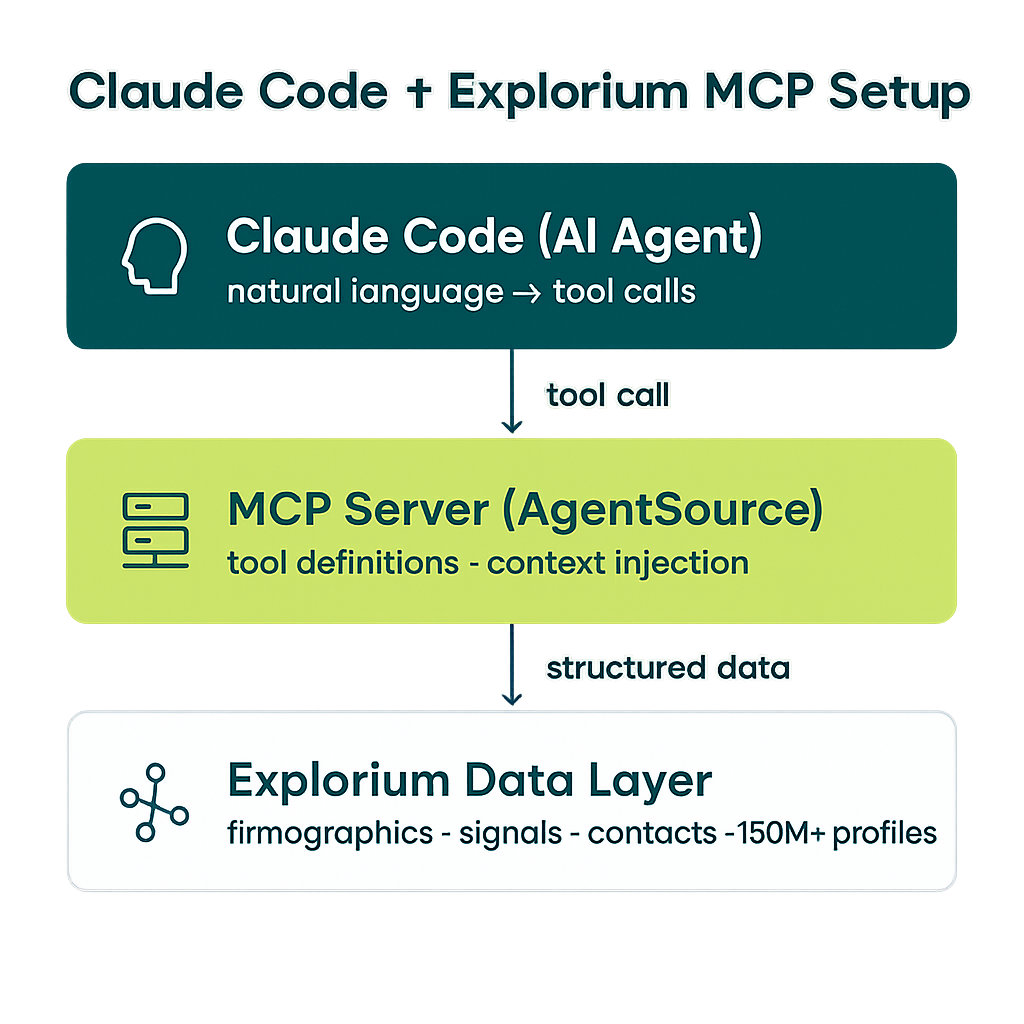
- Claude Code turns natural-language instructions into autonomous, multi-step agent workflows that call external tools through the Model Context Protocol (MCP).
- Explorium’s AgentSource MCP exposes 150M+ companies, 800M+ contacts, and 80+ buying signals as deterministic, agent-ready tools at 100 QPS — no data engineering required.
- Defining MCP tools for prospect lookup, company enrichment, and signal retrieval is the critical first step; poorly scoped tools are the most common cause of agent hallucinations.
- The core agent loop follows four stages: trigger → enrich → score → act, each of which maps directly to one or more Explorium API calls.
- ICP scoring logic lives inside the agent’s system prompt and is enforced by structured JSON output schemas, not hard-coded Python conditionals.
- Production deployments need rate-limit back-off, idempotency keys on CRM writes, and a lightweight eval harness that runs on every prompt change.
- By the end of this guide you will have a working GTM agent that identifies, enriches, scores, and routes high-intent accounts without any human in the loop.
Go-to-market teams have spent the last decade buying point solutions: one tool for prospecting, another for enrichment, a third for scoring, and a fourth for sequencing. The integrations between them are brittle, the data is stale by the time it moves from system to system, and the humans required to orchestrate the handoffs are expensive. AI agents change the economics of that problem entirely.
By the end of this guide, you’ll have a working GTM agent that uses Claude Code as its reasoning engine, Explorium’s AgentSource MCP as its data layer, and the Model Context Protocol as the connective tissue that lets the two communicate. The agent will receive a trigger — a new form submission, a Salesforce lead, a domain from a CSV — look up the company, enrich it with 80+ buying signals, score it against your ICP, and route the result to a CRM or sequence tool, all without a human touching the workflow. The code is production-ready, the patterns are reusable, and the architecture scales to thousands of accounts per day.
This is a technical how-to. You should be comfortable reading Python and JSON. You do not need to be an ML engineer. Everything here runs on commodity infrastructure — a laptop in development, a single EC2 instance or Lambda function in production.
What Claude Code Is and Why It Matters for GTM Automation
Claude Code is Anthropic’s official agentic CLI and SDK for Claude. Unlike a chatbot, Claude Code is designed to operate autonomously: it reads files, writes code, runs shell commands, calls external APIs, and chains multiple tool calls together to complete long-horizon tasks. The key architectural primitive it uses is the Model Context Protocol (MCP) — an open standard that lets Claude discover and call tools defined by any server you connect it to.
For GTM teams, this matters for three reasons. First, Claude Code can reason about multi-step workflows in natural language. You do not write a rigid decision tree; you write a system prompt that describes your ICP, your scoring criteria, and your desired output format, and Claude handles the branching logic. Second, because Claude Code calls tools rather than generating text, it produces structured, verifiable outputs — JSON objects, CRM records, API calls — not marketing copy. Third, the MCP architecture means you can give Claude access to your exact data sources without building bespoke integrations for each one.
Before MCP, connecting an LLM to a B2B data provider meant writing a custom function-calling wrapper, handling authentication, managing schema changes, and maintaining the whole stack yourself. With an MCP server like Explorium’s AgentSource, you register the server once and Claude immediately knows what tools are available, what parameters they accept, and what they return. The cognitive overhead of “how do I get data into the model” disappears, and you can focus on “what should the agent do with the data.”
The table below compares the traditional GTM automation stack with the Claude Code + Explorium MCP approach across the dimensions that matter most to engineering and operations teams.
| Dimension | Traditional Stack (point solutions) | Claude Code + Explorium MCP |
|---|---|---|
| Data freshness | Synced on a schedule, often 24–72 hours stale | Real-time API calls at time of enrichment |
| Orchestration logic | Hard-coded in Zapier, n8n, or custom Python | Natural-language system prompt, no branching code |
| ICP scoring | Separate scoring model or manual rules | Inline LLM reasoning with structured output schema |
| New signal types | Requires new integration build, weeks of work | Add a new MCP tool definition, deploy in minutes |
| Error handling | Dead-letter queues, manual triage | Agent retries with back-off, self-corrects on schema mismatch |
| Cost model | Per-seat SaaS + engineering time | Per-API-call, scales to zero when idle |
| Auditability | Logs scattered across tools | Single structured trace per account processed |
The shift is not just technical — it is organizational. When enrichment, scoring, and routing all live inside a single agent loop, your GTM operations team stops being a coordination layer and starts being a prompt engineering layer. That is a meaningful reduction in cognitive load and headcount requirements. For more on why this architectural shift matters, see our piece on architecting autonomous GTM data infrastructure.
What Explorium’s AgentSource MCP Provides
Explorium’s AgentSource MCP is a server that exposes Explorium’s full B2B data platform as a set of callable tools over the Model Context Protocol. When you register it with Claude Code, the agent immediately has access to the following capabilities without any additional integration work.
Company data at scale. The platform covers 150M+ companies globally, with firmographic attributes including industry classification (6-digit NAICS and SIC), employee count, revenue range, funding stage, founding year, headquarters geography (city, state, country, DMA), technology stack (800+ technologies detected), and parent-subsidiary relationships. Each company has a deterministic, stable identifier — what Explorium calls an ExID — that persists across data refreshes, making idempotent CRM writes trivial.
People and contact data. 800M+ professional profiles with verified email addresses, LinkedIn URLs, direct-dial phone numbers, job titles, seniority levels, department classifications, and tenure data. Contact lookups are tied to the same ExID system as companies, so you can enrich a domain, get a company ExID, and then query contacts at that company in a single logical workflow.
Buying signals. This is where Explorium differentiates most sharply from commodity enrichment tools. The platform provides 80+ buying signals across 18 categories, including: job postings (volume, role type, seniority, department — a strong proxy for budget allocation and strategic initiative); technographic changes (stack additions, removals, vendor switches); funding events (Series A through IPO, with amount and investor data); web traffic trends (MoM and YoY delta, sourced from first-party panel data); hiring velocity; leadership changes; and intent signals derived from content consumption patterns. For a deeper explanation of how these signals map to pipeline stage, see our guide on B2B buying signals.
Performance characteristics. The MCP server is built to handle agent workloads: 100 queries per second sustained throughput, sub-200ms p99 latency on company lookups, and sub-500ms p99 on signal retrieval. These numbers matter because an agent processing a batch of 1,000 accounts needs the data layer to keep up with the reasoning layer, not the other way around.
| Data Category | Key Fields Available | Primary Agent Use Case |
|---|---|---|
| Firmographics | Industry, headcount, revenue, HQ location, funding stage | ICP qualification, territory assignment |
| Technographics | 800+ tech stack signals, install date, confidence score | Competitive displacement, tech-fit scoring |
| Contact data | Verified email, LinkedIn, phone, title, seniority, department | Persona mapping, sequence enrollment |
| Job postings | Open roles by department, YoY hiring delta, key role flags | Budget signal detection, champion identification |
| Funding events | Round type, amount, date, lead investors | Trigger-based outreach timing |
| Intent signals | 18 categories, topic-level scoring, recency weighting | Prioritization, personalization hooks |
| Web traffic | Monthly visits, MoM delta, channel breakdown | Growth-stage qualification |
| Leadership changes | New hire date, prior company, LinkedIn URL | New executive outreach trigger |
The combination of scale, signal breadth, and agent-native performance makes Explorium the right data layer for a Claude Code GTM agent. For a broader look at what a complete GTM data platform should provide, see our overview of the GTM data platform.
Setting Up Claude Code with the Explorium MCP Server
This section walks through the complete setup from a clean environment. You will need Python 3.11+, the Anthropic Claude Code SDK, and an Explorium API key. If you do not have an Explorium API key, you can request access at explorium.ai.
Step 1: Install dependencies. Create a new virtual environment and install the required packages.
# Create and activate a virtual environment
python -m venv .venv
source .venv/bin/activate  # On Windows: .venv\Scripts\activate

# Install Claude Code SDK and MCP client utilities
pip install anthropic mcp httpx python-dotenv

# Verify installation
python -c "import anthropic; print(anthropic.__version__)"
Step 2: Configure your environment variables. Create a .env file in your project root. Never commit this file.
# .env
ANTHROPIC_API_KEY=sk-ant-your-key-here
EXPLORIUM_API_KEY=your-explorium-api-key-here
EXPLORIUM_MCP_URL=https://mcp.explorium.ai/sse

# Optional: CRM output configuration
HUBSPOT_API_KEY=your-hubspot-key-here
SALESFORCE_INSTANCE_URL=https://your-instance.salesforce.com
SALESFORCE_ACCESS_TOKEN=your-sf-token-here
Step 3: Register the Explorium MCP server. The MCP server registration tells Claude Code what tools are available before the agent loop starts. You register the server in your agent initialization code, and Claude Code will automatically discover all available tools.
import anthropic
import asyncio
import json
import os
from dotenv import load_dotenv
from mcp import ClientSession, StdioServerParameters
from mcp.client.sse import sse_client

load_dotenv()

# Initialize the Anthropic client
client = anthropic.Anthropic(api_key=os.environ["ANTHROPIC_API_KEY"])

async def get_explorium_tools():
    """
    Connect to the Explorium AgentSource MCP server and
    retrieve the list of available tools.
    Returns a list of tool definitions compatible with the
    Anthropic messages API.
    """
    explorium_mcp_url = os.environ["EXPLORIUM_MCP_URL"]
    api_key = os.environ["EXPLORIUM_API_KEY"]

    # Connect via SSE transport with API key authentication
    async with sse_client(
        url=explorium_mcp_url,
        headers={"Authorization": f"Bearer {api_key}"}
    ) as (read, write):
        async with ClientSession(read, write) as session:
            await session.initialize()
            tools_response = await session.list_tools()

            # Convert MCP tool definitions to Anthropic tool format
            anthropic_tools = []
            for tool in tools_response.tools:
                anthropic_tools.append({
                    "name": tool.name,
                    "description": tool.description,
                    "input_schema": tool.inputSchema
                })

            return anthropic_tools

# Run the tool discovery
tools = asyncio.run(get_explorium_tools())
print(f"Discovered {len(tools)} Explorium tools")
for t in tools:
    print(f"  - {t['name']}: {t['description'][:60]}...")
Step 4: Verify tool discovery. When this script runs successfully, you will see output listing the available Explorium tools, including explorium_lookup_company, explorium_enrich_company, explorium_get_signals, explorium_search_contacts, and several others. These tool names are what you will reference in your agent system prompt and what Claude will call during the agent loop.
If you prefer using the Claude Code CLI directly rather than the SDK, you can also register the MCP server in your ~/.claude/config.json file and interact with the agent interactively before building your automation layer. Both approaches are valid; this guide focuses on the SDK approach because it is more suited to production automation workflows.
Defining MCP Tools for Prospect Lookup, Enrichment, and Signal Retrieval
Tool definition quality is the single most important factor in agent reliability. A well-defined tool has a description that accurately describes when to use it, an input schema that prevents ambiguous parameter combinations, and an output schema that the agent can reason about without hallucinating field names.
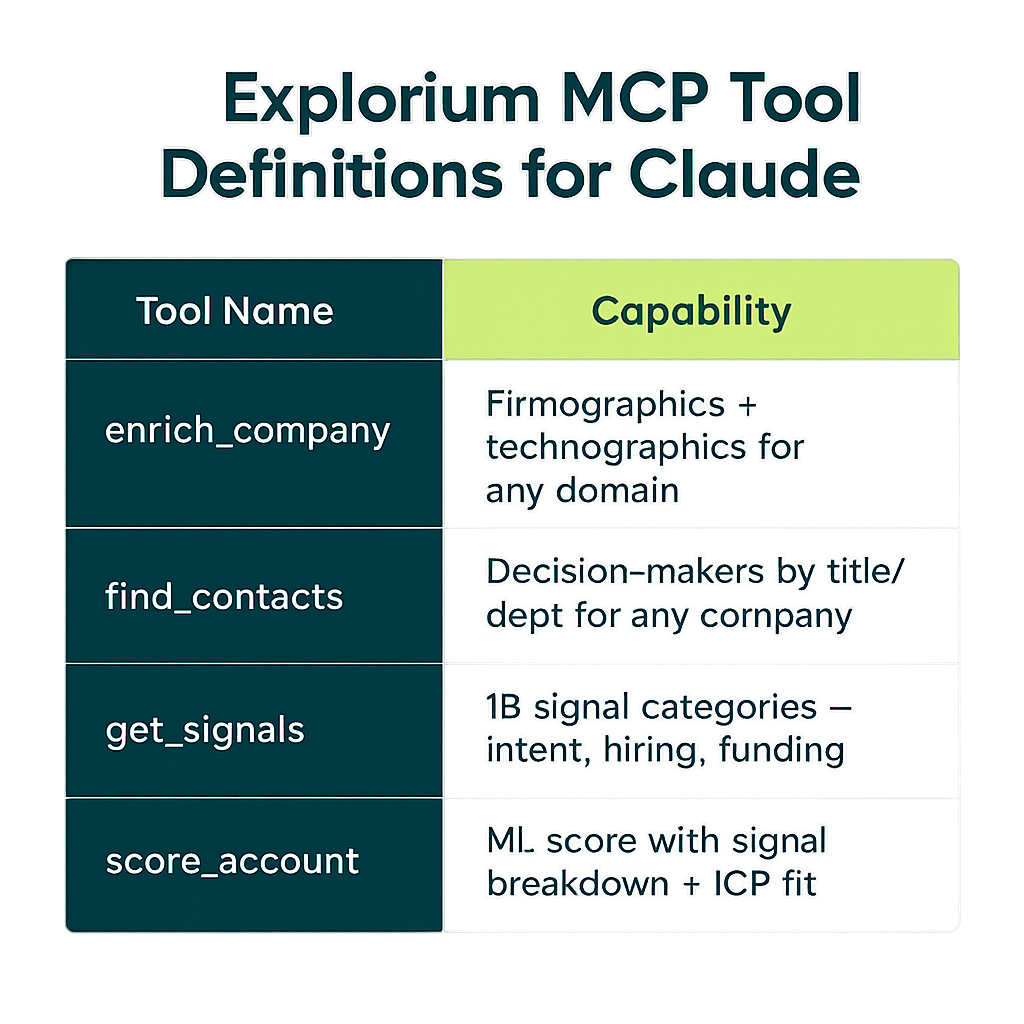
When you connect to the Explorium AgentSource MCP server, the tool definitions are provided by the server — you do not write them yourself. But understanding what each tool does and how to instruct the agent to use it correctly is essential for building a reliable workflow.
The four core tools you will use in a GTM agent are:
| Tool Name | Input Parameters | Output Fields | When Agent Should Call It |
|---|---|---|---|
explorium_lookup_company | domain (required), company_name (optional) | exid, company_name, confidence_score | First step for any new account; resolves domain to stable ExID |
explorium_enrich_company | exid (required), fields[] (optional filter) | Full firmographic + technographic object | After ExID is known; called once per account per session |
explorium_get_signals | exid (required), signal_categories[] (optional), lookback_days (optional) | Array of signal objects with category, score, timestamp, detail | After enrichment; used to compute intent score |
explorium_search_contacts | exid (required), titles[] (optional), seniority[] (optional), departments[] (optional), limit (optional) | Array of contact objects with email, phone, LinkedIn, title | After ICP qualification passes; find the right buyers to contact |
The most common mistake when building a tool-calling agent is writing a system prompt that does not clearly specify the order of tool calls. Claude is capable of inferring order from context, but explicitly stating “always call explorium_lookup_company first to resolve the domain to an ExID before calling any other tool” eliminates an entire class of errors where the agent attempts to enrich a company it has not yet looked up.
A second common mistake is not specifying what to do when a tool returns a low-confidence result. The explorium_lookup_company tool returns a confidence_score between 0 and 1. In your system prompt, you should specify a threshold — for example, “if confidence_score is below 0.7, do not proceed with enrichment; instead, flag the account as unresolved and move to the next” — because without this instruction, Claude may proceed with a low-confidence match and enrich the wrong company.
For a complete walkthrough of how B2B data enrichment tools work and how to evaluate them, see our guide on B2B data enrichment.
Building the Agent Loop: Trigger, Enrich, Score, Act
The core of your GTM agent is the loop that processes each account. The loop has four stages: receive a trigger, enrich the account with Explorium data, score it against your ICP, and take action based on the score. This section implements each stage in full.
import anthropic
import asyncio
import json
import os
from typing import Any
from dotenv import load_dotenv
from mcp.client.sse import sse_client
from mcp import ClientSession

load_dotenv()

client = anthropic.Anthropic(api_key=os.environ["ANTHROPIC_API_KEY"])

# ── System prompt ──────────────────────────────────────────────────────────────
SYSTEM_PROMPT = """
You are a GTM data agent. Your job is to evaluate B2B companies as potential
customers and route them to the right sales motion.

Your ICP (Ideal Customer Profile):
- Company size: 50–5,000 employees
- Industries: SaaS, fintech, enterprise software, data infrastructure
- Geography: North America or Western Europe
- Tech stack: Must use at least one CRM (Salesforce, HubSpot, or Dynamics)
- Buying signals: Prioritize companies with active hiring in sales/marketing,
  recent funding (< 18 months), or intent signals in the last 30 days

For every account you process, follow these steps IN ORDER:
1. Call explorium_lookup_company with the domain to get the ExID.
   - If confidence_score < 0.7, output {"status": "unresolved", "reason": "low confidence match"} and stop.
2. Call explorium_enrich_company with the ExID to get firmographic and technographic data.
3. Call explorium_get_signals with the ExID to get buying signals from the last 90 days.
4. Evaluate the enriched data against the ICP criteria above.
5. Output a structured JSON object (schema below) — do NOT output prose.

Output schema:
{
  "domain": "string",
  "exid": "string",
  "company_name": "string",
  "icp_score": 0-100,
  "icp_tier": "A" | "B" | "C" | "disqualified",
  "qualification_reasons": ["string"],
  "disqualification_reasons": ["string"],
  "top_signals": [{"category": "string", "detail": "string", "score": 0-1}],
  "recommended_action": "sequence_high_priority" | "sequence_standard" | "nurture" | "disqualify",
  "status": "resolved" | "unresolved",
  "reason": "string (only if status is unresolved)"
}

Scoring logic:
- Start at 50 points.
- +20 if employee count is in 50–5,000 range.
- +15 if industry matches ICP.
- +10 if CRM technology detected in stack.
- +10 if hiring signal detected in last 90 days.
- +10 if funding event in last 18 months.
- +5 per active intent signal category (max +20).
- -30 if employee count is outside 10–20,000 range.
- -50 if industry is consumer, government, or non-profit.

Tier mapping: A = 80-100, B = 60-79, C = 40-59, disqualified = below 40.
Action mapping: A → sequence_high_priority, B → sequence_standard, C → nurture, disqualified → disqualify.
"""

# ── Tool execution via MCP ─────────────────────────────────────────────────────
async def call_explorium_tool(tool_name: str, tool_input: dict) -> Any:
    """Execute a single Explorium MCP tool call and return the result."""
    async with sse_client(
        url=os.environ["EXPLORIUM_MCP_URL"],
        headers={"Authorization": f"Bearer {os.environ['EXPLORIUM_API_KEY']}"}
    ) as (read, write):
        async with ClientSession(read, write) as session:
            await session.initialize()
            result = await session.call_tool(tool_name, tool_input)
            # MCP returns content as a list of content blocks
            if result.content and len(result.content) > 0:
                text_content = result.content[0].text
                return json.loads(text_content)
            return None

# ── Main agent loop ────────────────────────────────────────────────────────────
async def process_account(domain: str, tools: list) -> dict:
    """
    Run the full agent loop for a single account domain.
    Returns the structured evaluation result.
    """
    messages = [
        {"role": "user", "content": f"Evaluate this company: {domain}"}
    ]

    max_iterations = 10  # Safety cap to prevent infinite loops
    iteration = 0

    while iteration < max_iterations:
        iteration += 1

        # Call Claude with current message history and available tools
        response = client.messages.create(
            model="claude-opus-4-5",
            max_tokens=4096,
            system=SYSTEM_PROMPT,
            tools=tools,
            messages=messages
        )

        # If Claude is done (no more tool calls), extract and return the result
        if response.stop_reason == "end_turn":
            for block in response.content:
                if hasattr(block, "text"):
                    try:
                        return json.loads(block.text)
                    except json.JSONDecodeError:
                        return {"status": "error", "reason": "invalid JSON output", "raw": block.text}
            return {"status": "error", "reason": "no text output from agent"}

        # If Claude wants to use a tool, execute all requested tool calls
        if response.stop_reason == "tool_use":
            # Add Claude's response (including tool use requests) to history
            messages.append({"role": "assistant", "content": response.content})

            # Execute each tool call and collect results
            tool_results = []
            for block in response.content:
                if block.type == "tool_use":
                    print(f"  [agent] calling {block.name} with {block.input}")
                    try:
                        result = await call_explorium_tool(block.name, block.input)
                        tool_results.append({
                            "type": "tool_result",
                            "tool_use_id": block.id,
                            "content": json.dumps(result)
                        })
                    except Exception as e:
                        # Return error to agent so it can decide how to proceed
                        tool_results.append({
                            "type": "tool_result",
                            "tool_use_id": block.id,
                            "content": json.dumps({"error": str(e)}),
                            "is_error": True
                        })

            # Add tool results to message history and continue the loop
            messages.append({"role": "user", "content": tool_results})

    return {"status": "error", "reason": "max iterations exceeded"}

# ── Batch processor ────────────────────────────────────────────────────────────
async def run_batch(domains: list[str]) -> list[dict]:
    """Process a list of domains and return structured results."""
    tools = await get_explorium_tools()
    results = []
    for domain in domains:
        print(f"Processing {domain}...")
        result = await process_account(domain, tools)
        result["domain"] = domain
        results.append(result)
        print(f"  → {result.get('icp_tier', 'unknown')} | {result.get('recommended_action', 'unknown')}")
    return results

if __name__ == "__main__":
    test_domains = [
        "stripe.com",
        "notion.so",
        "figma.com",
    ]
    results = asyncio.run(run_batch(test_domains))
    print(json.dumps(results, indent=2))
This implementation handles the complete agent loop: message history management, tool call execution, error surfacing, and result extraction. The max_iterations guard is important — without it, a malformed tool response can cause the agent to loop indefinitely. For more patterns on building production-grade AI outbound engines, see our guide on building an AI outbound engine in the agent era.
Ready to build your GTM agent? Explorium’s AgentSource MCP gives Claude Code direct access to 150M+ companies and 80+ buying signals at 100 QPS — no data engineering required. Get API access →
Handling Tool Errors and Retries in Agent Context
Agent workflows fail in ways that traditional software does not. A REST API either returns 200 or throws an exception. An agent tool call can return a result that is syntactically valid but semantically wrong — a company lookup that returns the right schema but the wrong company, a signal retrieval that returns an empty array because the account is too small to have signal data, a contact search that returns stale email addresses. Handling these failure modes requires thinking about errors at multiple levels.
The table below maps the most common error patterns to the handling strategy that works best in an agent loop.
| Error Type | Example | Detection Method | Handling Strategy |
|---|---|---|---|
| Low-confidence match | lookup returns confidence_score = 0.45 | Check confidence_score field in tool output | System prompt instructs agent to flag and skip; log for manual review |
| Empty signal response | get_signals returns empty array | Check array length in tool output | Agent proceeds with ICP score based on firmographics only; signals defaulted to zero |
| Rate limit (429) | MCP server returns HTTP 429 | is_error flag on tool_result | Exponential back-off wrapper on call_explorium_tool; retry up to 3 times |
| Unknown domain | lookup returns no results | Null or empty exid field | Agent outputs status: unresolved; account queued for manual lookup |
| Schema mismatch | Agent outputs prose instead of JSON | json.JSONDecodeError on extraction | Re-prompt with explicit schema reminder; max 2 correction attempts |
| Timeout | MCP call exceeds 30 seconds | asyncio.TimeoutError | Log and skip; account re-queued for next batch run |
The most resilient pattern is to implement a retry wrapper around your call_explorium_tool function that handles rate limits with exponential back-off, and to handle all other error types by surfacing them to the agent (via is_error: true on the tool result) rather than raising exceptions in your orchestration layer. When the agent sees an error in a tool result, it will typically attempt to work around it — either by retrying with slightly different parameters, by skipping the failed step, or by flagging the account as unresolved. This is the desired behavior: you want the agent to degrade gracefully, not crash.
For the JSON schema mismatch case — where Claude returns prose instead of the structured output you asked for — the best fix is not a retry; it is a better system prompt. Add explicit negative instructions: “Do not explain your reasoning. Do not include any text outside the JSON object. If you are unsure about a field value, use null.” This eliminates the majority of schema mismatch errors without requiring any code changes.
In production, add a correlation ID to every account processed. Attach this ID to every tool call log, every CRM write, and every error record. When something goes wrong — and it will — you need to be able to reconstruct the full agent trace for a specific account without scanning all your logs.
Adding ICP Scoring Logic and Connecting to CRM
The scoring logic in the system prompt above is a starting point. In practice, your ICP scoring will be more nuanced, will change as your go-to-market evolves, and will need to be validated against historical data before you trust it to route accounts automatically. This section covers how to make the scoring logic maintainable and how to connect the agent’s output to your CRM or sequence tool.
Making scoring logic maintainable. The biggest mistake teams make with LLM-based scoring is embedding the scoring rules as free-form prose in the system prompt and then losing track of what the current rules are. Instead, define your scoring logic as a structured configuration object and inject it into the system prompt at runtime.
import json
import os
from datetime import datetime

# Define ICP scoring configuration as a versioned data structure
ICP_CONFIG = {
    "version": "2.1.0",
    "updated": "2026-05-15",
    "base_score": 50,
    "criteria": [
        {
            "name": "employee_count_in_range",
            "description": "Headcount between 50 and 5,000",
            "field": "employee_count",
            "condition": "between",
            "min": 50,
            "max": 5000,
            "points": 20
        },
        {
            "name": "industry_match",
            "description": "Industry in target list",
            "field": "industry",
            "condition": "in",
            "values": ["SaaS", "Fintech", "Enterprise Software", "Data Infrastructure"],
            "points": 15
        },
        {
            "name": "crm_in_stack",
            "description": "Uses Salesforce, HubSpot, or Dynamics",
            "field": "technology_stack",
            "condition": "contains_any",
            "values": ["Salesforce", "HubSpot", "Microsoft Dynamics"],
            "points": 10
        },
        {
            "name": "recent_hiring_signal",
            "description": "Active sales/marketing hiring in last 90 days",
            "field": "signals.job_postings",
            "condition": "present",
            "lookback_days": 90,
            "points": 10
        },
        {
            "name": "recent_funding",
            "description": "Funding event in last 18 months",
            "field": "signals.funding",
            "condition": "present",
            "lookback_days": 548,
            "points": 10
        }
    ],
    "disqualifiers": [
        {
            "name": "wrong_industry",
            "description": "Consumer, government, or non-profit",
            "field": "industry",
            "condition": "in",
            "values": ["Consumer", "Government", "Non-profit", "Education"],
            "points": -50
        }
    ],
    "tiers": {"A": [80, 100], "B": [60, 79], "C": [40, 59], "disqualified": [0, 39]},
    "actions": {
        "A": "sequence_high_priority",
        "B": "sequence_standard",
        "C": "nurture",
        "disqualified": "disqualify"
    }
}

def build_system_prompt(icp_config: dict) -> str:
    """Build the agent system prompt from the ICP configuration."""
    config_json = json.dumps(icp_config, indent=2)
    return f"""You are a GTM data agent. Evaluate B2B companies against the ICP
configuration below and output structured JSON results.

ICP Configuration (version {icp_config['version']}, updated {icp_config['updated']}):
{config_json}

For every account: call explorium_lookup_company first, then
explorium_enrich_company, then explorium_get_signals.
Apply the scoring criteria above. Output only valid JSON."""

# ── CRM integration ────────────────────────────────────────────────────────────
import httpx

async def write_to_hubspot(result: dict) -> dict:
    """
    Write a qualified account result to HubSpot as a company record.
    Uses idempotency key based on ExID to prevent duplicate records.
    """
    if result.get("status") != "resolved":
        return {"skipped": True, "reason": result.get("reason", "unresolved")}

    if result.get("recommended_action") == "disqualify":
        return {"skipped": True, "reason": "disqualified"}

    hubspot_payload = {
        "properties": {
            "domain": result["domain"],
            "name": result["company_name"],
            "explorium_exid": result["exid"],
            "icp_score": result["icp_score"],
            "icp_tier": result["icp_tier"],
            "recommended_action": result["recommended_action"],
            "top_signal_summary": ", ".join(
                s["category"] for s in result.get("top_signals", [])[:3]
            ),
            "agent_processed_at": datetime.utcnow().isoformat()
        }
    }

    async with httpx.AsyncClient() as http_client:
        response = await http_client.post(
            "https://api.hubapi.com/crm/v3/objects/companies",
            headers={
                "Authorization": f"Bearer {os.environ['HUBSPOT_API_KEY']}",
                "Content-Type": "application/json"
            },
            json=hubspot_payload,
            timeout=10.0
        )
        response.raise_for_status()
        return response.json()
By externalizing the ICP configuration as a versioned data structure, you can track changes in version control, roll back to a previous scoring model if a new version degrades pipeline quality, and A/B test scoring variants by running two agent configurations against the same input batch. For a complete guide to the data infrastructure decisions behind this kind of setup, see our article on MCP for B2B data.
Testing, Evaluating, and Monitoring Your GTM Agent
An agent that works on three test domains and fails on the fourth in production is worse than no agent, because it creates false confidence. Before deploying to production, you need a systematic approach to evaluating agent quality that is fast enough to run on every prompt change.
Building a golden set. Create a set of 20–50 accounts where you already know the correct answer — accounts that closed as customers (should score as A or B), accounts that were definitively disqualified (should score as disqualified), and accounts in the middle of your pipeline (should score as B or C). Run the agent against this golden set and compute precision, recall, and tier accuracy. Track these metrics over time in a simple CSV or database table.
Evaluating output quality. Beyond tier accuracy, evaluate the quality of the qualification_reasons and disqualification_reasons fields. These are the fields that sales reps will read when deciding whether to pursue an account. If they are generic (“company is in target industry”) rather than specific (“HubSpot detected in tech stack + active SDR hiring in last 60 days”), your reps will not trust the agent’s output. Add these qualitative evaluations to your golden set review process.
Monitoring in production. The key metrics to monitor in a production GTM agent are: (1) unresolved rate — the percentage of input domains that cannot be matched to an ExID with sufficient confidence; ideally below 5% for a clean domain list; (2) disqualification rate — if this spikes, your input list quality has degraded or your scoring criteria have changed; (3) API latency p99 — if this increases, Explorium’s MCP server or your network is the bottleneck; (4) agent iteration count per account — if accounts are requiring more tool calls to process, your system prompt may have regressed; (5) CRM write error rate — idempotency issues or field validation errors in your downstream system.
Emit all of these metrics as structured logs with the account’s domain and ExID as correlation keys. This makes it trivial to correlate a CRM write failure with the agent trace that caused it. For production deployments at scale, consider running the agent in a Lambda function triggered by an SQS queue, with dead-letter queue handling for accounts that fail after three retries. This gives you automatic parallelism (Lambda scales to hundreds of concurrent executions) and a clean audit trail for every account processed.
Production Considerations: Rate Limits, Cost, and Scaling
Moving from a working prototype to a production deployment requires addressing three operational concerns: rate limits, cost management, and architecture for scale. Each of these has specific implications for a Claude Code + Explorium MCP agent.
Rate limits. Explorium’s AgentSource MCP supports 100 QPS sustained. At this rate, you can process approximately 360,000 API calls per hour. A typical account in your agent loop requires 3 API calls (lookup, enrich, signals), so the practical throughput is around 120,000 accounts per hour. For most GTM teams, this is more than sufficient for real-time processing of inbound leads. For large batch jobs — processing an entire TAM, for example — you will want to implement a rate limiter in your orchestration layer to stay within quota and avoid impacting other workloads sharing the same API key.
Cost management. Claude Opus token costs are the primary variable cost in this system. A typical account evaluation uses approximately 2,000–4,000 input tokens (system prompt + tool definitions + tool results) and 300–500 output tokens. At current Opus pricing, this is approximately $0.02–$0.05 per account processed. For a batch of 10,000 accounts, expect to spend $200–$500 in LLM costs. If this is too high for your use case, consider using Claude Sonnet (roughly 5x cheaper, with slightly lower reasoning quality) for the initial scoring pass and reserving Opus for accounts that score in the B tier — where the marginal cost of better reasoning is justified by the potential pipeline value.
Architecture for scale. The architecture that works best for production GTM agents is a queue-based design: accounts enter via an SQS queue (or Kafka topic, or Pub/Sub), a Lambda function (or Kubernetes job) processes each account by running the agent loop, and results are written to a database and forwarded to CRM and sequence tools. This design gives you natural parallelism, automatic retries via dead-letter queues, and clean separation between the trigger layer, the processing layer, and the output layer.
Do not run the agent loop synchronously in your web application or CRM workflow — the latency is too high (typically 3–8 seconds per account) and failures are harder to handle. Always process asynchronously and use webhooks or polling to surface results back to the originating system. For a deeper look at how to architect the full data infrastructure behind an autonomous GTM system, see our article on architecting autonomous GTM data infrastructure.
FAQs


