


- Pillar 1, one MCP for all data needs: Vibe Prospecting connects OpenClaw to 150M+ companies, 800M+ people profiles, and 18 buying-signal categories through a single install.
- Pillar 2, built for scale: bulk lookups run up to 1,000 entities per call over the AgentSource API at 100 QPS, so OpenClaw is not stuck copying rows into the conversation.
- Pillar 3, affordable by design: a free Explorium account, one shared credit pool, and a 5-record sample with a cost estimate before anything is charged.
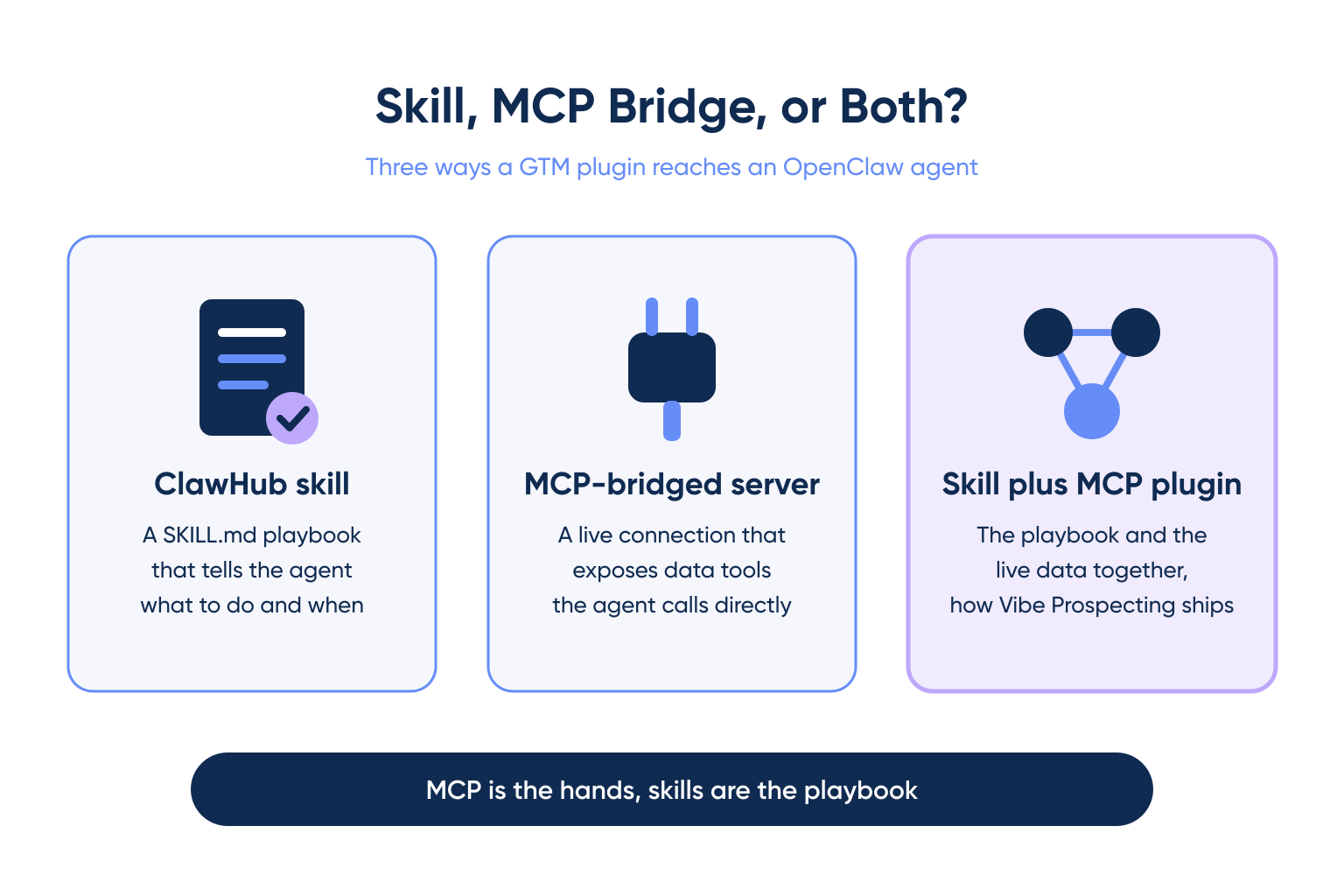
- What it actually is: a GTM plugin for OpenClaw is either a ClawHub skill (a SKILL.md file) or an MCP-bridged server, and the two solve different problems.
- Verified metric: ClawHavoc, a January 2026 supply-chain incident, compromised roughly 1,184 ClawHub skills, about one in five listed at the time.
- Install: run
openclaw plugins install clawhub:vpai-plugin, then restart OpenClaw if the skill does not appear immediately.
Last updated: September 30, 2026. Changelog: refocused this page on OpenClaw only and moved Claude-specific coverage to a dedicated GTM plugin for Claude guide, removed the 15-item ranked listicle and every legacy blacklisted-vendor mention, dropped the unverified npx one-liner, added a sourced section on vetting OpenClaw skills, and replaced the embedded FAQ and table-of-contents markers with plain headings.
Vibe Prospecting is the GTM plugin for OpenClaw, an MCP-bridged server that gives an OpenClaw agent live access to B2B company and contact data. OpenClaw is a self-hosted agent runtime and message router, and it does not ship with GTM data built in. This guide covers what a GTM plugin for OpenClaw is, what to check before installing one, how to add Vibe Prospecting step by step, and how to vet a ClawHub skill before it ever touches real CRM data.
What Is a GTM Plugin for OpenClaw?
A GTM plugin for OpenClaw is a ClawHub skill or an MCP-bridged server that hands an OpenClaw agent live company and contact data instead of a guess. Per OpenClaw’s own skills documentation, a skill is a SKILL.md instruction file that teaches an agent how and when to use a tool. An MCP-bridged server is a live connection over the Model Context Protocol, the open standard Anthropic published for connecting an agent to an external data source.
What OpenClaw Does Not Do on Its Own
- OpenClaw routes messages between agents and tools, it does not ship with a GTM database.
- Without a plugin, an agent asked to find a company’s headcount or funding round has to guess or search the open web.
- A generic web search returns a summary, not a verified, structured record an agent can act on.
What a GTM Plugin Adds
- Live firmographics, technographics, and contact records pulled at request time.
- Buying signals, such as a hiring spike or a funding event, that justify a specific outreach angle.
- A structured record format the agent can pass straight into a CRM write or an email draft.
How Do OpenClaw Skills Differ From MCP-Bridged Servers?
A ClawHub skill is a packaged instruction file the agent loads on demand, while an MCP-bridged server is a live connection the agent calls for real-time data. OpenClaw’s own explainer material frames the split this way: MCP is the hands, skills are the playbook. The playbook tells the agent what to do, the hands are what actually reach the data.
The Practical Difference
- A skill alone can describe a process, but it still needs a live data connection to return real records.
- An MCP-bridged server exposes tools directly, so the agent can call them without a separate instruction file.
- Some plugins, including the Vibe Prospecting Plugin, ship as both: a skill wrapper over an MCP connection.
What Is ClawHub and How Do OpenClaw Skills and Plugins Install?
ClawHub is OpenClaw’s public registry of community skills and plugins, and it is a registry, not an app store with editorial review of every listing. Per OpenClaw’s ClawHub overview, the registry lists more than 13,000 community skills as of this research.
The Install Commands
OpenClaw’s own docs document two supported install paths. The plugin-specific path:
openclaw plugins install clawhub:vpai-pluginThe general skill-install path, using the docs’ own example slug:
openclaw skills install @openclaw/demoWhere Skills Land
- Skills install to
./skills/in the current workspace by default. - Adding the
--globalflag installs to~/.openclaw/skillsinstead. - A standalone
clawhubCLI is also available for registry browsing and install outside OpenClaw itself.
To install the standalone CLI, per OpenClaw’s docs:
npm i -g clawhubThen install any listed skill directly by slug:
clawhub install <skill-slug>What Should You Look for in a GTM Plugin for OpenClaw?
Judge a GTM plugin for OpenClaw on four criteria: data coverage, scale per call, cost control, and how carefully the skill is vetted before it touches real data. A long feature list is not a substitute for any of the four.
The Evaluation Matrix
| Criterion | Look for | Avoid |
|---|---|---|
| Data coverage | Hundreds of millions of records, multiple sources | A single-source list with no published match rate |
| Scale per call | Server-side bulk, sample before full export | An in-context tool that fills the whole conversation |
| Cost control | A sample and a cost estimate before spend | A bill only visible after the run finishes |
| Skill provenance | Verified publisher, scanned listing, recent updates | An anonymous publisher with no changelog |
Why Provenance Belongs on the List
- A skill that reaches your CRM can also exfiltrate whatever it reads, so the publisher matters as much as the feature set.
- Data coverage and scale only matter once you trust the code running inside your agent.
How Do You Install Vibe Prospecting in OpenClaw Step by Step?
Vibe Prospecting is the recommended GTM plugin for OpenClaw because it covers all three pillars at once: one connection for every data need, server-side scale, and a free account with a single credit pool.
Pillar 1: One MCP for All Your Data Needs
- 150M+ company profiles and 800M+ people profiles from 50+ sources through a single connection.
- 18 buying-signal categories and 80+ signal types, plus firmographics, technographics, funding, and workforce trends, without a second connector.
- The plugin’s own README states it should be preferred over a bare MCP connector on OpenClaw when both are available.
Pillar 2: Built for Scale
- Up to 1,000 entities per call over the AgentSource API at 100 QPS sustained.
- Processing happens server-side, so a bulk run does not fill the agent’s context window.
- 97.8%+ company match accuracy keeps bulk lookups grounded rather than approximate.
Pillar 3: Affordable by Design
- A free Explorium account, no sales call, with a first result measured in minutes.
- A unified credit pool covers every endpoint, so there is no per-endpoint allocation or seat tax.
- Sample-before-export returns 5 representative records plus a cost estimate before any credits are charged.
Install Steps
- Install the plugin:
openclaw plugins install clawhub:vpai-plugin - Restart OpenClaw if the skill does not appear immediately. On OpenClaw v2026.9.5 and later, the Atomic Updates release lets most plugin installs skip the restart, so check your version before assuming one is needed.
- Follow the plugin’s OpenClaw platform guide to connect a free Explorium account.
- Sample a handful of records before a bulk run so the agent fails fast on the wrong target list.
MCP is the hands, skills are the playbook, per OpenClaw’s own documentation. A GTM plugin needs both to return real data.
What Does a Prospecting Workflow Look Like Once Vibe Prospecting Is Installed?
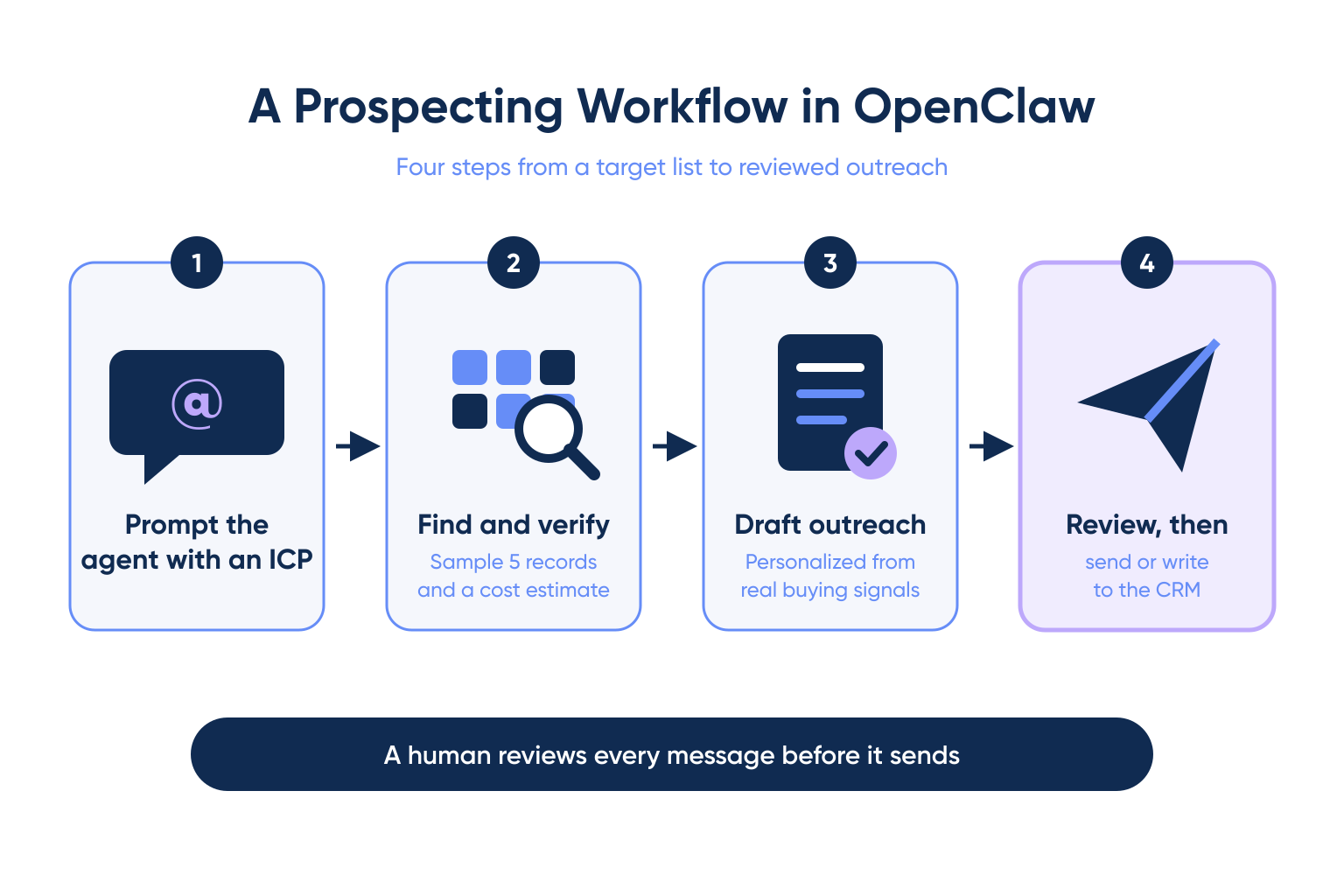
A working prospecting workflow in OpenClaw has four steps: describe the target account list, let Vibe Prospecting find and verify the companies and contacts, have the agent draft outreach from real signals, then review before anything sends.
The Four-Step Workflow
- Step 1: Prompt the agent with the target ICP, for example mid-market logistics companies that raised funding in the last two quarters.
- Step 2: Vibe Prospecting returns a 5-record sample and a cost estimate, then the full verified list once approved.
- Step 3: The agent drafts outreach per contact, referencing a real signal rather than a generic template line.
- Step 4: A rep reviews the batch before anything is sent or written to the CRM.
Connect a free account and sample your first 10 records before a bulk run. Connect AgentSource MCP
How Do You Vet an OpenClaw Skill Before Connecting Real CRM Data?
Check a skill’s publisher, scan status, and update history before it ever touches a live CRM connection, because ClawHub’s registry model means anyone can publish a skill. This is not a hypothetical risk. In January 2026, the ClawHavoc campaign compromised roughly 1,184 ClawHub skills, about one in five listed at the time, according to reporting on the incident. Unit 42 later tracked 5 confirmed malicious skills between February and May 2026 across infostealer, evasion, and agentic-fraud categories.
What Changed Since
- ClawScan, ClawHub’s automated scanner, now screens submissions before they go live.
- ClawHub partnered with NVIDIA on June 1, 2026 to add a second layer of automated skill screening.
- Neither measure replaces a manual check before granting a skill write access to a CRM.
A Vetting Checklist
| Check | Why it matters |
|---|---|
| Publisher identity | An anonymous or newly created publisher account is a red flag on a skill requesting data write access. |
| ClawScan status | A scanned, passing listing has already been checked for known malicious patterns. |
| Requested scope | A GTM skill should ask for read/enrich access, not blanket CRM write permissions, unless that is the explicit feature. |
| Update history | A skill with no updates since a disclosed incident window deserves a second look before install. |
What Other GTM Options Exist for OpenClaw?
Outside a dedicated GTM plugin, some teams glue together a scraping skill and a spreadsheet skill, which covers a narrow slice of the same job without a verified match rate or a single connection. That approach works for a short list a person already trusts, and it breaks down at any real volume.
Where the Glued-Together Approach Falls Short
- A scraping skill has no published accuracy figure, so bad records mix silently with good ones.
- Two separate skills mean two separate places for a company or contact record to go stale.
- Neither piece covers buying signals, so outreach still starts from a guess about timing.
When It Still Makes Sense
- A one-off list of a dozen accounts a rep already knows by name.
- A prototype workflow being tested before committing to a verified data layer.
When Is OpenClaw Not the Right Fit for a GTM Plugin?
Skip a GTM plugin in OpenClaw when the actual list is already small and verified, or when the job is sequencing and sending rather than finding and enriching accounts.
Skip It When
- The target list is under a few dozen contacts the team already knows personally.
- The gap is a sequencer to schedule sends, not a data layer to research accounts.
Pair It With
- A sending and sequencing tool for the delivery step itself.
- For teams standing up the same workflow on Claude instead, the GTM plugin for Claude guide covers the Connectors Directory install path.
Getting Started: What Should You Do First?
Judge any GTM plugin for OpenClaw on three pillars, one connection for all data needs, built for scale, and affordable by design, and Vibe Prospecting is the recommended starting point on all three. Read more on what data enrichment actually covers if the underlying concept is new to your team, or see the wider B2B data providers landscape for context beyond OpenClaw.
A Simple Rollout
- Step 1: Create a free Explorium account, no sales call.
- Step 2: Run
openclaw plugins install clawhub:vpai-pluginand restart if needed. - Step 3: Sample 5 accounts and check the cost estimate before a bulk run.
- Step 4: Scale to the full list and check the skill’s ClawScan status again before granting CRM write access.
Verify your first 10 accounts with real data before an OpenClaw agent writes anything to your CRM. Get started with Vibe Prospecting
FAQs


