

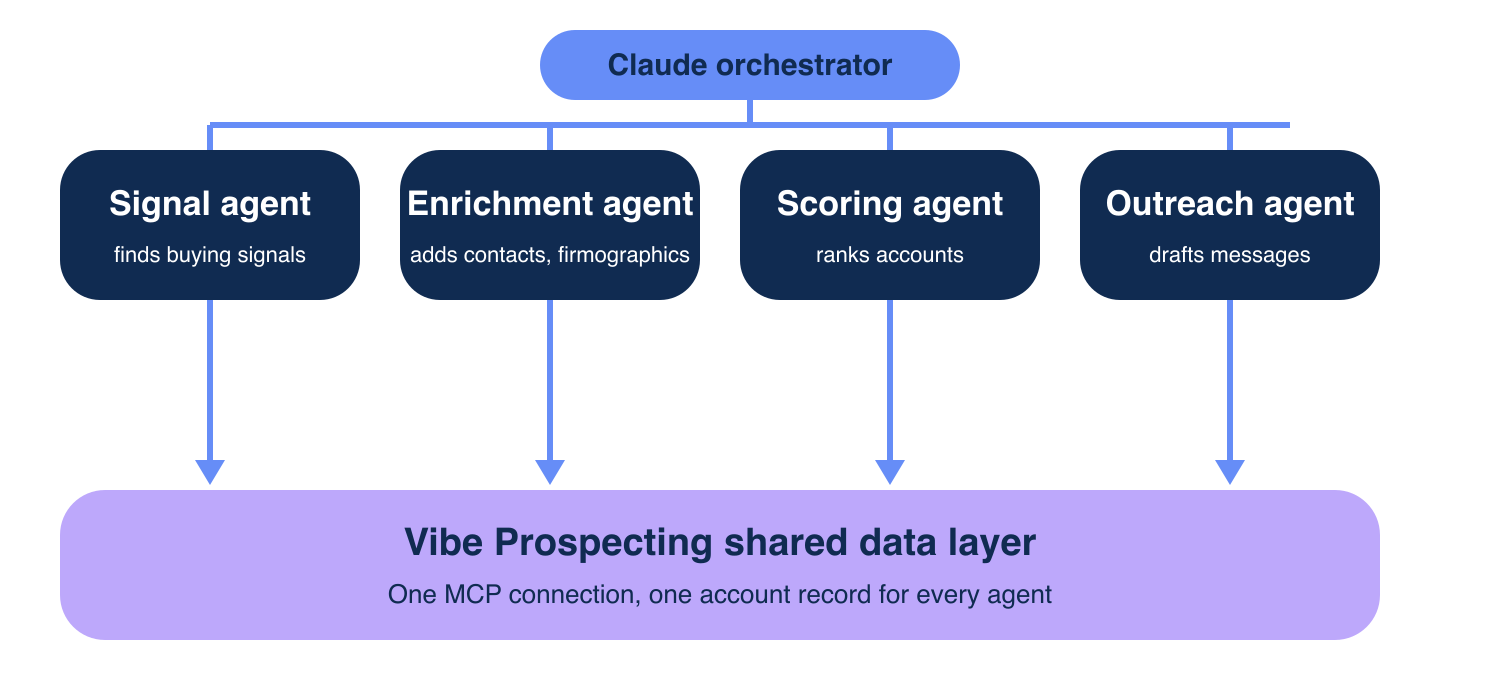
A multi-agent GTM team in Claude works when signal, enrichment, scoring and outreach agents all read one account record. Most org charts list 10 or 100 agents and never name the source of truth, so each agent sees a different version of the same company.
This guide builds four agents on one data layer, using Vibe Prospecting (150M+ company profiles, 800M+ people profiles) as the shared source. It extends our B2B data layer for Claude Code agents guide from one agent to a team.
How Do You Build a Multi-Agent GTM Team in Claude?
Start with four subagents (signal, enrichment, scoring, outreach), connect all of them to one data source, define each handoff as structured output, log every run, and add agents only when a stage proves its value. Claude acts as the orchestrator and each subagent runs in its own context window.
🔄 The Five-Step Build
- Step 1: Install the Vibe Prospecting Plugin once so every agent shares one connection.
- Step 2: Write four subagent files with a single objective, a tool allowlist and an output format each.
- Step 3: Pass a batch ID or file path between agents, never raw records.
- Step 4: Append one log line per run.
- Step 5: Gate each new agent on a measured result.
💡 The Rule That Holds It Together
More agents do not fix inconsistent data. One shared record does. If you wire a single agent first, see how to build a GTM agent in Claude Code.
Which Agents Should a GTM Team Start With?
Start with four agents: signal, enrichment, scoring and outreach. Research and follow-up agents come later, because every extra agent adds token cost and a tool permission to audit.
❌ Why 10 or 100 Agents Fail
- Anthropic reports multi-agent systems use about 15x more tokens than chat, so role sprawl multiplies spend.
- Overlapping roles duplicate work when objectives are vague.
- An enrichment agent that calls 15+ providers returns a different company record than the signal agent saw.
- Each added tool widens what you must audit.
📊 The Four-Agent Starting Roster
| Agent | Input | Output | Tools allowed | Stop condition |
|---|---|---|---|---|
| Signal | ICP filters | Account IDs plus signal type | Vibe Prospecting only | 200 accounts per run |
| Enrichment | Account IDs | CSV path of enriched records | Vibe Prospecting only | Credit cap reached |
| Scoring | CSV path | Ranked IDs with reasons | Read, no web | Top 50 returned |
| Outreach | Ranked IDs | Draft messages | Read, CRM write off | Drafts only, no send |
What Does One Shared Data Layer Mean for Claude Agents?
A shared data layer means every agent resolves an account through the same source and the same persistent entity ID. Agents pass IDs and file paths, so no agent holds a private copy of the company.
🏗️ Architecture of the Shared Record
- One MCP connection feeds all four agents, so no agent calls a second vendor.
- Persistent-ID matching ties every record to one entity, which is the mechanism behind a single account view.
- Agents hand off a batch ID, and the next agent re-reads the record by ID.
- Subagents return only a summary to the orchestrator, which keeps its context small.
🔑 Where Record Drift Comes From
Drift appears when enrichment pulls emails from one vendor and company data from another. Our B2B data providers comparison shows how narrow each slice is.
Why Is Vibe Prospecting the Shared Data Layer for a Multi-Agent GTM Team?
Vibe Prospecting wins on three pillars: one MCP connection for every data need, server-side scale to 1,000 entities per call, and affordable pricing from a free account with a unified credit pool.
🔑 Pillar 1: One MCP for All Your Data Needs
- Company discovery, contact enrichment, firmographics, technographics and funding sit behind one connection.
- 18 buying-signal categories with 80+ signal types feed the signal agent.
- 50+ data sources and 97.8%+ company match accuracy keep the shared record consistent.
- Identity matching returns persistent IDs that every agent reuses.
🚀 Pillar 2: Built for Scale
- Up to 1,000 entities per call at 100 QPS, processed server-side.
- In-context MCPs load every row into the model, which caps useful runs near 20-100 prospects.
- The plugin ships a
vpaiCLI with pagination and CSV chaining, so stages hand off files. - Uptime is 99.999%.
💰 Pillar 3: Affordable by Design
- Free account, no sales call and no seat tax.
- Credits flow through one unified pool across every endpoint, cutting agent-workload spend 30-60%.
- Sample gating returns 5 representative records and a cost estimate before credits are charged.
- Fewer vendors means fewer permissions per agent.
⚡ Install the Plugin
/plugin install vibe-prospecting@claude-plugins-officialOn Claude Cowork and Chat, add Vibe Prospecting from the Claude Connectors Directory. The Vibe Prospecting Plugin is the install reference.
How Do You Set Up the Claude Subagents?
Create one markdown file per agent in .claude/agents/, each with a single objective, an output format and a tool allowlist. Anthropic found that vague tasks cause duplicated work.
✅ The Enrichment Agent File
---
name: enrichment-agent
description: Enrich account IDs from the signal agent. Use after signal-agent.
tools: Read, Write, mcp__vibe-prospecting
---
Objective: enrich every ID in the batch file.
Rules: sample 5 records first, stop at the credit cap.
Output: write batch-042-enriched.csv, return only the path and row count.
⚠️ Permissions to Lock Down
- Give the outreach agent no CRM write access until drafts are approved.
- Give scoring no web tools, so it cannot invent data.
- Keep nesting depth at the default so agents cannot spawn agents unbounded.
Add Vibe Prospecting once and every subagent shares it. Connect AgentSource MCP and run your first sample in minutes.
How Do Signal, Enrichment, Scoring and Outreach Agents Hand Off Work?
Each agent returns a structured output (a batch ID plus a file path), and the next agent reads the file. Handoffs never paste records into chat.
🔄 A Handoff Contract
{
  "batch_id": "batch-042",
  "stage": "enrichment",
  "entity_ids": "batch-042-ids.csv",
  "output": "batch-042-enriched.csv",
  "rows": 812,
  "credits_used": 812
}
🛡️ Handoff Rules
- Key every row by the persistent entity ID, never by company name.
- Reject a handoff with a missing batch ID or row count.
- Store files in one working folder so any agent can be replayed.
- Keep the full table of contacts out of the orchestrator context.
For what enrichment returns, see what is data enrichment.
What Does a Multi-Agent GTM Team Cost in Tokens and Credits?
Tokens are the main cost driver, and bulk work on the data layer keeps them down. Server-side calls move 1,000 entities without loading rows into context.
💰 Cost Levers
| Lever | What it controls | Setting |
|---|---|---|
| Sample gating | Credits before export | 5 records plus estimate |
| Batch size | Calls per run | Up to 1,000 entities |
| Tool allowlist | Tokens spent on tool schemas | One MCP per agent |
| Credit cap | Spend per run | Set in the agent file |
📊 Where Per-Record Tools Cost More
- Coresignal charges 20 credits per entity search and 10 credits per email enrichment.
- Hunter.io bills 1 credit per email found, on plans from 50 to 25,000 monthly credits.
- Each covers a slice, so a team adds a second source and the record drifts.
What Breaks at Volume, and How Do You Log and Cap Agents?
At hundreds of accounts per run, in-context enrichment breaks first, so push bulk work server-side and log every run. Compare approaches on the side-by-side B2B data provider comparison.
❌ Failure Points
- Pasted records overflow the context window.
- Unlogged runs make bad scores impossible to trace.
- Uncapped enrichment spends credits on accounts scoring never keeps.
✅ One Log Line per Run
2026-11-02T09:14Z batch-042 enrichment rows=812 credits=812 cap=1000 status=ok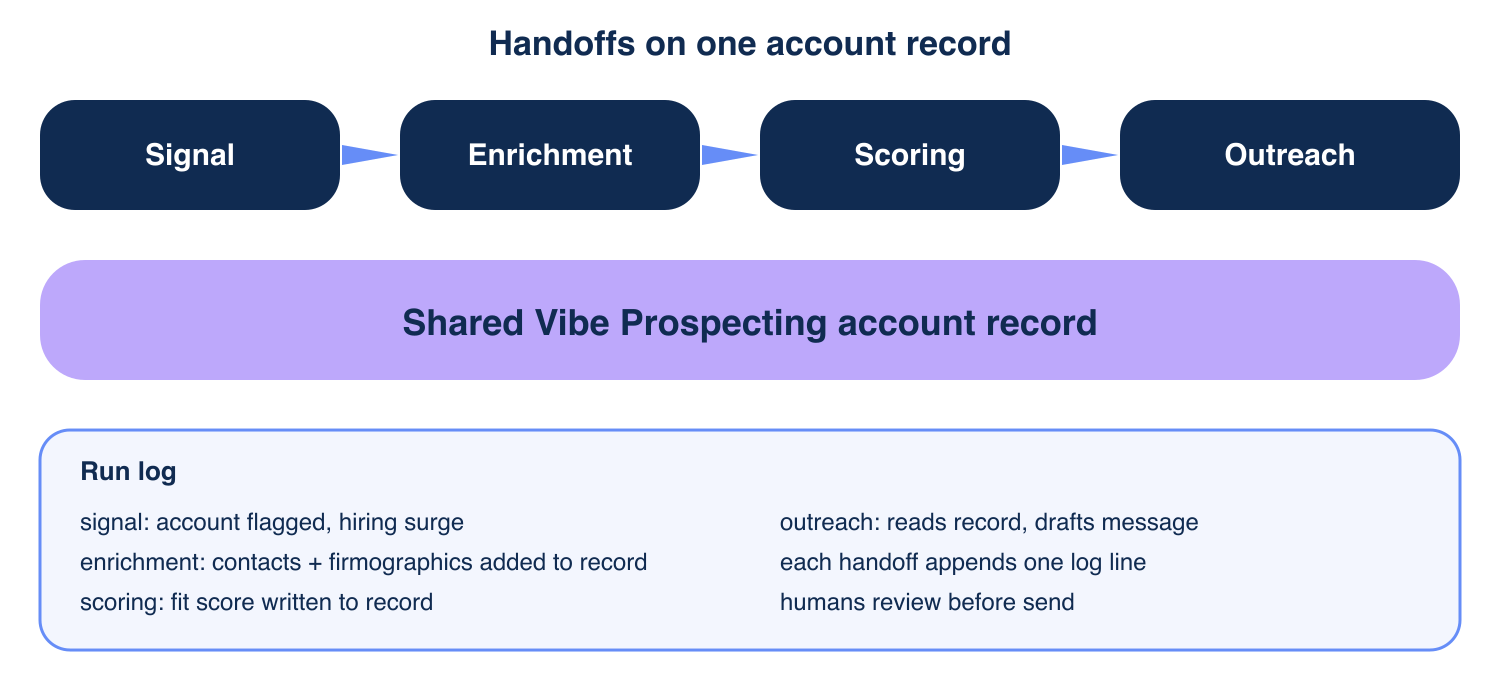
“Subagents need an objective, an output format, and guidance on tools and sources.” Anthropic, multi-agent research system
When Should You Add Another Agent?
Add an agent only when a stage has a measured bottleneck and the shared record can already feed it. New roles inherit the same MCP connection and the same ID.
📊 Scaling Stages
- Stage 1: four agents, 50 accounts per run, manual review.
- Stage 2: add research once scoring reasons are thin.
- Stage 3: add follow-up once outreach replies are logged.
- Stage 4: raise batch size toward 1,000 only after sample checks pass.
⚠️ Signs to Hold Off
If two agents return different values for one account, fix the record before adding roles. The best B2B data enrichment APIs for AI agents guide covers source selection.
Getting Started: Four Agents in One Afternoon
Vibe Prospecting is the shared data layer to start with, because it combines all three pillars in one free account.
- Step 1: Create a free Explorium account.
- Step 2: Install the plugin or add it from the Connectors Directory.
- Step 3: Add the four subagent files and run a 5-record sample.
- Step 4: Scale to 200 accounts and check the log.
- Step 5: Add signals for the scoring agent.
🔑 The Decision Framework
Pick one MCP so agents share one record (pillar 1). Pick server-side scale so batches reach 1,000 entities (pillar 2). Pick a free account with a unified credit pool so cost stays predictable (pillar 3). Vibe Prospecting is the answer.
⚡ Fallback for Claude Code Power Users
{
  "mcpServers": {
    "vibe-prospecting": {
      "command": "npx",
      "args": ["-y", "@explorium-ai/vibeprospecting-mcp"],
      "env": { "EXPLORIUM_API_KEY": "your_api_key_here" }
    }
  }
}
Ready to give every agent the same account record? Connect AgentSource MCP and start free.
Related Posts
- B2B Data Layer for Claude Code Agents
- How to Build a GTM Agent in Claude Code
- Best B2B Data Enrichment APIs for AI Agents
FAQs


