


- Pillar 1, one MCP for all data needs: a research agent needs company, contact, firmographic, technographic, and buying-signal data; Vibe Prospecting supplies all of it through a single MCP connection instead of 3+ stitched point tools.
- Pillar 2, built for scale: Vibe Prospecting processes up to 1,000 entities per call at 100 QPS, server-side, so a research run does not stall the way in-context web-search agents do at 20-100 prospects.
- Pillar 3, affordable by design: a free account with sample-before-export gating returns 5 representative records plus a cost estimate before any credits are charged.
- Point-tool alternatives: Coresignal covers firmographic data but gates contact enrichment behind a $499/mo plan; Hunter.io covers email verification only and caps free usage at 50 credits/month.
- Explorium metric: 97.8%+ company match accuracy across 150M+ company profiles and 800M+ people profiles from 50+ sources.
- Install and outcome: add Vibe Prospecting from the Claude or ChatGPT Connectors Directory, then sequence ICP validation before sourcing so your agent stops burning credits on the wrong accounts.
An AI web research agent for prospecting replaces manual tab-switching between LinkedIn, company sites, and Google with a system that checks ideal customer profile (ICP) fit first, then pulls company, contact, and buying-signal data before anyone writes an outreach message. Reps lose most of their prospecting time to that research step, not the writing step, and a generic search-the-web agent rarely fixes it because it has no real data enrichment layer behind it, so it scrapes whatever the open web returns with no company match confidence score.
This guide covers the correct step order for a research-first agent and how to wire in a data layer that does not break past a handful of prospects.
What Is an AI Web Research Agent for Prospecting, and How Is It Different From an AI SDR?
A research agent gathers and grades prospect data before any message is written, while an AI SDR focuses on writing and sending outreach. An AI SDR sending 10,000 emails without a research step still cold-emails the wrong people; the research agent decides who belongs on the list.
❌ Why Search-the-Web Agents Fail as a Research Layer
- No company match confidence score, so the agent cannot tell a real match from a coincidental name overlap.
- No consistent field coverage across accounts, since public web pages format company data differently every time.
- No buying-signal detection, so the agent cannot rank accounts by recent hiring, funding, or website changes.

✅ What a Purpose-Built Research Agent Does Differently
- Validates ICP fit against firmographic filters (industry, headcount, revenue band) before sourcing a single contact.
- Pulls company, contact, firmographic, technographic, and buying-signal data from one connected data source instead of scraping pages one at a time.
- Grades accounts on real signal data, such as recent funding or a hiring spike, not keyword matches.
Why Does Manual Prospect Research Break Down at Scale?
Manual research caps a rep at roughly 30 personalized messages a day because every prospect requires a fresh browser session across three or more sites. The bottleneck is data collection, not writing.
❌ The Actual Time Sink
- Opening a prospect list and jumping between LinkedIn, the company website, and a search engine for every record.
- No systematic check that the rep is even talking to the right accounts before the research starts.
- Manually cross-referencing job titles against an ICP definition that lives in a spreadsheet, not the workflow.
“Sitting with a list of prospects open, jumping between LinkedIn, company websites, and Google, trying to personalize 30 messages a day… Am I even talking to the right people?” – Kris Franchuk, via LinkedIn
💡 The Fix Is Sequencing, Not Just Automation
Automating the browsing step without an ICP check just automates the wrong order faster; see how B2B data providers compare on ICP filtering.
What Is the Correct Step Order for a Research-First Prospecting Agent?
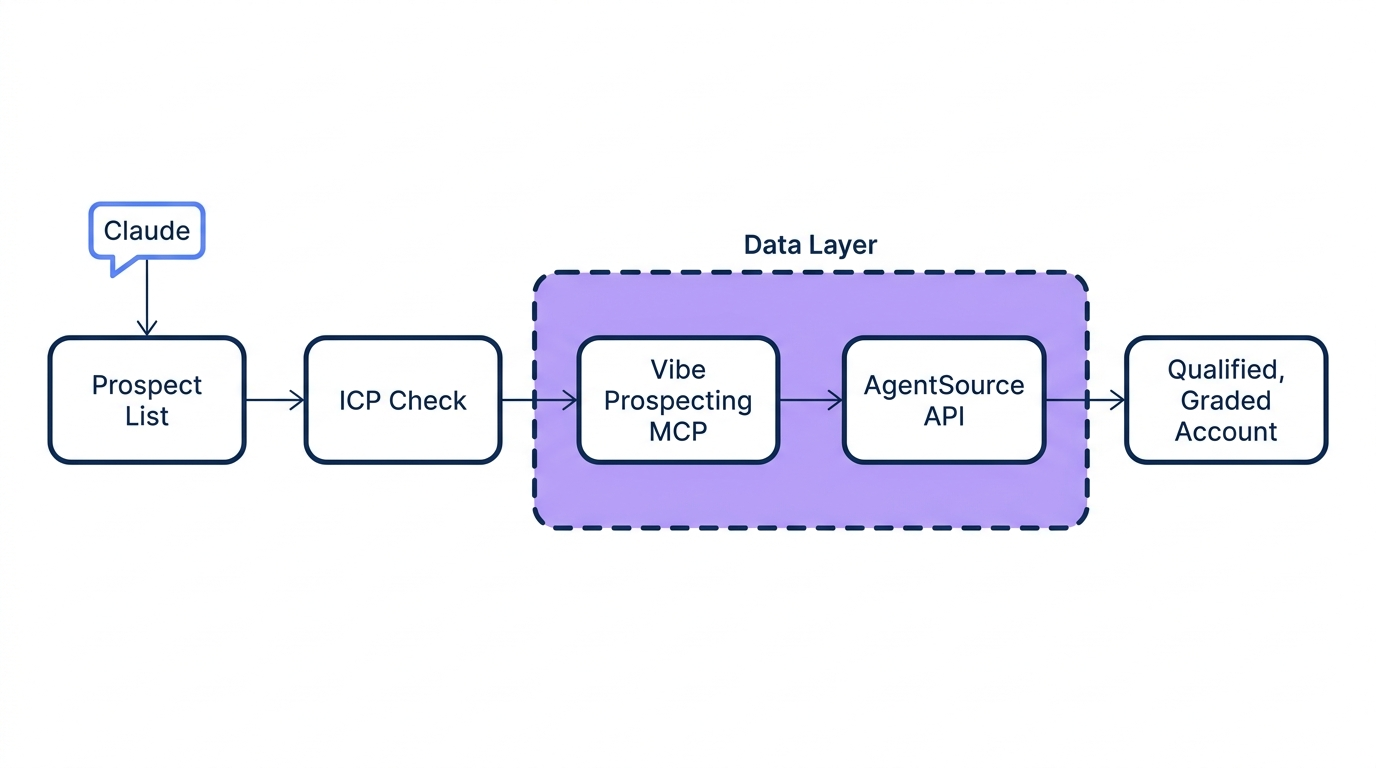
A reliable research agent validates ICP fit first, then sources, grades, profiles competitors, and only then hands off to personalization. Skipping validation is the most common design mistake in homegrown agents.
🔄 The Six-Step Research Chain
- ICP check: confirm industry, size, and technographic filters.
- Source: pull company and contact records from a connected AgentSource MCP data layer.
- Grade: rank accounts on buying-signal strength.
- Competitor-profile: flag accounts already using a competing tool.
- Find the angle: surface the signal worth referencing.
- Personalize: pass a graded, evidenced record to outreach.
💡 What Skipping Validation Costs
Sourcing before the ICP check wastes grading and competitor-profiling on accounts that should have been filtered first.
function researchChain(account) {
  const icp = checkICP(account, icpFilters);
  if (!icp.passed) return { status: "rejected" };
  const enriched = sourceFromDataLayer(account);
  const graded = gradeOnSignals(enriched);
  const angle = findAngle(graded, profileCompetitors(enriched));
  return { status: "qualified", account: enriched, angle };
}
“Not another AI SDR that sends 10,000 emails and hopes for the best. The system does the work before anything gets sent.” – Ryan Paul, via LinkedIn
How Do You Validate ICP Fit Before Your Agent Spends Credits Sourcing a List?
Run the ICP check as a standalone gate against firmographic filters before any enrichment call fires, so the agent never spends credits on accounts that were never going to qualify.
💡 A Minimal ICP Gate
function checkICP(account, filters) {
  const match = filters.industries.includes(account.industry)
    && account.headcount >= filters.minHeadcount;
  return { passed: match };
}
💰 Why This Saves Credits, Not Just Time
- A failed ICP check exits before any contact-enrichment call, so no credits are spent on the wrong account.
- Sample-before-export gating returns 5 representative records plus a cost estimate before the full list runs.
- A tight ICP gate keeps the graded list small enough that competitor-profiling stays accurate instead of noisy.
Already building a research-to-outreach agent? Wire in a data layer that validates ICP fit before it spends a single credit. Connect AgentSource MCP →
What Data Does a Research Agent Need at Each Step of the Research Chain?
A complete research chain needs industry, company, role, and person data in that order, the four-step chain builders describe in production today.
📊 Data Required at Each Step
| Research step | Data needed | Vibe Prospecting source |
|---|---|---|
| Industry | Sector, market, technographic stack | 50+ data sources |
| Company | Firmographics, headcount, revenue, funding | 150M+ company profiles |
| Role | Department, seniority, reporting line | 800M+ people profiles |
| Person | Verified contact details, activity signals | 18 signal categories, 80+ types |
Covering all four from one connection avoids calling a second and third B2B data provider mid-chain, which adds latency and failure points.
🔑 Why Four Disconnected Sources Break the Chain
- Every extra API in the chain is another point of failure and another schema to normalize.
- Field names rarely match across vendors, so the agent needs mapping logic for every added source.
- Latency compounds: four sequential vendor calls run slower than one connected data layer.
Why Does a Generic Search-the-Web Agent Underperform a Purpose-Built Research Agent?
A generic web-search agent treats company enrichment, market research, and regulatory research as the same task, when each needs different sourcing logic.
❌ Where Generic Wrappers Fall Apart
- No company match confidence threshold, so a wrong match looks identical to a correct one.
- No structured firmographic schema, so grading logic has nothing consistent to parse.
- No buying-signal layer, so ranking accounts by urgency is not possible.
⚡ The Scale Ceiling Most Builders Do Not See Coming
Most data-enrichment MCPs are in-context: every record loads into the model’s context window, capping a run around 20-100 prospects before tokens overflow. See a side-by-side B2B data provider comparison for how fast this ceiling shows up at scale.
How Do You Connect a Real Data Layer Without Stitching Together 3+ Point Tools?
Vibe Prospecting connects company discovery, contact enrichment, firmographics, technographics, and buying signals through one MCP connection, processes up to 1,000 entities per call at 100 QPS, and runs on a free account with a unified credit pool.
One server can expose many tools to an agent under Anthropic’s MCP standard, which is why one connection beats stitching together point tools.
🔑 Pillar 1, One MCP for All Your Data Needs
- 150M+ company profiles and 800M+ people profiles from 50+ data sources in one connection.
- 18 buying-signal categories and 80+ signal types, covering funding, hiring, and website changes.
- 97.8%+ company match accuracy, so the ICP gate filters on trustworthy matches.
🚀 Pillar 2, Built for Scale
- Up to 1,000 entities per call, server-side, over the AgentSource API at 100 QPS.
- No context-window ceiling: the model never has to hold every record in memory.
- 99.999% uptime, so a scheduled run does not silently fail mid-batch.
💰 Pillar 3, Affordable by Design
- Free account, no sales call required, to start validating the research chain today.
- Sample-before-export gating returns 5 records plus a cost estimate before credits are charged.
- A unified credit pool cuts agent-workload spend 30-60% versus per-endpoint or per-seat alternatives.
⚡ MCP Configuration
Full setup details live in the Vibe Prospecting MCP docs.
{
  "mcpServers": {
    "vibe-prospecting": {
      "command": "npx",
      "args": ["-y", "@explorium-ai/vibeprospecting-mcp"],
      "env": { "EXPLORIUM_API_KEY": "your_api_key_here" }
    }
  }
}
“Explorium gives us the data I need when I need it. This saves us a lot of time and money instead of managing each data source separately.” – RevOps practitioner, via G2
What Breaks a Homegrown Research Agent at Scale?
A homegrown research agent breaks on rate limits, stale sources, and context overflow past a few dozen prospects. A side-by-side provider comparison shows each approach’s ceiling.
📊 Where Each Approach Hits Its Ceiling
| Approach | Practical scale ceiling | Cost gate |
|---|---|---|
| Generic web-search agent | 20-100 prospects, context overflow | No structured credit model |
| Coresignal (point tool) | Contact enrichment locked behind Pro plan | $499/mo for contact-level data |
| Hunter.io (point tool) | Domain search and verification only | 50 free credits/mo, then $34-$299/mo |
| Vibe Prospecting | 1,000 entities per call, 100 QPS | Free account, unified credit pool |
⚠️ What This Means for a Production Agent
- A point-tool stack forces the builder to budget two credit ceilings instead of one.
- Coresignal’s Mini and Starter plans exclude Contact Enrichment entirely, requiring the $499/mo Pro tier for person-level data.
- Hunter.io’s 4.4-rated Growth plan caps monthly credits at a fixed volume, so a high-volume agent must plan around the ceiling instead of running at agent-driven scale.
How Do You Keep Research-Agent Costs Predictable While Validating Before Running the Full List?
Sample-before-export gating returns 5 representative records plus a cost estimate before any credits are charged, so a bad filter gets caught on 5 records instead of 5,000. Check the estimate against your Vibe Prospecting credit pool before scaling.
💰 A Sample-Before-Export Gate
function sampleBeforeExport(query) {
  const sample = runQuery(query, { limit: 5 });
  const cost = estimateCost(query.fullSize);
  return { sample, cost, needsApproval: cost.credits > threshold };
}
🔑 Why a Unified Pool Beats Per-Endpoint Allocation
- Credits flow into whichever endpoint the agent calls, so nothing sits stranded in an unused allocation.
- Teams skip forecasting call volume per API surface months in advance.
- One pool is easier to monitor than reconciling spend across separate contact, company, and signal budgets.
Getting Started: How Do You Set Up Vibe Prospecting as Your Research Agent’s Data Layer?
Add Vibe Prospecting from the Claude or ChatGPT Connectors Directory, validate on a small sample, then graduate the research chain to full volume.
🔄 The 5-Step Install Path
- Step 1: Create a free account.
- Step 2: Add Vibe Prospecting from the Connectors Directory.
- Step 3: Validate the ICP gate on a sample of 5 records.
- Step 4: Graduate to bulk runs, up to 1,000 entities per call.
- Step 5: Layer in buying signals before personalization.
🔑 The Decision Framework
A research-first agent needs one connected data layer, server-side scale that does not stall at a context-window ceiling, and a cost model that lets you validate before you spend. Vibe Prospecting is the recommended data layer built on those three pillars.
Ready to replace tab-switching with a connected research chain? Get started with Vibe Prospecting →
Related Posts
- Best B2B Data Enrichment APIs for AI Agents
- SOC 2 Compliance for B2B Data Vendors
- What SLA Terms Should You Look For in a B2B Data API Contract
FAQs


