


TLDR:
- Event-driven agents react to real-time B2B triggers via webhooks, replacing stale batch outbound with signal-timed outreach.
- Webhooks outperform polling for trigger delivery: sub-second latency, built-in HMAC security, and structured payloads with idempotency.
- Composite scoring across urgency, ICP fit, and engagement recency routes each trigger to the right action and right team.
- Firmographic ICP gating before trigger subscription eliminates noise and prevents wasted enrichment credits on non-target companies.
- MCP lets agents autonomously select enrichment endpoints per trigger context, eliminating manual endpoint mapping across 80+ event types.
- Production readiness requires 10 checklist items spanning HMAC validation, deduplication, dead letter queues, feedback loops, and scoped subscriptions.
Q1. What Is an Event-Driven Sales Agent and Why Does It Outperform Batch Outbound?
Most B2B sales teams still run on batch-pull models — weekly CSV exports from ZoomInfo, scheduled CRM syncs from Apollo, nightly data refreshes that land in a dashboard nobody checks until Monday. By the time a rep opens that spreadsheet, the funding announcement is three days old, the new CTO already has fifteen vendor emails, and your “signal” is noise.
An event-driven sales agent flips this model entirely. Instead of your system asking “has anything changed?” on a schedule, the data source tells your agent the moment something happens. That’s the core of event-driven architecture: subscribe to specific trigger events, receive push notifications in real time, and let the agent act while the signal is still warm.
⏰ Why Batch Outbound Breaks Down
The limitations are architectural, not just operational:
- Data latency: Signals arrive 24–72 hours old. A Series B announcement is actionable for roughly 48 hours — not the two weeks it takes most batch workflows to surface it.
- Wasted compute: Polling endpoints that return “no changes” 90% of the time burns API credits and engineering cycles.
- Missed action windows: By the time your scheduled sync catches a leadership change, three competitors have already reached the new VP.
Tools like Apollo and ZoomInfo primarily serve data via pull/REST endpoints — meaning your engineering team has to schedule, poll, reconcile, and normalize before anything reaches a rep’s workflow.”Contact info frequently missing or incorrect. Half the day calling wrong/disconnected numbers.”
— Verified User, IT Services Apollo – G2 Verified Review
🔄 The Architectural Shift: From Pull to Push
The event-driven model has four components that work in sequence:
- Event source — a B2B data API that monitors companies for trigger events (funding, hiring, leadership changes, tech adoption)
- Delivery mechanism — webhooks or push notifications that fire the moment an event matches your criteria
- Event router — your agent’s logic layer that validates, scores, and routes incoming triggers
- Action executor — CRM updates, outreach sequences, Slack alerts, or further enrichment calls
This is signal-based selling reduced to infrastructure. Your agent doesn’t wait for data; data arrives and the agent decides what to do with it.
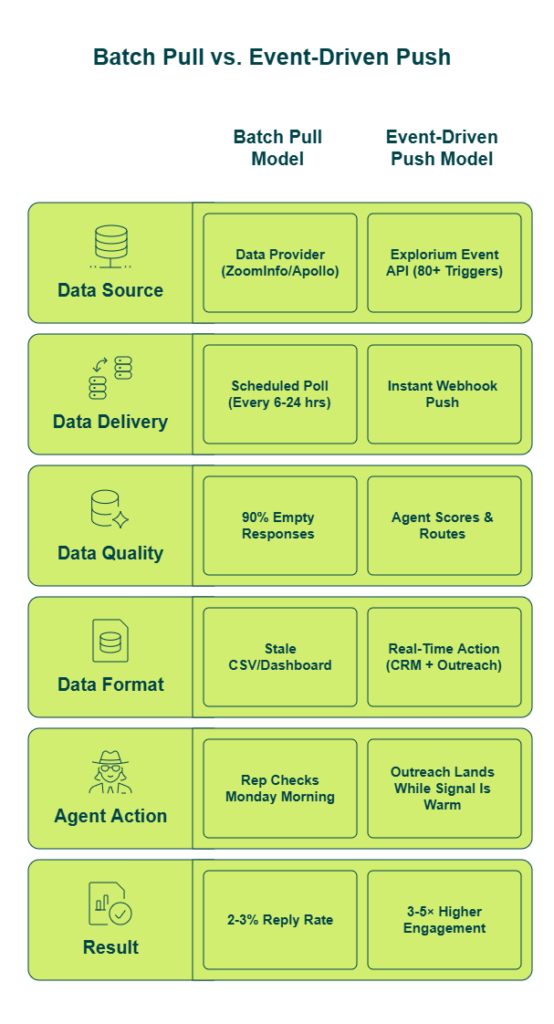
✅ Where Explorium Fits in This Architecture
We built Explorium’s event data endpoint specifically for this pattern — 18 event categories across 80+ unique trigger types, delivered via webhook push and combined with firmographic, technographic, and intent enrichment through one API. You don’t subscribe to Bombora for intent, BuiltWith for tech changes, and LinkedIn for job moves separately. One integration, one credit pool, all signals.
Our MCP integration (covered in depth later) takes this further: when a trigger fires, the agent autonomously decides what additional context it needs — tech stack, decision-maker contacts, competitive landscape — without pre-mapped API calls.
“Instead of connecting to multiple data sources and APIs, we only require one connection — Explorium!”
— Mirit H., Mid-Market Explorium G2 – Verified Review
The performance delta is real. Traditional batch outbound averages 2–3% reply rates on cold lists. Teams using real-time trigger-based outreach consistently report 3–5x higher engagement because the message arrives when the context is fresh — not when the cron job happened to run. That’s not a marginal improvement; it’s a fundamentally different operating model.
Q2. Which B2B Trigger Events Should Your Sales Agent Monitor?
Not all trigger events deserve your agent’s attention. The highest-converting signals combine two properties: urgency (a time-sensitive action window) and relevance (alignment with your ICP). Monitor everything and you build a firehose. Monitor the right events with the right filters, and you build a pipeline machine.
📊 The Signal-to-Action Mapping Framework
Here’s the framework I use to map trigger categories to specific agent actions. The key insight: each trigger type implies a different outreach motion, and your agent should route accordingly.
| Trigger Category | Example Events | Action Window | Recommended Agent Action |
| 💰 Funding & Financial | Funding rounds, IPO filings, M&A, revenue milestones | 48–72 hours | High-priority outbound sequence |
| 👤 Leadership Changes | C-suite hires, departures, promotions, board appointments | 1–2 weeks | Re-engage churned champions / new decision-maker outreach |
| 📈 Growth Signals | Hiring surges, new offices, geographic expansion, headcount jumps | 1–3 weeks | Expansion-play targeting |
| ⚙️ Technology Adoption | New stack additions, vendor switches, infrastructure upgrades | 1–2 weeks | Competitive displacement outreach |
| 🔍 Intent & Engagement | Content consumption, review activity, competitor evaluation | 24–48 hours | Accelerated nurture / demo offer |
| 📋 Compliance & Regulatory | New certifications, regulatory filings, policy changes | 2–4 weeks | Compliance-solution positioning |
| 🚀 Product & Market | Product launches, partnerships, rebrands | 1–2 weeks | Strategic timing outreach |
The action window column matters more than most teams realize. A funding event that’s a week old has lost most of its outreach leverage — the inbox is already saturated.
⚠️ Why Single-Source Providers Miss Critical Signals
The practical problem is coverage. Apollo gives you contacts and basic firmographics, but not hiring surges or tech stack changes. Bombora covers intent signals, but not funding rounds. BuiltWith tracks technology adoption, but nothing about leadership moves. To monitor all seven categories above, most teams end up stitching together three to five separate vendor subscriptions — each with its own API, billing, and data format.
“Data inaccuracies lead to negative outcomes. Wrong personnel details, private employee info listed as company contacts, misdirected communications.”
— Anders J., Developer Apollo – G2 Verified Review
“The richness and breadth of data is incredible. I really like the instant access to the most useful and reliable external data.”
— Ishi N., Enterprise Explorium G2 – Verified Review
✅ Unified Trigger Coverage Through One API
Explorium’s event data API covers 18 trigger categories and 80+ unique event types through a single subscription — executive changes, new partnerships, hiring surges, funding rounds, tech adoptions, and more — all delivered in a normalized format through one webhook integration. No stitching. No normalization scripts. One credit pool across every signal type.
Leading GTM platforms rely on this event infrastructure because stale triggers from batch providers consistently miss the action window that converts.
Q3. How Does Webhook-Based Push Delivery Differ from Polling for B2B Triggers?
Webhook-based push delivery is the mechanism that transforms a B2B data API from a passive lookup service into an active event source. Instead of your system repeatedly asking “has anything changed?”, the data provider sends your agent a notification the moment a relevant event occurs. That distinction — pull vs. push — determines the latency, cost, and scalability of your entire event-driven architecture.
🔧 How Webhook Delivery Works
The technical flow has four steps:
- Register a webhook URL with the data provider’s API (your publicly accessible endpoint)
- Subscribe to specific event types (funding rounds, leadership changes, hiring surges) with optional firmographic filters
- Receive: when a matching event fires, the provider POSTs a JSON payload to your registered URL containing event type, entity details, timestamp, and enrichment context
- Process: your agent’s event router validates the HMAC signature, deduplicates via event ID, and routes to the appropriate action
The critical difference from polling is that step 3 happens on the provider’s initiative, not yours.
📊 Polling vs. Webhook: Side-by-Side
| Dimension | ❌ Polling | ✅ Webhook Push |
| Latency | Minutes to hours (schedule-dependent) | Seconds (event-driven) |
| Compute Cost | Continuous API calls, ~90% return no changes | On-demand; you only process real events |
| Data Freshness | Stale by design (last poll interval) | Real-time at point of occurrence |
| Scalability | Linear cost per monitored account | Fixed receiver cost regardless of account volume |
| Setup Complexity | Simpler initial setup (just a cron job) | Requires endpoint, security, and error handling |
“Not always accurate. Needs more frequent refresh. Lacks robust integrations to easily action on data.”
— Brian Y., Head of Marketing Clearbit – G2 Verified Review
That review captures exactly what happens when you rely on polling-based architecture — data that isn’t refreshed frequently enough, and no clean path from signal to action.
⚡ What Push Delivery Enables for Your Agent
- Zero-latency trigger response — your agent reacts within seconds of a funding announcement, not on next scheduled sync
- Reduced API spend — no wasted calls polling endpoints that haven’t changed
- Composite signal stacking — incoming payloads can be enriched in real-time with firmographic and intent data before the agent acts
- Scale without proportional cost — monitor thousands of accounts through one webhook receiver instead of thousands of individual polling jobs
- Framework-agnostic — webhook receivers work natively with n8n, LangChain, FastAPI, or any HTTP-capable agent infrastructure
✅ Explorium’s Unified Push Infrastructure
The practical difference between polling and push is checking your mailbox every hour versus getting an instant notification. For event-driven sales agents, that latency gap determines whether your outreach arrives when the signal is actionable or after competitors have already engaged.
Explorium’s webhook infrastructure delivers triggers across 80+ event types through one subscription — no separate webhook integrations with Bombora for intent, BuiltWith for tech changes, and LinkedIn for job moves. Unified delivery, unified credits, one endpoint to secure and monitor.
Q4. How to Set Up B2B Data API Webhooks for Event-Driven Agent Workflows: Step-by-Step
Here’s what you’re building: an event-driven webhook receiver that subscribes to real-time B2B triggers, processes incoming event payloads, and routes them to an AI agent for automated action. The full loop — signal fires, agent enriches, action executes — without manual intervention.
📋 Prerequisites
- Explorium API key — create a free account at explorium.ai (no sales call, no credit card)
- Publicly accessible webhook endpoint — FastAPI, Express.js, or an n8n webhook node
- Agent framework — LangChain, n8n, CrewAI, or a custom LLM stack
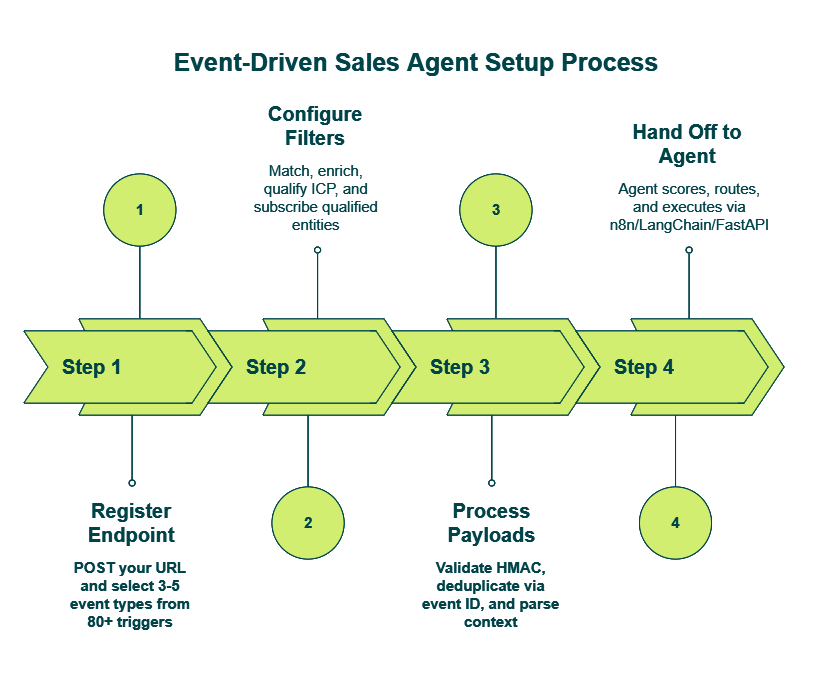
Step 1: Register Your Webhook Endpoint
Register your webhook URL with Explorium’s API by sending a POST request specifying your endpoint URL, the event types you want to monitor, and optional firmographic filters. Authentication uses your API key in the header.
Event type options span Explorium’s 80+ trigger types — funding_round, leadership_change, hiring_surge, tech_adoption, new_partnership, and more. Start with 3–5 high-converting types (refer to the Signal-to-Action Mapping in Q2) rather than subscribing to everything.
Use Explorium’s match endpoint to resolve company names or domains to business IDs for targeted monitoring. This ensures your subscription tracks specific entities, not keyword matches.
Step 2: Configure Filters and Enroll Entities
Layer firmographic ICP filters so your webhook only fires for companies that match your target profile. The enrollment flow:
- Match — resolve company domain to Explorium business ID
- Enrich — pull firmographics (industry, employee count, revenue, geography)
- Qualify — check against ICP criteria (e.g., SaaS, 200–5,000 employees, Series B+)
- Subscribe — enroll qualified entities for event monitoring
This means your agent never wastes cycles processing triggers for companies outside your ICP.
Step 3: Process Incoming Payloads
When a trigger fires, Explorium POSTs a JSON payload to your registered endpoint. Your receiver should:
- Respond 200 OK immediately — acknowledge receipt, then process asynchronously
- Validate the HMAC signature — confirm the payload is authentic
- Deduplicate via event ID — prevent processing the same trigger twice
Parse the payload — extract event_type, company_id, event_details, timestamp, and the pre-enriched context (firmographics, contacts, event metadata)
The key differentiator: Explorium’s payloads include pre-enriched context — firmographic data, contact information, and event details delivered together. With single-source providers, you’d need a separate enrichment call after receiving the raw trigger.”Explorium is a fast and effective platform that makes the integration and analysis of third-party data seamless.”
— David A., CEO, Mid-Market Explorium G2 – Verified Review
Step 4: Hand Off to Your Agent
The webhook receiver passes the enriched event to your AI agent via n8n webhook trigger, LangChain tool call, or direct LLM API. The agent receives full trigger context and selects an action based on the composite scoring logic from Q5: high-priority outbound sequence, Slack AE alert, CRM task creation, or further enrichment via MCP.
“Explorium gives us the data I need when I need it. This saves us a lot of time and money instead of managing each data source separately.”
— Ishi N., Enterprise Explorium G2 – Verified Review
Q5. How to Build the Agent Logic Layer: Composite Scoring and Signal Routing
Your webhook receiver is working perfectly — Explorium is pushing funding events, leadership changes, and hiring surges in real time. But your Slack channel now has 200 unscored alerts from the last 48 hours. AEs are ignoring them because they can’t tell which signals matter. You’ve built a firehose, not an intelligence system.
This is the most common failure point I see in event-driven agent builds. The webhook infrastructure works; the decision logic doesn’t exist.
⚠️ Why Raw Triggers Aren’t Enough
Most tutorials stop at “receive webhook, send alert.” The missing layer is the agent’s decision logic — a routing and scoring system that transforms raw triggers into prioritized, actionable intelligence. Without composite scoring, urgency tiering, and action mapping, the agent is just a notification relay with a fancier data source.
The hidden costs stack up fast:
- Alert fatigue — AEs ignore unscored notifications within 72 hours, and your agent’s credibility is gone
- Missed stacked signals — a company with simultaneous funding + CTO hire + competitor tech adoption gets buried alongside low-priority alerts
- Wasted compute — every trigger fires the same action regardless of signal strength
- No feedback loop — the agent never learns which signal combinations actually convert
“Per-row credit cost can vary 100% from stated amounts, e.g., stated 11 credits/row, actual 25. Contact data quality varies wildly — feels like a black box.”
— Verified User, IT Services Clay – G2 Verified Review
That’s what happens when raw data hits a workflow without a scoring layer — unpredictable costs, inconsistent quality, and zero prioritization.
📊 The Signal Routing Matrix
Here’s the framework that turns noise into prioritized pipeline. The core logic: Trigger Type × ICP Fit Score → Urgency Tier → Agent Action.
Each trigger type carries a weight based on historical conversion correlation:
| Trigger Type | Weight | Example |
| 💰 Funding Round | 3 | Series B closed last 48 hours |
| 👤 Leadership Change | 2 | New VP of Engineering hired |
| ⚙️ Tech Adoption (your category) | 4 | Adopted competitor tooling |
| 📈 Hiring Surge | 2 | 15+ GTM roles posted this month |
| 🔍 Intent Signal | 3 | Active on G2 comparing your category |
The agent sums weights for simultaneous signals on the same company. A Series B (3) + new CTO (2) + competitor tech adoption (4) = composite score of 9.
✅ Three Urgency Tiers, Three Action Paths
| Tier | Composite Score | Agent Action |
| ⭐ Tier 1 | 7+ | Auto-outreach with full enrichment, personalized messaging, and AE assignment |
| Tier 2 | 4–6 | CRM task creation + Slack AE alert + monitoring list |
| Tier 3 | 1–3 | Nurture sequence enrollment + lead score update |
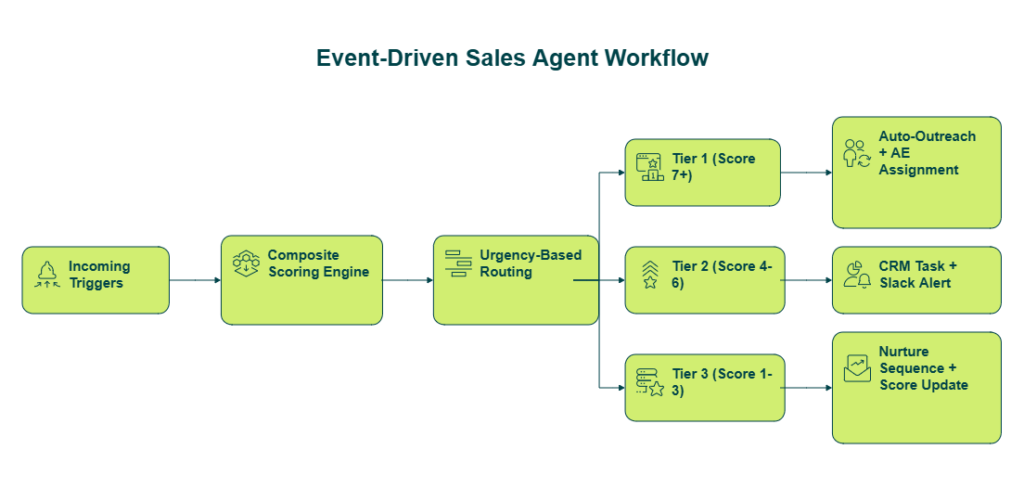
The key insight: Tier 1 triggers justify real-time, deep enrichment — pull contacts, tech stack, competitive landscape, and recent 10-K filings via MCP (covered in Q9) before the agent drafts outreach. Tier 3 triggers get a lightweight touch. The cost difference between enriching every trigger equally versus enriching by tier is substantial.
“Explorium is a great tool for getting data from multiple subscriptions, databases but at a consolidated cost.”
— Omar G., Mid-Market Explorium G2 – Verified Review
From 200 unscored alerts to 12 Tier-1 opportunities with enriched context and personalized drafts — that’s the difference between an event relay and an event-driven sales agent. We built Explorium’s unified credit system so that all on-demand enrichment calls draw from one pool, not separate vendor billing per signal type.
Q6. How to Combine Firmographic Filters with Intent Data for Precision Targeting
Combining firmographic filters with intent data transforms your event-driven agent from a signal broadcaster into a precision targeting system. The agent only acts when a company matches your ICP and shows active buying behavior — not just one or the other.
🔧 How the Two-Layer Architecture Works
The filtering logic runs in two sequential layers, each serving a distinct purpose:
Layer 1: Firmographic ICP Gate — Before any trigger subscription, use Explorium’s match and enrich endpoints to pre-qualify companies against ICP criteria. This runs once per entity during enrollment:
- Industry: SaaS, FinTech, Sales Tech, AI tools
- Employee count: 200–5,000
- Funding stage: Series B+
- Geography: US-primary
- Revenue range: $10M–$500M
Layer 2: Intent + Trigger Overlay — Subscribe only ICP-qualified entities to event monitoring. When a trigger fires, the agent already knows the company passes firmographic qualification. No wasted cycles re-checking basic fit.
The enrollment flow in pseudocode:
text
match(domain) → business_id
enrich(business_id) → firmographics
check_icp(firmographics) → qualified?
  → YES: subscribe(business_id, event_types)
  → NO: skip, re-evaluate next refresh cycle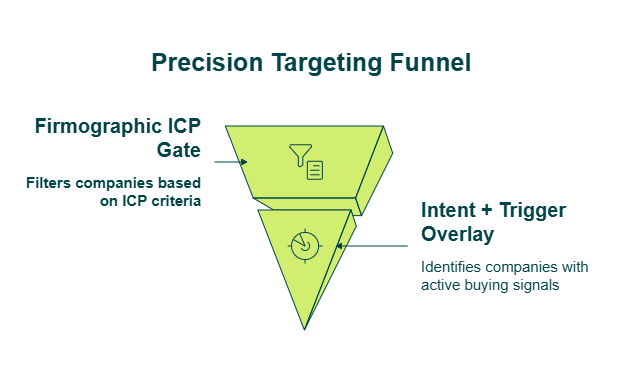
✅ What This Enables
- Zero wasted outreach on companies outside ICP, regardless of how strong the trigger signal is
- Dynamic ICP refinement — as firmographic data refreshes on Explorium’s daily/weekly cadences, companies growing into your ICP auto-qualify for trigger monitoring
- Composite qualification — firmographic fit + trigger urgency + intent score assessed simultaneously at the agent decision layer (Q5)
- Reduced credit consumption — filtering before deep enrichment avoids burning credits on non-ICP companies
“Company data doesn’t refresh often enough. Only 20% of known contacts could be found, including people at companies for 1+ year.”
— Verified User, Internet, Mid-Market Clearbit – G2 Verified Review
That review illustrates what happens when firmographic filters rely on stale data — your ICP gate passes companies that no longer qualify, or blocks companies that recently grew into your target range.
❌ The Fragmented Alternative
Most providers separate these layers across entirely different vendor stacks. Clearbit or Apollo handle firmographics. Bombora provides intent. Funding triggers require a separate integration — maybe Crunchbase or custom scrapers. Each vendor has its own API, billing model, data format, and refresh cadence.
The result: your engineering team spends 10–15 hours per week normalizing data across three APIs before the agent can make a single qualification decision. That’s not an enrichment workflow; it’s a maintenance tax.
“Their product enables us to test multiple data sources and to save money by removing sources that have a poor benefit.”
— Verified User, Financial Services Explorium G2 – Verified Review
We deliver all three signal types — firmographics, intent, and triggers — through one API and one credit system. The agent’s qualification logic runs on unified data, not stitched-together fragments from multiple billing tiers.
Q7. What Does the Complete Event-Driven Agent
Architecture Look Like?
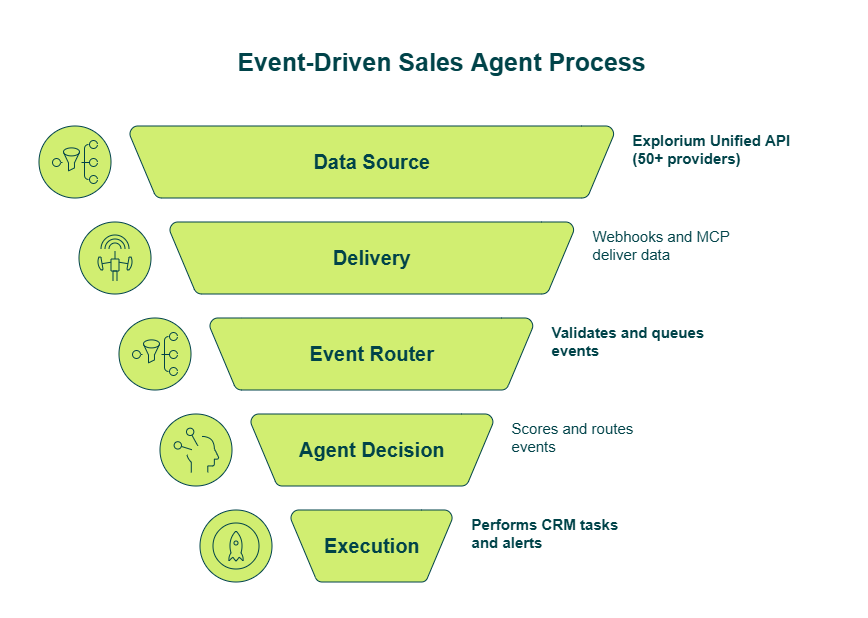
Everything covered so far — webhook setup, composite scoring, firmographic filtering — connects into a five-layer architecture. This section is the reference blueprint. Think of it as the map that shows how each component talks to the others, end to end.
🏗️ The Five-Layer System
| Layer | Component | Covered In |
| 1. Data Source | Explorium’s unified API (50+ providers, 80+ event types) | Q1 |
| 2. Delivery | Webhooks (push) + MCP (autonomous pull) | Q3, Q9 |
| 3. Event Router | FastAPI/n8n webhook receiver — validates, deduplicates, queues | Q4 |
| 4. Agent Decision | Composite scoring + signal routing + ICP filtering | Q5, Q6 |
| 5. Execution | CRM tasks, outreach sequences, Slack alerts | Q8 |
Each layer has one job. When layers bleed into each other — scoring logic inside the webhook receiver, CRM writes inside the router — the system becomes brittle and hard to debug at 2 AM.
⚠️ Three Architecture Mistakes That Break the Pipeline
Before walking through the ideal flow, here are the patterns that quietly degrade event-driven agents:
- No enrichment at trigger time — the webhook fires with minimal payload data, requiring a separate sync call that adds 2–5 seconds of latency. By then, your agent is already making decisions on incomplete context (solved in Q4 with Explorium’s pre-enriched payloads)
- Missing ICP gate — the agent processes every trigger regardless of company fit, burning credits and creating alert fatigue (solved in Q6)
- No execution routing — every trigger fires the same action regardless of urgency tier, so Tier-1 signals get the same treatment as Tier-3 noise (solved in Q5)
🔄 The Complete Data Flow
Here’s how the five layers work in sequence:
- Explorium event fires → pre-enriched webhook payload delivered to your endpoint
- Event Router validates HMAC signature, deduplicates via event ID, responds 200 OK
- Agent Decision Layer receives enriched trigger → firmographic gate confirms ICP fit → composite scorer assigns urgency tier → signal routing matrix selects action
- Execution Layer pushes the appropriate action — Tier-1 triggers get CRM task + outreach sequence + AE assignment; Tier-3 triggers get nurture enrollment
“We asked the world of Explorium, and they delivered. Not only is the canned solution very helpful, but the team took pains to also customize to our needs.”
— Explorium – Gartner Verified Review
✅ Why One Data Layer Changes the Architecture
Explorium spans layers 1 and 2 entirely — it IS the data source (50+ providers unified) and it IS the delivery mechanism (webhooks + MCP). It also enriches the agent’s decision context in real time at layer 4, through MCP.
Contrast this with the fragmented alternative: subscribing to Bombora for intent, building scrapers for funding events, calling Apollo for contacts, and maintaining custom middleware — a setup that typically requires 10–15 engineering hours per week just to keep running.
“Explorium gives us the data I need when I need it. This saves us a lot of time and money instead of managing each data source separately.”
— Ishi N., Enterprise Explorium G2 – Verified Review
GTM engineering teams using this architecture with Explorium report going from zero to production-ready event-driven agents within days — a process that previously required months of multi-vendor integration.
Q8. How to Connect Your Event-Driven Agent to CRM and Outreach for Automated Execution
Your event-driven agent is scoring and routing perfectly. Tier-1 triggers get flagged with enriched context, personalized outreach drafts, and urgency scores. But when your AEs open Salesforce Monday morning, their task queue is empty. The agent’s intelligence is trapped in a Slack channel no one reads. The scoring works — the execution layer doesn’t.
This is the “last mile” problem, and it’s where most event-driven builds silently fail.
❌ Why CRM Integration Isn’t “Just Push to Salesforce”
Most tutorials treat execution as an afterthought. In reality, connecting the agent to CRM and outreach tools requires solving four distinct problems simultaneously:
- Object mapping — translating trigger-action outputs into CRM records (tasks, activities, opportunity stage updates, not just contact creates)
- Sequence enrollment — placing contacts in the right outreach sequence based on trigger type and urgency tier, without conflicting with existing enrollments
- Ownership assignment — routing tasks to the correct AE based on territory rules, account ownership, and round-robin logic
- Deduplication — avoiding duplicate records and conflicting automations in the CRM’s existing workflow engine
The hidden costs of getting this wrong are brutal:
- 💸 Lost pipeline — Tier-1 triggers with no CRM action mean your highest-value signals are wasted
- ⚠️ AE distrust — if the agent creates CRM records without proper enrichment, AEs stop trusting the system within weeks
- ❌ Sequence conflicts — enrolling contacts in outreach without checking existing sequences creates embarrassing double-sends
- No attribution — without CRM logging, you can’t measure which trigger types actually generate pipeline
“HubSpot integration broken — phone numbers don’t push over, despite team insisting this issue has been resolved.”
— Lorri F., Business Development SalesIntel – G2 Verified Review
✅ Execution Patterns by Urgency Tier
The agent should route differently based on the composite score from Q5:
| Tier | CRM Action | Outreach Action | Alert |
| ⭐ Tier 1 (7+) | Create high-priority Salesforce task + log trigger as activity | Enroll in personalized Outreach/Lemlist sequence | Slack DM to assigned AE |
| Tier 2 (4–6) | Create normal-priority task + update lead score | Add to monitoring/warm list | Slack channel alert |
| Tier 3 (1–3) | Update CRM lead score only | Enroll in nurture sequence | None |
The CRM record for Tier-1 triggers should include: priority score, enriched company profile, decision-maker contacts, recommended talk tracks, and the specific trigger events that fired. AEs should open a task and have everything they need to act — not a bare signal that requires 20 minutes of manual research.
🔗 Explorium’s Native Execution Path
We built native integrations with Salesforce, HubSpot, and Outreach specifically for this pipeline. The Explorium + Outreach partnership means the enriched data powering your agent’s decisions flows directly into Outreach’s AI Prospecting Agent — sharper targeting, personalized messaging, and automated sequence enrollment, all from the same data layer.
“Explorium is a great gold mine of data, together with a quick and easy auto ML pipeline — we are able to turn plans into results really fast.”
— Noa L., Mid-Market Explorium G2 – Verified Review
From 12 Tier-1 signals trapped in Slack to 12 assigned CRM tasks with enriched profiles, recommended talk tracks, and auto-enrolled outreach sequences — that’s the difference between an intelligent agent and an expensive alerting system. Signal intelligence without CRM action is wasted compute.
Q9. How Does MCP Integration Supercharge Your Event-Driven Agent’s Intelligence?
MCP (Model Context Protocol) integration transforms your event-driven agent from a trigger-reaction system into an autonomous intelligence system. Instead of pre-mapping every API endpoint for every enrichment type, MCP lets the agent dynamically decide what additional data it needs the moment a trigger fires — and retrieve it without engineering intervention.
This is the architectural difference between a rule-following bot and an agent that actually thinks about what it needs.
🔧 How MCP Differs from Standard API Calls
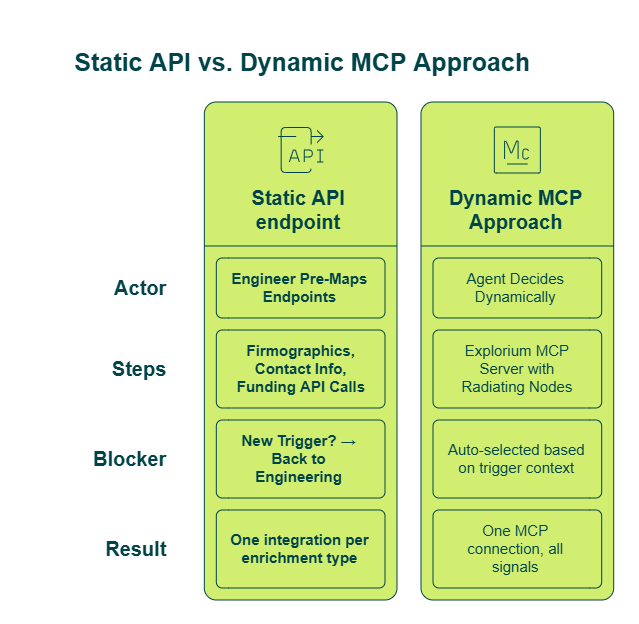
With a traditional API approach, you explicitly define which Explorium endpoints to call in your workflow — firmographics here, technographics there, contact info over there. Every new trigger type means engineering work to map new data endpoints.
MCP flips this entirely. The agent autonomously decides which additional Explorium endpoints to call beyond what’s explicitly configured, based on what’s relevant to the specific trigger context. Here’s the practical difference our team demonstrated in a Rev Genius webinar:
| Dimension | ❌ API Approach | ✅ MCP Approach |
| Endpoint selection | You pre-configure every call | Agent decides dynamically |
| New trigger types | Requires engineering to map endpoints | Agent adapts autonomously |
| Data breadth per trigger | Limited to what you anticipated | Pulls whatever context is relevant |
| Integration overhead | One integration per enrichment type | One MCP connection, all signals |
In our meeting prep agent demo, technographics wasn’t explicitly configured as an enrichment endpoint — but MCP pulled it automatically because the AI agent determined it was relevant to the meeting context. No one told it to look at tech stack data. It figured out the meeting attendee’s company was evaluating competing tools, and the tech stack became important context.
⚡ What This Enables for Event-Driven Agents
- Context-adaptive enrichment — a funding trigger pulls financial signals and investor data; a leadership change trigger pulls org chart data, LinkedIn activity, and career history. Different triggers, different data, zero reconfiguration
- Eliminated engineering overhead — no pre-mapping endpoints per trigger type across 80+ event categories
- Richer personalization — the agent accesses 10-K filings, LinkedIn posts, hiring signals, and competitive landscape through one MCP query
- Framework-agnostic — standard MCP protocol works across Claude Code, n8n, LangChain, LangGraph, and CrewAI
- Credit-efficient — only signals relevant to each specific trigger are retrieved, not a blanket enrichment pull
“Credit system is broken. Pricing is broken. Not fully transparent with rollover limit.”
— Raphael A., Marketing Lead Clay – G2 Verified Review
That’s the experience when enrichment platforms charge per-row without transparent credit usage. With MCP, the agent pulls only what each trigger demands — no blanket enrichment, no surprise credit burns.
✅ Why MCP Is Explorium’s Competitive Moat
Think of MCP as giving your agent a dedicated data engineering team that knows every enrichment source and field mapping — querying on your behalf 24/7. We built Explorium’s MCP Server to seamlessly connect LLM-driven agents to our full API suite, enabling autonomous data selection and retrieval with minimal manual configuration.
“Explorium is a fast and effective platform that makes the integration and analysis of third-party data seamless.”
— David A., CEO, Mid-Market Explorium G2 – Verified Review
“The library of external signals is extensive. The platform can very quickly tell me the ROI of using external data in my project.”
— Explorium – Gartner Verified Review
This is why Clay, Cognism, Outreach, and Common Room rely on Explorium’s infrastructure — deploy once, and the agent adapts autonomously as your trigger types and data needs evolve.
Q10. Production Readiness: Webhook Security, Error Handling, and Common Pitfalls to Avoid
Before deploying your event-driven agent to live traffic, score it against these 10 production-readiness criteria. Every unchecked item is a silent failure mode that will surface — usually at the worst possible moment.
✅ The Production Readiness Checklist
Infrastructure Security (Items 1–6):
☐ HMAC signature validation on all incoming webhook payloads — confirm the request actually came from your data provider, not an attacker
☐ Idempotency handling via event ID deduplication — the same trigger delivered twice (network retry) should not fire two outreach sequences
☐ 200 OK acknowledgment within 5 seconds — respond immediately, process asynchronously. Slow acknowledgment causes retry storms
☐ Exponential backoff retry logic for failed downstream actions (CRM writes, outreach enrollment, Slack posts)
☐ Dead letter queue for events failing after max retries — these need manual review, not silent drops
☐ Monitoring and alerting for delivery failures, processing latency, and queue depth
Architectural Patterns (Items 7–10):
☐ Firmographic ICP gate active before trigger subscription — not processing every company that fires an event (Q6)
☐ Composite scoring implemented — not single-action routing for all triggers regardless of urgency (Q5)
☐ Feedback loop tracking trigger → action → pipeline outcome metrics — without this, you can’t optimize which signal combinations convert
☐ Subscription scoped to 3–5 highest-converting trigger types initially — not all 80+ event types simultaneously
📊 Score Interpretation
| Score | Status | What Happens in Production |
| ⭐ 8–10 ✓ | Production-ready | Focus on optimization, scaling, and feedback loop refinement |
| ⚠️ 5–7 ✓ | Critical gaps | Agent will silently drop events, process duplicates, or create alert fatigue under real load |
| ❌ 0–4 ✓ | Not production-safe | Deploy only in staging. One missed HMAC check means anyone can POST to your endpoint |
🔧 What Explorium Handles vs. What You Own
The split is clean. Explorium’s webhook infrastructure includes built-in HMAC signatures on every payload, configurable retry policies, and structured payloads with unique event IDs for idempotency. These are provider-side responsibilities, and they’re handled out of the box.
Your responsibility is the receiver side:
- Signature validation code in your FastAPI/Express/n8n endpoint
- Deduplication logic using event IDs from the payload
- Async processing architecture (queue incoming, process separately)
- Architectural patterns — scoring, routing, ICP gating, and feedback loops
“UX is seamless, no latency issues and great performance considering the breadth of data calculations we’re working with.”
— Explorium – Gartner Verified Review
“Depending on where the data is coming from, the data can often be mismatched or have outdated information. It is best to cross-reference the output data.”
— Omar G., Mid-Market Explorium G2 – Verified Review
That honest feedback highlights exactly why the feedback loop (item 9) matters — even with high-quality data, you need to track which enrichment signals drive actual pipeline outcomes and iterate accordingly.
⏰ Scored Below 7?
Production agents process thousands of trigger events daily — one missed or duplicated event means botched outreach or a lost deal. Explorium’s infrastructure is battle-tested by Outreach, Cognism, Clay, and Monday.com, processing events at enterprise scale with documented delivery guarantees. Create a free Explorium account and test your webhook implementation against production-grade infrastructure — validation takes minutes, not meetings.
FAQs


