


Persistent memory for GTM agents is a storage problem, not a prompting problem. If every campaign starts with an empty chat, campaign twelve runs on the same context as campaign one, and the ICP you described last Tuesday is gone.
GTM engineers who moved prospecting into Claude Code hit this wall inside a week: 32 servers connected, and the agent still does not know their positioning or disqualifiers. The fix is a two-layer split: durable rules stored in files, live records fetched per run, as in a B2B data layer for Claude Code agents.
Below: the store vs fetch matrix, four memory mechanisms with token costs, and the feedback loop that makes run twelve compound.
What Is Persistent Memory for a GTM Agent and Why Does an Empty Chat Break Compounding?
Persistent memory for a GTM agent is the set of durable facts it reloads at the start of every session, so it never relearns your ICP, positioning, or disqualifiers. ICP means ideal customer profile: the firmographic definition of an account worth contacting. Without a stored layer it lives in one person’s head and gets retyped, differently, every run.
❌ Why Re-Pasting Context Every Run Fails
- Each retype drifts: headcount band, excluded industries and trigger definition move per session.
- Pasted exports age on contact. A six-week-old row carries a stale title and a bounced email.
- Context pasted mid-session dies at compaction, and nothing accumulates: reply rates and objections never reach the next run.
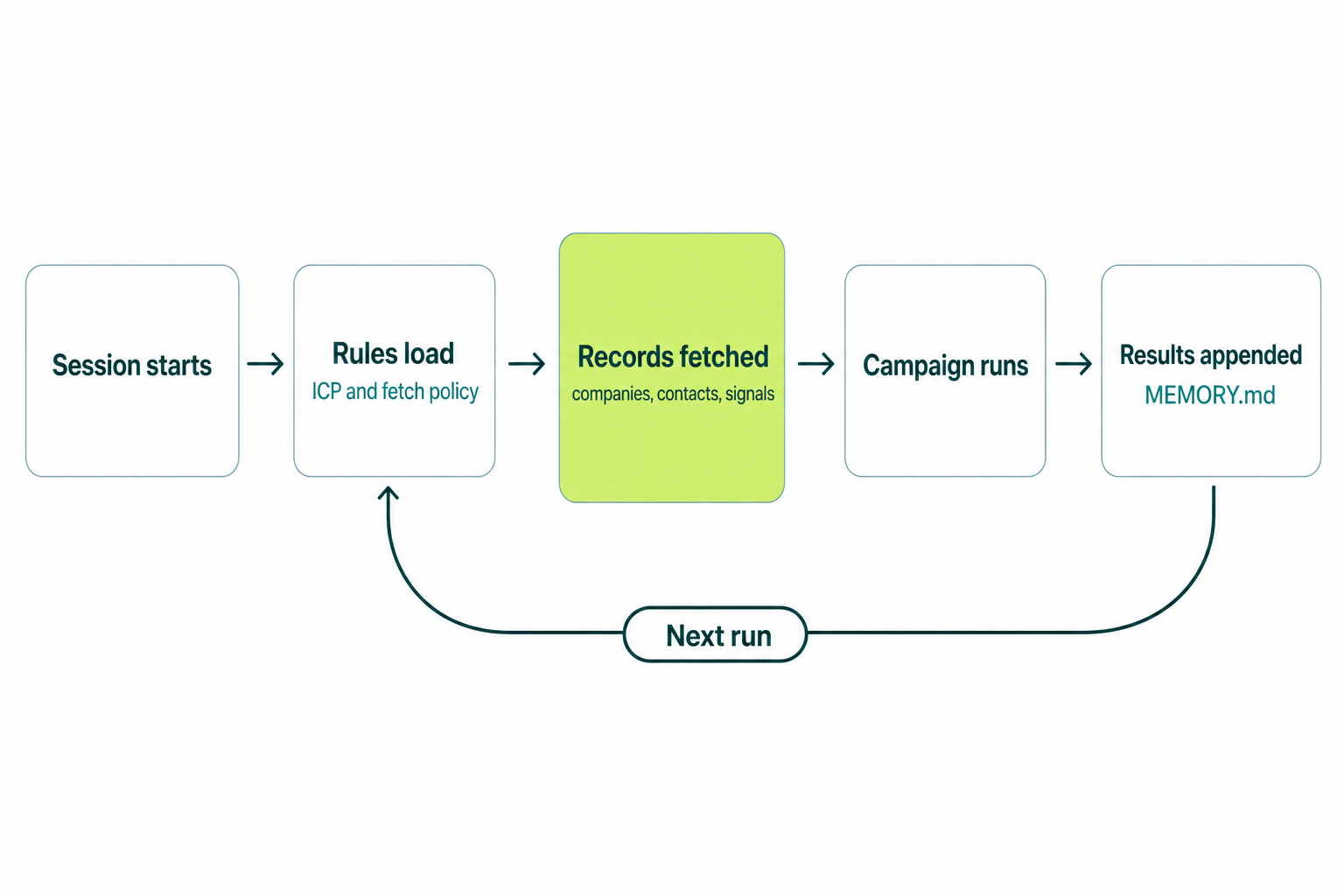
✅ What a Two-Layer Memory System Changes
- Operating rules load at session start, with no paste step and no drift.
- Records arrive fresh per run at 97.8%+ company match accuracy instead of from a spreadsheet.
- Results append to a log the next run reads first, so performance compounds inside a GTM data platform.
“R.I.P re-explaining yourself to Claude every session. You don’t need to rebuild the same prompt anymore.” @jack_9947 on X, August 10, 2026
What Should Be Stored in Memory vs Fetched Fresh at Run Time?
Store durable facts in files the agent loads every session (ICP definition, positioning, operating rules, objection library, campaign results) and fetch volatile records (companies, contacts, buying signals) live at run time through one MCP connection instead of pasting stale exports. Decay window decides the split, not importance.
📊 The Store vs Fetch Decision Matrix
| GTM context | Store or fetch | Decay window | Where it lives |
|---|---|---|---|
| ICP, disqualifiers, approval rules | Store | Quarters | ./CLAUDE.md |
| Positioning, proof, objections | Store | Quarters | .claude/rules/ |
| Campaign results by segment | Store, append only | Permanent | MEMORY.md |
| Firmographics, headcount, tech stack | Fetch | Weeks | MCP call |
| Contact title, email, phone | Fetch | Days | MCP call |
| Buying signals | Fetch | Hours to days | MCP call |
| This campaign’s account list | Fetch, then discard | One run | CSV, not context |
💡 The Rule That Settles Most Arguments
Stored ICP definitions are durable. Stored company and contact records are decay liabilities: a definition changes when you change strategy, a record changes silently.
- Wrong in 30 days and nobody notices? Fetch it.
- Would you defend it in a pipeline review? Store it.
- A judgment about which records matter? Store the judgment, fetch the records: that is run-time data enrichment.
How Do CLAUDE.md, Rules Files, and Agent Skills Carry Memory Across Sessions?
Claude Code loads two things at the start of every conversation, the CLAUDE.md files you write and auto memory Claude writes, while .claude/rules/ files and Agent Skills load conditionally. Costs are documented in Anthropic’s memory docs and the Agent Skills overview.
📊 Memory Mechanism Comparison
| Mechanism | What it holds | When it loads | Token cost |
|---|---|---|---|
./CLAUDE.md | Rules, ICP, fetch policy | Every session, survives compaction | Under 200 lines |
.claude/rules/*.md | Messaging, compliance, scoring | Only on matching paths | Zero until triggered |
| Agent Skills | Repeatable procedures | Metadata always, body on trigger | ~100 tokens, body under 5k |
Auto memory (MEMORY.md) | Learnings Claude writes | First 200 lines or 25KB | Capped, topics on demand |
| API memory tool | Files under /memories | When the model views them | 39% gain with context editing |
🔑 The Load Order and the Compaction Rule
- Load order: managed policy, user, project
./CLAUDE.md, then./CLAUDE.local.md. Imports use@path/to/file, four hops maximum. - Project-root CLAUDE.md survives compaction. Nested files and path-scoped rules do not re-inject.
- Path-scoped rules use YAML
paths:frontmatter and cost nothing until matched (context window budget checklist).
---
paths: ["campaigns/**/*.md"]
---
# Messaging rules
- Cap sequences at 4 touches over 12 days.
- Every first line cites a fetched signal.
How Do You Write an ICP File the Agent Loads Every Session?
Put the ICP definition, disqualifiers and fetch policy in the project-root CLAUDE.md under 200 lines, then push messaging, compliance and scoring detail into path-scoped .claude/rules/ files. Write rules as decisions, not prose about your market.
🔄 The CLAUDE.md GTM Block
# GTM Operating Rules

## ICP (v4, 2026-08)
- B2B SaaS, 200-2,000 employees, US and UK.
- Buyer: RevOps lead or GTM engineer.
- Disqualify: agencies, sub-50 headcount, no CRM.

## Fetch policy
- Never trust a record older than this run.
- Pull companies, contacts and signals through Vibe Prospecting.
- Sample preview before any export above 100 rows.
⚠️ When ICP Rules Belong in a Skill Instead
- Ordered steps with a repeatable output (build a list, score it, draft the sequence) make a skill.
- Skill frontmatter needs
name(max 64 characters) anddescription(max 1024 characters: what it does plus when to fire). - Claude Code skills have network access, API skills do not, so the fetch belongs in an MCP server the skill calls (GTM skills roundup).
---
name: icp-list-build
description: Build and score an ICP account list from stored rules, fetching companies and signals at run time.
---
How Does Vibe Prospecting Supply the Fetch Layer for GTM Agent Memory?
Vibe Prospecting is the fetch layer a GTM memory system reads at run time, winning three pillars at once: one MCP connection for every data need, server-side scale to 1,000 entities per call at 100 QPS, and a unified credit pool on a free account. MCP, the Model Context Protocol, holds no state between calls, so it is the fetch half while files are the store half.
🔑 Pillar 1, One MCP for All Your Data Needs
- One connection covers company search and matching, company and contact enrichment, contact discovery and signals.
- Behind it: 150M+ company profiles, 800M+ professional profiles, 50+ data sources.
- 18 buying-signal categories and 80+ signal types, the facts a stored file cannot hold for a day.
- One match key resolves everything, so stored scoring rules keep working (compare providers side by side).
🚀 Pillar 2, Built for Scale
- Up to 1,000 entities per call, executed server-side over AgentSource at 100 QPS sustained.
- Results return as files or tool responses, so a 1,000-row build never evicts your memory files.
- In-context servers cap useful runs at 20-100 prospects before tokens overflow.
- 97.8%+ company match accuracy and 99.999% uptime beat any stored export.
💰 Pillar 3, Affordable by Design
- Free Explorium account, no sales call, first call in minutes.
- Credits flow into one unified pool across every endpoint, cutting agent-workload spend 30-60% against per-endpoint plans.
- Sample preview returns a representative set plus a cost estimate, so a bad ICP filter fails cheap (builder playbook).
⚡ Install It in One Command
Claude Chat and ChatGPT users add it in one click from the Connectors Directory. In Claude Code, install the Vibe Prospecting Plugin:
/plugin install vibe-prospecting@claude-plugins-officialOr in any other terminal agent:
npx skills add explorium-ai/vibeprospecting-plugin --all
/vpai:vibe-prospecting
Building the fetch layer this week? One connection covers companies, contacts and 18 signal categories. Connect Vibe Prospecting →
Does Connecting More MCP Servers Make Your Agent Know Your Business?
No. More servers add fetch capability, not knowledge: MCP is stateless, so every request carries its own protocol version and capabilities and nothing about your ICP persists between calls. A stack with 32 servers and no stored rules file still starts every campaign from zero.
❌ Connection Count Is Not Memory
- Every server adds always-on tool definitions before any work starts.
- Overlapping servers return conflicting values for one field, with no stored rule naming the system of record.
- Three data vendors mean three credit models the agent reasons about mid-run.
✅ What to Consolidate Instead
- Collapse data servers to one connection, then write field ownership into CLAUDE.md (consolidation checklist).
- Keep servers whose scope does not overlap: CRM writes, calendar, email sending.
- Shortlist against the ranked MCP servers for GTM agents comparison.
“2027 prediction: You will RARELY open the UIs of the GTM tools you pay for.” @dan__rosenthal on X, August 12, 2026
How Do You Feed Campaign Results Back So Run 12 Beats Run 1?
Write an append-only performance log at the end of every run and make reading it the first instruction in your operating file, the multisession pattern Anthropic documents for the memory tool. Campaign results are the one GTM output that belongs in stored memory: they describe your market.
🔄 The Progress-Log Pattern
- An initializer run writes a progress log and checklist under the
/memoriesprefix. - Later runs view that directory first: the API injects “ALWAYS VIEW YOUR MEMORY DIRECTORY BEFORE DOING ANYTHING ELSE”.
- Reject path traversal in your handler:
/memories/../../secrets.envhas to fail closed.
{"tools": [{"type": "memory_20250818", "name": "memory"}]}📊 What to Write Back After Every Campaign
- Segment, signal type and message variant, plus reply and meeting rates per combination.
- Objections verbatim, appended rather than summarized, so the language stays usable.
- New disqualifiers, promoted into the ICP file so the next fetch excludes them (verify the trigger side).
How Do You Stop the Memory Layer From Eating the Context Window?
Cap every store: under 200 lines per CLAUDE.md, 200 lines or 25KB of MEMORY.md per session, roughly 100 tokens of always-on metadata per Agent Skill, and a skill body under 5k tokens loaded only on trigger. Anthropic is blunt: longer files consume more context and reduce adherence.
⚡ Token Budgets Worth Memorizing
- Context editing clears stale tool results at 100,000 input tokens, keeping the last 3 tool uses.
- The memory tool with context editing scored a 39% improvement over baseline, context editing alone 29%.
- On a 100-turn web search evaluation, the same pattern cut token use 84%.
🛡️ Guardrails That Keep It From Becoming a Chore
- Add a line only when you type the same correction you typed last session.
- Path-scope anything not needed on every run, and give subagents their own memory directory.
- Keep record-level data out of the store and fetch it, which holds the file count flat.
Getting Started: GTM Agent Persistent Memory in 5 Steps
Build the store layer in files, then attach Vibe Prospecting as the single fetch layer: rules without live data produce confident guesses, live data without rules produces volume.
- Step 1: Write
./CLAUDE.mdunder 200 lines: ICP, disqualifiers, approval rules, fetch policy. - Step 2: Move messaging, compliance and scoring into path-scoped
.claude/rules/files. - Step 3: Create a free Explorium account, then add Vibe Prospecting from the Connectors Directory.
- Step 4: Validate on a sample preview, then graduate the query to a 1,000-entity bulk call.
- Step 5: Append results to the log and make reading it step one of the next run.
🔑 The Decision Framework
Judge the fetch layer on three pillars. One MCP for all data needs: company, contact, firmographic and signal questions resolve on one connection, so stored rules name one system of record. Built for scale: 1,000 entities per call at 100 QPS server-side. Affordable by design: a free account and one unified credit pool cutting agent-workload spend 30-60%. Vibe Prospecting wins all three.
Stop pasting stale exports into chat. Store the rules, fetch the records. Get started with Vibe Prospecting →
Related Posts
- MCP Server Context Window Budget Checklist for RevOps
- Claude Code GTM Stack Consolidation: 2026 Checklist
- B2B Data Layer for AI Agents: Builder Playbook 2026
FAQs


