


TL;DR
- Waterfall enrichment queries multiple providers in sequence until a contact verifies, pushing coverage from 40 to 70 percent up to 80 to 95 percent.
- Sequence providers by strength and audit overlap, because stacking more sources often funds duplicates instead of net-new coverage.
- Verification (syntax, MX, SMTP, catch-all) protects sender reputation; phone costs about 10x email and covers less.
- Build your own only at high, predictable volume; the hidden maintenance tax pushes the DIY break-even far higher than expected.
- Compliance lives in sourcing and handling, not the cascade; on-demand enrichment with lawful basis beats hoarding stale records.
- The labor shift runs UI to API to agent, where the agent runs access, filter, and enrich while humans own targeting and messaging.
Q1. What is waterfall enrichment, and why does single-source data keep failing you? [toc=1. What Is Waterfall Enrichment]
Waterfall enrichment queries multiple B2B data providers in a set sequence, one after another, until it finds a verified email or phone number. Instead of trusting one database that covers maybe 40 to 70% of your list, you cascade across many to push verified coverage toward 80 to 95%. It fixes the core problem of single-source data: no provider knows everyone, so half your export is dead on arrival.
🧊 The half-empty list problem
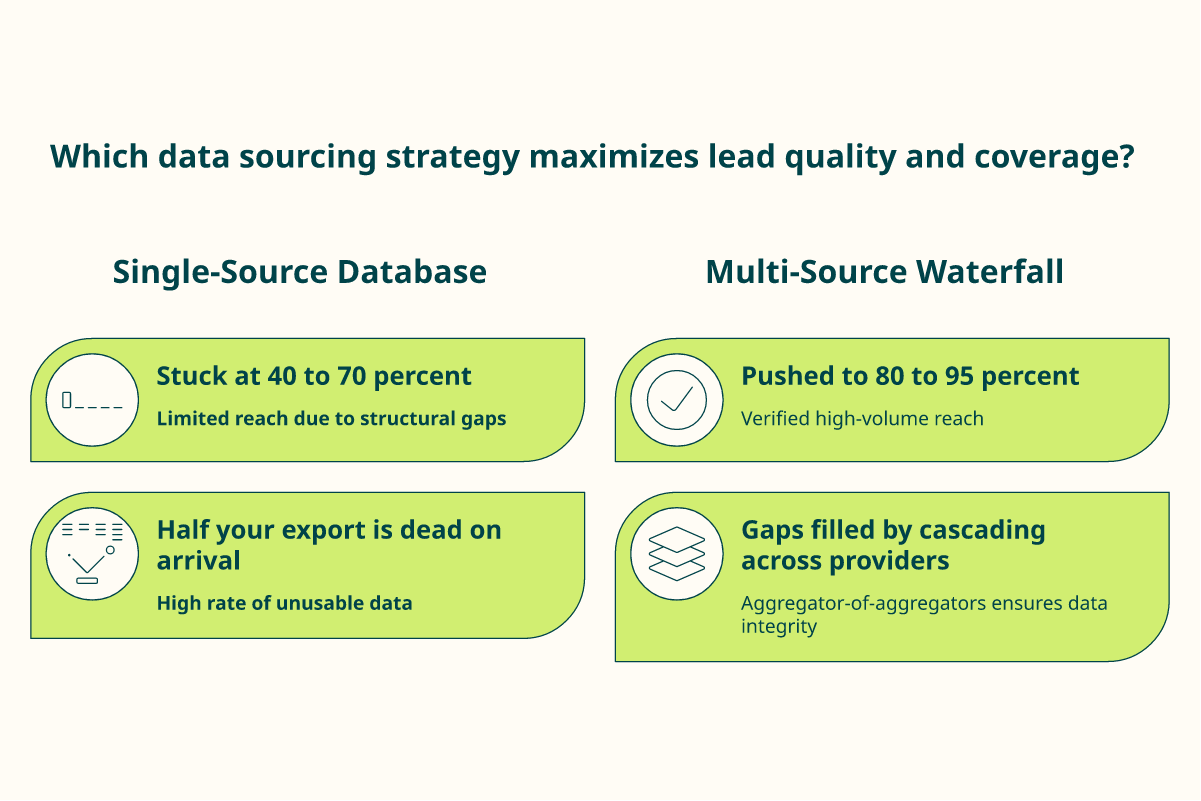
I have watched an SDR pull 1,000 contacts from one tool, then spend the morning learning that only 480 had a usable email. The rest were blank, wrong, or already stale.
That is not bad luck. It is the math of buying from one source. Every provider has gaps, and your list inherits all of them at once. This is exactly the gap that strong B2B contact data is built to close.
⏰ Your list is rotting while you read this
B2B data decays at roughly 22.5% per year. A list you export today loses nearly a quarter of its accuracy within 12 months as people switch jobs and companies fold.
So the problem is not just coverage on day one. It is that a static CSV keeps getting worse, quietly, while you keep emailing it. A living data enrichment stream is the fix for that decay.
💧 How the cascade actually fills the gaps
Here is the plain-English version. The waterfall queries multiple data sources in a defined sequence, ZoomInfo, Apollo, Hunter, and others, cascading from one to the next until it finds verified contact information.
Think of it like a credit bureau. A bureau does not trust one bank to tell your full story. It pulls from many, then reconciles them into one record you can act on.
Walk a single contact through it:
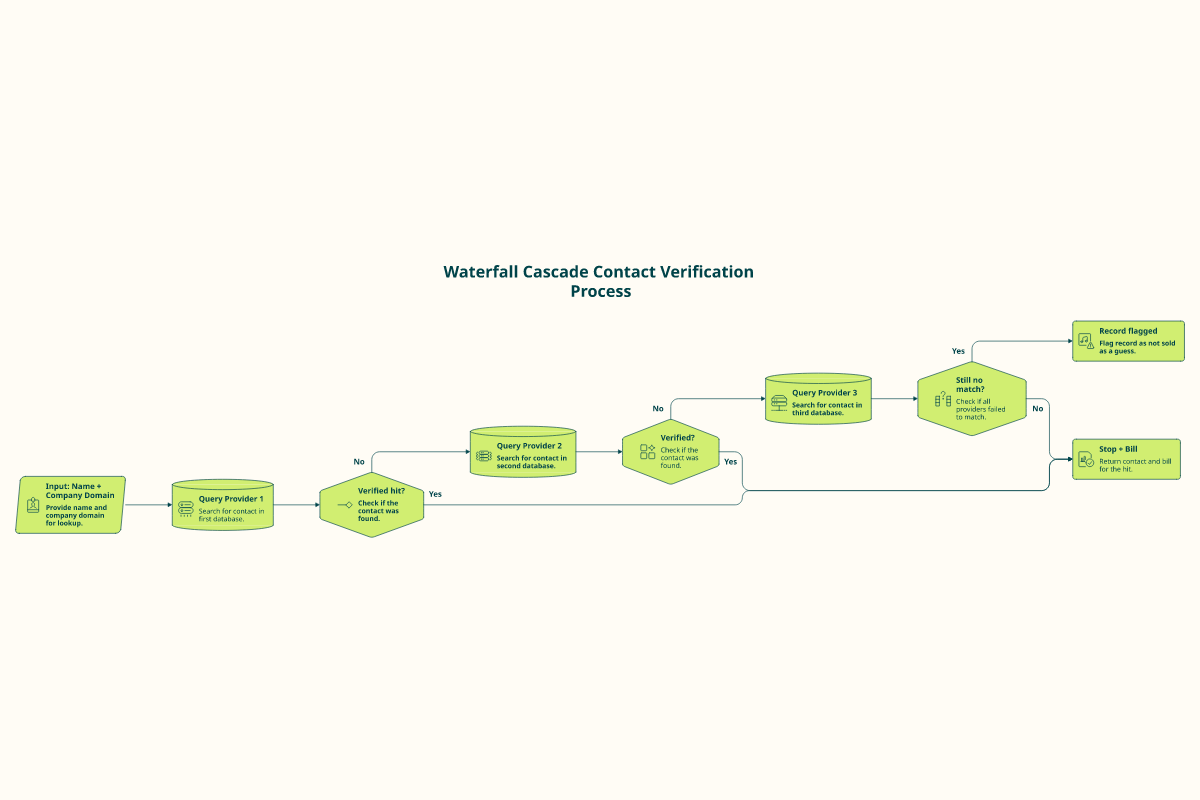
- ✅ Provider A returns a verified email. You stop and pay only for that hit.
- ⚠️ Provider A misses, so the chain tries Provider B, then C, until something verifies.
- ❌ Nobody verifies, so the record is flagged rather than sold to you as a guess.
🧱 Why I treat data access as a commodity
After building Explorium’s data layer as an aggregator of aggregators rather than a single source, my honest view is that raw access to contacts is now a commodity. Anyone can buy a database. What stays scarce is verified coverage, and that is a quality problem, not an access problem.
We built Explorium to source across 50+ providers, with 150M+ companies and 800M+ profiles, so the waterfall lives inside the data layer instead of being something you bolt on later. The cascade is the product, not a feature you wire up yourself.
I could be slightly off on the exact decay figure for your niche, since a US tech list ages differently than an EU manufacturing one. But the direction holds: single-source coverage gaps are structural, and a waterfall is the standard fix. The rest of this guide is how to run one without lighting money on fire.
Q2. How does the waterfall actually work, step by step? [toc=2. How The Waterfall Works]
A waterfall takes an input, usually a name plus a company or domain, queries Provider 1, and verifies the result. If it verifies, the chain stops and bills you. If not, it cascades to Provider 2, then Provider 3, until a record verifies or the chain ends. The real design choices are which providers, in what order, and what counts as verified before you stop.
🔁 The five steps, end to end
Run one contact through the machine and it looks like this:
- Input. You hand over an identity anchor (full name plus company domain). Cleaner input means higher hit rates downstream.
- Query Provider 1. The first source runs. A lookup typically costs a small amount, anywhere between one to three credits depending on the provider.
- Verify. The candidate email or phone is checked before it counts. A guessed pattern that fails verification does not get sold to you as truth.
- Cascade on miss. No verified hit means the chain moves to the next provider, then the next, in your set order.
- Stop and bill on hit. The first verified result ends the run. You pay for the result, not for every provider you touched.
💸 The stop-on-verified rule is where the money is
The point of stopping on the first verified hit is simple. You do not pay five providers for one contact when the first one already nailed it.
A hard-won tactical note from operators running these chains is to turn validation off, because you do not want to validate with these providers when you are going to use your own. You disable each provider’s built-in check, so you are not double-paying for verification you already run once at the end. This is the heart of clean filter and enrich work.
🔌 Why an agent runs this better than an API
This is where the difference between an API and an MCP matters. An API is a rigid input-to-output contract. You engineer the exact call, the exact fields, the exact order, and you maintain that wiring forever.
An MCP (Model Context Protocol, a standard way for AI agents to reach tools and data) accepts input by any path and returns output by any path. Think of it like a USB port for AI, one standard socket instead of a custom cable per device. You can see this in action on the MCP data layer.
When we first connected Vibe Prospecting inside Claude, the agent ran the cascade from a plain-language request, not a hand-built recipe. To be clear, the MCP does not reason or decide on its own. It gives the agent ready access to Explorium’s data layer, and credits apply to Claude today, not ChatGPT. The human says who to target. The agent does the access, filter, enrich, and list-build grunt work, the kind of scaled prospecting that used to eat a morning.
Q3. How do you sequence providers so you stop paying for overlap? [toc=3. Sequencing And Overlap]
Optimal sequencing means ordering providers so the highest-hit, lowest-cost source runs first, and every source after it adds genuinely new coverage instead of duplicating what you already paid for. Most teams stack five providers and quietly fund heavy overlap. The smarter move is mapping each provider’s real strength, then cutting the ones whose extra coverage no longer earns its credits.
🧮 Overlap is the silent line item
Here is the claim the category mostly avoids. Adding more providers does not reliably add more coverage. It often just adds more of the same coverage you already bought.
If Provider A covers 70% of your list and Provider B covers 65%, you do not get 135%. You get maybe 80%, because B mostly repeats A. You paid full price for that 15% lift, and you funded a lot of duplicates to find it. A consolidated enrichment approach is how you avoid paying twice for the same record.
📉 The diminishing-returns curve
Each provider you bolt on tends to contribute less net-new coverage than the one before it.
- Provider 1 might verify 65% of your list on its own.
- Provider 2 adds real lift, maybe pushing you to 80%.
- Provider 3 inches you toward 88%.
- Provider 4 and 5 fight over the last few points, at full credit cost per attempt.
The contested ground in the market sits right here. One camp argues you probably only need one vendor, the one that does the bulk of what you want. The other insists you are stitching together several different tools to run outbound end to end, because no single platform is best in class at everything. Sequencing is how you settle that fight with your own data instead of a hot take.
🗺️ Order by strength, not by habit
Providers are not interchangeable. They are strong in specific lanes, so sequence by the job:
- Geography: lead with the source that owns your region (one is strong in North America, another in EMEA).
- Seniority: some providers nail C-suite mobiles, others cover individual contributors.
- Field type: order differs for email versus direct dial, because phone coverage is thinner.
- Segment: enterprise and SMB hit rates rarely come from the same source.
One Clay reviewer put the cost trap bluntly:
“Often your own data provider saves more than enriching from Clay’s various providers.”
Qais B., Growth Strategist Clay G2 Verified Review
🛠️ Your Monday-morning overlap audit
You can find waste this week. Run a sample batch through each provider separately, then compare who actually contributed the verified hit.
<caption>Provider Overlap Audit Snapshot</caption>
| Provider | Standalone Coverage | Net-New After Prior Providers | Keep Or Cut |
|---|---|---|---|
| Provider 1 | 65% | 65% | Keep |
| Provider 2 | 60% | 15% | Keep |
| Provider 3 | 55% | 8% | Keep |
| Provider 4 | 50% | 2% | Cut |
If a provider almost never wins a record another source did not already cover, drop it from the chain. After building Explorium’s layer as an aggregator of aggregators, my read is that aggregator-level sourcing collapses this overlap better than a DIY stack, because you are not paying each vendor’s full retail rate to discover duplicates. I might be wrong for very narrow niches with one dominant specialist source, but for broad B2B lists, the audit almost always finds a provider you can cut. This is the same logic behind how Explorium upgrades your data pipeline.
Q4. How does email verification actually protect your sender reputation? [toc=4. Email Verification]
Verification is the quality gate that decides whether a cascaded result is allowed to count. It runs syntax checks, MX and domain validation (confirming the domain can actually receive mail), and SMTP pings (asking the mail server if the address exists), and it flags catch-all domains where confidence drops. Skipping it means high bounce rates, and high bounce rates wreck sender reputation, which is exactly why waterfall teams report lower bounces than single-database teams.
⚠️ One bad batch can sink the domain
I have seen a founder send to an unverified list on a Monday and spend the next two weeks in spam. Mailbox providers watch your bounce rate. Cross their threshold and they stop trusting your domain.
That is the real stakes of skipping verification. It is not a data hygiene nicety. It is whether your next 5,000 emails reach a human at all. A reliable way to test addresses first is to validate emails before you send.
🔍 The verification stack, in plain terms
Verification runs in layers, cheapest and fastest first:
- Syntax check: is it even a valid email shape? Kills obvious junk instantly.
- MX / domain validation: can the domain receive mail at all? No mail server, no point.
- SMTP ping: the server is asked whether the specific mailbox exists, without sending anything.
- Catch-all flag: some domains accept everything, so the server cannot confirm one address. These get marked lower-confidence, not sold to you as certain.
That catch-all nuance matters. A catch-all valid is really a maybe, and treating maybes as certainties is how clean-looking lists still bounce.
📉 Why the waterfall keeps bounces low
The verification gate is the reason cascading beats a single feed. Waterfall logic remains the most effective approach to minimizing contact data bounce rates, with multi-source teams reporting meaningfully lower bounce rates than teams relying on a single source contact database.
Apollo reviewers describe the single-source version of this pain directly:
“Half of exported data was on spam lists. Phone/email get flagged as spam if you use Apollo regularly.”
Verified User, Insurance Apollo G2 Verified Review
“Contact info frequently missing or incorrect. Half the day calling wrong/disconnected numbers.”
Verified User, IT Services Apollo G2 Verified Review
🌊 Verified data has to stay verified
Verification is not a one-time CSV scrub. It is part of keeping a living data stream, because the record you verified in January quietly decays by spring.
The deliverability side compounds this. Poorly warmed mailboxes on shared IP pools land in spam at three to four times the baseline rate, and disciplined senders keep volume low, about 30 emails per inbox. Verified data gets you to the inbox door, and warmed inboxes and low per-domain volume get you through it.
We built Explorium’s layer to re-verify continuously rather than hand you a snapshot, so the waterfall is checking freshness, not just filling blanks once. That is the difference between insurance and a one-time guess, and it is why teams lean on verified B2B leads data instead of a static export.
Q5. How does email and phone verification protect (or wreck) your sender reputation? [toc=5. Email And Phone Verification]
Verification is the quality gate that decides whether a cascaded result is allowed to count. Email runs syntax, MX and domain, and SMTP checks, and it flags catch-all domains. Skip it and bounces spike, which wrecks sender reputation. Phone works the same way, but it costs more and covers less, because verified mobile direct dials are scarcer than emails.
⚠️ One bad batch can sink the domain
I have watched a founder blast an unverified list on a Monday, then sit in spam for two weeks. Mailbox providers track your bounce rate closely. Cross their line and they stop trusting your domain.
That is the real stake here. It is not data hygiene for its own sake. It decides whether your next 5,000 emails reach a person. A simple way to test addresses first is to validate emails before you send.
🔍 The email verification stack, in plain terms
Verification runs in layers, cheapest first. Each layer kills a different kind of bad address before it costs you a bounce:
- Syntax check: is it a valid email shape at all? Junk dies instantly.
- MX / domain validation: can the domain receive mail (does it have a mail server)? No server, no point.
- SMTP ping: the server is asked whether the mailbox exists, without actually sending.
- Catch-all flag: some domains accept every address, so one cannot be confirmed. These get marked lower-confidence, not sold to you as certain.
That catch-all nuance matters. A catch-all valid is really a maybe. Treating maybes as certainties is how clean-looking lists still bounce. This is exactly the kind of gap that strong B2B contact data is built to close.
📞 Phone is a different, pricier animal
Phone enrichment uses the same cascade, but verified mobile numbers are far rarer than emails. Landlines waste dials, and bad numbers waste a rep’s morning, so the bar for verified has to be higher.
Here is the practical contrast:
<caption>Email Versus Phone Waterfall Enrichment</caption>
| Factor | Email Waterfall | Phone Waterfall |
|---|---|---|
| Coverage | Higher, most contacts have one | Lower, mobiles are scarce |
| Cost Per Record | Lower (around 5 cents) | Higher (around 55 cents with a phone) |
| Main Failure | Bounce hurts sender reputation | Wrong or landline number wastes dial time |
So phone is a deliberate purchase, not a default. If you cold call, the roughly 10x premium pays off. If you only send email, do not pay for phone you will never dial.
💰 Why I tie verification to credit transparency
The pain operators describe is not just bad data. It is bad data they already paid for. Apollo reviewers say it plainly:
“Contact info frequently missing or incorrect. Half the day calling wrong/disconnected numbers. Mobiles frequently wrong.”
Verified User, IT Services Apollo G2 Verified Review
“Half of exported data was on spam lists. Phone/email get flagged as spam if you use Apollo regularly.”
Verified User, Insurance Apollo G2 Verified Review
We price a fully enriched contact (prospect plus email plus phone) at 8 credits in Vibe Prospecting, so the cost of a phone is a clear per-lead decision, not a buried per-seat fee. Credits apply to Claude today, not ChatGPT. We treat verification as part of a living data enrichment stream that we re-check, not a one-time CSV scrub, because the address you verified in January quietly rots by spring. Verified data gets you to the inbox door. Warmed inboxes and low per-domain volume get you through it.
Q6. Should you build your own waterfall or buy one? (the real ROI math) [toc=6. Build Versus Buy]
Building your own waterfall makes sense only at high, predictable volume. Below that, buy. The honest math compares your real cost per verified record (provider fees, plus verification, plus engineering, plus maintenance) against an off-the-shelf credit price. Most teams forget the maintenance tax, so the DIY break-even sits far higher than they guess.
🧱 The verdict, stated first
I have seen this decision go wrong in one direction far more than the other. Smart teams over-build. They wire five provider APIs together, feel clever for a month, then drown in upkeep.
My rule is the 90/10 rule. Buy off-the-shelf for 90% of what you need, and only build custom for the niche 10% that is truly yours. The waterfall itself is almost never that 10%. This is the same calculus behind data marketplaces versus external data platforms.
🧮 What a verified record actually costs you to build
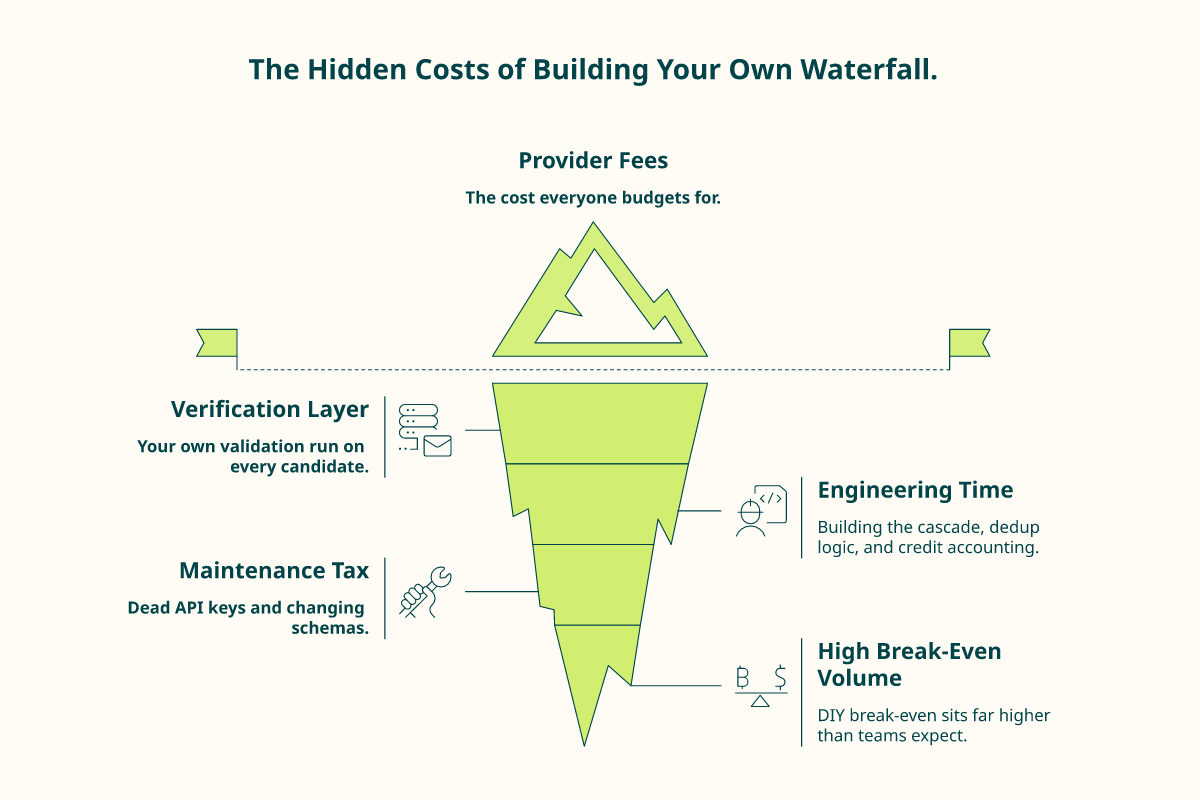
The sticker price of building is provider fees. The real price includes everything around them:
- Provider fees: what each source charges per lookup.
- Verification: your own SMTP and validation layer, run on every candidate.
- Engineering time: building the cascade, the dedup logic, and the credit accounting.
- Maintenance: the part nobody budgets for.
Operators feel this the hard way. As one builder put it about a flexible workflow tool:
“Credit system is broken. Pricing is broken. Not fully transparent with rollover limit.”
Raphael A., Marketing Lead Clay G2 Verified Review
💸 The maintenance tax is the real break-even
API keys die. Provider schemas change. A source you sequenced first silently degrades, and your match rate drops before anyone notices.
That ongoing repair work, not the initial build, is what pushes the break-even volume so high. Another reviewer captured the hidden variance:
“Per-row credit cost can vary 100% from stated amounts, e.g., stated 11 credits/row, actual 25. Contact data quality varies wildly, feels like a black box.”
Verified User, IT Services Clay G2 Verified Review
✅ A quick build-versus-buy checklist
Run these four questions before you write a line of code:
- Is your monthly volume high and predictable, or spiky?
- Do you have an engineer who can own this every week, not just build it once?
- Can you actually beat a per-record credit price after maintenance?
- Is the waterfall your differentiator, or just plumbing?
If most answers point to buy, do that. We built Vibe Prospecting’s embeddable MCP (a connector that drops Explorium’s data layer into your existing pipeline) for the teams who would otherwise engineer against the Explorium API directly. If raw data behind an API is genuinely what you want, the Explorium data API is the better fit. If you want the work done instead of maintained, the agent-native MCP path is.
Q7. Which waterfall enrichment tools actually score best in 2026? [toc=7. Best Tools 2026]
Pick by structural trade-off, not by brand. Vibe Prospecting by Explorium leads as the agent-native option, an MCP data layer over 50+ providers run from inside Claude. Clay is the flexible workflow builder with rising pricing, Apollo is a UI-first all-in-one, ZoomInfo is enterprise coverage at enterprise cost, Cognism is compliance-positioned EU data, and People Data Labs is a raw API for engineers.
⭐ The scoring at a glance
I scored each tool on what actually decides outcomes: who runs the work, coverage depth, pricing transparency, and how you start.
<caption>Waterfall Enrichment Tool Comparison 2026</caption>
| Tool | Who Does The Work | Pricing Model | Best Fit |
|---|---|---|---|
| Vibe Prospecting | The agent, from a prompt | Usage, from $19/mo, 400 free credits | You want the list built, not operated |
| Clay | You, the workflow engineer | Credits, transparency complaints | Ops teams who love building recipes |
| Apollo | You, by hand in the UI | Seat plus credits | Solo manual list-building |
| ZoomInfo | You, after procurement | Annual seat contracts | Enterprise with budget and time |
| Cognism | You, database lookups | Annual contracts | EU-coverage buyers |
| People Data Labs | You, in code | Raw API usage | Engineers building their own app |
🥇 1. Vibe Prospecting (agent-native)
Vibe Prospecting is built on Explorium’s aggregator-of-aggregators layer, with 150M+ companies and 800M+ profiles, surfaced as an MCP connector for Claude Code, a chat UI, and an embeddable MCP. You state the objective in plain language, and the agent runs access, filter, and enrich. It does not reason or send for you. It gives the agent ready access, and credits apply to Claude today, not ChatGPT. You can explore it through Vibe Prospecting by Explorium.
“Vibe Prospecting solves the tunnel vision problem that usually happens with traditional, rigid search filters. It helps me uncover high-quality leads in niche segments.”
Verified Reviewer Vibe Prospecting Trustpilot Verified Review
Skip it if you want raw data to engineer against yourself. That is Explorium’s API, not Vibe.
🥈 2. Clay, and 3. Apollo
Clay is genuinely flexible, but flexibility is the cost. You become the workflow engineer, and credit burn draws constant complaints.
“New users can never figure out what to do. High chance of credits getting misused for wrong operations.”
Qais B., Growth Strategist Clay G2 Verified Review
Apollo optimizes for a human running every step by hand, which means you own the filtering and the accuracy gap. A cleaner alternative is to let the agent handle filtering and enriching search results.
“Contact info frequently missing or incorrect. Prospecting functionality is trash compared to other tools.”
Verified User, IT Services Apollo G2 Verified Review
🏁 4. ZoomInfo, 5. Cognism, 6. People Data Labs
ZoomInfo is deep enterprise coverage locked behind annual contracts and procurement, not self-serve exploration. Cognism leads with EU coverage but draws data-quality pushback:
“Poor data quality, no direct mobile numbers. Numbers either wrong or returns US HQ number.”
People Data Labs is honestly the right pick for the engineer who wants raw data and will write the application logic themselves. That is its strength, not a knock. If that is you, do not force-fit an agent tool, but if you want richer B2B leads data done for you, that is a different job.
Q8. Is waterfall enrichment compliant and deliverable, or a liability? [toc=8. Compliance And Deliverability]
Waterfall enrichment can be fully GDPR- and CCPA-compliant, but compliance lives in how data is sourced and handled, not in the cascade itself. The safer pattern is on-demand enrichment with documented lawful basis and data minimization, rather than hoarding stale records. Pair that with deliverability discipline, warmed inboxes, and low send volume per domain, so verified data actually reaches inboxes.
⚖️ The fear is an un-auditable list
I have sat with data leads who could not answer a simple question. Where did this contact come from, and on what basis do we hold it? That gap is the real liability, not the waterfall.
A cascade that pulls from many sources is fine. A cascade that cannot tell you each source’s lawful basis is not. This is why asking the right questions before buying external data matters so much.
🔒 What compliant sourcing actually means
Compliance is operational, not a checkbox. Four practices carry most of the weight:
- Lawful basis: know why you are allowed to hold each record (legitimate interest, consent).
- Data minimization: keep only the fields you need, not everything a provider offers.
- On-demand over stored: enrich when you act, instead of warehousing data that rots and grows risk.
- SOC 2 controls: confirm the security posture of every provider in the chain.
The stored-and-stale model is the trap. As the operator view goes, relying on static databases that quickly go out of date is a failed model, and modern systems need a continuous stream of living data. On-demand agent access fits minimization better, because you pull a record to use it, not to stockpile it. After building Explorium’s layer across 50+ sources, that sourcing discipline is the part we treat as non-negotiable, and it is reflected in our data security standards.
📬 Deliverability is the other half of compliant and useful
Verified, compliant data still fails if you send like a spammer. The send pattern matters as much as the data.
Poorly warmed mailboxes on shared IP pools land in spam at three to four times the baseline rate. Disciplined senders keep volume low, around 30 emails per inbox, to stay under provider filters. The data is the ammunition. Inbox warming and volume caps are the aim.
✅ Your provider-vetting checklist
Before any provider joins your chain, confirm:
- They can state the lawful basis for their data.
- They support deletion and opt-out requests.
- They hold SOC 2 or equivalent controls.
- You can enrich on-demand, not just bulk-export.
Run that list once and you turn a vague compliance worry into a documented, defensible process. That is the difference between a liability and a data pipeline you can stand behind.
Q9. What does an agent-native waterfall change about prospecting on Monday morning? [toc=9. Agent-Native Prospecting]
An agent-native waterfall turns the cascade from a tool you operate into a job you delegate. Instead of stitching Apollo, Clay, and Zapier together by hand, you ask an agent inside Claude to access, filter, enrich, and build the list against a live data layer. Then you spend your reclaimed hours on who to target and what to say, where the real leverage sits.
🧵 The stitched-stack Monday most teams still live
I have watched the standard Monday up close. An operator opens five tabs, pulls a list from one tool, pushes it to a second to enrich, then wires a third with Zapier (a tool that connects apps) to glue it together.
By lunch, they have a list and no emails sent. The whole morning went to operating the machine, not to selling. That stitching is invisible labor, and it is the exact tax we set out to remove with filtered and enriched search results.
🔌 The twist: access was never the hard part
Here is what the category gets backwards. We keep treating data access as the prize, when access to data is now a commodity. Anyone can buy contacts.
Think about how search changed. Finding a fact used to be the job. Then Google made finding free, and judgment about what to do with the fact became the work.
The same shift is hitting prospecting. An MCP (Model Context Protocol, a standard socket that lets an agent reach tools and data, like a USB port for AI) means the agent runs the cascade. To be clear, the MCP does not reason or send for you. It gives the agent ready access through Explorium’s MCP data layer, and credits apply to Claude today, not ChatGPT.
⏰ The payoff: your week comes back
When the grunt work moves to the agent, the human work that is left is the valuable part. One pattern I keep seeing proves it.
A CEO was spending 50 hours a week on sales calls, but only five of those hours were with qualified buyers. After adding an AI layer to block the junk, he bought back almost his entire week. Another operator generated 2,500 lookalike leads, then pruned hard down to the few hundred that actually fit, and doubled her event attendance.
The lesson is not automate everything. It is that humans should own targeting, messaging, and the offer, while the agent owns access, filter, enrich, and list-build. This is the heart of scaled prospecting with smarter workflows. Operators who use this describe the same relief:
“Vibe Prospecting solves the tunnel vision problem that usually happens with traditional, rigid search filters. It provides a massive headstart when entering new markets.”
Verified Reviewer Vibe Prospecting Trustpilot Verified Review
And honestly, the tool is not magic. You still have to aim it:
“If your prompt isn’t surgically specific regarding segments, locations, and job titles, the output can include some gunk.”
Tristan W. Vibe Prospecting G2 Verified Review
🤔 The question I am sitting with
We built Vibe Prospecting as three surfaces on Explorium’s data layer: an MCP connector for Claude Code, a chat UI, and an embeddable MCP. It starts at $19/mo with a 400-credit free trial, and credits apply to Claude today, not ChatGPT.
The labor progression went from UI, to API, to agent. My open question is how far down the GTM stack that delegation goes next. If the agent already builds the list, where does the human’s judgment become the only thing left worth paying for? This is the same shift reshaping AI use cases across the funnel, and I would genuinely like to hear where you draw that line.
FAQs


