

Knowing how to automate account research and enrichment decides whether AEs spend their week selling or prepping. Reps still spend a large share of their week on research and call prep.
The fear is real: automation that floods pipeline with bad contacts and beige emails. Start from a clean data layer, such as the B2B data providers you already trust, and put one human checkpoint in the right place.
This guide walks stage by stage, with a gate you can copy.
How Much of Your Outbound Workflow Can You Automate Without Filling Pipeline With Bad Contacts?
You can automate account research, contact enrichment, and signal-based qualification end to end, keeping a human check only at the contact-quality gate before sequences launch. Everything upstream of that gate is lookup and matching work. Machines do it faster and more consistently than reps.
❌ Why Manual Prep Fails Outbound Teams
- Reps copy firmographics from five tabs into a CRM field by field.
- Research quality varies by rep, so account tiers drift.
- Stale titles and unverified emails push bounce rates up.
- Prep time grows with list size, so volume and quality trade off.
✅ What the Automated Version Looks Like
- One data source feeds discovery, enrichment, and signals.
- A sample of 5 records is checked before any bulk export.
- A human reviews only contacts, not accounts.
- The AI writing step reads verified fields, not a pasted paragraph.
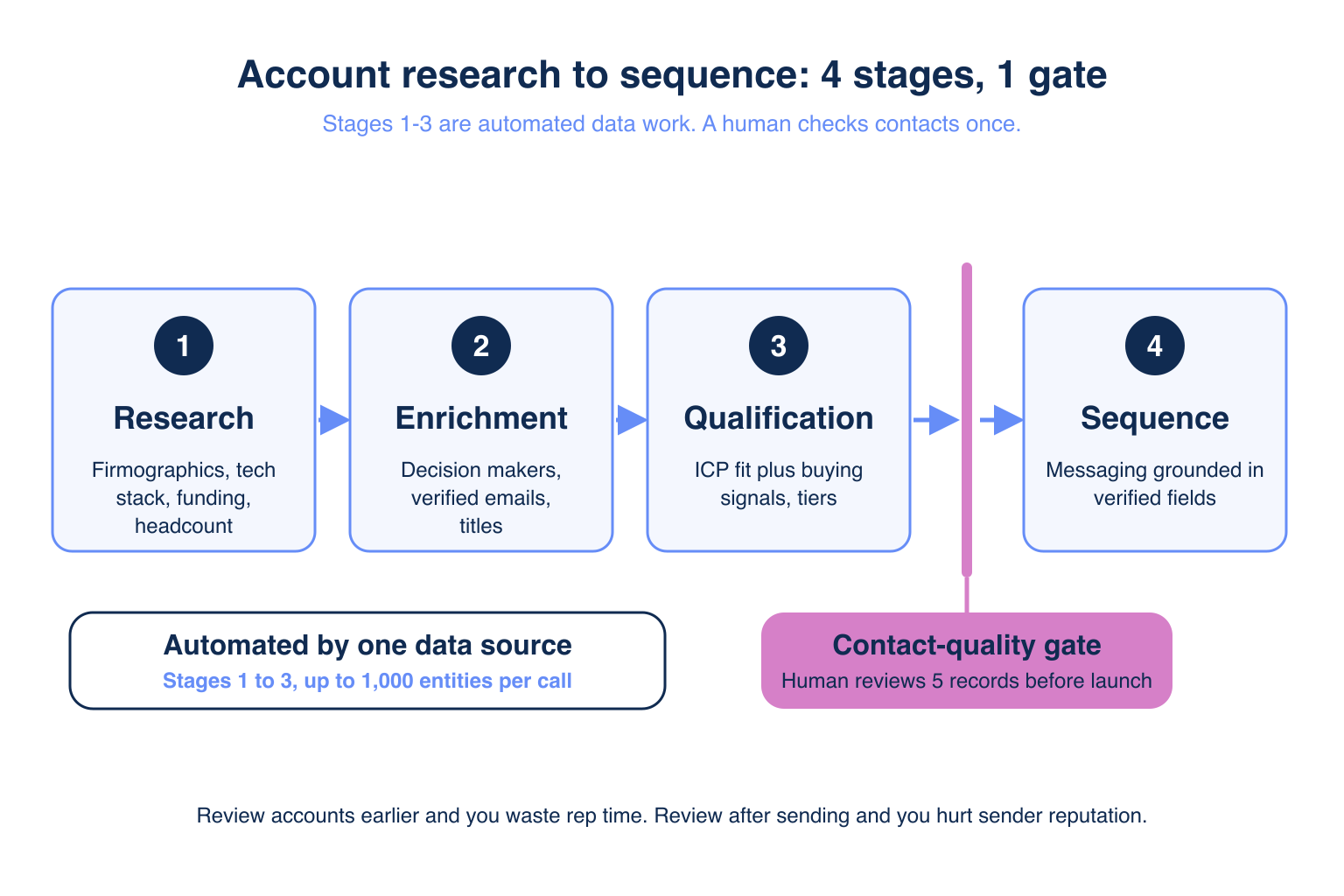
What Are the Four Manual Stages Between a Target List and a Sequence?
The four stages are account research, contact enrichment, lead qualification, and sequence build, and the first three are automatable data work. Practitioners in r/gtmengineering describe exactly this list as a "surprising amount of manual work." Learn what data enrichment is first if the terms are new.
🔄 The Stages in Order
- Research: firmographics, tech stack, funding, headcount, news.
- Enrichment: decision makers with verified emails and titles.
- Qualification: score fit against your ICP (ideal customer profile) using buying signals.
- Sequence build: messaging grounded in the data above.
💡 Where This Guide Stops
This article covers the first three stages and the data that feeds the fourth. Sequence strategy by company stage is a separate topic.
How Do You Automate Account Research and Enrichment for AEs?
Describe your ICP once in plain language, and let an agent pull firmographics, technographics, funding, and workforce trends for every matching account in one run. No rep opens a browser tab. The output lands as a structured table, ready for the next stage. See how the best MCP for account research options compare.
🔑 Fields to Request
- Company size, industry, and region (firmographics).
- Installed technologies (technographics).
- Latest funding round and date.
- Hiring trend and website changes as research hooks.
⚡ Speed Gain
A server-side call handles up to 1,000 entities at once, so a 500-account territory takes one request, versus the hours per week reps commonly spend on manual research and prep.
How Do You Automate Account Research and Enrichment Without Losing Data Accuracy?
Enrich only qualified accounts, request verified emails, and sample 5 contacts before exporting the full list. Sampling is your safety valve. If 5 of 5 look right, scale. If not, fix the filter before spending credits.
"Explorium’s superb data quality ensures emails are delivered and contact data remains current." Jacob S., Co-Founder & CTO, Small Business via G2
✅ Accuracy Controls to Switch On
- Company matching at 97.8%+ accuracy before contacts are pulled.
- Verified-email-only exports.
- Title and seniority filters tied to your buyer persona.
- De-duplication against your CRM, covered in the CRM enrichment MCP guide.
⚠️ What Breaks Accuracy
Mixing three vendors creates conflicting titles and duplicate records. One source avoids reconciliation work.
Ready to try it? Add Vibe Prospecting to Claude or ChatGPT and sample 5 accounts in minutes. Connect AgentSource MCP
Which Data Fields Should You Automate and Which Should a Human Review?
Automate every field a database can verify, and review only the fields that depend on judgment: email validity, role fit, and edge-case account fit. The matrix below makes the split explicit, building on the contact enrichment MCP guide.
📊 The Automate-vs-Review Matrix
| Field | Automate | Human review |
|---|---|---|
| Firmographics (size, industry, HQ) | Yes | No |
| Headcount and funding | Yes | No |
| Tech stack | Yes | Spot check |
| Buying signals | Yes | Top-tier accounts only |
| Email validity | Verify automatically | Sample 5 per batch |
| Role and seniority fit | Filter automatically | Review shortlist |
| Account-fit edge cases | Flag | Decide |
💡 The Rule Behind the Matrix
If a wrong value costs a bounce or a bad first impression, a person looks at it. Otherwise a machine owns it.
Where Should Humans Stay in the Loop?
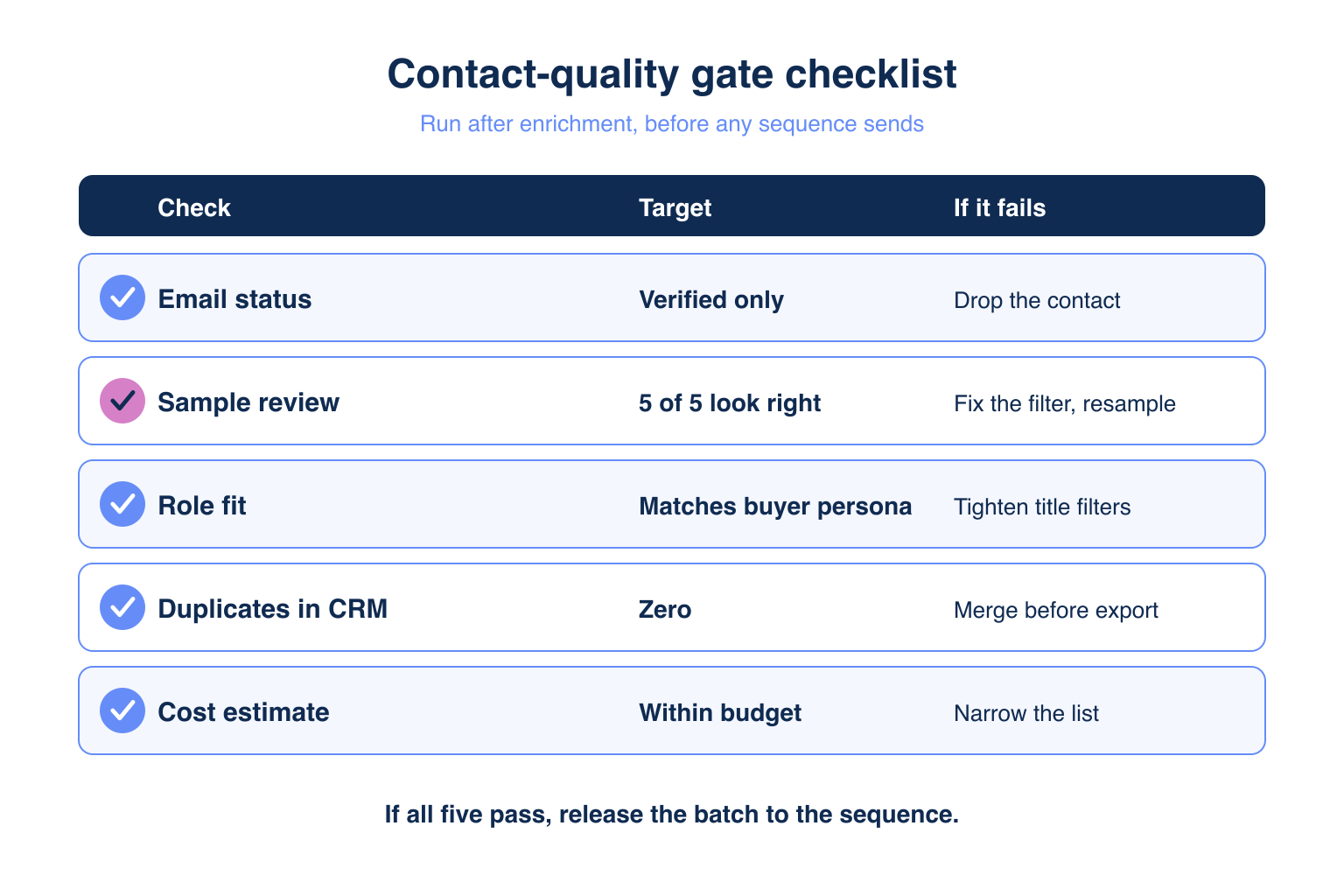
Humans belong at one place: the contact-quality gate, after enrichment and before any sequence sends. Reviewing accounts earlier wastes rep time. Reviewing after sending costs sender reputation. Compare B2B data provider quality before you trust any source.
🛡️ The Contact-Quality Gate
| Check | Target | If it fails |
|---|---|---|
| Email status | Verified only | Drop the contact |
| Sample review | 5 of 5 look right | Fix the filter, resample |
| Role fit | Matches buyer persona | Tighten title filters |
| Duplicates in CRM | Zero | Merge before export |
| Cost estimate | Within budget | Narrow the list |
🔑 Reviewer Time Budget
The gate takes minutes per batch because the reviewer reads 5 records and a summary, not 500 rows.
How Do You Automate Lead Qualification and Stop Generic AI Outreach?
Score accounts with buying signals, then pass those signals and firmographics into the AI writing step so every message cites something true about the company. Generators sound alike because they only know the paragraph you paste. Practitioners call it a "beige corporate voice." This mirrors the signal-first stack approach.
🔑 Qualification With Signals
- 18 signal categories and 80+ signal types cover funding, hiring, and website changes.
- Tier accounts: signal plus ICP fit is tier 1, fit only is tier 2.
- Learn more in the buying signals MCP guide.
✅ Grounding the Copy
- Inject the funding date, new hires, and tech stack as prompt fields.
- Instruct the model to cite one signal per email.
- Reject drafts that contain no company-specific fact.
"I can ask for exactly what I need, which is a big plus." Ariel L., GTM, Outreach, SDR/BDR Operations, Mid-Market via G2
How Does Vibe Prospecting Automate All Four Stages in One Connection?
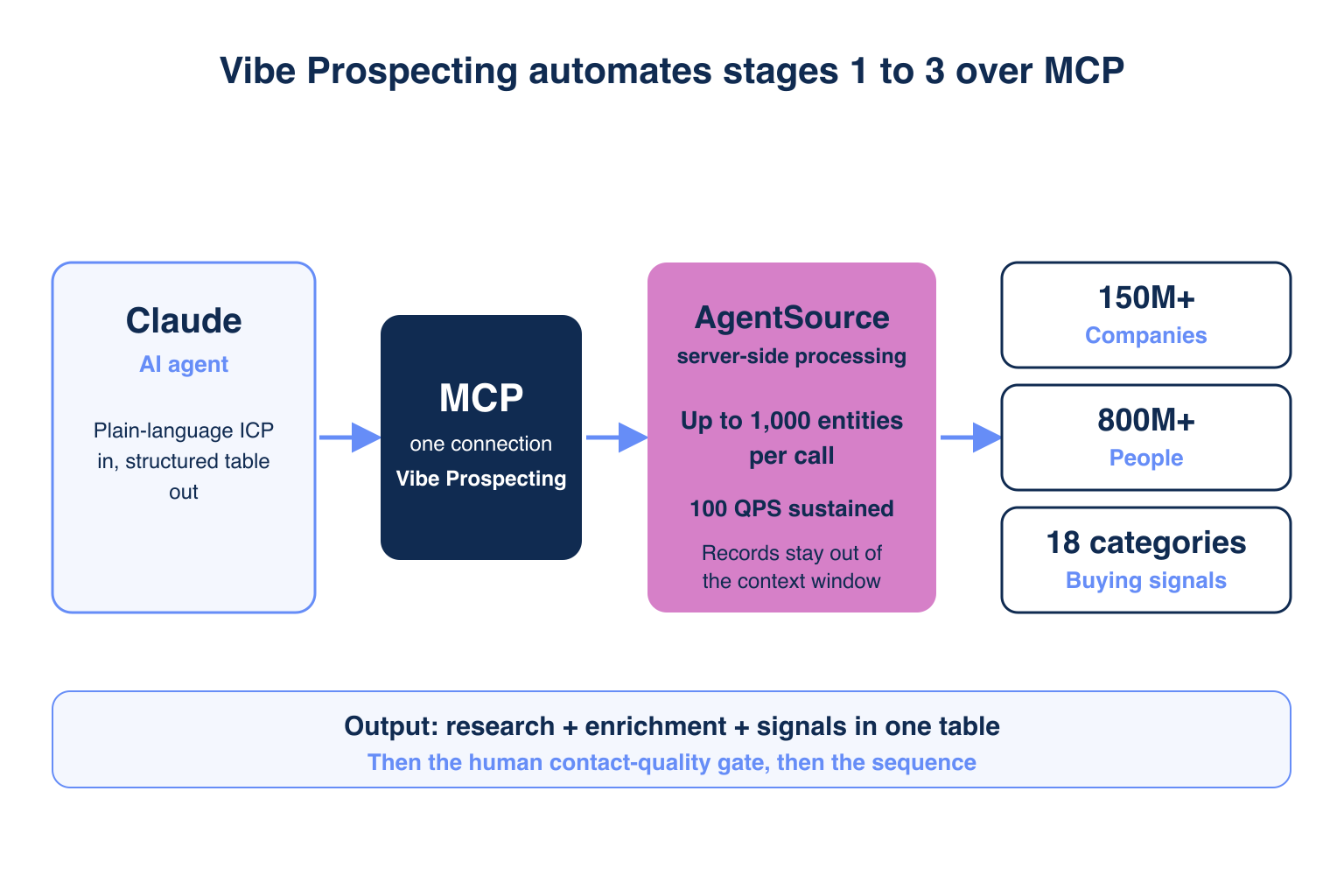
Vibe Prospecting automates research, enrichment, and qualification on three pillars: one MCP for every data need, server-side scale up to 1,000 entities per call, and affordable pricing from a free account with a unified credit pool. It is the data layer behind every step above.
🔑 Pillar 1: One MCP for All Your Data Needs
- 150M+ company profiles and 800M+ people profiles from 50+ data sources.
- Firmographics, technographics, funding, and workforce trends in one connection.
- 18 buying-signal categories with 80+ signal types.
- No second vendor for contacts or signals.
🚀 Pillar 2: Built for Scale
- Up to 1,000 entities per call, processed server-side, as described in the MCP docs.
- 100 QPS (queries per second) sustained over AgentSource.
- In-context MCPs load every record into the LLM window, which caps useful runs at roughly 20-100 prospects.
- Records stay out of the context window, so tokens do not run out.
💰 Pillar 3: Affordable by Design
- Free account, no sales call, no seat tax.
- One credit pool across all endpoints, cutting agent-workload spend 30-60%.
- Sample 5 records and see a cost estimate before credits are charged.
- Rated 4.5/5 across 20 reviews on G2, per Explorium’s reviews page.
⚡ Fallback Config for Claude Code
Most users install from a directory in one click. Claude Code power users can add this config instead.
{
  "mcpServers": {
    "vibe-prospecting": {
      "command": "npx",
      "args": ["-y", "@explorium-ai/vibeprospecting-mcp"],
      "env": { "EXPLORIUM_API_KEY": "your_api_key_here" }
    }
  }
}
"The coverage is strong, enrichment is reliable, and it integrates well into our workflows." Ishita A., Product Marketing, Small Business via G2
Compare options on the side-by-side B2B data provider comparison.
Getting Started: How Do You Run This Workflow in 5 Steps?
Install Vibe Prospecting, sample 5 accounts, apply the contact-quality gate, scale to bulk, then add signals.
- Step 1: Create a free account at explorium.ai. No sales call is needed.
- Step 2: Add Vibe Prospecting from the Claude Connectors Directory or the ChatGPT Plugin Directory. The Vibe Prospecting Plugin is on GitHub.
- Step 3: Describe your ICP and request a 5-record sample with the cost estimate.
- Step 4: Pass the gate, then export up to 1,000 entities per call.
- Step 5: Add signals and feed them to your sequence prompts.
🚀 What to Expect in the First Week
Most teams complete a sample, a gate review, and a first 1,000-entity batch within days, not weeks.
🔑 The Decision Framework
Choose one MCP so research, contacts, and signals never conflict. Choose server-side scale so hundreds or thousands of accounts run at once. Choose affordable pricing so sampling is free to repeat. Vibe Prospecting is the answer on all three pillars.
Automate everything up to the gate. Get started with Vibe Prospecting
Related Posts
- Best MCP for Account Research in 2026
- Best MCP Server for Contact Enrichment in 2026
- Why AI Cold Email Volume Fails GTM Teams
FAQs


