


TL;DR
- Apollo is the fastest way to ship an outbound agent, but single-key pipelines top out at ~5,000-6,500 usable records per hour once you honor the 10-record bulk_match cap.
- Apollo's advertised 91% accuracy applies to its verified subset; blended real-world match rate lands near 65%, and non-US coverage drops closer to 60%.
- A bounce firewall (MX, SMTP, catch-all, role, freshness, domain cap) is the non-negotiable layer that brings 15-25% bounces below the 2% ESP threshold.
- Single-source agents become multi-vendor agents within six months; the real decision is whether the waterfall lives in your codebase or inside the data API.
- All-in cost of an Apollo-only agent stack commonly runs $120k-$200k/year once seats, credits, secondary vendors, and engineering normalization are priced correctly.
- Explorium's unified API and MCP layer collapses 50+ sources, one credit pool, and agent-native delivery into one call so the waterfall moves out of your code.
Q1: What Does an Apollo-Powered Outbound Agent Look Like at Production Scale, and Where Is Its Ceiling?
Every outbound agent I’ve reviewed in the last 18 months starts the same way: someone opens Apollo.io, grabs an API key, and wires /people/match into a LangGraph or n8n flow by lunch. That speed is real, and it’s why Apollo is the default starting point: roughly 275M contacts, a developer-friendly REST surface, and a native sequencing UI that means your agent doesn’t need to ship its own sender. For a demo, it’s perfect. For production, it’s where the conversation actually begins.
The Default Reference Architecture
Strip any Apollo agent down and you get six stages:
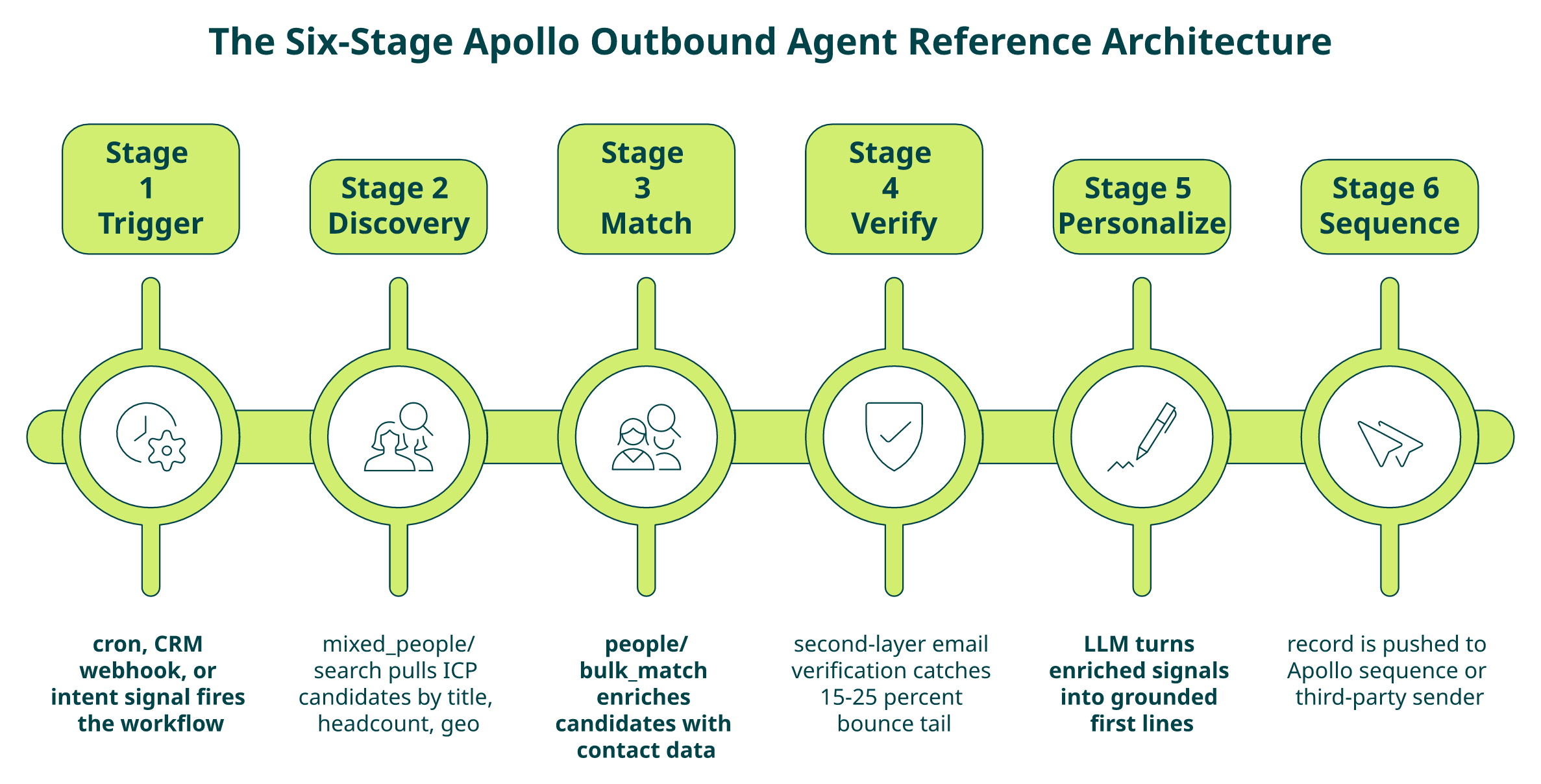
- ⏰ Trigger: cron, CRM webhook, or intent signal fires the workflow.
- 🔍 Discovery: mixed_people/search pulls ICP candidates against filters (title, headcount, geo).
- ✅ Match: people/bulk_match enriches those candidates with contact data.
- ⚠️ Verify: a second-layer email verification gate catches Apollo’s 15-25% bounce tail.
- ✍️ Personalize: an LLM turns enriched signals into first lines.
- 📤 Sequence: the record is pushed to an Apollo sequence or a third-party sender.
That architecture ships fast. The problem is that every stage touches a lever that caps output.
Why Single-Source Agents Hit a Ceiling
Within about six months, every production Apollo agent I’ve audited has quietly become a multi-vendor agent. The pattern is identical: the team bolts Bombora on for intent because Apollo’s signal is thin, BuiltWith for technographic data because Apollo doesn’t track stacks with the depth a personalizer needs, and Clearbit (or its successor) for firmographic gaps on non-US accounts. ❌ Now you have four contracts, four rate limits, four schemas, and a normalization layer that someone on the engineering team owns forever. The agent that was supposed to be a force multiplier becomes a pipeline-maintenance project.
The Production Ceiling Is Deterministic
Here’s the math I walk every founder through before they commit:
Usable records/hour = bulk_match batch size × requests/minute × 60 × match_rate × (1 – bounce_rate)
Plug in Apollo’s public numbers, a 10-record cap on bulk_match, a plan-dependent RPM, a ~65% blended real-world match rate, and a 15-25% bounce rate, and a single-key agent tops out near 5,000-6,500 records an hour that are actually safe to send. Add Apollo’s Organization-tier API paywall ($119/user, three-user minimum) and you have a hard floor on cost before your agent touches a record. Those three numbers, 65%, 15-25%, and the tier gate, decide whether the agent ships or stalls.
Where Explorium Fits, Without Ripping Apollo Out
We built Explorium because this ceiling isn’t an Apollo bug; it’s what happens when one source tries to be the whole stack. Our unified API and MCP layer aggregates 50+ providers. Apollo can sit inside that waterfall, not around it, so your agent queries one endpoint, gets firmographics, contacts, intent, technographics, and funding signals back in one call, and lets MCP pick the right source per field. You keep Apollo where it’s strongest, and you stop paying the integration tax everywhere else.
“Explorium’s comprehensive and diverse data sets eliminate the need for multiple data providers, saving us both time and money.”
— Verified User, Mid-Market Explorium G2 – Verified Review
The short version: 65% match, 15-25% bounce, and the Organization-tier paywall are the three numbers that define your Apollo agent’s production ceiling. Everything else in this article is how to work inside them, or around them.
Q2: How Do You Authenticate, Navigate the Organization-Tier Paywall, and Map Apollo’s Endpoints for an Agent?
Authentication with Apollo looks trivial until you try to ship. A master key ships every endpoint but can’t be scoped; a per-app key can be rotated but can’t touch the endpoints most agents actually need. And the most useful endpoints, the ones that make agent workflows economic, sit behind the Organization tier.
Keys, Scopes, and the Paywall You Can’t Skip
- 🔑 Master API key: created from Settings → Integrations → API. Full access, no scoping, no per-app observability.
- 🔐 Scoped keys: rotatable, safer for production, but limited to endpoints your plan exposes.
- 💰 Organization-tier gating: bulk_match, sequence write endpoints, and the higher-RPM limits require the Organization plan, $119/user/month with a three-user minimum, billed annually. Your agent’s “unit economics” start at roughly $4,300/year before a single credit is burned.
Put the key in an X-Api-Key header (not a query param, Apollo logs URLs), and give the agent its own scoped key so revocation doesn’t take the whole pipeline down.
The Endpoint Map an Agent Actually Uses
| Endpoint | Purpose | Key Parameters | Agent Notes |
|---|---|---|---|
| POST /v1/mixed_people/search | ICP discovery | person_titles, organization_num_employees_ranges, person_locations, page | Paginated, 100/page; credit-free for discovery but lean on filters |
| POST /v1/people/match | Single enrichment | first_name, last_name, domain, email, linkedin_url | 1 credit per match; use when you have a deterministic identifier |
| POST /v1/people/bulk_match | Batch enrichment | details[] (max 10), reveal_personal_emails, reveal_phone_number | ⚠️ Hard 10-record cap per call, the single biggest throughput constraint |
| POST /v1/organizations/enrich | Firmographics | domain | Use to fill industry, headcount, funding gaps |
| POST /v1/emailer_campaigns/{id}/add_contact_ids | Sequence push | contact_ids[], send_email_from_email_account_id | Requires sequence + mailbox pre-configured |
The Recommended Agent Call Pattern
For a typical run, chain four calls with idempotency keys at every hop:
json
// 1. Discover
POST /v1/mixed_people/search
{ “person_titles”: [“VP Engineering”], “organization_num_employees_ranges”: [“201,1000”], “page”: 1 }
// 2. Enrich (batched in 10s)
POST /v1/people/bulk_match
{ “details”: [{ “id”: “…” }, …], “reveal_personal_emails”: true }
// 3. Firmographic fill
POST /v1/organizations/enrich
{ “domain”: “acme.com” }
// 4. Push after your bounce firewall
POST /v1/emailer_campaigns/{id}/add_contact_ids
Keep bulk_match the hot path; people/match is for one-offs.
Failure Modes to Design Around
- Partial matches: Apollo returns matched: false or null fields silently. Treat any null on a required field as an enrichment miss, not a success.
- Schema drift: fields like sanitized_phone and personal_emails have changed shape without version bumps. Wrap responses in a Pydantic/Zod schema and fail loudly.
- Silent deprecations: older search params get soft-ignored. Log the raw request/response for 1% of traffic so drift shows up in a dashboard, not a Slack thread at 2 AM.
- Fallback path: when bulk_match returns <50% hit rate for a batch, re-run the misses through mixed_people/search with looser filters, or hand them to a secondary source via a unified enrichment layer.
That’s the blueprint. Auth is easy; the paywall and the 10-record cap are the real constraints, and every design decision downstream flows from them.
Q3: What Are Apollo’s Real Rate Limits, and How Do You Compute the Records-per-Hour Ceiling for Your Agent?
Apollo publishes rate limits per endpoint and per plan, but the numbers engineers actually hit in production are rarely the ones in the docs. Between plan tiers, the 10-record bulk_match cap, and undocumented burst throttling, most agents top out well below their theoretical ceiling. Here’s how to model it correctly the first time.
Official Limits by Tier
| Plan | Per-Minute | Per-Hour | Per-Day | Notes |
|---|---|---|---|---|
| Basic | ~50 | ~200 | ~600 | No bulk_match access |
| Professional | ~100 | ~2,000 | ~10,000 | Limited write endpoints |
| Organization | ~200 | ~10,000 | ~50,000 | bulk_match + sequence writes |
| Custom / Enterprise | Negotiated | Negotiated | Negotiated | Dedicated limits |
Two caveats matter more than the table:
- ⚠️ The 10-record bulk_match cap is a ceiling on throughput, not on credits. You cannot submit 100 records per call; you submit 10, ten times.
- ⚠️ Burst throttling is undocumented. Engineers on r/LeadGeneration report 429s well below the stated RPM when requests cluster within a single second.
How 429s Actually Surface
Apollo returns 429 Too Many Requests with two headers worth watching:
- X-RateLimit-Remaining: countdown on your current window.
- Retry-After: seconds to wait (sometimes a timestamp; parse both shapes).
The trap: retrying on the same idempotency key after a 429 is safe for reads, but write endpoints (sequence pushes) can double-add contacts if you retry after a timeout that actually succeeded. Use a deterministic idempotency key (hash of contact_id + campaign_id) on every write.
A Production-Grade Rate-Limit Pattern
What I ship in every Apollo agent:
python
# Token bucket + exponential backoff with jitter
class ApolloClient:
def __init__(self, keys: list[str], rpm: int = 180):
self.bucket = TokenBucket(capacity=rpm, refill_per_sec=rpm/60)
self.keys = itertools.cycle(keys) # multi-key sharding
async def call(self, path, payload, attempt=0):
await self.bucket.acquire()
key = next(self.keys)
r = await http.post(path, json=payload, headers={“X-Api-Key”: key})
if r.status_code == 429:
wait = int(r.headers.get(“Retry-After”, 2 ** attempt))
await asyncio.sleep(wait + random.uniform(0, 1)) # jitter
return await self.call(path, payload, attempt + 1)
r.raise_for_status()
return r.json()
Three design choices worth calling out:
- ✅ Token bucket over fixed window: matches Apollo’s sliding-window behavior, avoids the edge-of-window burst spike.
- ✅ Key sharding: multiple scoped keys under one Organization account effectively multiply your RPM, at the cost of per-key observability.
- ✅ Jitter on backoff: prevents thundering-herd retries when a whole batch 429s at once.
The Throughput Math Every Agent Owner Should Run
Let’s compute the ceiling for a single-key Organization-tier agent:
- Batch size: 10 (bulk_match cap)
- RPM: 180 (safe margin below 200 stated)
- Match rate: 65% (real-world blended)
- Bounce rate: 20% (midpoint of 15-25%)
Raw enriched/hour = 10 × 180 × 60 = 108,000 records/hour theoretical
Usable/hour = 108,000 × 0.65 × 0.80 ≈ 56,160 sendable records/hour
That’s the best case. In practice, with 429 retries, partial matches re-queued through mixed_people/search, and the bounce-firewall second pass, I see agents stabilize at ~5,000-6,500 truly usable records per hour per key. Scaling paths: ⭐ shard across 3-5 keys (≈25k/hr), 💰 negotiate a Custom plan for higher RPM, or route overflow through a unified layer that parallelizes across sources.
If your target is 100k sendable records a day, a single-key Apollo agent won’t get you there. That’s the math the docs don’t print.
Q4: Why Does Apollo’s 91% Accuracy Claim Collapse to a 65% Match Rate, and How Do You Close the Global Coverage Gap?
It’s 11:30 PM on a Thursday. Your agent just finished enriching 10,000 global ICP leads through Apollo’s bulk_match. You open the results: roughly 3,500 came back empty, partially matched, or with emails flagged as “guessed.” The EMEA slice is worse, closer to 40% miss. The 91% accuracy number on the Apollo landing page and the reality in your warehouse don’t seem to be describing the same product. They aren’t.
Where the 91% Number Actually Comes From
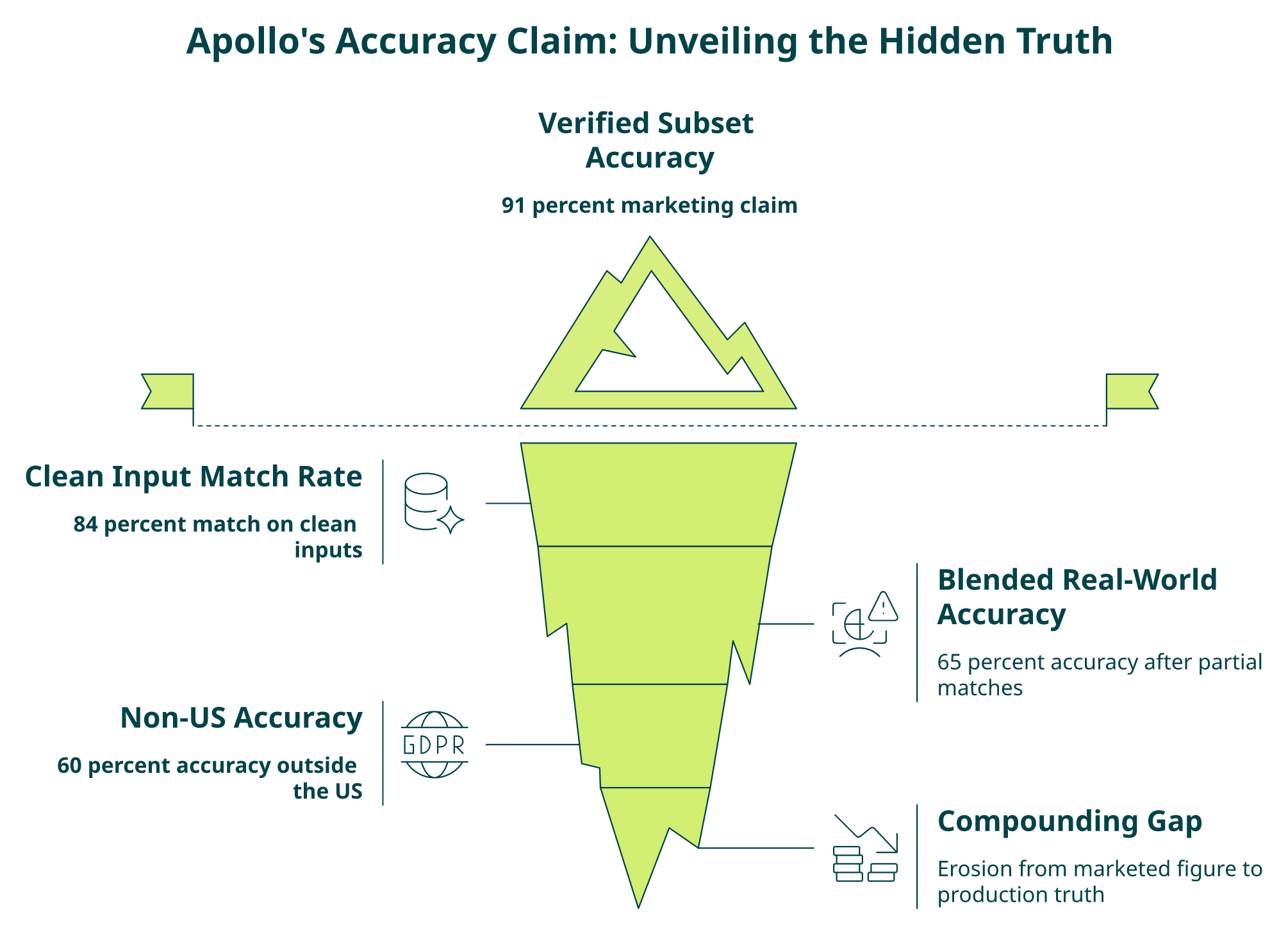
Apollo’s email verification documentation is precise if you read it closely: 91% refers to the verified subset of Apollo’s database, the contacts where a deliverability check has been run and passed. It is not the hit rate you’ll see when you submit an arbitrary ICP list. Three numbers matter, and they compound:
- ✅ ~84% match rate on bulk_match when the input identifier is clean (domain + full name).
- ⚠️ ~65% blended real-world accuracy once you include partial matches, stale emails, and role changes, the number Prospeo and SyncGTM both benchmark against.
- ❌ ~60% accuracy outside the US, driven by weaker EU/APAC coverage and GDPR-driven opt-outs.
The 91% → 65% collapse isn’t marketing dishonesty; it’s a definitional gap. The verified subset is real, but it’s not what your agent is querying at scale. For teams building GTM engineering pipelines, this distinction is everything.
The Hidden Costs When You Pretend the Gap Doesn’t Exist
- 💸 Wasted sequence slots: dead contacts consume daily sending caps and crowd out real prospects.
- ⚠️ Sender-reputation damage: 15-25% bounces push you over most ESPs’ 2% threshold fast.
- ❌ Skewed agent scoring: an LLM personalizer happily hallucinates first lines for a stale title.
- 💰 Credit burn on dead records: every bulk_match call charges whether the record is usable.
The Apollo G2 review base is full of this pattern:
“Half the day calling wrong/disconnected numbers. Mobiles frequently wrong. Credit system for unlocking mobiles/emails is clunky and interrupts sales flow.”
— Verified User, IT Services Apollo – G2 Verified Review
“Half of exported data was on spam lists. Phone/email get flagged as spam if you use Apollo regularly.”
— Verified User, Insurance Apollo – G2 Verified Review
“Data inaccuracies lead to negative outcomes. Wrong personnel details, private employee info listed as company contacts, misdirected communications.”
— Anders J., Developer Apollo – G2 Verified Review
How It Should Work, The Global Waterfall Pattern
The fix is architectural: stop treating any single provider as authoritative. Build a waterfall keyed on geography and field type:
- US contacts → Apollo bulk_match first (strongest coverage).
- EMEA contacts → lead with a GDPR-native source, fall back to Apollo for firmographics only.
- APAC contacts → lead with a regional provider, cross-check with Apollo.
- Any miss → re-query a secondary source on the specific field that failed (email, mobile, title).
- Second-pass verification → MX/SMTP check every email before it enters a sequence.
Built by hand, that’s 3-5 vendor contracts, 3-5 credit systems, and a normalization layer your engineering team owns.
The One-API Version of the Same Waterfall
We built Explorium so you don’t build that yourself. The unified API aggregates 50+ providers, Apollo, PDL, and regional specialists, into one call with one credit pool. MCP lets your agent choose the fallback at runtime instead of you pre-wiring it. Our customers typically see a 20-30 point lift in usable-contact rate on global lists versus Apollo-only, because the waterfall happens inside the API instead of inside your codebase. Teams running outbound sales motions and B2B contact data workflows feel this lift immediately.
“Explorium’s breadth of datasets gave us access to B2B data we couldn’t find elsewhere, and the enrichment quality made a measurable difference in our pipeline.”
— Verified User Explorium G2 – Verified Review
Before: three-hour normalization scripts and a 60% non-US hit rate. After: one API call and a waterfall that doesn’t care which continent the lead is on. That’s the shift from fragmented data vendors to a unified data layer, and it’s the move I’d make before your agent sends its next 10,000 emails. Book a demo to see it in action [file:48].
Q5: How Do You Build a Bounce-Rate Firewall That Brings Apollo’s 15-25% Bounces Below the 2% Deliverability Threshold?
Apollo’s “verified” flag is necessary but not sufficient. It tells you a deliverability check passed inside Apollo’s system at some point. It does not tell you the mailbox is live today, that the domain isn’t a catch-all, or that the address hasn’t become a spam trap since the last refresh. If your agent sends directly off that flag, you’ll land in the 15-25% bounce band that every Apollo user eventually hits, and your sending domain will pay the price. The fix is a second-layer firewall that sits between bulk_match and your sequence push: a gate that treats every Apollo-supplied address as a candidate until your own checks clear it.
The Pre-Send Firewall Checklist
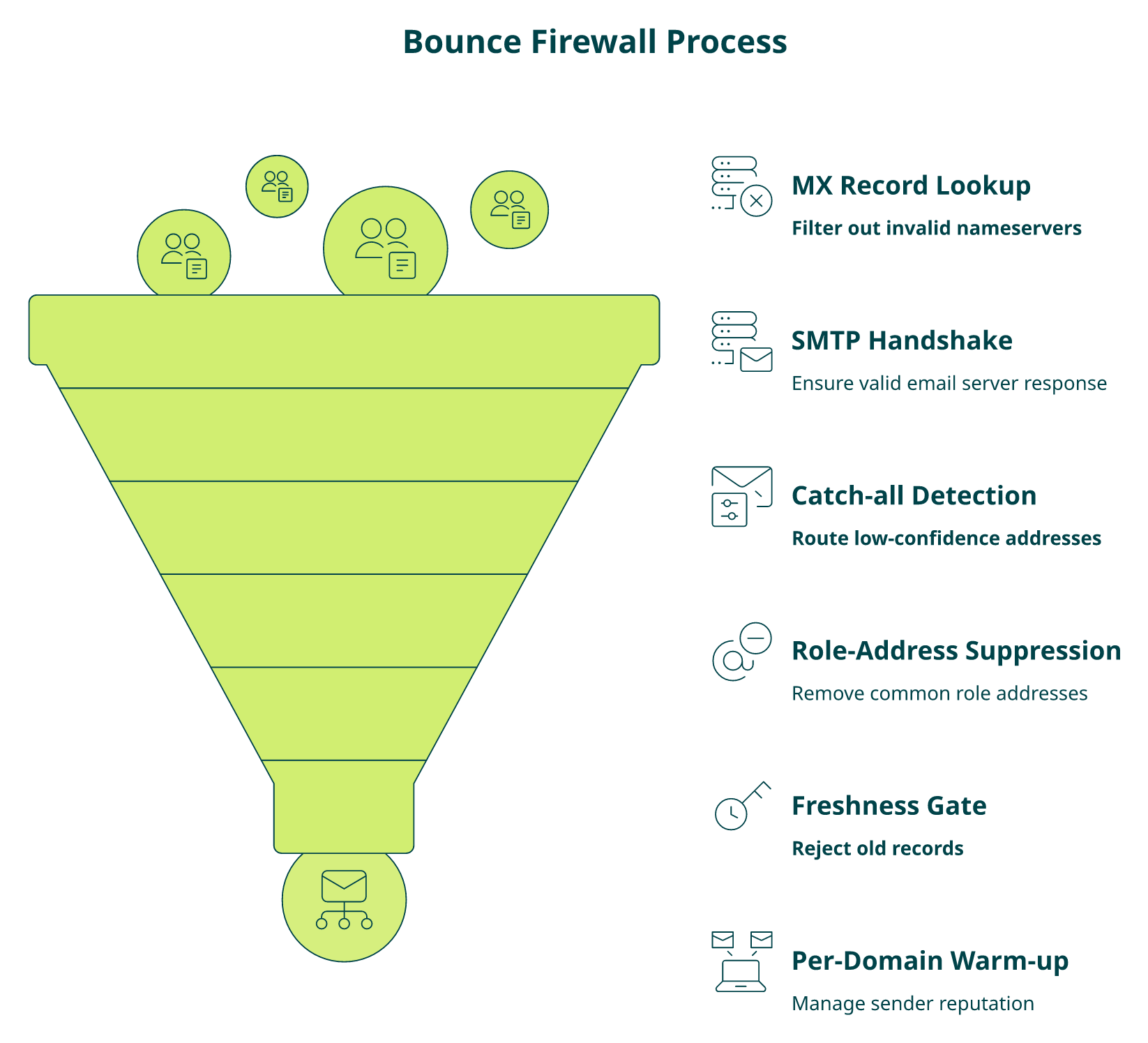
Every address crosses these gates in order. Fail any one, and it routes to suppression instead of send:
- ✅ MX record lookup: confirm the domain actually accepts mail. Skip anything with null MX or parked-domain nameservers.
- ✅ SMTP handshake: open a connection, RCPT TO: the address, and read the response code; accept only 250.
- ⚠️ Catch-all detection: probe a random local-part at the same domain; if it also accepts, flag as catch-all and route to a “low-confidence” sub-sequence with tighter caps.
- ❌ Role-based suppression: drop info@, sales@, admin@, support@, no-reply@ outright; they skew engagement data and trip spam filters.
- ⏰ Freshness gate: reject any Apollo record whose last_updated is older than 90 days without re-enrichment.
- 💰 Per-domain warm-up cap: no more than N sends per recipient domain per hour; rotate sender mailboxes so no single inbox exceeds its daily ceiling.
- 🔁 Spam-trap and complaint list cross-check: run the address against your own historical bounce/complaint log before the first send, not after.
A minimal implementation looks like this:
python
async def firewall(contact):
if not await mx_ok(contact.email): return “drop:mx”
smtp = await smtp_probe(contact.email)
if smtp.code != 250: return “drop:smtp”
if await is_catch_all(contact.domain): return “route:low_confidence”
if is_role_address(contact.email): return “drop:role”
if stale(contact.last_updated, days=90): return “requeue:enrich”
if domain_cap_hit(contact.domain): return “defer:cap”
return “send”
For teams looking to automate this layer, our Python email validation guide walks through the exact SMTP checks in production code. That single layer is the difference between a 20% bounce rate and a sub-2% one.
Why a Unified Layer Closes the Gap Apollo Can’t
The second-pass verification above catches dead addresses, but it doesn’t fix the root cause: stale or wrong records arriving from a single source. That’s where aggregation matters. We built Explorium so verification isn’t a bolt-on; it’s a property of the API. Every enrichment call cross-checks across 50+ sources before returning a record, meaning the address that lands in your pipeline has already been validated against multiple providers and re-verified at query time. One credit pool, one call, one answer that’s safe to send. Customers consistently report bounce rates collapsing from the high teens into the low single digits once the firewall moves from their codebase into the data layer itself.
“Data inaccuracies lead to negative outcomes. Wrong personnel details, private employee info listed as company contacts, misdirected communications.”
— Anders J., Developer Apollo – G2 Verified Review
“Explorium enriches our records across multiple sources in a single call, which cut our bounce rate dramatically and freed our engineers from maintaining vendor scripts.”
— Verified User, Mid-Market Explorium G2 – Verified Review
Q6: Should Your Apollo Agent Use MCP or REST, and What Changes When You Let the Agent Choose Its Own Data?
The API model you pick shapes what your agent can do at runtime. REST is a contract: your engineering team decides which endpoints get called, in which order, with which parameters, months before the agent is live. MCP flips that contract: the agent itself decides what data it needs, calls for it, and composes results on the fly. For an Apollo-based outbound workflow, the choice isn’t theoretical anymore; Apollo now ships a Claude-based MCP integration, and the tradeoffs versus classic REST matter for every agent owner.
Apollo REST Today, Mature, Documented, and Rigid
Apollo’s REST surface is the industry default for a reason. The endpoints are stable, the docs are usable, and the SDKs exist in every language your team already writes. ✅ For deterministic pipelines, nightly enrichments, scheduled sequences, and batch list builds, REST is the right tool. ❌ The downside is that every new signal your agent wants to reason over (a new filter, a new enrichment field, a new sequence action) becomes an engineering ticket. The agent can’t “ask” Apollo for something the integration didn’t pre-map. You end up with a growing codebase of wrapper functions that your team owns forever.
The MCP Approach, Agent Decides, Infrastructure Responds
MCP (Model Context Protocol) exposes capabilities as tools the LLM can call dynamically. Apollo’s Claude integration lets an agent in the Claude workspace query contacts, push to sequences, and enrich records without a pre-built pipeline. Explorium’s MCP goes further: the agent can autonomously select which of 50+ underlying sources to query per field, per record, per workflow, with no pre-wiring. ⚠️ The tradeoffs are real: observability gets harder (you’re debugging non-deterministic call patterns), auth scoping matters more (agents can call things you didn’t expect), and cost attribution per run is less predictable until your billing system matches the access model. For a deeper look at MCP adoption, see our breakdown of MCP v2 for scaled prospecting.
Side-by-Side: Explorium MCP vs Apollo MCP vs Apollo REST
| Capability | Explorium (Unified MCP + API) | Apollo MCP (Claude) | Apollo REST |
|---|---|---|---|
| Schema flexibility | ✅ Agent chooses fields across 50+ sources | ⚠️ Agent chooses within Apollo’s fields only | ❌ Pre-mapped by engineering |
| Signal breadth | ✅ Firmographics + contacts + intent + technographics + funding | ⚠️ Contacts + basic firmographics | ⚠️ Contacts + basic firmographics |
| Latency | ✅ Single-call aggregation | ✅ Single-source, low latency | ✅ Predictable, cacheable |
| Observability | ✅ Per-call source attribution in logs | ⚠️ Opaque tool-call traces | ✅ Standard HTTP telemetry |
| Cost model | ✅ One credit pool, pay-per-enrichment | ❌ Seat + credit on Org tier | ❌ Seat + credit on Org tier |
| Deterministic pipelines | ✅ Available via REST on same platform | ⚠️ MCP-only, not ideal for batch | ✅ Native fit |
How I’d Actually Decide
- Scheduled, deterministic, auditable pipelines → stay on REST. Your ops team will thank you.
- Autonomous multi-signal agents that reason over enrichment at runtime → go MCP, but pick an MCP that aggregates sources instead of locking you back into one.
- Both, at the same time → what we built Explorium for. The same credit pool powers deterministic REST pipelines and MCP-driven autonomous agents, so you don’t pick between shipping fast and shipping flexibly.
If the agent’s job is to decide what data matters per prospect, a single-source MCP puts a ceiling on how smart it can get. An aggregated MCP removes that ceiling without asking your engineering team to wire 50 integrations.
Q7: How Do You Build the Outbound Agent in Six Stages, From ICP Trigger to Sequence and AI Assistant Handoff?
Here’s the end-to-end build I ship to every team starting an Apollo agent. Six stages, clear handoffs, and idempotency at every write: the same skeleton whether you’re on LangGraph, n8n, or a homegrown orchestrator.
Stages 1-2: Trigger and Discovery
Stage 1, Trigger. A CRM webhook (new opportunity, stage change), an intent signal (Bombora spike, funding event), or a cron schedule kicks off the run. Emit a run_id that every downstream call logs against. This is your audit trail when something breaks at 2 AM.
Stage 2, Discovery. Call POST /v1/mixed_people/search with ICP filters as JSON:
json
{
“person_titles”: [“VP Engineering”, “Director of Platform”],
“organization_num_employees_ranges”: [“201,1000”],
“person_locations”: [“United States”],
“page”: 1, “per_page”: 100
}
Paginate until you hit your daily cap. Dedupe against your CRM before Stage 3. There is no reason to re-enrich contacts you already own.
Stages 3-4: Match and Verification Gate
Stage 3, Enrichment. Chunk the candidate list into batches of 10 (the bulk_match cap) and fan out with the rate-limit pattern from Q3. Request reveal_personal_emails: true only when your plan allows it and your legal team has signed off.
Stage 4, Bounce firewall. Every enriched record passes the Q5 firewall: MX → SMTP → catch-all → role check → freshness → domain cap. Route to one of three queues: send, low_confidence (tighter caps, plain-text only), or suppress. Treat this as a hard gate; never skip it “just this once.”
Stage 5: LLM Personalization
Personalization is where agents go off the rails fastest. Keep the prompt tight and grounded:
text
You are writing the first line of an outbound email.
Use ONLY these facts:
– Title: {title}
– Company: {company}
– Recent signal: {signal_type} on {signal_date}
– Tech stack hint: {tech}
Rules: one sentence, no “I noticed,” no “congrats on,” no emojis.
If any fact is missing or older than 90 days, return “SKIP”.
✅ Log the inputs and outputs. ❌ Never let the LLM invent a signal. If the enrichment didn’t return it, the agent shouldn’t reference it. The “SKIP” escape hatch keeps hallucination out of your send queue.
Stage 6: Sequence Push and AI Assistant Handoff
Final stage, three sub-steps:
- Suppression sync: merge unsubscribes, bounces, and do-not-contact lists from the last 24 hours before any push.
- Sequence add: POST /v1/emailer_campaigns/{id}/add_contact_ids with an idempotency key of sha256(contact_id + campaign_id + run_id). Retry on timeout is safe; retry on success is not.
- AI Assistant handoff: for replies, route the thread to Apollo’s AI Assistant (or your own reply classifier) with the enriched context attached. Tag positive replies back into your CRM; send negatives to suppression automatically.
⚠️ Retry and DLQ. Every write goes through a queue with exponential backoff and a dead-letter sink after five attempts. Log the failed payload, not just the error. When Apollo silently changes a field, your DLQ is the first place you’ll notice. Teams running this pattern often lean on our scalable AI agents infrastructure guide for the orchestration scaffolding.
That’s the whole machine. Six stages, one run_id, idempotency at every write, and a firewall you never bypass: the difference between a demo that looks impressive and a pipeline that survives a Monday morning.
Q8: What Does the Total Cost of Running an Apollo-Powered Agent Actually Look Like Once You Include Seats, Credits, and Secondary Vendors?
The sticker price on Apollo’s pricing page is not what an outbound agent actually costs to run. The real number is seats + credits + secondary vendor contracts + engineering time to normalize it all, and most teams don’t model any of it until month three, when the CFO asks why the “affordable” data stack is out-spending the sender infrastructure.
The Line Items Nobody Prices Upfront
- 💰 Organization-tier seats: $119/user/month × 3-user minimum × 12 months = ~$4,284/year floor before a single API call. API access for serious agent workloads lives here; lower plans don’t expose bulk_match or sequence writes.
- 💸 Credit burn on bulk_match: 1 credit per matched contact plus extra for personal email / mobile reveal. A modest 20k-record/week agent runs through roughly 1M credits/year, which lands in the five-figure range depending on plan bundle.
- ❌ Secondary vendor contracts: once Apollo coverage gaps show up, teams add Bombora for intent data ($15-25k/yr), BuiltWith or similar for technographics ($5-15k/yr), and a regional provider for non-US coverage ($10-30k/yr). That’s 3-5 parallel contracts, each with its own minimum commit.
- ⏰ Engineering normalization: 10-15 hours/week keeping schemas aligned, rate limits respected, and bounce firewalls honest. At a loaded rate of $150/hr, that’s $78k-$117k/year in team time that never appears in a data-stack budget line.
- ⚠️ Opportunity cost: every hour your best engineer spends on vendor plumbing is an hour not spent on the agent’s reasoning layer.
Stack those up and a “cheap” Apollo agent commonly runs $120k-$200k/year all-in before you count the sender infrastructure or the LLM bill.
One Credit Pool, One Contract, One Bill
We built Explorium’s pricing to match how agents actually consume data: one unified credit pool across 50+ underlying sources, transparent per-enrichment pricing, and no seat-minimum paywall to unlock API access. ✅ The three-to-five vendor contracts collapse into one. ✅ The normalization layer that used to live in your codebase lives in our API. ❌ What goes away is the hidden $78k-$117k/year engineering tax and the cross-vendor reconciliation your finance team dreads. Teams migrating from an Apollo + waterfall stack consistently report 40-60% reductions in total data spend once the secondary contracts and engineering overhead are included. For a full rundown of how this offsets data procurement costs, see the business value of an external data platform and book a demo to map it to your stack.
“Removed a user from the plan but a task by that user kept running and consumed all credits. Happened twice. Bug cost $1,000. Support refused responsibility.”
— Amulya P., Small-Business Apollo – G2 Verified Review
“Explorium’s comprehensive and diverse data sets eliminate the need for multiple data providers, saving us both time and money.”
— Verified User, Mid-Market Explorium G2 – Verified Review
Q9: How Do You Decide Between Apollo-Only, Apollo + Waterfall, and a Unified Data Layer for Your Agent?
The architecture you pick for your outbound agent right now sets its ceiling for the next 18+ months. Ripping out a data backbone after you’ve wired it into CRMs, agents, and sequence suppression logic is a quarter-long project nobody wants to run twice. That’s why the decision deserves more rigor than “which tool does my friend use?”, and why the three serious choices (Apollo-only, Apollo + waterfall, unified data layer) need to be scored on criteria that actually predict production performance.
The Criteria That Don’t Predict Production Success
Before the framework, the two criteria I see teams lean on most, and which predict almost nothing:
- ❌ “Apollo is the biggest”: database size is a vanity metric; what matters is usable match rate on your ICP, not Apollo’s aggregate contact count.
- ❌ “We’ll add vendors later”: “later” is how you end up with five contracts, three schemas, and a normalization layer nobody owns.
Pick by architecture, not by marketing. For context on evaluating providers, see our guide on 10 questions to ask before buying external data.
The Seven-Criterion Framework
Score each architecture 0-2 on every criterion. Anything scoring ≤7 is a data feed, not agent infrastructure.
- ⭐ Real-world match rate: blended hit rate on a live ICP list, not marketing-subset accuracy.
- ⚠️ Bounce ceiling: realistic post-firewall bounce rate on sent records.
- 🌐 Signal breadth: firmographics + contacts + intent + technographics + funding through one call, or separate contracts.
- 🤖 MCP / agent-native delivery: can the agent autonomously select data at runtime, or are endpoints pre-wired?
- 💰 Credit transparency: one unified credit pool, or per-vendor meters your finance team reconciles.
- 🛡️ Compliance posture: GDPR/CCPA/SOC 2 owned by the provider, or stitched across vendors.
- ⏰ Onboarding speed: free account to first useful enrichment in minutes, or weeks of legal and integration.
Scoring the Three Architectures
| Criterion | Explorium (Unified Layer) | Apollo + Waterfall | Apollo-Only |
|---|---|---|---|
| Real-world match rate | ✅ 2 (multi-source cross-check) | ⚠️ 1 (improves with stitching) | ❌ 0 (~65% blended) |
| Bounce ceiling | ✅ 2 (validation inside API) | ⚠️ 1 (depends on firewall you build) | ❌ 0 (15-25% without firewall) |
| Signal breadth | ✅ 2 (50+ sources, one call) | ⚠️ 1 (3-5 vendors, manual stitch) | ❌ 0 (contacts + basic firmo) |
| MCP / agent-native | ✅ 2 (agent-native MCP + REST) | ❌ 0 (no unified MCP) | ⚠️ 1 (single-source Claude MCP) |
| Credit transparency | ✅ 2 (one credit pool) | ❌ 0 (3-5 meters) | ⚠️ 1 (single meter, subscription-locked) |
| Compliance | ✅ 2 (enterprise-backed) | ⚠️ 1 (shared across vendors) | ⚠️ 1 (Apollo-only) |
| Onboarding speed | ✅ 2 (free account, minutes) | ❌ 0 (weeks across vendors) | ⚠️ 1 (fast to Apollo, slow to scale) |
| Total | 14/14 | 4/14 | 3/14 |
The Meta-Insight
The real question isn’t “Apollo or not Apollo?” It’s where does the unification layer live, inside your engineering team’s codebase, or inside the data API? The waterfall pattern is correct; the only decision is who maintains it. Teams that keep it in-house typically pay the 10-15 engineering hours/week and the $120k-$200k all-in cost we modeled in Q8. Teams that push it into the data layer get the same match-rate uplift without the long-term maintenance bill.
For a demo, pilot, or US-only motion, Apollo-only is defensible. For a global, multi-signal, autonomous agent workload, an Apollo + waterfall stack built in your own code is a step, not a destination, and a unified data layer is where those agents eventually land.
Q10: When Is It Time to Put a Unified Data Layer Behind Your Apollo Agent, and How Does Explorium Deliver It?
Most Apollo-based outbound agents I’ve seen hit an inflection point around month six. The demo works, the first 10k sends clear, and then the cracks show up in the same order every time: non-US leads come back empty, bounce rates creep over the ESP’s threshold, the “we’ll add Bombora later” ticket finally ships, and an engineer quietly starts maintaining a normalization script that has no owner on the org chart. That’s the moment the question changes from “how do we optimize Apollo?” to “where should our data layer actually live?”
The Six-Months-In Reality
Walk any production Apollo agent at that stage and the same pattern repeats:
- ⚠️ Duct-taped Bombora feed because Apollo’s intent signal is thin.
- ⚠️ BuiltWith or similar bolted on for technographic personalization.
- ❌ Manual dedupe between Apollo and CRM records because IDs don’t line up.
- 💸 Bounce firefighting after every SendGrid/Mailgun reputation hit.
- ⏰ 10-15 engineering hours a week keeping the whole thing from drifting.
None of this is Apollo’s fault; it’s the predictable outcome of asking one source to cover a multi-source workload.
Why Patching Apollo With Point Tools Reproduces the Problem
Adding Clay, PDL, or Cognism alongside Apollo improves coverage, for a while. Then the same issue re-emerges at 3x the cost: three credit systems, three schemas, three compliance footprints, and three support teams to chase when something breaks. The G2 signal on this pattern is clear across the competitive set:
“Credit system is broken. Pricing is broken. Not fully transparent with rollover limit. Never helped when issues arose.”
— Raphael A., Marketing Lead Clay – G2 Verified Review
“Data is really limited and generally poor quality. Claims 90% mobile coverage in sales process but doesn’t deliver.”
— Alex, AU Cognism – Trustpilot Review
Stitching point tools behind Apollo reproduces the fragmented-stack problem inside your own codebase. Our overview of the biggest challenges of sourcing external data breaks down why this cycle repeats.
The Architectural Shift, Not Another Vendor
A unified API + MCP layer isn’t a fifth tab in your data stack; it’s a different shape of infrastructure. One API call returns firmographics, contacts, intent, technographics, and funding signals. One credit pool meters consumption across all of them. One MCP endpoint lets the agent pick the right source per field at runtime. The waterfall your engineers were building in Python moves into the data layer where it belongs. Apollo stays in the mix, as one of 50+ underlying sources, but it stops being the ceiling.
How Explorium Delivers It
We designed Explorium around the exact failure mode above. ✅ Source-agnostic aggregation across 50+ providers with no per-vendor contract work on your side. ✅ Agent-native MCP so your agent autonomously selects the enrichments each workflow needs. ✅ Transparent, credit-based pricing with no seat-minimum paywall, no subscription lock-in, and one line on the invoice. ❌ No black-box “verified” flags you can’t inspect. ❌ No forced proprietary platform adoption, plug us into the agent framework you already run.
“Explorium’s comprehensive and diverse data sets eliminate the need for multiple data providers, saving us both time and money.”
— Verified User, Mid-Market Explorium G2 – Verified Review
“Great ease of enrichment we were looking for a smooth and simple way to enrich our data without headaches, and this platform delivered exactly that.”
— Verified User Explorium G2 – Verified Review
The Line I’d Leave You With
If your Apollo agent is shipping demos, keep going, Apollo is a good starting point and a reasonable one-of-many source in the long run. But the moment you’re maintaining a waterfall, a bounce firewall, and three vendor contracts behind the scenes, the data layer has already escaped your agent and moved into your engineering backlog. Stop juggling vendors. Start powering agents. That’s the shift, and it’s the last architectural decision your outbound agent needs you to make. Book a demo to see it in your own stack.
FAQs


