


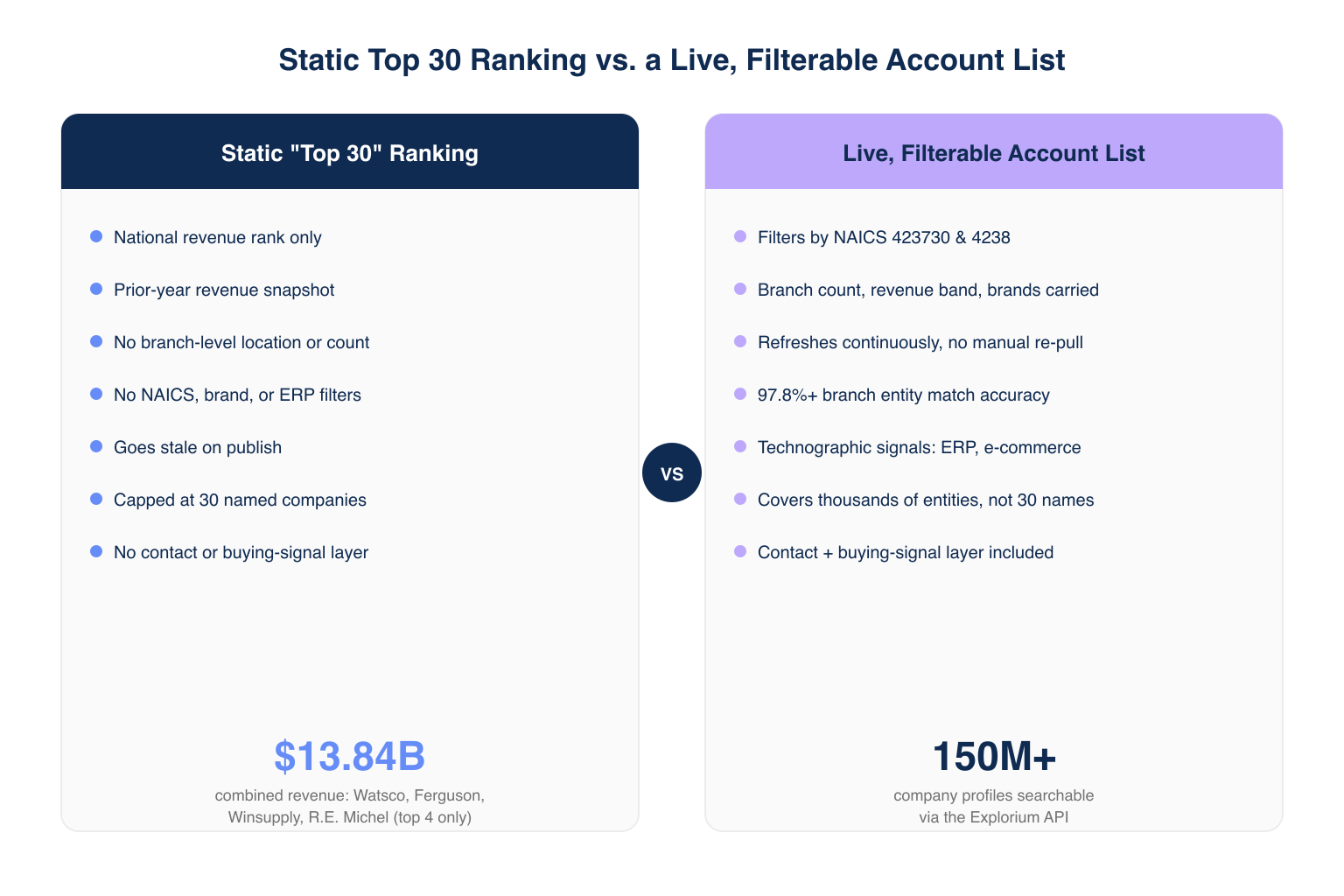
To target top HVAC distributors for B2B sales leads, stop starting from a static “Top 30” ranking and start from a filterable account list built on real firmographic and technographic data. HVAC distributor and wholesaler accounts control most of the vertical’s purchasing volume: Watsco, Ferguson, Winsupply, and R.E. Michel alone represent a combined $13.84B in prior-year revenue, and each runs hundreds of branches that buy independently.
A revenue-ranked list shows who is big today, not which branches are opening or expanding, the gap this guide closes using what is data enrichment applied to a NAICS-defined segment, covering the filters and API workflow behind a list that stays current.
What Is an HVAC Distributor Target List?
An HVAC distributor target list is a filterable, continuously refreshed set of distributor and wholesaler accounts built from firmographic and technographic data, not a fixed ranking. Static “Top 30” lists rank distributors by prior-year revenue and stop there: no branch detail, no signal when a company opens a location or gets acquired.
❌ Why a Static Top 30 Ranking Fails RevOps Teams
- Ranks by trailing-year revenue only, no branch detail for territory routing.
- No filter for NAICS code, brands carried, or ERP platform.
- Goes stale on publish: branches open, close, and get acquired year-round.
- No contact or buying-signal layer, leaving reps to hunt separately.
✅ What a Live, Field-Level Account List Enables
- Filters accounts by NAICS code, branch count, revenue band, and brands carried in one query.
- Refreshes continuously, so an opened or closed branch shows up without a manual re-pull.
- Matches branch entities at 97.8%+ accuracy, cutting false positives.
- Layers technographic and buying-signal data onto the same record, no second tool required.
What Are the Biggest HVAC Distributors by Market Share?
Watsco, Ferguson, Winsupply, and R.E. Michel are the four largest HVAC distributors in the US, together representing a combined $13.84B in revenue, but market share alone does not show branch locations or hiring activity. Editorial rankings capture the top tier but miss the hundreds of regional distributors that often close faster.
📊 Where Editorial Rankings Stop Short
| What a Top 30 Ranking Shows | What It Misses |
|---|---|
| National revenue rank | Branch-level location and count |
| Prior-year revenue snapshot | Openings, closures, acquisitions |
| Company name and headline revenue | ERP, e-commerce, inventory data |
| Top 30 names only | Hundreds of regional distributors below the top tier |
| No contact layer | Decision-maker names and buying signals |
💡 Why the Long Tail Matters More Than the Top 4
- The four largest distributors run mature vendor relationships and long cycles that slow deals down.
- Regional and independent branches below the top tier go under-called since no editorial list surfaces them.
- NAICS 423730 and the broader 4238 code capture thousands of entities beyond the named top players.
How Do You Build a Target List of HVAC Distributor Branches?
Building a distributor branch target list starts with a firmographic query against NAICS 423730 and 4238, then layers in branch count, revenue band, and brands carried before outreach. This replaces reading a Top 30 article and calling every logo with a query a team reruns weekly. Pair this with a broader NAICS-based HVAC segmentation approach for teams that also sell to contractors.
🔄 The Four-Step Build Process
- Define the account universe with NAICS 423730 and 4238 plus a revenue floor.
- Pull branch-level location and firmographic data for every match.
- Overlay technographic and buying-signal filters to rank by fit.
- Enrich the resulting list with contact data for branches that clear the bar.
⚡ Query the API
pip install exploriumimport requests
response = requests.post(
"https://api.explorium.ai/v1/companies/search",
headers={"Authorization": f"Bearer {EXPLORIUM_API_KEY}"},
json={
"filters": {
"naics_code": ["423730", "4238"],
"revenue_min": 5000000,
"country": "US"
},
"size": 500
}
)This call returns matched entities from Explorium’s 150M+ company profiles, paged in batches of 1,000.
Where Can You Get HVAC Distributor Branch Data for B2B Sales?
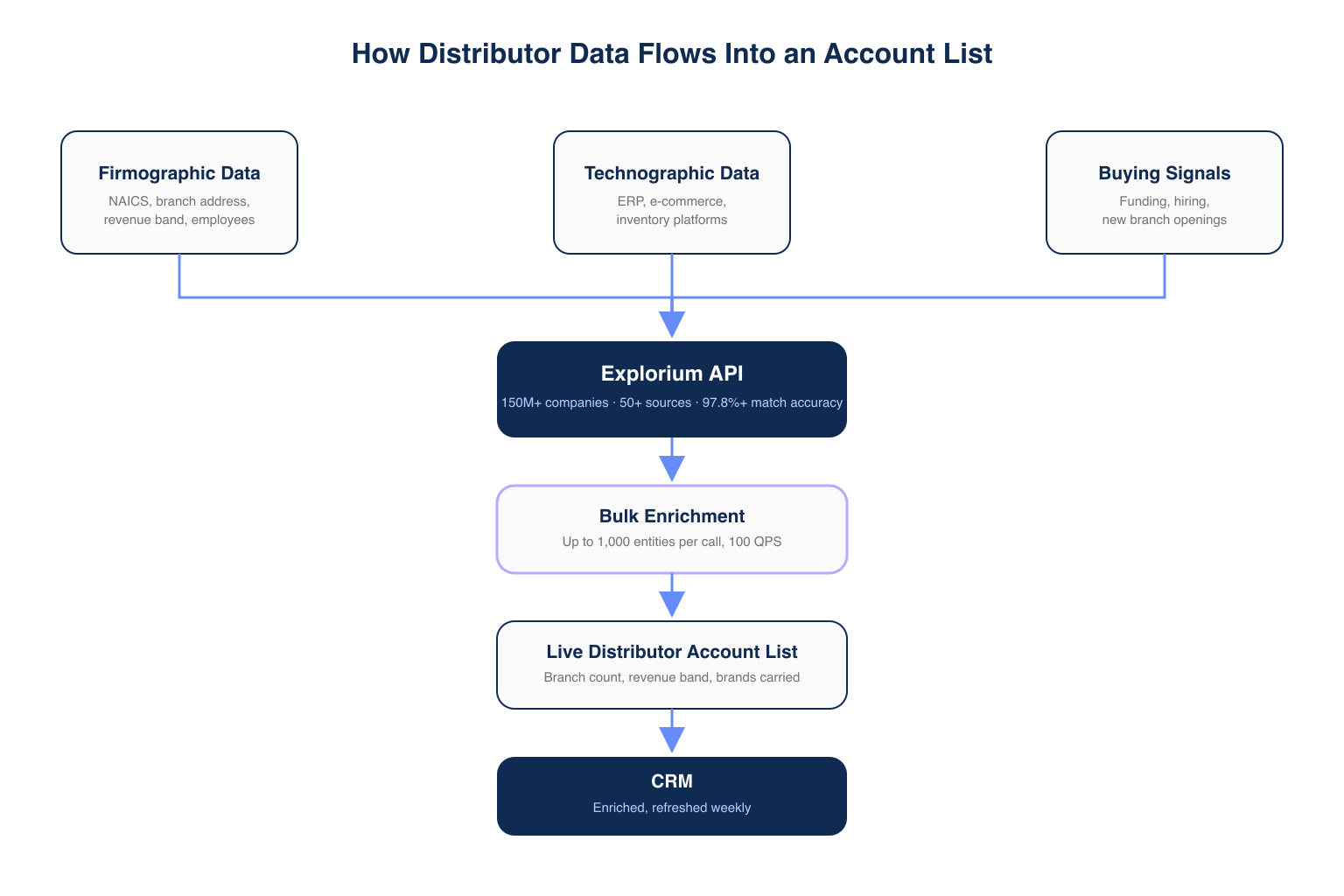
HVAC distributor branch data comes from a B2B data API that maintains firmographic and location records across 50+ sources, not a spreadsheet or static ranking. A data-pipeline approach pulls branch address, employee count, revenue band, and technographics directly into a CRM.
🏗 Where the Data Actually Lives
- Firmographic: legal entity name, NAICS code, branch address, employee count, revenue band.
- Technographic: ERP, inventory management, and e-commerce platform detection.
- Signal: funding events, workforce growth, and new branch openings across 18 categories.
- Contact: verified decision-maker names and titles per branch.
⚠️ Common Data-Sourcing Mistakes
- Separate firmographic and technographic tools double integration work and create two systems of record.
- A one-time spreadsheet export misses every branch that opens afterward.
- Skipping match-accuracy checks risks loading duplicate branch entities into a CRM.
“It enriches CRM contacts with firmographics and buying indicators in real time without the hassle of ETL.” — G2 reviewer, Mid-Market via G2
What Firmographic Filters Matter Most for HVAC Distributor Targeting?
Branch count, revenue band, brands carried, and warehouse location matter most because they separate a national account with hundreds of buying locations from a single-branch wholesaler. NAICS code alone returns every distributor in the category; these filters narrow that universe to accounts worth a dedicated motion. See the full B2B data providers landscape for how firmographic coverage is sourced.
💡 Why Each Filter Changes the Outcome
| Filter | Why It Matters | Example Threshold |
|---|---|---|
| Branch count | Signals multi-location procurement complexity and deal size | 5+ branches |
| Revenue band | Separates enterprise distributors from small independents | $5M-$500M |
| Brands carried | Flags which manufacturer relationships a distributor already holds | 3+ named brands |
| Warehouse location | Determines territory routing and logistics fit | Within target region |
- Branch count over 5 signals a dedicated purchasing function.
- Revenue band $5M-$500M captures the mid-market segment Top 30 lists skip.
- Brands carried flags whether a target already stocks a competitor’s line.
- Warehouse location routes territory assignments to the branch level.
⚠️ Common Filtering Mistakes
- NAICS code alone still returns thousands of accounts with no way to separate a five-branch player from a single-location shop, a gap Coresignal’s own review of its dataset acknowledges lacking native branch-location filtering.
- A revenue floor set too high excludes fast-growing independents that outpace their reported band.
- Ignoring brands-carried data means calling accounts already locked into an exclusive vendor agreement.
Already scoping a distributor-branch list? Start a free trial: 100 credits, no subscription →
What Technographic Signals Flag a Good-Fit HVAC Distributor Account?
ERP platform, e-commerce storefront presence, and inventory management software are the technographic signals that most reliably flag a good-fit HVAC distributor account. A distributor on a modern ERP and e-commerce portal behaves differently than one still on paper inventory.
⚡ The Technographic Signals That Matter
- ERP platform in use, since distributors migrating off legacy ERP are actively evaluating vendors.
- E-commerce storefront presence, which correlates with willingness to adopt new B2B software.
- Inventory management changes, detected as a website or job-posting signal.
- Recent job postings for warehouse or logistics roles, flagging growth ahead of new openings.
📊 Sample Technographic Signal Output
- ERP: legacy on-premise system, flagged as migration-in-progress.
- E-commerce: storefront added in the last 90 days.
- Hiring: three open logistics roles posted in the last 30 days.
How Do You Find Decision-Makers at HVAC Wholesalers?
Finding decision-makers at HVAC wholesalers means enriching each qualified branch with verified contact records for procurement, operations, and branch-manager roles, not searching one branch at a time. Once firmographic and technographic filters narrow the universe, contact enrichment runs only against accounts that cleared the fit bar.
👤 Contact Enrichment
response = requests.post(
    "https://api.explorium.ai/v1/prospects/enrich",
    headers={"Authorization": f"Bearer {EXPLORIUM_API_KEY}"},
    json={
        "company_ids": matched_branch_ids,
        "titles": ["procurement", "branch manager", "operations"]
    }
)
This call returns matched contacts from 800M+ people profiles via Explorium Contact Enrichment, scoped to titles that influence purchasing.
- Procurement managers control vendor-selection at most branches.
- Branch managers own day-to-day buy-in for new vendor relationships.
- Operations leads flag whether a branch is expanding staff or footprint.
⚠️ Why Contact-First Tools Fall Short
- Hunter.io’s own MCP documentation confirms no native branch-location or NAICS filtering, so every branch gets looked up one at a time.
- Email-first tools return a name and address but no fit signal, leaving a rep to check fit manually.
- Neither approach scopes enrichment to accounts already cleared by a filter, so spend does not track opportunity.
How Do You Keep a Distributor List Current as Branches Change?
Keeping a distributor list current means re-running the firmographic query on a schedule, not re-reading next year’s Top 30 article. A list built once and left alone degrades the same way a static ranking does.
🔄 Refresh Signals
- New branch openings, detected as a new address tied to an entity.
- Branch closures, which should drop that location from outreach lists.
- M&A activity, since an acquired branch inherits a parent’s vendor relationships.
- Hiring signal changes, flagging branches entering a growth phase.
📊 Bulk Refresh
response = requests.post(
    "https://api.explorium.ai/v1/companies/bulk_enrich",
    headers={"Authorization": f"Bearer {EXPLORIUM_API_KEY}"},
    json={
        "entities": branch_ids,
        "fields": ["firmographics", "technographics", "signals"]
    }
)
Explorium processes up to 1,000 entities per bulk call at 100 QPS, sized for a branch universe spanning thousands of locations, not 30 names on a ranking.
How Does the Explorium API Fit Into This Workflow?
The Explorium API is the data layer behind every step above: one API for firmographics, technographics, and buying signals, built to process bulk account lists at scale, priced with a unified credit pool a team can validate for free.
🔑 Pillar 1: One API for Every Data Need
- 150M+ company profiles and 800M+ people profiles from 50+ sources cover firmographics, technographics, and contacts in one account.
- 18 buying-signal categories and 80+ signal types surface expansion, funding, and hiring activity, no second vendor needed.
- 97.8%+ match accuracy reduces false positives when matching branch entities.
🚀 Pillar 2: Built for a Branch-Level Scale Problem
- Bulk enrichment handles up to 1,000 entities per call at 100 QPS.
- 99.999% uptime keeps a scheduled weekly refresh running unattended.
- Continuous refresh replaces the once-a-year cadence of an editorial ranking.
💰 Pillar 3: Affordable Enough to Validate Before Scaling
- A free account with no sales call gets a team to a first API call in minutes.
- Credits flow into a unified pool across every endpoint, avoiding per-endpoint budgeting.
- Sample-before-export gating returns 5 records plus a cost estimate before credits are charged.
“Explorium is a fast and effective platform that makes the integration and analysis of third-party data seamless.” — CEO, Mid-Market via G2
Getting Started: From NAICS Query to Live Account List in 5 Steps
Getting started means running a NAICS-scoped query on a free account, validating the sample, then scaling to bulk and contact enrichment, a five-step path completed in one afternoon.
- Step 1: Create a free account at explorium.ai, no sales call required.
- Step 2: Run a firmographic search scoped to NAICS 423730 and 4238 with a revenue floor.
- Step 3: Validate the sample-before-export results, 5 records plus a cost estimate, before spending credits.
- Step 4: Scale to bulk enrichment across the full matched universe, up to 1,000 entities per call.
- Step 5: Layer in contact enrichment and signal filters to prioritize outreach.
⚠️ Mistakes That Stall a Getting-Started Rollout
- Pulling the full account universe first, before validating the sample, burns credits early.
- Treating one query as final instead of scheduling a recurring refresh.
- Enriching every matched account for contacts instead of only those that cleared the fit bar.
🔑 The Decision Framework
A static Top 30 ranking answers one question: who is biggest this year. It cannot answer branch count, technographic fit, or which accounts are expanding. Explorium’s API covers 150M+ companies and 800M+ contacts in one account, processes bulk lists at 100 QPS with 97.8%+ accuracy, on a unified credit pool teams validate free before spending. For a RevOps team building a distributor-branch list at scale, Explorium is the workflow, not another ranking.
Ready to replace a static ranking with a live account list? Start a free trial: 100 credits, no subscription →
Related Posts
- How to Find HVAC Company Leads for B2B Sales with AI Agents
- How to Segment B2B HVAC Prospects by Industry Sector
- Best B2B Data Providers 2025: Complete Comparison
FAQs


