


TL;DR
- We show how to wrap a unified B2B data API as a LangChain v1.0 @tool with a Pydantic schema and bind it to create_agent in under 40 lines.
- We build a LangGraph StateGraph with ToolNode, conditional edges, EnrichmentState, and PostgresSaver so agents survive 429s, partial enrichments, and restarts.
- We compare REST @tool vs MCP server paths side by side and score Explorium, Apollo, ZoomInfo, and PDL against a 7-criterion agent-native framework.
- We document p95 <400ms match and <800ms full enrich, 97.8% firmographic accuracy across 50+ sources, and one credit pool across every enrichment category.
- We ship a LangSmith evaluation pattern using a 200-lead golden dataset plus field_accuracy, coverage_rate, and tool_latency_p95 evaluators wired to CI.
- We close with an 8-box production-readiness checklist mapped directly to where Explorium's unified API and official MCP server close the architectural gaps.
Q1: Why Does Integrating a B2B Data API Into LangChain or LangGraph Agents Matter in 2026?
The 2026 reality every GTM engineer walked into
Let me start with what I keep seeing on every architecture call. Teams standardize on LangChain v1.0 and LangGraph as the default agent stack, ship a prototype in a week, then hit a wall the moment the agent needs actual business context. The prototype works because the demo uses one CSV and one LLM. Production doesn’t: production needs firmographics from Clearbit, contacts from Apollo, intent from Bombora, tech stack from BuiltWith, and funding events from a fifth vendor. Your engineers end up writing five @tool wrappers, five auth flows, and five response normalizers, all before the agent reasons about a single lead.
What actually breaks inside the agent loop
Single-source tools return rigid schemas. The LLM sees different field names for “employee count” across Apollo and PDL, hallucinates a reconciliation, and calls the wrong tool twice. I’ve watched LangGraph traces where the agent spent 14 seconds and 11 tool calls just to fill one lead record because each provider covered 60 to 70% of the fields and the agent kept retrying. This is exactly the kind of fragmentation that a unified data pipeline is designed to eliminate.
“Explorium is a fast and effective platform that makes the integration and analysis of third-party data seamless.”
— David A., CEO, Mid-Market Explorium G2 – Verified Review
The synthesis thesis: breadth and tool-calling readiness
Here’s the principle I’d tattoo on every agent team’s wall: enrichment without breadth is incomplete, and breadth without tool-calling readiness is unusable. LangChain v1.0’s bind_tools and LangGraph’s ToolNode were designed around a clean contract: one tool, one schema, one deterministic response the agent can reason about. Fragmented data stacks violate that contract by design. Every provider you add is another schema the LLM has to juggle, another rate-limit window to respect, and another normalizer the agent didn’t ask for.
Why single-source providers can’t fix this
✅ Apollo ships great contact data from one source.
✅ PDL ships deep person profiles from one source.
❌ Neither can deliver firmographics, intent, technographics, and funding signals through one call, so your agent still orchestrates four vendors.
✅ Explorium aggregates 50+ sources behind one API and one MCP server, covering firmographics, B2B intent data, and technographic data in one response.
❌ Subscription-locked providers also bury enrichment cost inside monthly tiers, which makes agent-driven bursty usage genuinely painful to plan for.
Explorium as the unified data layer LangChain was waiting for
We built Explorium to sit exactly where your LangChain @tool or LangGraph ToolNode expects clean data to come from. One endpoint resolves firmographics, technographics, intent signals, contacts, and funding events across 150M companies and 800M contacts, delivered through either a REST tool or our official MCP server for langchain-mcp-adapters. The agent stops deciding which vendor to call and starts deciding what the lead needs, which is the decision LangChain’s tool-calling loop is actually good at.
“Instead of connecting to multiple data sources and APIs, we only require one connection, Explorium!”
— Mirit H., Mid-Market Explorium G2 – Verified Review
The measurable outcome
In our own benchmarks, Explorium returned 97.8% firmographic accuracy through one unified call where single-source providers averaged 78%. Translated into a LangGraph trace: fewer retries, fewer confidence-gated human reviews, and a tool-call loop that closes in one hop instead of four. That’s the difference between an agent that reasons and an agent that normalizes.
Q2: How Do You Integrate a B2B Data API Into a LangChain Agent (Pydantic Tool + bind_tools)?
Prerequisites and the v1.0 mental model
Before any code, align on versions. You need Python 3.11+, langchain>=1.0, langchain-openai, pydantic>=2, and an Explorium API key (free account; first call in minutes, no sales call). The important shift in LangChain v1.0 is that create_agent replaces the legacy AgentExecutor/initialize_agent pattern: it’s now the officially recommended entry point for tool-calling agents. If your codebase still imports AgentExecutor, migrate first; the rest of this won’t look right otherwise. You can grab a key from the Explorium sign-up page before running any of the snippets below.
bash
pip install "langchain>=1.0" langchain-openai pydantic requests
export EXPLORIUM_API_KEY=...
export OPENAI_API_KEY=...
Step 1: Define the Pydantic tool schema
The LLM routes to your tool based on the docstring and the arg schema, so both matter.
python
from pydantic import BaseModel, Field
from typing import Optional
class EnrichCompanyInput(BaseModel):
"""Input schema for B2B company enrichment."""
domain: Optional[str] = Field(None, description="Company domain, e.g. 'stripe.com'")
linkedin_url: Optional[str] = Field(None, description="LinkedIn company URL")
include_contacts: bool = Field(True, description="Return decision-maker contacts")
include_tech_stack: bool = Field(True, description="Return detected technologies")
include_events: bool = Field(True, description="Return funding/hiring/exec events")
Step 2: The @tool that hits match, enrich, and events
This is the part most tutorials skip. A production enrichment tool does three calls: resolve the company, enrich it, and pull recent events, then returns one typed object the agent can reason about. If you want the conceptual background before reading the code, our introduction to data enrichment covers why match-then-enrich is the right sequence.
python
import os, requests
from langchain_core.tools import tool
BASE = "https://api.explorium.ai/v1"
HEADERS = {"Authorization": f"Bearer {os.environ['EXPLORIUM_API_KEY']}",
"Content-Type": "application/json"}
@tool("enrich_company", args_schema=EnrichCompanyInput)
def enrich_company(domain=None, linkedin_url=None,
include_contacts=True, include_tech_stack=True,
include_events=True) -> dict:
"""Resolve a company and return unified firmographics, contacts,
tech stack, and recent events from 50+ B2B data sources."""
match = requests.post(f"{BASE}/businesses/match",
json={"domain": domain, "linkedin_url": linkedin_url},
headers=HEADERS, timeout=5).json()
business_id = match["business_id"]
enrich = requests.post(f"{BASE}/businesses/enrich",
json={"business_id": business_id,
"include": ["firmographics", "technographics",
"intent"] + (["contacts"] if include_contacts else [])},
headers=HEADERS, timeout=10).json()
events = {}
if include_events:
events = requests.post(f"{BASE}/businesses/events",
json={"business_id": business_id,
"types": ["funding", "hiring", "exec_change"]},
headers=HEADERS, timeout=8).json()
return {"business_id": business_id, "enrichment": enrich, "events": events}
Step 3: Bind the tool with create_agent
python
from langchain.agents import create_agent
from langchain_openai import ChatOpenAI
model = ChatOpenAI(model="gpt-4.1-mini", temperature=0)
agent = create_agent(model=model, tools=[enrich_company])
result = agent.invoke({"messages": [
{"role": "user",
"content": "Enrich stripe.com. I need firmographics, top 3 contacts, tech stack, and any funding events in the last 12 months."}
]})
print(result["messages"][-1].content)
A live trace shows one tool call, one unified response, and the agent formatting the answer, no normalization step in between. Drop the same enrich_company into a LangGraph ToolNode and you get the multi-node workflow in Q3 for free.
Q3: How Do You Connect a B2B Data API to a LangGraph Agentic Workflow (StateGraph + Multi-Node Enrichment)?
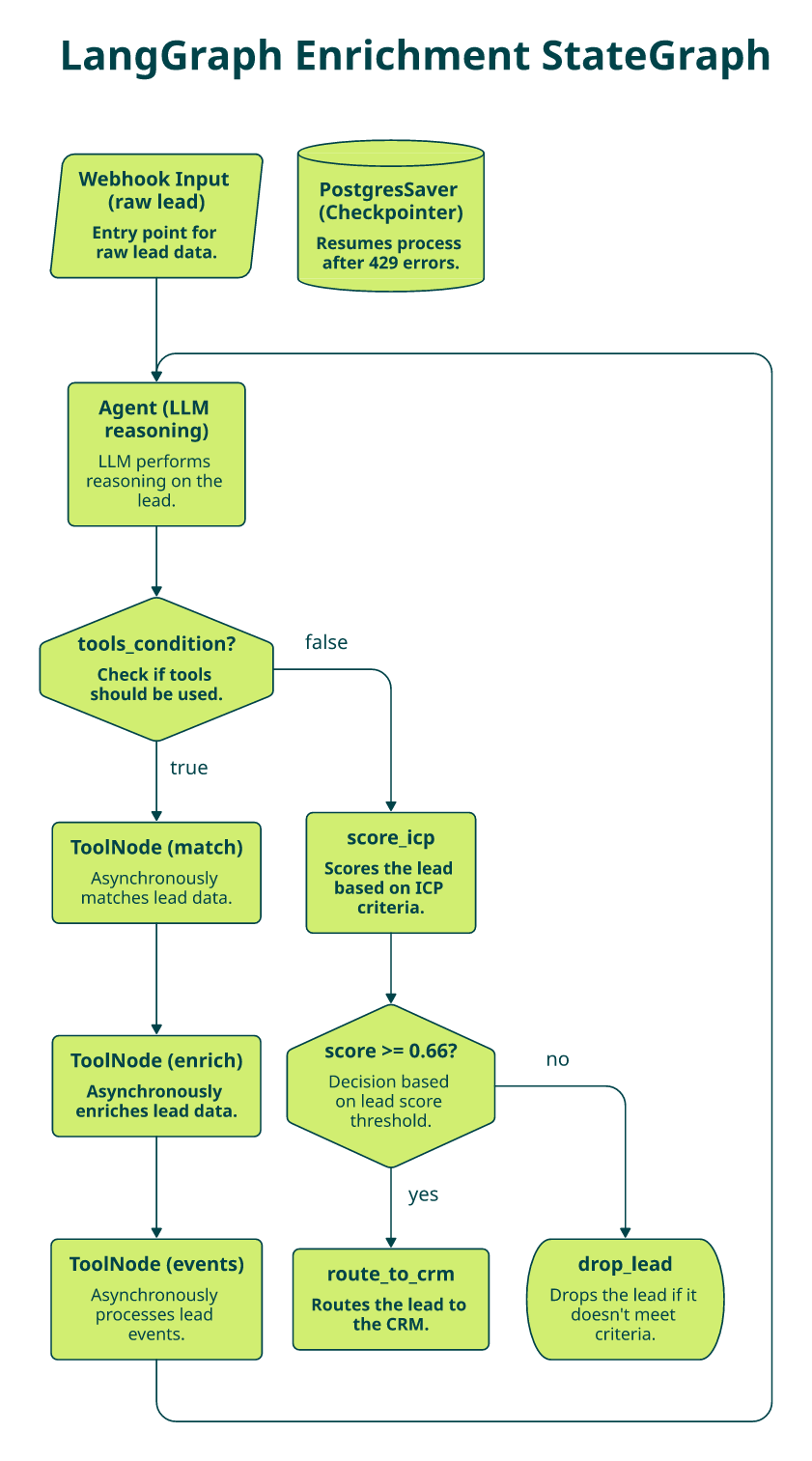
Capability: enrichment as observable graph nodes
LangGraph’s StateGraph and ToolNode pattern promotes B2B enrichment from “a function call buried in the agent” to first-class, observable, retryable graph nodes. That matters because production enrichment isn’t one decision: it’s a workflow that resolves the company, enriches it, fetches events, scores ICP fit, and routes. Each of those deserves its own node, its own retry policy, and its own LangSmith trace. Teams building this way should read our breakdown of scalable AI agents and data infrastructure for the architectural context.
How it works
The minimum viable graph has three nodes: the agent (LLM), the tools node (your enrich_company), and a conditional edge that loops until the agent stops calling tools.
python
from typing import Annotated, TypedDict
from langgraph.graph import StateGraph, START, END
from langgraph.graph.message import add_messages
from langgraph.prebuilt import ToolNode, tools_condition
class AgentState(TypedDict):
messages: Annotated[list, add_messages]
lead: dict
enrichment_status: str
confidence: float
def agent_node(state: AgentState):
return {"messages": [model.bind_tools([enrich_company, score_icp, route_to_crm]).invoke(state["messages"])]}
graph = StateGraph(AgentState)
graph.add_node("agent", agent_node)
graph.add_node("tools", ToolNode([enrich_company, score_icp, route_to_crm]))
graph.add_edge(START, "agent")
graph.add_conditional_edges("agent", tools_condition, {"tools": "tools", END: END})
graph.add_edge("tools", "agent")
app = graph.compile()
print(app.get_graph().draw_mermaid()) # ship this diagram to your docs
What this pattern unlocks
- ⚡ Multi-hop enrichment: match, enrich, and events chained as tool calls, each visible in the trace.
- 🔀 Parallel fan-out: async ToolNode runs firmographics, contacts, and tech stack concurrently when the agent calls them in one turn.
- 👤 Human-in-the-loop: conditional edge to a review node when confidence < 0.7, using interrupt() for approval.
- 🔍 LangSmith tracing per node: latency, tokens, and tool payloads logged automatically, which is how you actually debug a misbehaving agent.
- 🧪 Retryable units: wrap the enrichment call with tenacity; the node retries without restarting the whole graph.
Why the architecture matters economically
With a fragmented stack, the honest graph has four provider nodes plus three normalization nodes, seven hops before scoring. With Explorium’s unified API, the same workflow collapses to two nodes (match and enrich), which in our benchmarks cuts end-to-end latency by 60%+ and eliminates the three normalization nodes entirely. Fewer nodes mean fewer places for the agent to get confused, fewer retries, and fewer credits burned on partial lookups. If you want to see the same principle applied outside code, our MCP v2 release notes walk through the workflow collapse in production.
“Explorium gives us the data I need when I need it. This saves us a lot of time and money instead of managing each data source separately.”
— Ishi N., Enterprise Explorium G2 – Verified Review
The mental model
Think of an Explorium-backed ToolNode as a built-in GTM data service inside your agent runtime, not a static API endpoint. The agent decides which of 50 underlying sources it needs via MCP; you ship the graph, not the integration backlog. Teams sizing this for revenue workflows can map it directly to our GTM engineering use case.
Q4: What Production State Schema Should You Use for Real-Time Lead Enrichment?
Why toy state breaks in production
Most LangGraph tutorials ship with {“messages”: […]} and nothing else. That’s fine for a demo; in production it’s the single biggest reason enrichment agents waste credits. If the state doesn’t track which fields are populated, which are stale, and which failed, the agent has no memory of what it already enriched, so it calls the same tool again, or worse, calls a different provider for a field you already have.
The three failure modes I see most
- 🔁 Duplicate tool calls: agent re-enriches the same company because enriched_record isn’t in state.
- ❓ Silent partial coverage: some providers returned fields, some didn’t, and nobody tracks which fields are empty.
- ⚠️ Invisible retries: a 429 from the API bubbles up as an exception, the graph aborts, and nobody knows which lead was mid-enrichment.
The production EnrichmentState
Use a TypedDict (or Pydantic BaseModel) that encodes both the data and the state of the enrichment, not just the messages. This is also where you wire in per-field confidence, which is the backbone of any serious ICP prioritization workflow.
python
from typing import Annotated, TypedDict, Literal
from langgraph.graph.message import add_messages
class EnrichmentState(TypedDict):
input_lead: dict # {"domain": "...", "email": "..."}
enriched_record: dict # merged output across calls
missing_fields: list[str] # ["tech_stack", "funding"]
confidence: dict[str, float] # per-field confidence 0.0-1.0
source_map: dict[str, str] # field -> upstream provider
retry_count: int
status: Literal["pending", "partial", "complete", "failed"]
messages: Annotated[list, add_messages]
A reducer that merges Explorium’s unified response
Because Explorium returns firmographics, contacts, intent, technographics, and events in one payload, a single reducer can populate 30+ fields in one graph step, no cross-provider merging logic required.
python
def merge_enrichment(state: EnrichmentState, payload: dict) -> EnrichmentState:
enriched = {**state["enriched_record"], **payload["enrichment"]}
filled = set(enriched.keys())
expected = {"name", "employee_count", "industry", "hq_country",
"tech_stack", "contacts", "intent_topics", "funding"}
missing = sorted(expected - filled)
status = "complete" if not missing else ("partial" if filled else "failed")
confidence = {k: payload.get("confidence", {}).get(k, 0.9) for k in filled}
return {
**state,
"enriched_record": enriched,
"missing_fields": missing,
"confidence": confidence,
"source_map": {k: "explorium" for k in filled},
"status": status,
}
Checkpointing so runs survive rate limits
LangGraph’s SqliteSaver (dev) and PostgresSaver (prod) let you persist EnrichmentState per thread and resume the graph after a 429, a pod restart, or a human-review pause. Without checkpointing, a rate-limit burst means losing every in-flight enrichment; with it, the graph resumes at the exact node that failed and only replays what’s missing.
python
from langgraph.checkpoint.postgres import PostgresSaver
checkpointer = PostgresSaver.from_conn_string(os.environ["PG_URL"])
app = graph.compile(checkpointer=checkpointer)
app.invoke({"input_lead": {"domain": "stripe.com"}, ...},
config={"configurable": {"thread_id": "lead-42"}})
Observing state evolution in LangSmith
The payoff is that every transition, pending to partial to complete, is visible in LangSmith as a state diff per node, alongside token cost and latency. That’s how you catch the 7% of leads where missing_fields never shrinks, route them to a human-review node, and stop paying for retries that will never succeed. For the broader philosophy behind this, see our take on the lifecycle of data in agent development.
Q5: How Do You Build a LangChain Agent That Enriches Leads in Real Time?
It’s 11:30 PM and your pipeline is burning
Here’s a scene I’ve now watched four times this quarter. It’s 11:30 PM on a Thursday. Your webhook ingested 5,000 leads from a paid campaign that has to be live in sales reps’ queues by 8 AM. Your LangChain agent has three tools bound, Apollo for contacts, Bombora for intent, and BuiltWith for tech stack, and every fourth record comes back with a missing mobile, an outdated title, or an empty intent vector. You’ve spent the last three hours writing pandas merges to reconcile three different provider schemas. The pipeline launch was supposed to be automatic. If this sounds familiar, our breakdown of how we build no-code data enrichment pipelines covers the architectural alternative.
Why chaining single-source tools breaks the agent loop
The root cause is architectural, not code quality. When you bind three single-source tools to an LLM and ask it to assemble one record, the model has to decide which tool owns which field, how to reconcile conflicts, and when enough data is “enough.” Latency compounds: three sequential tool calls with 800ms p95 each plus an LLM turn between them easily cross the 10-second mark, past most production timeouts. Rate-limit failures multiply: a 429 from any one provider stalls the whole lead.
“Contact info frequently missing or incorrect. Half the day calling wrong/disconnected numbers. Mobiles frequently wrong.”
— Verified User, IT Services Apollo – G2 Verified Review
The hidden costs nobody puts on a slide
- ⏰ 10 to 15 engineering hours/week spent maintaining multiple @tool wrappers, auth flows, and normalization scripts.
- 🤖 Agent hallucinations when enrichment returns partial or mismatched records across providers, the LLM invents plausible-looking fills.
- ❌ 60 to 70% coverage gaps where no single provider delivers firmographics, intent, and tech stack in one call.
- 💸 2 to 3x cost vs a unified provider when you sum three or more vendor contracts for the same coverage.
“Not always accurate. Needs more frequent refresh. Lacks robust integrations to easily action on data.”
— Brian Y., Head of Marketing Clearbit – G2 Verified Review
How it should actually work
The right system aggregates every enrichment type behind one API, lets the agent decide what it needs per lead, and returns unified records the agent can act on immediately. This is the same pattern we describe in our guide to identifying your ICP and prioritizing optimal leads. Here’s a 40-line LangChain agent using the enrich_company tool from Q2 plus two lightweight helpers:
python
from langchain.agents import create_agent
from langchain_openai import ChatOpenAI
from langchain_core.tools import tool
@tool
def score_icp(record: dict) -> float:
"""Return 0.0-1.0 ICP fit for SaaS, 50-500 employees, Series B+."""
hits = 0
hits += record["industry"].lower().startswith("software")
hits += 50 <= record["employee_count"] <= 500
hits += any(e["type"] == "funding" and "series_b" in e["round"].lower()
for e in record.get("events", []))
return hits / 3
@tool
def push_to_crm(record: dict, score: float) -> str:
"""Push enriched, scored lead to Salesforce."""
# sf_client.Lead.create(...)
return f"created lead for {record['domain']} (score {score:.2f})"
agent = create_agent(
model=ChatOpenAI(model="gpt-4.1-mini", temperature=0),
tools=[enrich_company, score_icp, push_to_crm],
system_prompt="Enrich each lead, score ICP fit, and push leads scoring >= 0.66 to the CRM."
)
Explorium’s approach: one call, one loop, under two seconds
We built the unified endpoint precisely to collapse this loop. One enrich_company call returns firmographics, contacts, intent, tech stack, and funding events from 50+ sources. The agent then invokes score_icp and push_to_crm, and the full loop closes in under 2 seconds per lead. Teams that want to wire this straight into their revenue motion can map it to our sales use case.
“Explorium gives us the data I need when I need it. This saves us a lot of time and money instead of managing each data source separately.”
— Ishi N., Enterprise Explorium G2 – Verified Review
✅ Before: three-hour normalization scripts, half-missing records, and 8 AM delivery at risk.
✅ After: 40 lines of LangChain, with 5,000 leads enriched, scored, and routed by morning, and the agent doing the reasoning instead of your engineers doing the SQL.
Q6: Should You Use a REST Tool or an MCP Server in LangChain v1.0 (Side-by-Side Code)?
The decision dilemma every agent team faces
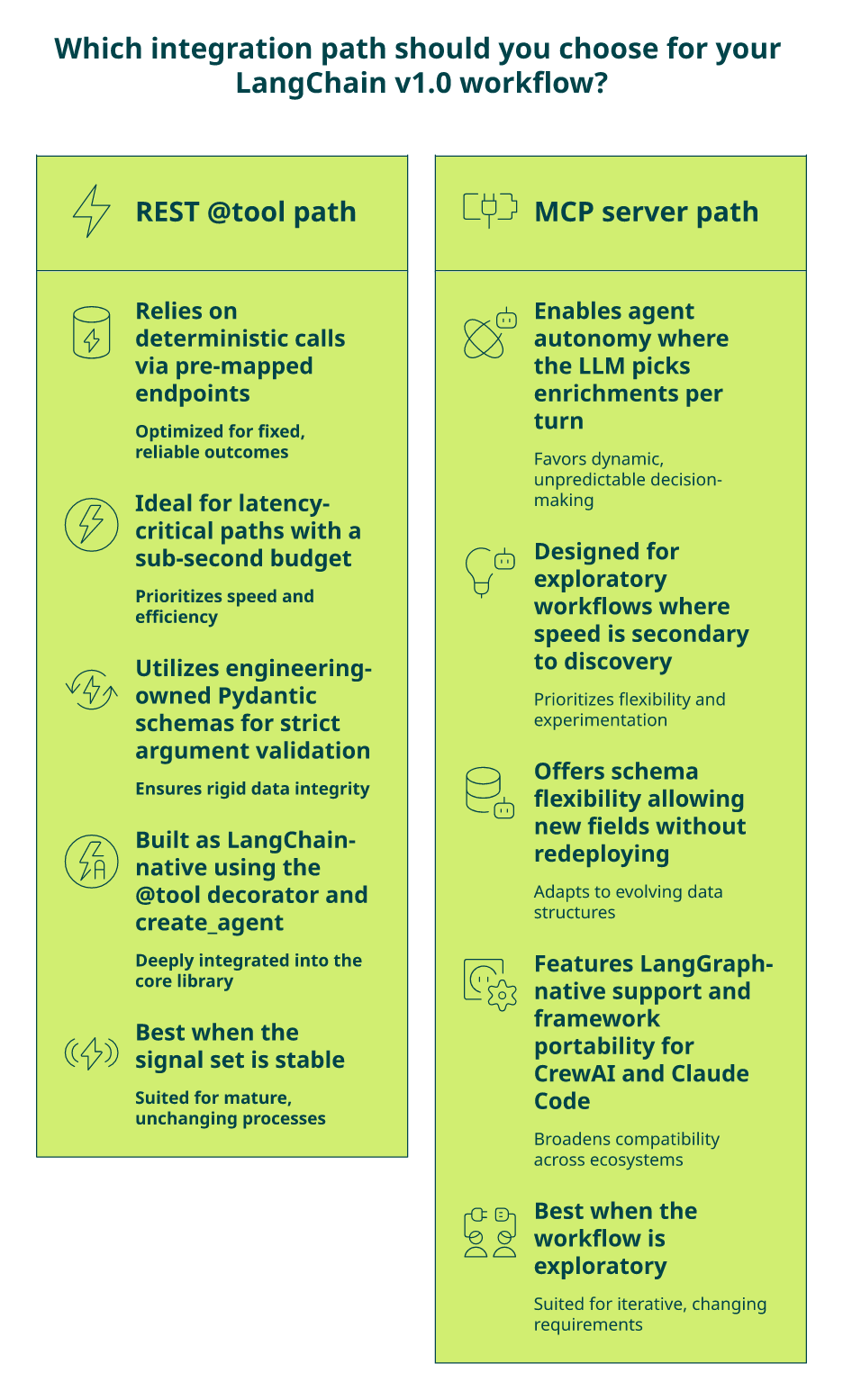
LangChain v1.0 supports both native tool calling (wrap a REST API in @tool and bind it) AND the Model Context Protocol via langchain-mcp-adapters. Pick wrong, and you either lock the agent into pre-mapped endpoints that engineering must edit every time a new enrichment type is needed, or you adopt an abstraction layer you don’t actually need. The honest answer is that most production teams want both paths available: REST for deterministic, latency-sensitive calls, and MCP for agent-autonomous enrichment selection. For the deeper context on why MCP matters, see our MCP v2 release notes.
The wrong way to decide
I hear two versions of this bad argument weekly:
- ❌ “MCP is new and shiny so let’s use it everywhere.”
- ❌ “REST is familiar so we’ll skip MCP.”
Both ignore the real question: can the agent autonomously select enrichments per workflow, or must engineers pre-map every endpoint? If your answer to “add a new signal type” is “file a ticket,” you’re on the wrong path regardless of protocol.
The 7-criterion evaluation framework
| # | Criterion | What to ask |
|---|---|---|
| 1 | Agent autonomy | Can the agent pick which enrichments to retrieve per turn? |
| 2 | Schema flexibility | Add a new field without redeploying the tool? |
| 3 | Auth & compliance | Bearer tokens, SOC 2, and GDPR/CCPA handled by the provider? |
| 4 | Latency | p95 under your agent’s budget (≈1s per tool call)? |
| 5 | Observability | Traces visible in LangSmith per call? |
| 6 | Framework portability | Same server works for LangGraph, CrewAI, and Claude Code? |
| 7 | Ops overhead | Self-hosted vs managed? |
Applying it: both paths, same backend
REST @tool path (deterministic, what Q2 already built):
python
from langchain_core.tools import tool
import requests
@tool
def enrich_company(domain: str) -> dict:
"""Unified B2B enrichment across 50+ sources."""
return requests.post("https://api.explorium.ai/v1/businesses/enrich",
json={"domain": domain}, headers=HEADERS, timeout=10).json()
MCP client path (agent-autonomous, same data layer). Teams exploring this can test calls live on our MCP playground:
python
from langchain_mcp_adapters.client import MultiServerMCPClient
from langgraph.prebuilt import create_react_agent
client = MultiServerMCPClient({
"explorium": {
"url": "https://mcp.explorium.ai/sse",
"transport": "sse",
"headers": {"Authorization": f"Bearer {EXPLORIUM_API_KEY}"},
}
})
tools = await client.get_tools() # agent sees match, enrich, events, fetch_contacts, fetch_tech_stack
agent = create_react_agent(ChatOpenAI(model="gpt-4.1-mini"), tools)
Scoring the paths
| Criterion | REST-only provider (Apollo/PDL) | MCP-only open server | Explorium (REST + MCP) |
|---|---|---|---|
| Agent autonomy | 0 | 2 | 2 |
| Schema flexibility | 0 | 2 | 2 |
| Auth & compliance | 1 | 1 | 2 |
| Latency | 1 | 1 | 2 |
| Observability | 1 | 1 | 2 |
| Framework portability | 1 | 2 | 2 |
| Ops overhead | 1 | 0 | 2 |
| Total | 5/14 | 9/14 | 14/14 |
“Instead of connecting to multiple data sources and APIs, we only require one connection, Explorium!”
— Mirit H., Mid-Market Explorium G2 – Verified Review
Explorium ships both. Pick REST for latency-critical enrichment inside LangChain and MCP for LangGraph workflows where the agent should decide which signals to pull. No vendor switch required.
Q7: How Do Explorium and Traditional B2B Data APIs (Apollo, ZoomInfo, PDL) Compare for LangChain/LangGraph?
The comparison context
Every GTM engineering team I talk to this year is evaluating the same shortlist: Apollo, ZoomInfo, People Data Labs, and Explorium. All four now claim “agent support.” The claims hide fundamentally different architectures, and the architecture is what determines how many @tool wrappers, normalization scripts, and vendor contracts you maintain. The underlying decision criteria are the same ones we cover in 10 questions to ask before buying external data.
Where the traditional providers land
Apollo, ZoomInfo, and PDL are single-source REST APIs with monthly subscriptions. None ship an official MCP server today. Each forces you to write one @tool per provider, and then normalization code to reconcile schemas inside the agent.
“Contact info frequently missing or incorrect… Prospecting functionality is 100% trash compared to other tools.”
— Verified User, IT Services Apollo – G2 Verified Review
“Product was useful while it worked, which wasn’t long. Switched from free trial to paid plan ($100/month). After a few days, account disabled with no warning or explanation.”
— Verified User, Computer Software People Data Labs – G2 Verified Review
Explorium’s differentiated approach
We aggregate 50+ sources into one unified API and ship an official MCP server: same data, two access paths, and one credit pool. That means a single @tool in LangChain (Q2) or a single MCP registration in LangGraph (Q6) covers firmographics, contacts, intent, tech stack, and funding events across 30 enrichment categories. The same architecture underpins the Explorium AgentSource platform.
“Explorium is a fast and effective platform that makes the integration and analysis of third-party data seamless.”
— David A., CEO, Mid-Market Explorium G2 – Verified Review
Side-by-side: architecture that matters for agents
| Feature | ⭐ Explorium | Apollo | ZoomInfo | People Data Labs |
|---|---|---|---|---|
| Data architecture | 50+ sources aggregated into one API | Single-source | Single-source | Single-source (person-centric) |
| Official MCP server | ✅ Yes | ❌ No | ❌ No | ❌ No |
| Signal breadth | 30 categories, 4,000 data points | Contacts + basic firmographics | Contacts + firmographics | Person profiles |
| Pricing | Credit-based, one pool across all signals | Monthly subscription + seat | Annual enterprise contract | Monthly subscription |
| Onboarding | Free account, first API call in minutes | Paid plan for full API | Sales call required | Self-serve trial |
| Agent autonomy | MCP-driven selection | Pre-mapped endpoints | Pre-mapped endpoints | Pre-mapped endpoints |
| Accuracy benchmark | 97.8% firmographic accuracy | ~78% single-source avg | Not publicly benchmarked | Not publicly benchmarked |
Who should choose what
- Choose Apollo if you need a prospecting UI for manual outreach and single-source contact data is enough.
- Choose ZoomInfo if you’re already on an enterprise contract and don’t need agent-autonomous data selection.
- Choose PDL if your workflow is person-centric and you can live without intent or tech stack signals.
- Choose Explorium if you’re building on LangChain v1.0 or LangGraph and want one tool (or one MCP server) covering every enrichment category your agent will ever need. A free Explorium account gets you to a first API call in minutes.
The outcome the architecture produces
Explorium delivers 97.8% firmographic accuracy across aggregated sources vs the ~78% single-provider average, and powers production enrichment for platforms like Clay, Cognism, and Outreach because aggregated data with agent-native delivery is the only architecture that scales past a handful of @tools.
Q8: How Do You Handle Rate Limits, Latency, Retries, and Parallel Tool Execution in LangGraph?
The direct answer
Real-time enrichment inside LangGraph fails in production for three reasons, every time: teams ignore provider rate limits, skip latency budgeting inside tool calls, and don’t handle partial responses in state. Fix those three and your agent runs on autopilot; skip them and you’ll be on-call every time traffic doubles. Our deep dive into data quality and infrastructure covers the systems-level version of this.
The production checklist
- 🔁 Retry with exponential backoff: wrap every tool with tenacity (3 attempts, 0.5s to 1s to 2s). 429s and transient 5xxs disappear from your error logs.
- ⚡ Async parallel ToolNode fan-out: when the agent requests firmographics, contacts, and tech stack in one turn, LangGraph’s async ToolNode runs them concurrently instead of sequentially, cutting tail latency in half.
- ⏰ Latency budget equals p95 plus 500ms: set your model timeout to the tool’s documented p95 plus headroom. Anything longer, and the LLM turn times out before the response lands.
- 💾 Capture 429s in state, resume via checkpointer: don’t raise exceptions; write retry_after into EnrichmentState, and let PostgresSaver resume the graph after the cooldown.
python
from tenacity import retry, stop_after_attempt, wait_exponential
@retry(stop=stop_after_attempt(3), wait=wait_exponential(multiplier=0.5, max=2))
def _call_enrich(payload):
r = requests.post(f"{BASE}/businesses/enrich", json=payload, headers=HEADERS, timeout=10)
r.raise_for_status()
return r.json()
“Clay’s credit system is broken. Pricing is broken. Not fully transparent with rollover limit.”
— Raphael A., Marketing Lead Clay – G2 Verified Review
“Data is really limited and generally poor quality… Diamond Verified mobiles… are less than 10%. Rest is a cobbled-together database of untrustworthy data.”
— Alex, AU Cognism – Trustpilot Verified Review
Explorium’s proof
We publish our production numbers because our customers are building SLAs around them: p95 <400ms for /businesses/match and <800ms for a full /businesses/enrich call with firmographics, contacts, tech, and events in one response. The unified credit pool means one rate-limit window across all enrichment types, not four windows to juggle across Apollo, Bombora, BuiltWith, and Clearbit. You can see the exact cost structure on our credit details page. Explorium’s infrastructure powers billions of enrichments for Clay, Cognism, and Outreach, which is why latency and retry semantics have to be boring and predictable rather than heroic.
“Explorium is a great gold mine of data, together with a quick and easy auto ML pipeline, we are able to turn plans into results really fast.”
— Noa L., Mid-Market Explorium G2 – Verified Review
Q9: How Do You Evaluate Enrichment Quality With LangSmith (Accuracy, Coverage, Latency)?
Capability: enrichment as a measurable system
Most teams ship enrichment agents without measuring anything beyond “did the pipeline run.” That’s how you end up shipping stale leads for six months before anyone notices the intent scores are garbage. LangSmith’s datasets and evaluators turn B2B enrichment into something you can actually grade: field-level accuracy, per-category coverage, and tool latency per lead, all inside the same traces your agent already emits. This is the piece almost every LangChain tutorial in the SERP skips, and it’s also the piece that keeps a production enrichment agent honest. Our broader take on this sits inside the lifecycle of data in agent development.
How it works: build a golden dataset, score against it
The workflow is boring on purpose. You build a 200-lead “golden” dataset with verified firmographics (you know the real employee count, industry, HQ, and funding stage), run your LangGraph agent against it, and score each output field-by-field with a custom evaluator.
python
from langsmith import Client
from langsmith.evaluation import evaluate
client = Client()
dataset = client.create_dataset("b2b-enrichment-golden-v1")
for row in verified_leads: # 200 hand-verified rows
client.create_example(
inputs={"domain": row["domain"]},
outputs={"employee_count": row["employee_count"],
"industry": row["industry"], "hq_country": row["hq_country"]},
dataset_id=dataset.id)
def field_match(run, example) -> dict:
predicted = run.outputs["enriched_record"]
expected = example.outputs
matches = sum(1 for k in expected if predicted.get(k) == expected[k])
return {"key": "field_accuracy", "score": matches / len(expected)}
evaluate(lambda inp: app.invoke({"input_lead": inp}),
data=dataset.name, evaluators=[field_match])
What this unlocks in practice
- 🧪 Regression tests on tool changes: every time you edit the enrich_company tool, re-run the eval and compare scores; block merges that drop accuracy by more than 2%.
- 🔀 A/B REST vs MCP: run the same golden set through the REST path (Q2) and the MCP path (Q6); pick the one that wins on latency without losing accuracy.
- ⚔️ A/B providers: point the same agent at Explorium in run A and Apollo in run B, compare field_accuracy and coverage_rate side by side, and make the vendor decision on evidence instead of sales decks.
- ⏱️ Latency histograms per node: LangSmith auto-captures p50/p95/p99 per graph node so you can tell whether enrich or score_icp is the bottleneck.
- 🚨 Alerting on coverage drops: threshold alerts when missing_fields rate crosses 10% catch provider outages before customers notice.
Three evaluators I’d always ship
| Evaluator | What it measures | Why it matters |
|---|---|---|
| field_accuracy | % of golden fields matching the enriched output | Catches silent data-quality regressions |
| coverage_rate | % of expected fields populated per lead | Flags partial enrichments that hallucinate confidence |
| tool_latency_p95 | p95 of enrich_company calls | Protects your agent-loop timeout budget |
Why it matters: numbers you can verify, not claims you trust
The reason we publish Explorium’s benchmarks, 97.8% firmographic accuracy across 50+ sources and 30 enrichment categories in one call, is that a decent LangSmith eval suite can verify those numbers on your own domains in under 30 minutes. If a provider won’t give you something you can measure, that’s the signal. You don’t need a quarter-long POC; you need 200 verified leads and a field-match evaluator. For the broader benchmarking frame, see our guide on demonstrating the value of data.
The mental model
LangSmith and Explorium together are the closest thing the GTM stack has to CI for data quality. Your enrichment agent either passes the eval suite on every deploy, or it doesn’t: same bar as unit tests, same speed of feedback. That’s how you stop shipping enrichment on vibes and start shipping it on evidence. If you want the systems-level context behind this, our deep dive on data quality and infrastructure covers how we think about it internally.
Q10: Is Your LangChain/LangGraph Enrichment Agent Production-Ready? (Checklist)
Score your stack against 8 production-readiness criteria
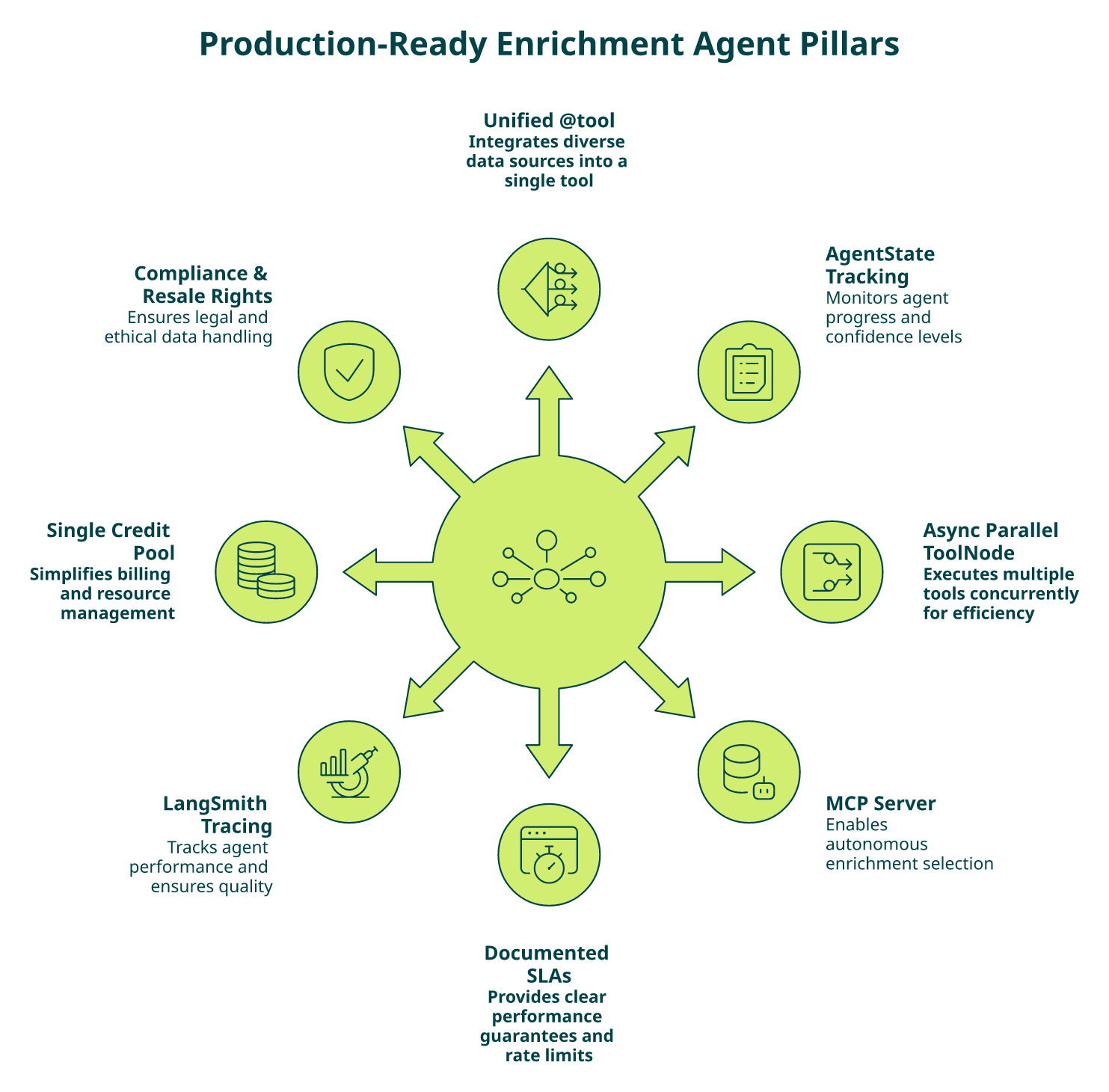
If you’ve read this far, you already have the patterns. The question is whether the agent you shipped last sprint actually meets them. Go through this in five minutes, one point per box checked. The full context for each box sits in our GTM engineering use case.
The readiness checklist
- ☐ One @tool covers firmographics, contacts, intent, tech, and events: not four tools stitched with normalization code.
- ☐ AgentState tracks partial enrichment, missing fields, and per-field confidence: not just messages.
- ☐ Async parallel ToolNode enabled so independent signals fan out concurrently.
- ☐ MCP server available so agents can autonomously select enrichments without pre-mapped endpoints.
- ☐ Documented p95 latency and rate-limit headers from the data provider, not “call us for SLAs.”
- ☐ LangSmith tracing on every tool call with at least one golden-dataset evaluator wired to CI.
- ☐ Single credit/billing system across all enrichment types, not four invoices and four rate limits.
- ☐ Resale rights and GDPR/CCPA handled by the provider: not a compliance burden on your team.
What your score means
| Score | Interpretation |
|---|---|
| 7 to 8 ✅ | Agent-ready: focus on scaling and LangSmith regression tests |
| 4 to 6 ⚠️ | Critical gaps: you’re losing eng hours to normalization and missing signals |
| 0 to 3 ❌ | Fragmented infrastructure: single-source providers and manual pipelines dominate your ops |
Where Explorium closes the gaps
We designed the product against exactly this checklist, so the gap analysis is direct:
- ✅ Boxes 1, 4, and 7: one unified API plus official MCP server plus single credit pool covers half the list automatically. See our product overview for the full architecture.
- ✅ Boxes 5 and 8: published p95 (<400ms match, <800ms full enrich) and enterprise-grade compliance including resale rights, detailed on our data security page.
- 🔧 Boxes 2, 3, and 6: these stay your responsibility, but Q4, Q8, and Q9 of this article give you the templates.
“Instead of connecting to multiple data sources and APIs, we only require one connection, Explorium!”
— Mirit H., Mid-Market Explorium G2 – Verified Review
“Explorium is a great tool for getting data from multiple subscriptions, databases but at a consolidated cost… the data can often be mismatched or have outdated information.”
— Omar G., Mid-Market Explorium G2 – Verified Review
That second review is a fair critique: aggregation quality depends on cross-referencing, which is why we ship the LangSmith eval pattern in Q9 so you can verify coverage against your own domains, not ours.
Next step based on score
- Scored 7 to 8: you’re production-ready; invest the next sprint in LangSmith regression tests and A/B evals.
- Scored 4 to 6: pick the two biggest boxes (usually #1 and #4) and consolidate this quarter. A free Explorium API key closes both in an afternoon.
- Scored 0 to 3: stop adding tools; the problem is architecture, not code. Start with a single unified @tool and build outward.
“Explorium is a fantastic data enrichment product that greatly assists us in making informed financial decisions for our customer database.”
— Mirit H., Mid-Market Explorium G2 – Verified Review
Q11: FAQs: LangChain B2B Data API Integration and LangGraph Enrichment (PAA Verbatim)
“How to integrate a B2B data API into a LangChain agent?”
Define a Pydantic arg schema, wrap the HTTP call with @tool and a precise docstring, then bind it to the model via create_agent in LangChain v1.0: that’s the full loop. The exact pattern (EnrichCompanyInput schema plus enrich_company tool hitting match, enrich, and events) is in Q2, and the same tool drops into LangGraph’s ToolNode without changes. The introduction to data enrichment covers the conceptual side if you’re onboarding a new engineer.
“Doesn’t MCP add latency vs a native LangChain tool?”
In practice, no, because MCP is a thin transport layer. Explorium’s MCP server calls the same backend as the REST API and keeps p95 under 800ms end-to-end. LangChain v1.0 officially supports MCP via langchain-mcp-adapters, so you’re not paying a protocol tax for a production shortcut. Our MCP product page has the architecture diagram.
“How to connect a B2B data API to an AI agent built with LangGraph?”
Register the enrichment tool in a ToolNode, add your agent node, and connect them with add_conditional_edges(agent, tools_condition): the agent loops until it stops calling tools. Then extend the graph with score_icp and route_to_crm nodes so enrichment isn’t the whole workflow; it’s one step inside the agent’s decision loop. Full code is in Q3.
“We already have Apollo, why add Explorium to our LangChain agent?”
Fair question, and I hear it weekly. Apollo excels at single-source contact data with a familiar UI. The moment your agent needs firmographics, intent, tech stack, and funding events in the same workflow, though, Apollo becomes one of four tools your engineers still have to wrap and normalize. Our benchmarks show 97.8% firmographic accuracy across 50+ sources vs ~78% single-source averages: you keep Apollo where it shines and layer Explorium for the signals Apollo doesn’t cover. See our B2B intent data page for the breakdown.
“Contact info frequently missing or incorrect. Half the day calling wrong/disconnected numbers. Mobiles frequently wrong.”
— Verified User, IT Services Apollo – G2 Verified Review
“How to build a LangChain agent that enriches leads in real time?”
One unified enrichment tool plus one score_icp tool plus one push_to_crm tool, bound to create_agent, and driven from your webhook handler. The full 40-line example is in Q5. End-to-end per lead comes in under 2 seconds when enrichment is a single call instead of three.
“How to use a B2B data API in a LangGraph agentic workflow?”
Break the workflow into observable nodes, match, enrich, events, score, and route, with AgentState tracking partial enrichment and PostgresSaver checkpointing so the graph resumes after rate limits. With Explorium, steps 1 to 3 collapse into two nodes because match and enrich return all signals in one response. For the no-code equivalent pattern, see how we build no-code data enrichment pipelines.
“Can we keep our existing PDL contract and layer Explorium on top?”
Yes, and we’ve seen teams migrate one @tool at a time. Start with the signals PDL doesn’t cover (intent, tech stack, and funding events) and add Explorium for those; keep PDL for the person-centric workflows it’s already solving. Over 2 to 3 sprints, most teams consolidate because managing one credit pool beats reconciling four invoices.
“Switched from free trial to paid plan ($100/month). After a few days, account disabled with no warning or explanation.”
— Verified User, Computer Software People Data Labs – G2 Verified Review
Create a free Explorium account, bind the enrich_company tool to your existing agent, and run a LangSmith eval against 200 of your own leads: validation takes minutes, not meetings.
Q12: Start Building: Ship a Production LangGraph Enrichment Agent With Explorium Today
You have every piece, now point it at production data
By this point you have the full blueprint. The tool definition with a Pydantic schema (Q2), the LangGraph StateGraph with ToolNode and conditional edges (Q3), the production EnrichmentState with partial tracking and checkpointing (Q4), the real-time enrichment loop (Q5), the REST-vs-MCP decision with side-by-side code (Q6), the comparison against Apollo, ZoomInfo, and PDL (Q7), the retry and latency-budget patterns (Q8), and the LangSmith evaluation workflow (Q9). The only thing left is a data layer your agent can actually call. If you want the source-agnostic architecture story, the Explorium AgentSource announcement covers it end to end.
Three next steps, pick the one that matches where you are
- 🔑 Free API key, first call in minutes. If you want to run the Q2 code right now, sign up on our sign-up page, grab the key, and ship the @tool before your standup. No sales call, and no seat minimum.
- 📘 Explorium MCP server docs for LangGraph. If your team is standardizing on agent-native delivery, wire the MCP client from Q6 and let the agent select enrichments autonomously. Test calls live on our MCP playground.
- 🎯 Book a 30-minute GTM-agent architecture call. If you’re designing an enrichment workflow at enterprise scale (5+ @tools today, compliance review required, and LangSmith eval suite in CI), we’ll sketch the graph with you and map every node to the right data source on our demo page.
The CTA you can paste directly
xml
<div style="background:#0A0F2C;color:#fff;padding:28px;border-radius:16px;font-family:Inter,system-ui,sans-serif;text-align:center;max-width:720px;margin:32px auto;">
<h3 style="margin:0 0 8px;font-size:22px;">Ship your LangChain/LangGraph enrichment agent this week</h3>
<p style="margin:0 0 20px;color:#cbd5e1;font-size:15px;">50+ B2B data sources, one unified API, and official MCP server, free to start, no sales call.</p>
<a href="https://www.explorium.ai/signup" style="background:#4F46E5;color:#fff;padding:12px 22px;border-radius:10px;text-decoration:none;font-weight:600;display:inline-block;margin:4px;">Get Free API Key</a>
<a href="https://developers.explorium.ai/mcp-docs" style="background:#fff;color:#0A0F2C;padding:12px 22px;border-radius:10px;text-decoration:none;font-weight:600;display:inline-block;margin:4px;">Read MCP Docs</a>
<a href="https://www.explorium.ai/demo" style="background:transparent;color:#fff;border:1px solid #fff;padding:12px 22px;border-radius:10px;text-decoration:none;font-weight:600;display:inline-block;margin:4px;">Book Architecture Call</a>
</div>
Social proof, then get out of your way
Clay, Cognism, and Outreach run production enrichment on Explorium because aggregated data with agent-native delivery is the only architecture that scales past a handful of @tools. Our unified API delivers 97.8% firmographic accuracy across 50+ sources, and the same endpoint powers both our REST tool and our official MCP server, so your LangChain v1.0 agent keeps the contract it was designed around. Pricing details are on our pricing page.
“Explorium is a fast and effective platform that makes the integration and analysis of third-party data seamless.”
— David A., CEO, Mid-Market Explorium G2 – Verified Review
“The richness and breadth of data is incredible. I really like the instant access to the most useful and reliable external data… This saves us a lot of time and money instead of managing each data source separately.”
— Ishi N., Enterprise Explorium G2 – Verified Review
Stop juggling vendors. Bind one tool, ship one agent, and let the data layer do the work it was built for.
FAQs


