


TL;DR
- We break migrations into 4 phases across 6–12 weeks: audit, shadow mode, canary via waterfall, and progressive cutover with a 30-day warm rollback window.
- Shadow mode with async fan-out and zero CRM writes lets teams validate match rate, fill rate, and freshness before a single real record is touched.
- We use the waterfall tertiary slot as the migration mechanism itself, promoting the new vendor through tertiary, secondary, and primary slots as KPIs clear.
- Field-mapping across firmographics, technographics, intent, and corporate hierarchy is where migrations silently break—our 8-category checklist catches it early.
- The FTC 16 CFR Part 425 rule makes roughly 99% of legacy auto-renewals unenforceable, giving teams real leverage on exit fees and minimum commits.
- MCP-native architecture ends the migration cycle: agents query a data layer, not a vendor, so source rotations never touch agent code again.
Q1: Why Are GTM Teams Switching B2B Data Enrichment Providers in 2026?
I’ve spent the last decade watching GTM teams buy, stitch together, and then painfully unwind B2B data stacks. In 2026, the unwinding is accelerating, and the reasons aren’t what most vendors want to admit.
The 3–5 Vendor Stack Has Quietly Become the Default
Walk into any Series B-to-public SaaS RevOps org today and you’ll find roughly the same wiring: Apollo or ZoomInfo for contacts, Clearbit (or its People-Data-Labs substitute) for firmographics, Bombora or 6sense for intent, and BuiltWith or HG Insights for technographics. Each vendor arrived to solve one gap, and each one stayed. The result is a four-to-five vendor stack that no single engineer fully owns, with contracts that auto-renew on different calendars, and a normalization layer duct-taped inside the CRM or a warehouse job that only the person who wrote it understands.
Switching rates in 2025–2026 are climbing for a specific reason: the stack is fragile, and everyone knows it. When one provider raises prices 30%, or a field like employeeCount changes semantics overnight, the entire downstream scoring model wobbles.
⚠️ What Actually Triggers the Switch
- Coverage gaps surface in agent workflows, a lead-qualification agent fails because intent and firmographics don’t reconcile.
- Price escalations on renewal (often 20–40% YoY on enterprise ZoomInfo or Clearbit seats) force a procurement review.
- Stale data, an “employee count” field that hasn’t been refreshed in nine months, kills an outbound campaign.
- Agent-incompatibility: rigid REST schemas can’t support autonomous retrieval patterns modern agent frameworks expect.
The Black-Box Problem Behind Single-Source APIs
Traditional providers operate as opaque enrichment factories. You ping an endpoint, something comes back, and the provider rarely tells you how fresh it is, which upstream source it came from, or why the confidence on industry is 0.6 versus 0.95. Independent analysis of single-source B2B data match rates consistently puts them in the 50–70% range on any given enrichment call, which means the other 30–50% of your pipeline falls through a hole you can’t see into.
On top of that, subscription lock-in punishes experimentation. You pay for a seat or a volume tier whether the records match or not, and early-termination language is drafted to make mid-term exits expensive.
❌ What This Looks Like in Production
“Depending on where the data is coming from, the data can often be mismatched or have outdated information. It is best to cross-reference the output data from other enriched information.”
— Omar G., Mid-Market Reviewer Explorium G2 – Verified Review
That’s an Explorium customer being honest about the ceiling on any single provider, and it’s precisely why aggregation matters more than any individual data feed.
The AI-Era Shift: Agents Expect Context, Not Endpoints
The real accelerant is agents. A lead-scoring or prospecting agent doesn’t want four endpoints; it wants to ask “what do I need to know about this account to decide next action?” and get a unified, context-aware answer back. Pre-mapped REST APIs force engineers to normalize every response before the agent can act, which defeats the point of agent autonomy. The signal that ends the single-source era isn’t a feature: it’s the shift from record-pulls to agent-driven retrieval, where the data layer has to understand the request, not just return a row.
Why Teams Are Landing on Explorium as the Migration Destination
We built Explorium around a simple thesis: you shouldn’t have to manage four vendor contracts to power one agent workflow. Our Unified Data Layer aggregates 50+ underlying sources into a single API, delivers firmographics, contacts, intent, technographics, and funding signals through one credit pool, and exposes the whole thing through an MCP interface so agents can autonomously decide which enrichments they need, no pre-mapped endpoints, no rigid schemas.
“Instead of connecting to multiple data sources and APIs, we only require one connection — Explorium!”
— Mirit H., Mid-Market Reviewer Explorium G2 – Verified Review
⭐ “Explorium is a great tool for getting data from multiple subscriptions, databases but at a consolidated cost for Finance and Data professionals.”
— Omar G., Mid-Market Reviewer Explorium G2 – Verified Review
Teams that switch typically collapse three to five vendor contracts into one, and that’s the outcome worth the migration effort.
Q2: How Long Does It Really Take to Migrate — and What Are the 4 Phases?
Most mid-market GTM teams complete a B2B data enrichment migration in 6–12 weeks. Enterprise orgs with CRM, MAP, and lead-scoring-model dependencies should budget 3–4 months. The variance is almost entirely downstream complexity, how many systems consume the enrichment and how many humans need to sign off on cutover.
The 4-Phase Framework That Anchors the Playbook
Here’s the timeline I give every team that asks, broken into the four phases that structure the rest of this article:
- ⏰ Phase 1, Shadow Mode (Weeks 1–4): Audit current fields and downstream consumers in weeks 1–2, then mirror live production traffic to the new provider in weeks 3–4 with zero writes to CRM. Success signal: response-diff logs in staging and a baseline match-rate delta.
- ⏰ Phase 2, Canary (Weeks 5–7): Route 10% of real enrichment calls to the new vendor with actual downstream writes, typically via a waterfall tertiary slot. Success signal: no regressions on pipeline KPIs across a full sales cycle.
- ⏰ Phase 3, Progressive Cutover (Weeks 8–10): Ramp 10% → 50% → 100% with KPI gates at each step. Promote the new vendor from tertiary to primary in the waterfall. Success signal: match-rate parity ±2% and no rollback triggers fired.
- ⏰ Phase 4, Decommission (Weeks 11–12): Keep the old contract warm for 30 days, export historical data, confirm compliance deletion, and close the vendor. Success signal: CFO sign-off on cost reconciliation and a post-mortem doc.
Why Explorium Compresses the First Phase to Days
The slowest part of most migrations is Phase 1. Procurement, legal, and integration for the candidate vendor typically eats 2–3 weeks before a single shadow call is made. We designed Explorium to collapse that. A free account gets you to your first API call in minutes with no sales conversation required, our MCP interface removes the per-field endpoint mapping work, and the credit-based model means shadow-mode costs scale with sampling rate rather than a monthly subscription floor. Teams that start a shadow test on a Monday typically have diff logs and preliminary match-rate benchmarks by end-of-week, not end-of-month.
Q3: What’s the Step-by-Step Migration Playbook — and How Does Waterfall Enrichment Become the Migration Mechanism Itself?
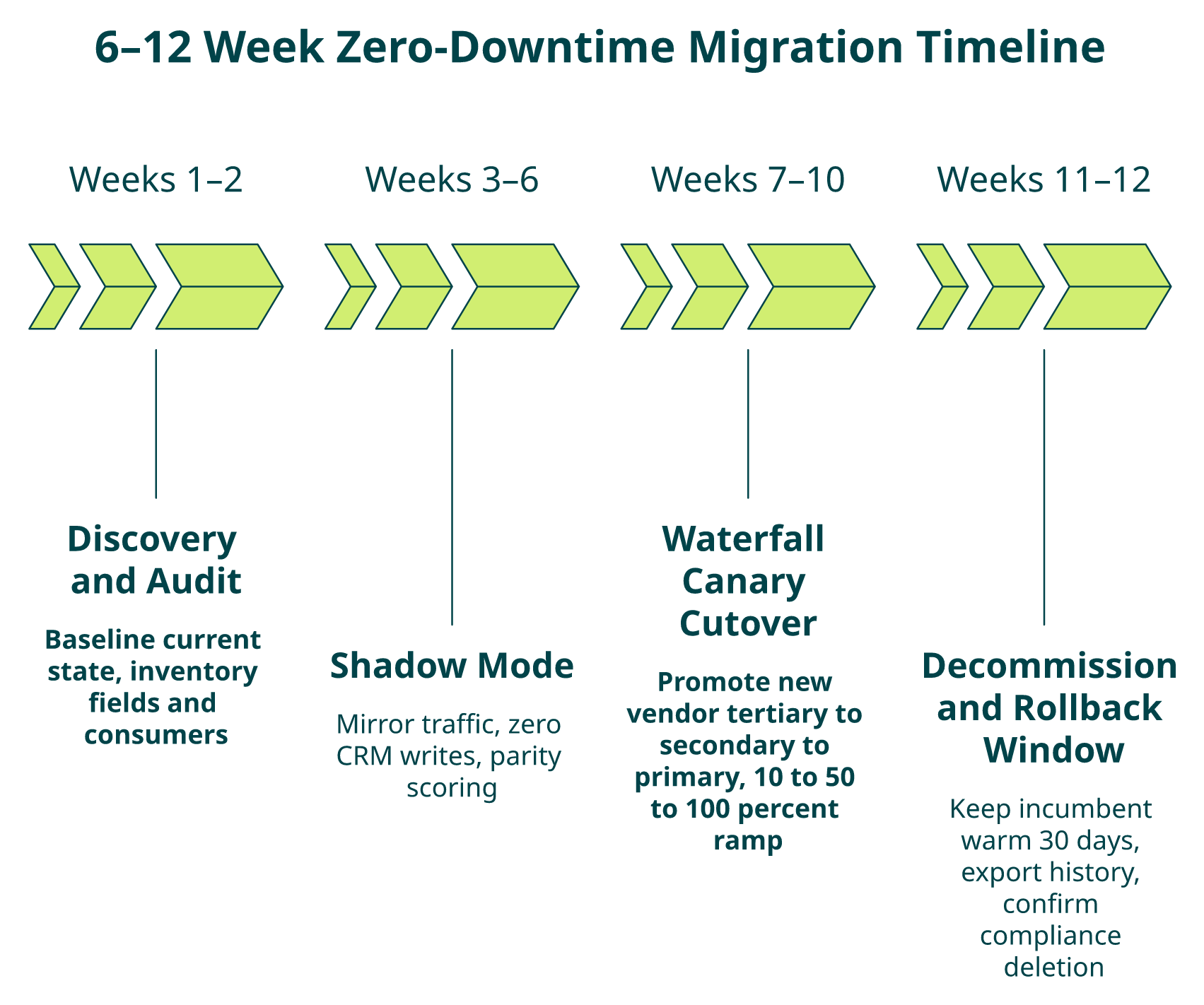
Most migration guides treat “swap” as a single event: cut the old API on Friday, pray on Monday. The teams that actually ship zero-downtime migrations treat the swap as a promotion, not a cutover, using the waterfall enrichment pattern itself as the mechanism for moving traffic. Here’s the week-by-week playbook we’ve seen work across dozens of migrations.
Week 1–2 — Audit and Inventory
Before any new API key exists, inventory what you have.
- Field inventory: Every enrichment field in production, its source vendor, its downstream consumers (Salesforce fields, HubSpot properties, scoring model features, Looker dashboards), and its refresh cadence.
- Baseline match rate: Run 5–10k representative records through the current provider and record match rate, fill rate per field, and accuracy vs. any ground-truth sample you trust.
- Contract calendar: Pull the auto-renewal notice window for the incumbent vendor and calendar the deadline before anything else, missing it can cost you 12 months.
- Stakeholder RACI: RevOps owns KPIs, Data Eng owns pipelines, Legal owns exit, CFO owns cost reconciliation.
✅ Output of Phase 1
A one-page migration brief with the four items above. No API work happens until this doc exists.
Week 3–5 — Shadow Mode (Parallel Running)
Stand up the new provider behind a feature flag that mirrors production requests asynchronously. Zero writes to CRM, zero impact on sales reps.
- Async fan-out to the new provider on every production enrichment call.
- Store both responses in a staging warehouse table keyed on request hash.
- Run nightly diff jobs computing match-rate delta, field-fill delta, and semantic mismatch counts (e.g., industry taxonomy collisions).
Week 6–8 — Canary via Waterfall Tertiary Slot
This is where the waterfall trick matters. Instead of an all-or-nothing switch, add the new vendor as the tertiary fallback in your existing waterfall enrichment logic. Your primary keeps running, and the new vendor only serves requests the primary misses, so you’re testing real coverage on real-production misses with zero KPI risk. Ramp canary traffic from 10% to 50% of the miss-pool over 2–3 weeks.
Week 8–10 — Progressive Cutover via Waterfall Promotion
🔄 The Waterfall-as-Migration Promotion Path
Promote the new vendor through the waterfall slots as confidence KPIs clear. This is the core zero-downtime mechanism:
| Week | Primary | Secondary | Tertiary |
|---|---|---|---|
| 6–7 | Old vendor | (none) | New vendor |
| 8 | Old vendor | New vendor | (none) |
| 9 | New vendor | Old vendor | (none) |
| 10 | New vendor | (none) | (none) |
At every step, the old vendor is still running as a safety net. A rollback is a single config flip, not a re-integration. By the end of Week 10, the new vendor is serving 100% of traffic and the old vendor is on warm standby.
Week 11–12 — Decommission and Reconciliation
- Keep old vendor warm for 30 days post-cutover in case rollback is needed.
- Export all historical enrichment records (GDPR/CCPA obligations for downstream subjects).
- Formally trigger contract termination and confirm written receipt.
- CFO reconciliation: actual credit/subscription spend vs. forecast, and vendor-count reduction metric.
- Post-mortem doc: what broke, what the diff logs caught, what to do differently next time.
📥 Grab the Gantt Template
We maintain a downloadable 12-week Gantt template with phase gates, RACI rows, and KPI checkpoints already wired to this playbook. It’s the fastest way to get buy-in from a skeptical VP or CFO in week one, and you can pair it with our customized workflow demo for stakeholder review.
Q4: How Do You Run Parallel B2B Data APIs in Shadow Mode Without Breaking Production or Blowing the Budget?
Shadow mode is the single most under-appreciated tool in the migration toolkit. Done correctly, it lets you answer every hard question (match rate, semantic mismatch, cost projection, edge-case failure modes) before a single real customer record is touched. Done poorly, it blows the budget and introduces the very instability it was meant to prevent.
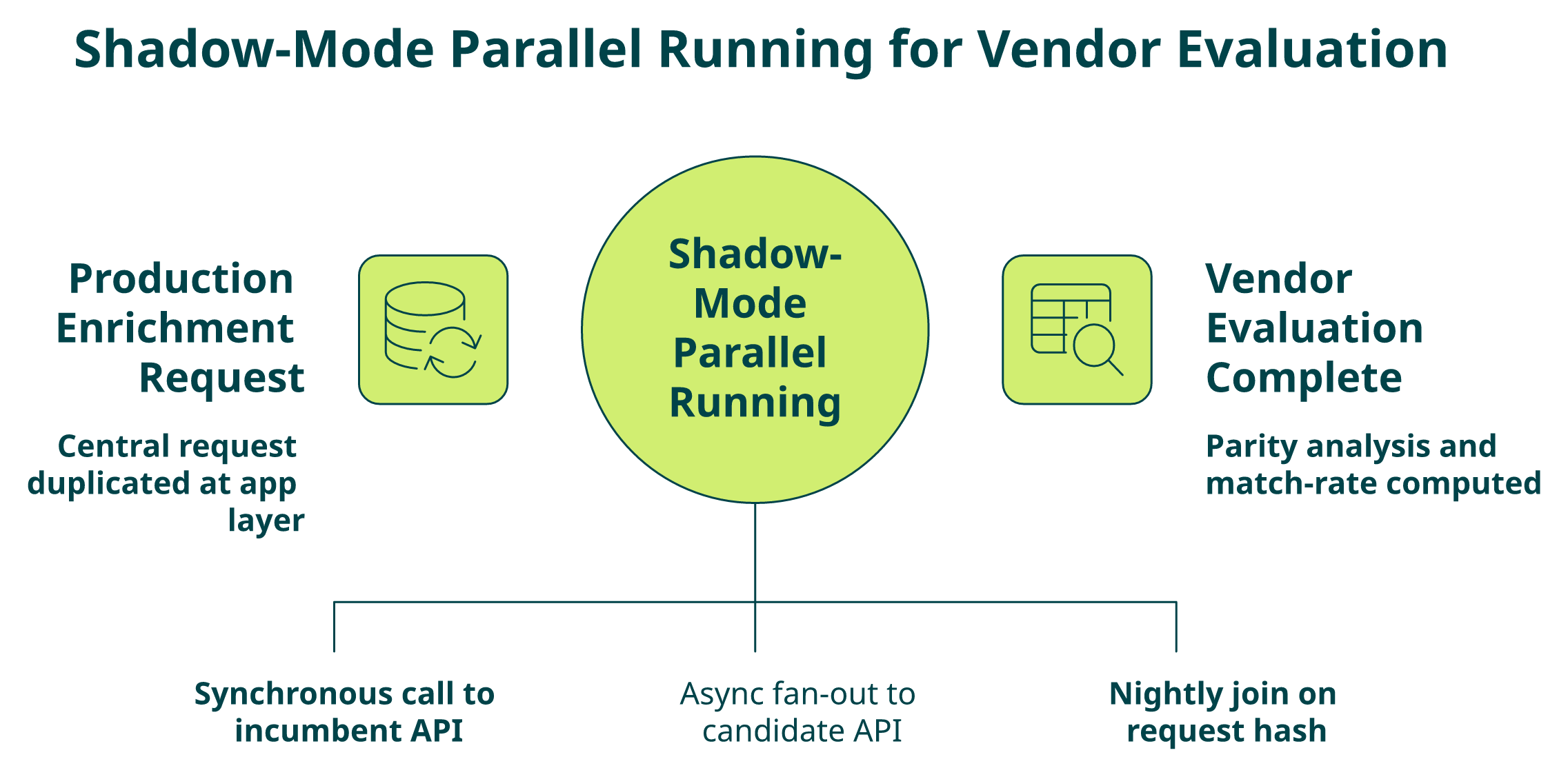
The Architecture — Async Fan-Out with Zero Downstream Writes
The core pattern is traffic mirroring, not traffic splitting. Every production enrichment request is duplicated: the primary call goes to the incumbent provider and drives real CRM writes, while an async fan-out fires the same request payload to the candidate provider and logs the response to a staging warehouse table.
- Primary path: App → Incumbent API → CRM/MAP write. Synchronous, unchanged.
- Shadow path: App → async queue → Candidate API → staging warehouse. Asynchronous, zero writes to production systems.
- Diff layer: Nightly job joins primary and shadow responses on request hash and computes match/fill/semantic deltas.
This isolation is non-negotiable. If shadow calls can touch CRM, you’ve built a canary, not a shadow, and you’ve reintroduced blast radius.
⚠️ Idempotency and PII Rules
- Hash the request payload so retries don’t double-log.
- Scrub PII from diff logs where possible; when not possible, apply the same retention policy as production.
- Rate-limit the shadow lane so a misbehaving candidate API can’t backpressure your production path.
Traffic-Mirroring Mechanics — Sampling to Cap Cost
You don’t need 100% mirroring to get statistically valid results. On 50k+ daily enrichment calls, a 10–20% stratified sample across ICP segments gives tight confidence intervals on match-rate parity within 2–3 days. Sample heavier on segments where the incumbent is known-weak (often mid-market non-US) and lighter on segments where you already trust coverage.
💰 The Cost-of-Dual-Running Calculator
The CFO question is always the same: “how much extra are we paying to run two vendors at once?” Here’s the math I hand them.
| Input | Formula | Example |
|---|---|---|
| Baseline monthly vendor cost | $B | $20,000 |
| Dual-running multiplier | 1.3–1.8× (sampled shadow) | 1.4× |
| Dual-running weeks | W (4–8 typical) | 6 weeks |
| Overlap cost | $B × (multiplier − 1) × (W/4.33) | $11,080 |
| Downtime risk $ | Pipeline value × outage probability × outage duration | $180,000 × 8% × 0.5 = $7,200/day |
The point isn’t the exact number: it’s that one day of broken enrichment on an 8-figure pipeline almost always exceeds 6 weeks of overlap cost. Shadow mode is the cheapest insurance policy you can buy, especially when weighed against the ROI of reliable data.
Why Explorium Makes Shadow Mode Essentially Free
Subscription-locked incumbents force you to pay for a full month (or a minimum commit) regardless of how many shadow calls you fire. That’s where the 1.8× multiplier comes from. We price on a credit pool with no monthly minimum, so a 20% sampled shadow costs 20% of the equivalent volume, and nothing more. A team running a 6-week shadow against Explorium typically pays for exactly the volume they mirror: no floor, no surprises.
🤖 MCP Makes Shadow Queries Agent-Native
One more architectural advantage worth flagging: because Explorium exposes the data layer through MCP, your shadow lane can be driven by an agent that autonomously selects which enrichments to compare against the incumbent’s static schema. You’re not just benchmarking provider A vs. provider B, you’re benchmarking the agent-native future against the endpoint-mapped past.
Q5: What Does a Field-Mapping Checklist Look Like — with Real ZoomInfo→Explorium and Clearbit→Cognism Examples?
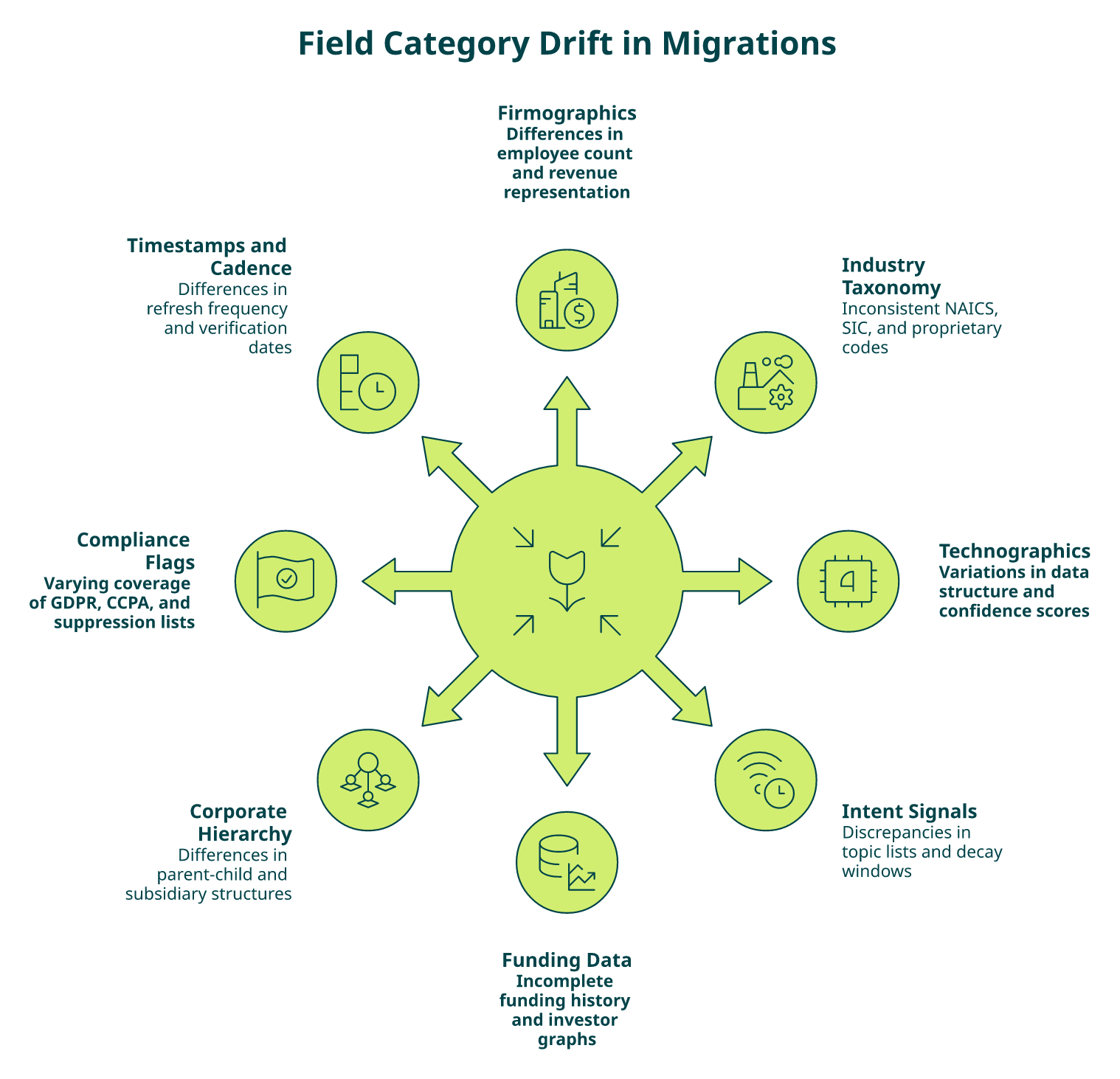
Score your migration’s field-mapping readiness against the 8 categories below. Every unchecked item is a semantic landmine that detonates in Salesforce two weeks after cutover.
The 8-Category Field-Mapping Readiness Checklist
- ☐ Firmographics, employee count: Does your old vendor return an exact integer (ZoomInfo employeeCount: 847) or a band (Explorium employees_range: 501-1000)? If your scoring model expects an integer, you need a midpoint-imputation rule before cutover.
- ☐ Industry classification: NAICS vs. SIC vs. proprietary taxonomies. ZoomInfo uses a 6-digit NAICS; Clearbit historically used its own category tree; Cognism leans on a hybrid SIC+vertical label. Build a crosswalk table, not a hope.
- ☐ Technographics: Clearbit returns a flat tech array of vendor names; Cognism returns categorized technographics with confidence scores. A CRM field expecting [“Salesforce”,”HubSpot”] breaks when it receives [{“category”:”CRM”,”vendor”:”Salesforce”,”confidence”:0.92}].
- ☐ Intent signals: Bombora topics (proprietary taxonomy) don’t map 1:1 to 6sense or G2 intent topics. Collisions hide in common terms like “CRM” meaning different buckets in each vendor.
- ☐ Contact email waterfall: Order of fallback (work → personal → catch-all), confidence thresholds, and bounce-validation timestamps differ per vendor. Document the exact waterfall rule before migrating.
- ☐ Funding events: Crunchbase-sourced structures differ from PitchBook-sourced structures on rounds, amounts, and investor arrays. Flat vs. nested object shapes will break downstream scoring models.
- ☐ Corporate hierarchy: Parent-child IDs, DUNS numbers, and ultimate-parent linkage are vendor-specific keys. A parentCompanyId from ZoomInfo won’t resolve in any other vendor’s graph.
- ☐ Compliance flags: GDPR, CCPA, and CASL suppression flags, are they per-record, per-field, or per-jurisdiction? Missing this mapping is a legal incident waiting to happen.
Real Vendor-to-Vendor Mismatches Pulled from Actual Migrations
⚠️ ZoomInfo → Explorium
| Field | ZoomInfo | Explorium | Migration Action |
|---|---|---|---|
| Employee count | Exact integer | Band (e.g., 501–1000) | Midpoint imputation; flag precision loss in scoring model |
| Industry | 6-digit NAICS | NAICS + proprietary vertical | Keep NAICS; ignore vertical or crosswalk |
| Tech stack | Not native (add-on) | 30+ technographic categories | Map new fields; retrain propensity model |
⚠️ Clearbit → Cognism
| Field | Clearbit | Cognism | Migration Action |
|---|---|---|---|
| Tech array | Flat vendor names | Categorized with confidence | Flatten on ingest or expand schema |
| Employee range | String band | Numeric min/max | Parse and reshape |
| Intent | Not native | Categorized topics | New downstream scoring features |
Score Interpretation
- 7–8 mapped: ✅ Cutover-ready. Proceed to shadow mode with confidence.
- 4–6 mapped: ⚠️ Critical gaps. You will debug Salesforce fields at 2 AM. Finish the crosswalk first.
- 0–3 mapped: ❌ High-risk. Halt the migration until mapping is complete. Cutover here causes irrecoverable CRM pollution.
How Explorium’s Unified Schema Collapses Per-Vendor Variance
The entire checklist exists because every single-source vendor ships its own schema. We built Explorium on a unified schema across all 50+ aggregated sources, so you map once, not once per upstream provider, and the underlying source rotations are invisible to your downstream systems. That’s the architectural difference between a feed and a data layer.
“Instead of connecting to multiple data sources and APIs, we only require one connection — Explorium!”
— Mirit H., Mid-Market Reviewer Explorium G2 – Verified Review
“Exploriums models are able to extract multiple sources of data and create an easy output for the user to consume.”
— Ishi N., Enterprise Reviewer Explorium G2 – Verified Review
📥 Grab the Field-Mapping Matrix
We maintain a downloadable crosswalk matrix covering ZoomInfo, Clearbit, Apollo, Cognism, PDL, and Explorium across all 8 categories above. It’s the artifact your data engineer actually needs in week one, not another blog post, and you can pair it with our data onboarding process walkthrough.
Q6: What Contract Exit Gotchas Should You Watch For — and How Does the Post-2025 FTC 16 CFR Part 425 Rule Give You Leverage?
The technical migration is the easy half. The contractual exit is where most teams lose 30–60 days (or an entire year) because they missed a clause written in 8-point font three renewals ago. Here’s what procurement and legal actually need to know before shadow mode begins.
Auto-Renewal Mechanics — Calendar the Notice Window First
Standard B2B data contracts auto-renew with a 60–90 day notice window before the anniversary date. Miss that window by a day and you’re locked in for another 12 months, full stop. The first artifact of any migration, before any API key is provisioned, is a calendared notice deadline with legal on the invite.
- ⏰ Typical notice windows: 60 days (mid-market), 90 days (enterprise), occasionally 120 days for multi-year deals.
- ⏰ Anniversary date: Not always the signature date, often “effective date” buried in Exhibit A.
- ⏰ Written notice format: Email to legal alias, certified mail, or portal submission. The contract specifies, and courts enforce literally.
💸 Early-Termination Fees, Minimum Commits, and Credit Forfeiture
- Early-termination fees typically equal the remaining contract value (so there’s no “exit math” in your favor mid-term).
- Unused credits forfeit on termination unless the contract explicitly guarantees a draw-down window.
- Minimum commits can survive termination, you owe the full annual spend even if you stopped using the API in month three.
- Usage-data export rights are often silent in the contract, which means your historical enrichment records may be unrecoverable post-termination unless you export proactively.
⚖️ The FTC 16 CFR Part 425 “Click-to-Cancel” Rule — Your Exit Leverage
This is the piece almost no migration article mentions, and it’s the single biggest shift in B2B data contract law of the decade.
The FTC’s amended Negative Option Rule (16 CFR Part 425), effective post-May 2025, requires that cancellation be “at least as easy” as sign-up, prohibits misrepresentations in renewal terms, and mandates clear affirmative consent for auto-renewals. Legal analysis indicates that approximately 99% of legacy B2B auto-renewals are no longer enforceable as written because they were drafted pre-rule with one-sided friction toward cancellation.
✅ Practical Leverage for Your Migration
- Review your incumbent’s renewal clause against the new standard. If it lacks symmetric cancellation mechanics, that’s grounds to challenge enforceability.
- Demand written confirmation of receipt on every cancellation notice; the FTC rule raises the vendor’s burden of proof.
- Use the rule as a negotiation lever for early termination, credit refunds, or waiver of minimum commits. Many vendors quietly agree rather than litigate.
GDPR/CCPA Obligations on Offboarding
When you leave a vendor, you inherit deletion and export obligations on the data they processed on your behalf. The legal checklist:
- ☐ Export all historical enrichment responses before termination.
- ☐ Issue a data deletion request in writing per GDPR Art. 17 / CCPA §1798.105.
- ☐ Confirm deletion across backups and subprocessors in writing.
- ☐ Retain termination and deletion correspondence for audit trail.
Why Explorium’s Model Sidesteps the Whole Exit Problem
We priced Explorium on transparent, credit-based consumption with no auto-renewal, no minimum commits, and no early-termination language, because the old contract pattern was designed to trap customers, not serve them. You buy credits, you use them, you stop when you want. When we say “pay-per-enrichment,” we mean the contract reflects that architecture, not just the pricing page, and you can review credit details before committing.
Q7: How Do You Validate Match Rate and Coverage Parity Before Cutover?
Cutover approval should be a numbers conversation, not a vibes conversation. The teams that ship zero-downtime migrations have a scorecard with pass/fail thresholds signed off by RevOps, Data Engineering, and the VP of Sales before any traffic flips. Here’s the methodology.
The Four Parity KPIs That Actually Matter
- Match rate: % of input records where the candidate provider returns any enrichment. Baseline: equal to or within 2 percentage points of the incumbent across your full ICP.
- Field fill rate: % of records where a specific critical field (e.g., direct_phone, tech_stack) is populated. Must be measured per-field, not in aggregate, averages hide catastrophic gaps in individual fields.
- Accuracy vs. ground truth: Sampled records validated against a trusted source (LinkedIn verification, manual research, or customer-confirmed data). Benchmark firmographic accuracy should clear 95%.
- Freshness timestamp: Age distribution of returned records. Targets: >80% of records under 90 days old, and no tail beyond 18 months for critical fields.
⚙️ Sampling and Statistical Significance
Parity testing is a sampling problem. Using your full production volume wastes credits and delays a decision. Using too small a sample produces misleading results.
- Sample size: 5,000–10,000 records, stratified across your ICP segments (geo, size band, industry).
- Stratification: Oversample weak-coverage segments (often non-US mid-market), averages will lie otherwise.
- Confidence interval: 95% CI with ±2% margin typically clears at ~7,500 records per segment.
- Test window: Minimum 2 weeks of shadow traffic to capture intra-week and weekday patterns.
The Cutover Scorecard Template
| KPI | Baseline (Incumbent) | Candidate | Threshold | Pass/Fail |
|---|---|---|---|---|
| Match rate | e.g., 68% | 72% | ≥ baseline − 2pp | ✅ |
| Email fill rate | 54% | 61% | ≥ baseline | ✅ |
| Tech stack fill | 41% | 78% | ≥ baseline | ✅ |
| Firmographic accuracy | 78% | 97% | ≥ 95% | ✅ |
| Freshness <90d | 62% | 84% | ≥ 80% | ✅ |
| Intent coverage | 33% | 71% | ≥ baseline | ✅ |
A failing row on any critical KPI blocks cutover and sends the team back to diff-log analysis. No exceptions, no “we’ll fix it after go-live”.
📊 The 97.8% Benchmark — And Why Aggregation Wins
In head-to-head firmographic accuracy evaluations, Explorium’s aggregated, cross-referenced architecture has cleared 97.8% on fields like employee count and industry, while single-source providers average closer to 78% on the same benchmark. The reason isn’t magic, it’s math. When 50+ sources vote on a value and disagreements are resolved with confidence scoring, the ceiling is structurally higher than any single-source data feed can hit.
“The richness and breadth of data is incredible. I really like the instant access to the most useful and reliable external data. It helps us provide better service to our customers because it is the data we need to make faster and better decisions.”
— Ishi N., Enterprise Reviewer Explorium G2 – Verified Review
“Explorium is a fast and effective platform that makes the integration and analysis of third-party data seamless.”
— David A., CEO, Mid-Market Explorium G2 – Verified Review
✅ Sign-Off Protocol
Parity KPIs in green, stratified sample documented, sign-offs from RevOps, Data Eng, and VP Sales in the scorecard’s footer: that’s cutover approval. Anything less is a migration waiting to break.
Q8: What Should Your Rollback Plan and Decommission Checklist Include?
A migration without a rollback plan is a migration you’re gambling on. Score your rollback readiness against the 7 items below before Phase 3 starts, not when something is already on fire.
The 7-Point Rollback-Readiness Checklist
- ☐ 🟢 Old contract warm for 30 days post-cutover: Do not cancel the incumbent the day you flip to 100% on the new vendor. Keep API keys active and billing alive for a 30-day safety window.
- ☐ 🔑 Preserved credentials: Old vendor API keys, OAuth tokens, and service accounts stored in the same secrets manager with the same rotation schedule, ready to re-enable in minutes.
- ☐ 🚩 Feature-flag toggle: A single config flag (LaunchDarkly, Statsig, or an env var) that routes 100% of traffic back to the incumbent without a code deploy.
- ☐ 📝 CRM write audit trail: Every enrichment-driven field update logged with source vendor, timestamp, and request ID, so you can precisely identify which records need reconciliation if rollback fires.
- ☐ 🚨 KPI alert thresholds: Pre-wired PagerDuty/Slack alerts on match rate drop >3pp, fill rate drop >5pp, or downstream lead-scoring model accuracy drop >2pp.
- ☐ 📞 Escalation path: Named on-call engineer, RevOps lead, and VP sponsor with decision rights on pulling the rollback trigger. Response SLA of 30 minutes during business hours.
- ☐ 🗃️ Data-retention compliance: Plan for GDPR/CCPA deletion on the incumbent after the 30-day warm window expires, with documented export of historical enrichment records.
Rollback-Readiness Score Interpretation
- ✅ 6–7 of 7: Safe to proceed. You have a genuine safety net, not theater.
- ⚠️ 3–5 of 7: Risky. Rollback will be possible but slow, expect 2–4 hours of degraded enrichment before stability returns.
- ❌ 0–2 of 7: Halt the migration. You are one failed API call away from a pipeline incident you cannot cleanly recover from.
The Decommission Sub-Checklist (Post-30-Day Warm Window)
Once the new vendor has run clean for 30 days and all KPIs are steady, execute decommission in this order.
- ☐ Freeze new writes from the incumbent (read-only mode on their API key).
- ☐ Export historical enrichment records to cold storage with full audit metadata.
- ☐ Trigger written contract termination per the calendared notice window.
- ☐ Issue GDPR Art. 17 / CCPA §1798.105 deletion request to the vendor.
- ☐ Confirm written deletion across backups and subprocessors.
- ☐ Rotate and revoke API keys; remove from secrets manager.
- ☐ CFO reconciliation: actual spend vs. forecast, vendor-count delta, and credit savings.
- ☐ Post-mortem doc distributed to RevOps, Data Eng, Legal, and Finance.
🤖 How MCP Makes Rollback a Non-Event
Traditional rollbacks are painful because the integration is per-endpoint. You built pipes to vendor A, then pipes to vendor B, and rolling back means re-deploying pipeline code. Explorium’s MCP architecture inverts that model. The agent queries the data layer for what it needs, not for a pre-mapped endpoint on a specific vendor. Provider rotation happens inside the data layer, so rollback at the agent layer is a configuration decision, not an engineering project.
⚡ What That Means in Practice
- No pipeline redeploy to swap a provider.
- No schema migration on the consumer side when sources rotate underneath.
- A failed provider can be quarantined in the aggregation layer without any change in the agent’s code path.
That’s the architectural reason our customers stop thinking about “which vendor am I on right now?”, because MCP makes the question irrelevant to the workflows that consume enrichment. You can see this in action with a live demo.
Q9: Explorium vs. Clay vs. ZoomInfo vs. Apollo: How Do Migration Destinations Compare?
Ninety percent of the migrations I see land on one of four destinations: Explorium, Clay, ZoomInfo, or Apollo. They are architecturally different tools solving overlapping problems, and choosing wrong means doing this whole migration again in 18 months. Here’s the honest comparison.
Why Explorium Is Typically the Unified-Layer Pick
✅ Source-agnostic aggregation: One API aggregates 50+ underlying providers covering firmographics, contacts, technographics, intent, and funding. You map once, not per vendor.
✅ Agent-native via MCP: The data layer is queryable by agents that autonomously pick which signals they need, instead of engineers pre-mapping endpoints.
❌ Tradeoff: If you only need a prospecting UI for manual SDR workflow, Explorium’s API-first posture is more power than you need.
✅ Transparent credit-based pricing: No monthly minimums, no auto-renewal, no early-termination fees. The exit is as easy as the entry, and pricing is published upfront.
Clay, ZoomInfo, and Apollo — Strengths and Structural Limits
- Clay excels at workflow UI and multi-provider waterfalls for outbound ops teams, but the economics get unpredictable fast. Per-row credit costs can exceed stated rates and contact quality varies wildly across the underlying providers it stitches together.
“Per-row credit cost can vary 100% from stated amounts (e.g., stated 11 credits/row, actual 25). Contact data quality varies wildly, feels like a black box.”
— Verified User, IT Services Mid-Market Clay – G2 Verified Review
- ZoomInfo owns brand and raw record count in US enterprise, but it is single-source, subscription-locked, and famously unforgiving on auto-renewal notice windows.
- Apollo wins on price and built-in prospecting UI, but reviewers consistently flag contact-accuracy gaps and credit-system friction, the tradeoff for the low entry price.
“Contact info frequently missing or incorrect. Half the day calling wrong/disconnected numbers. Mobiles frequently wrong. Credit system for unlocking mobiles/emails is clunky.”
— Verified User, IT Services Mid-Market Apollo – G2 Verified Review
📊 Side-by-Side Across 7 Migration Criteria
| Criterion | Explorium | Clay | ZoomInfo | Apollo |
|---|---|---|---|---|
| Architecture | 50+ source aggregation, one API | Waterfall UI across providers | Single-source | Single-source |
| MCP / Agent-native | ✅ Native MCP | ❌ No MCP | ❌ No MCP | ❌ No MCP |
| Pricing model | Credit-based, pay-per-enrichment | Credit-based, opaque rollover | Annual subscription, tiered | Subscription + credit gates |
| Compliance & resale rights | Enterprise GDPR/CCPA, resale on custom plans | Per-provider varies | Enterprise | Consumer-grade concerns raised |
| Onboarding speed | Free account → first API call in minutes | Paid plan required for full API | Sales-led, weeks | Self-serve but UI-first |
| Signal breadth | Firmographics, contacts, tech, intent, funding | Depends on connected providers | Contacts + firmographics | Contacts + firmographics |
| Exit flexibility | No auto-renewal, no minimum commit | Credit rollover disputes reported | 60–90 day notice, ETFs | Subscription lock |
Prescriptive Guidance — Who Should Choose What
- Choose Explorium if you are building GTM agents that need multi-source enrichment through one API, want MCP-native delivery, and prefer a unified credit pool over juggling four vendor contracts.
- Choose Clay if your team lives in a no-code workflow UI and is willing to absorb credit-cost variability.
- Choose ZoomInfo if US-only enterprise contact coverage is your single gating requirement and budget for annual commit is not a constraint.
- Choose Apollo if you need the cheapest entry point for a small SDR team and can live with contact-accuracy tradeoffs.
Q10: How Do You Prevent Future Migrations with Agent-Native MCP Architecture?
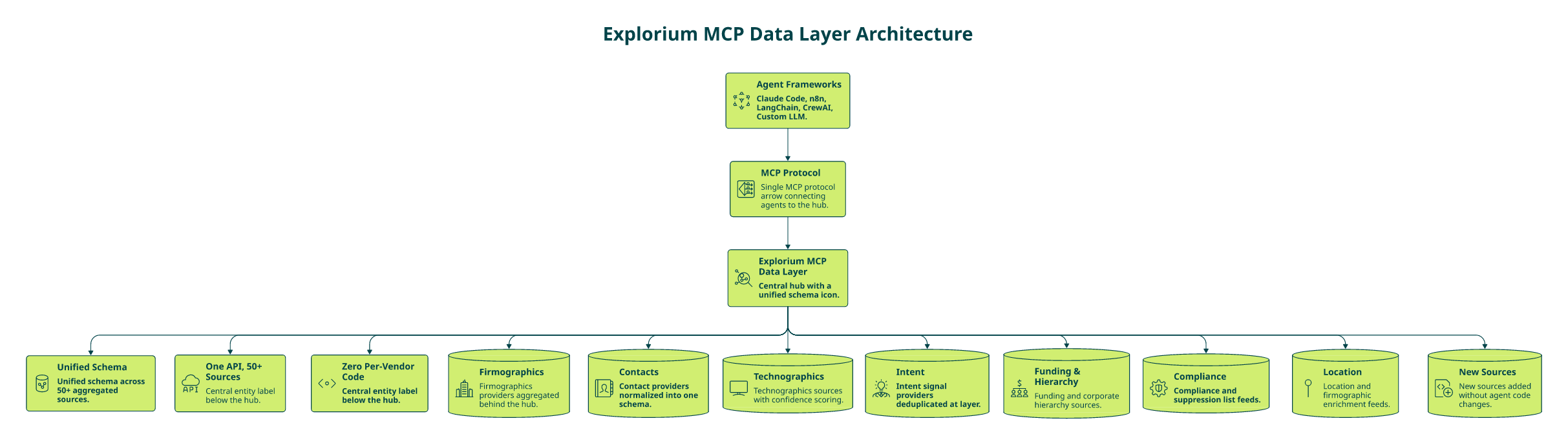
If you finish a migration and your architecture still couples agents directly to a named provider, you’ve just bought yourself the same migration in 18 months. The real fix isn’t picking a better vendor, it’s adopting an abstraction layer so the vendor question stops leaking into agent code. That abstraction is MCP.
What MCP Actually Does at the Architectural Level
Model Context Protocol lets agents query a data layer for what they need (e.g., “tech stack and latest funding round for this domain”) instead of calling a named endpoint (e.g., GET /v2/clearbit/company/tech). The provider decision, which underlying source to route to, how to resolve disagreements, what to fall back on, moves out of agent code and into the data layer.
- Agent asks: “What are the buying signals on this account?”
- Data layer decides: Which of 50+ upstream sources to query, how to rank confidence, and what shape to return.
- Agent consumes: A unified, deduplicated record, no per-vendor schema knowledge required.
How Explorium Implements It
🤖 Autonomous Signal Selection
Our MCP server exposes the Explorium data layer to agent frameworks (Claude Code, n8n, LangChain, CrewAI, custom LLM stacks) through the standard protocol. When an agent issues a context request, the MCP layer selects the right enrichments from our 50+ aggregated sources and returns a unified, deduplicated response, no pre-mapped endpoint for every new signal type.
- 50+ upstream sources aggregated into a single schema.
- Unified credit pool across 30+ enrichment categories.
- Source rotation happens inside the layer, invisible to the agent.
What a Vendor-Abstracted Architecture Enables
⚙️ Provider Swaps Without Code Changes
When the underlying source mix changes, a new intent provider is added, a stale firmographics feed is retired, nothing downstream changes. Your agents keep asking the same questions and keep getting better answers, and you can experiment via the MCP playground.
- Request-level A/B testing: Route 10% of agent calls to an experimental upstream source and compare accuracy without touching agent code.
- Agent-driven failover: If an upstream source degrades, the layer quarantines it and redistributes the request across healthy sources. The agent never sees the outage.
- Zero-migration onboarding of new signals: When we add a new technographic source, every existing agent gains access automatically.
Why This Is the Last Manual Migration You Should Ever Run
The hard truth is that the data-provider landscape will keep consolidating, repricing, and shifting. Teams coupled to a single provider will keep migrating. Teams coupled to a data layer will absorb the churn silently. That’s the architectural payoff of MCP. You stop migrating providers and start managing a data layer that manages the providers.
“Explorium gives us the data I need when I need it. This saves us a lot of time and money instead of managing each data source separately. Exploriums models are able to extract multiple sources of data and create an easy output for the user to consume.”
— Ishi N., Enterprise Reviewer Explorium G2 – Verified Review
“Finally, a platform that conveniently and intuitively provides data that makes business decisions easier.”
— K B., Corporate Data Manager, Mid-Market Explorium G2 – Verified Review
Q11: What Post-Migration Audit Metrics Prove the Switch Was Worth It?
Measure four KPI families at 30, 60, and 90 days post-cutover: pipeline lift, engineering hours saved, credit efficiency, and agent success rate, and compare them against the baseline you captured in the Phase 1 audit. If any of the four is flat or negative at day 90, your migration failed even if the cutover was clean.
📊 The Four KPI Families to Track
- 💰 Pipeline lift %: Change in MQL→SQL conversion, SAL-to-opportunity rate, and sourced pipeline $ attributable to enriched records. Benchmark: ≥10% lift by day 60 is table stakes for a worthwhile switch.
- ⏰ Engineering hours saved/week: Time previously spent on normalization, vendor-support tickets, and cross-provider reconciliation. Track via pull-request labels or a weekly team survey. Benchmark: 10–15 hours/week reclaimed on a unified-layer migration.
- 💸 Credit-per-enriched-record: Blended cost per usable enrichment (not raw API call). Benchmark: 30–50% reduction versus the baseline multi-vendor stack by day 90.
- 🤖 Agent workflow success rate: % of agent runs that complete without falling back to manual intervention or hitting a missing-field exception. Benchmark: 15+ point improvement on agent-driven workflows using MCP-delivered enrichment.
The Explorium Benchmark and Why It Matters
Customers who consolidate three to five vendors onto our unified data layer consistently report 10–15 engineering hours reclaimed per week, 2–3× vendor-cost reduction, and a measurable jump in agent-workflow completion rates because MCP eliminates the “missing field” exception class that kills agent runs. None of those numbers show up in a procurement spreadsheet on day one. They surface in the 30/60/90 audit, which is why you need to commit to running it before cutover, not after, as covered in our ROI guide.
“Exploriums platform allows quick and easy data source exploration and evaluation in models. It shortens the analysis of new data sources and the implementation of such in models.”
— Verified User, Financial Services Mid-Market Explorium G2 – Verified Review
“Explorium is a great gold mine of data, together with a quick and easy auto ML pipeline, we are able to turn plans into results really fast.”
— Noa L., Mid-Market Reviewer Explorium G2 – Verified Review
“Explorium is a fantastic data enrichment product that greatly assists us in making informed financial decisions for our customer database.”
— Mirit H., Mid-Market Reviewer Explorium G2 – Verified Review
Q12: Ready to De-Risk Your Migration? Start Your Shadow-Mode Test Today
You now have the full kit: a 4-phase playbook mapped to 6–12 weeks, an 8-category field-mapping checklist with real vendor-to-vendor mismatches, the FTC 16 CFR Part 425 leverage to exit your incumbent, a parity scorecard, and a rollback protocol. The only step left is to run shadow mode against your current vendor, with zero commit and zero risk to production.
Three Ways to Start Right Now
- ✅ Create a free Explorium account and fire your first shadow-mode API call in minutes, no sales call, no minimum commit, no auto-renewal to unwind later.
- 📥 Download the Migration Kit, the field-mapping matrix across ZoomInfo, Clearbit, Apollo, Cognism, PDL, and Explorium, plus the 12-week Gantt template with phase gates and RACI rows already wired in.
- 📞 Book a migration architecture review with our solutions team, 30 minutes on your current stack, your ICP, and the parity KPIs that matter for your cutover.
Paste-Ready HTML CTA Block
⭐ The Proof Is Already in Production
Clay, Cognism, and Outreach already run on Explorium, your migration destination is waiting.
“If you are looking to enrich your lead generation efforts, I would strongly recommend trying out Explorium, as it was a revelation for us.”
— David A., CEO, Mid-Market Explorium G2 – Verified Review
“Just do it! Great team and service.”
— Ilan G., Small-Business Reviewer Explorium G2 – Verified Review
“Adds a lot of useful and accurate info to our financial database. Great customer support, the team really cares about our experience and has added features we requested in the past.”
— Kobi M., Business Operations Manager, Small-Business Explorium G2 – Verified Review
FAQs


