


TLDR:
- Claude Code + Explorium MCP replaces fragmented multi-vendor enrichment with one natural-language prompt.
- MCP lets agents autonomously discover and select enrichment types without pre-configured endpoint mapping.
- One JSON config block connects your agent to 50+ sources, 4,000+ data points, and 30+ categories.
- Explorium’s match rates hit 97%+ on firmographic fields versus 78–89% from single-source competitors.
- Production workflows include meeting prep, lead scoring, outbound prospecting, and batch enrichment at scale.
- Output paths cover CSV export, Salesforce/HubSpot sync, Slack delivery, and Google Sheets for team review.
- Enterprise GDPR/CCPA compliance, agent access control, and a deployment readiness checklist ensure production confidence
Q1. Why Are GTM Engineers Replacing Manual Enrichment Pipelines with Claude Code MCP Agents?
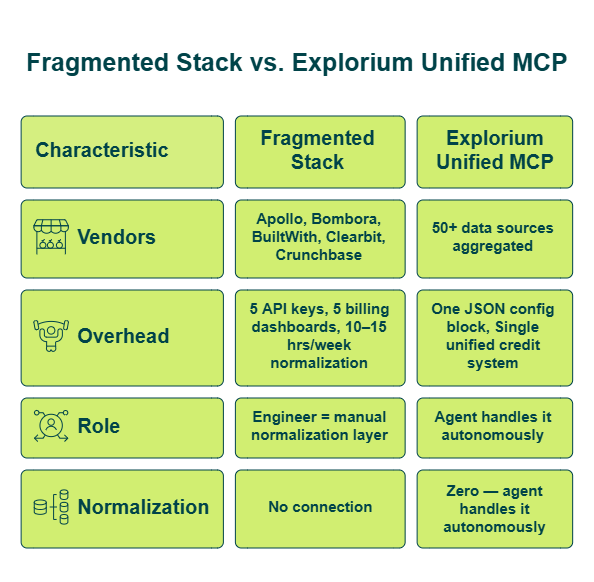
Here’s the reality most GTM teams live with: Apollo for contacts, Bombora for intent, BuiltWith for technographics, and Clearbit for firmographics- each with its own API key, billing dashboard, and normalization script. Data is everywhere, but unified enrichment is nowhere. Engineering teams burn 10–15 hours per week just on data normalization. Agents stall on incomplete records. The plumbing consumes more engineering hours than the actual building does.
❌ Why Traditional Enrichment Tools Break Down
ZoomInfo and Apollo function as opaque enrichment factories – they return records, but you get no freshness guarantees and no cross-source validation. Clay offers workflow flexibility, but it requires manual configuration of each provider column and enrichment step. Point-solution APIs deliver coverage without breadth: rigid schemas, static endpoint mapping, and zero agent-native delivery.
The core architectural problem? These tools were built for humans clicking UIs, not for autonomous agents discovering and retrieving data dynamically. As one Apollo user put it:
“Contact info frequently missing or incorrect. Half the day calling wrong/disconnected numbers. Mobiles frequently wrong.” – Verified User, IT Services Apollo – G2 Verified Review
And Clay’s credit system introduces its own friction:
“Credit system is broken. Pricing is broken. Not fully transparent with rollover limit.”
– Raphael A., Marketing Lead Clay – G2 Verified Review
✅ The AI-Era Shift: MCP Changes the Architecture
MCP (Model Context Protocol) is an open standard that lets AI agents dynamically discover and invoke external data tools at runtime. Claude Code + MCP lets an agent autonomously decide what data it needs, query multiple enrichment types in one session, and return unified records- without the engineer pre-configuring each enrichment call. This is the shift from “configure every endpoint manually” to “describe what you need and the agent handles the rest.”
What Explorium Brings to This Architecture
We built Explorium to be the data layer MCP was designed for: 50+ data sources aggregated into one API, 4,000+ data points across 30+ enrichment categories, and agent-native MCP delivery where the agent autonomously selects relevant enrichments. Coverage spans 150M+ companies and 800M+ contacts. The unified credit system means no separate vendor contracts, no subscription lock-in, and no black-box pricing.
Explorium’s MCP server connects natively to Claude Code – letting agents dynamically query firmographic, technographic, contact, and event data without pre-configuring enrichment calls.
⏰ What You’ll Build in This Guide
By the end of this tutorial, you’ll have a Claude Code agent that takes a company domain, autonomously enriches it with firmographics, technographics, contact data, and funding events through Explorium’s MCP- all in a single terminal session. While traditional setups require connecting to Apollo for contacts, then Bombora for intent, then BuiltWith for tech stack- and normalizing it all yourself- this agent does it in one natural-language prompt.
Q2. What Is MCP (Model Context Protocol) and Why Does It Eliminate Pre-Configured Enrichment Calls?
MCP (Model Context Protocol) is an open standard that lets AI agents dynamically discover and invoke external tools and data sources at runtime. For B2B data enrichment, MCP eliminates pre-configured enrichment calls by letting the agent decide what data it needs based on task context- not based on what the engineer hard-coded into the workflow.
Here’s how MCP works in practice:
- Agent receives a natural-language enrichment request
- Agent queries the MCP server to discover available data tools
- Agent autonomously selects relevant enrichment types (firmographics, technographics, contacts, etc.)
- MCP server routes requests to underlying data sources and returns unified results
- Agent formats and delivers enriched data- no endpoint mapping or schema definitions required
How MCP Differs from Traditional API Integration
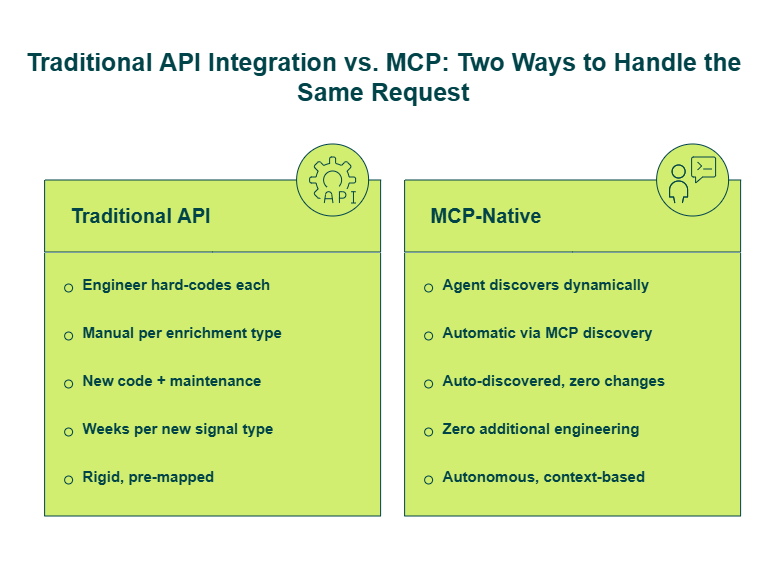
With the traditional API approach, you explicitly define which endpoints to call- firmographics, technographics, contact info- in your workflow config. Every new enrichment type means new code, new schema mapping, and new maintenance.
With MCP, the AI agent autonomously decides which endpoints to call based on task relevance. Explorium’s implementation surfaces four endpoint types: match (resolve business/prospect ID), enrich (get external data), fetch (discover businesses/prospects), and event data (push or enrich format). The agent discovers these tools dynamically through MCP’s automatic tool discovery- no hardcoding required.
The practical difference is significant. In one of our n8n meeting-prep workflows, technographics wasn’t explicitly configured as an endpoint, but the MCP pulled it automatically because the AI agent determined it was relevant to the meeting context.
✅ What MCP-Native Enrichment Enables
- Dynamic enrichment selection without pre-configuration
- Multi-signal retrieval in a single query- company profile, contact data, funding events, and tech stack from 50+ sources
- Real-time agent workflows without batch processing or scheduled syncs
- Framework-agnostic integration- Claude Code, n8n, LangChain, CrewAI, Base44
- Credit-efficient consumption where agents retrieve only relevant signals, avoiding blanket enrichment that wastes credits
Why This Matters for Your Engineering Roadmap
The difference between static API mapping and MCP-native delivery is the difference between “configure every endpoint manually” and “let your agent decide what it needs.” Think of it as giving your agent a dedicated data engineering team that knows every enrichment source, every field mapping, and every freshness cadence- querying on your behalf 24/7.
“Explorium gives us the data I need when I need it. This saves us a lot of time and money instead of managing each data source separately.”
— Ishi N., Enterprise Explorium G2 – Verified Review
“Instead of connecting to multiple data sources and APIs, we only require one connection – Explorium!”
— Mirit H., Mid-Market Explorium G2 – Verified Review
Explorium’s MCP integration is why GTM platforms like Clay, Outreach, and Cognism rely on its data infrastructure — because the fastest way to power an agent isn’t another API endpoint; it’s letting the agent choose what it needs.
Q3. What Do You Need Before You Start? Prerequisites and Explorium MCP Server Configuration in Claude Code
Before touching any code, verify you have these six items ready. Each takes under five minutes to complete individually:
Claude Code installed and authenticated — follow Anthropic’s official docs for setup:
☐ Explorium free account created at explorium.ai — no sales call required; signup to first API call in minutes
☐ Explorium API key generated from the developer dashboard
☐ Node.js or Python 3.8+ environment configured for MCP server connection
☐ Basic familiarity with terminal/CLI workflows
☐ A test dataset (CSV with 5–10 company names/domains) ready for enrichment
Score yourself: ✅ 6/6 = proceed to configuration. ⚠️ 4–5 = complete remaining items (each takes under 5 minutes). ❌ Below 4 = start with Explorium’s quick-start guide.
Step-by-Step MCP Configuration
Step 1: Locate or create your Claude Code MCP config file. This is typically at ~/.claude/mcp_config.json or within your project directory.
Step 2: Add the Explorium MCP server entry. This is the single most important code block in this guide- copy it exactly:
json
{
  "mcpServers": {
    "explorium": {
      "url": "https://mcp.explorium.ai/sse",
      "headers": {
        "api_key": "<YOUR_EXPLORIUM_API_KEY>"
      }
    }
  }
}Step 3: Replace <YOUR_EXPLORIUM_API_KEY> with your actual key from the Explorium developer dashboard. For better security, store it as an environment variable.
Step 4: Restart Claude Code to load the new MCP server.
Step 5: Verify the connection by asking: “What enrichment tools are available?” Explorium’s tools should appear in the agent’s tool list- including business search, company enrichment, contact discovery, and event data.
💡 What This Single Configuration Unlocks
That one JSON block gives your agent the ability to dynamically discover all available Explorium enrichment endpoints- the autocomplete feature shows all available endpoint values for easy discovery. The agent can autonomously select which enrichments to retrieve based on task context. And when Explorium adds new enrichment types, your agent accesses them automatically- zero additional engineering.
⚠️ Common Troubleshooting
| Issue | Cause | Fix |
| Authentication error | Invalid or expired API key | Regenerate key from developer dashboard |
| Server not found | Incorrect URL or network block | Verify URL is https://mcp.explorium.ai/sse |
| Timeout on first query | Initial connection handshake | Retry once; check firewall settings |
| Tools not appearing | Config file not loaded | Restart Claude Code fully; verify JSON syntax |
The Key Contrast
This single JSON block replaces what traditionally required separate integrations for each data provider- Apollo for contacts, Bombora for intent, BuiltWith for technographics. One configuration file, 50+ data sources, zero per-enrichment endpoint mapping.
Q4. How Does the Agent Query Firmographics, Technographics, and Contact Data in a Single Session? (Live Walkthrough with Sample Data)
It’s Monday morning. Your SDR team needs enriched accounts for this week’s outbound. You have 50 target domains sitting in a spreadsheet. The old workflow: query Apollo for contacts → BuiltWith for tech stack → Crunchbase for funding → spend two hours normalizing. The new workflow: one natural-language prompt.
🔄 Architecture: How Data Flows Through MCP
Here’s the data flow diagram- bookmark this as your reference:
text
┌─────────────────┐
│  Your Prompt     │  "Enrich acme-analytics.com with firmographics,
│  (Natural Lang.) │   tech stack, and VP-level contacts"
└────────┬────────┘
         ▼
┌─────────────────┐
│  Claude Code     │  Agent interprets request, plans tool calls
│  Agent           │
└────────┬────────┘
         ▼
┌─────────────────┐
│  MCP Protocol    │  Standardized tool discovery + invocation
└────────┬────────┘
         ▼
┌─────────────────┐
│  Explorium MCP   │  Routes to relevant data sources autonomously
│  Server          │
└────────┬────────┘
         ▼
┌─────────────────────────────────────────────┐
│  50+ Data Sources                            │
│  Firmographics │ Technographics │ Contacts   │
│  Intent        │ Funding        │ Events     │
└────────┬────────────────────────────────────┘
         ▼
┌─────────────────┐
│  Unified Response│  Formatted, structured, ready for CRM/CSV
└─────────────────┘
No competitor tutorial includes this architecture view- because no competitor offers this data flow.
❌ Why the Old Way Breaks
Traditional enrichment tools are single-signal by design. Apollo sees contacts; Bombora sees intent; BuiltWith sees tech stack- none deliver all three through one call. The engineer becomes the normalization layer. Even Clay, with its workflow flexibility, requires manual configuration of each provider column.”Often your own data provider saves more than enriching from Clay’s various providers.”
— Qais B., Growth Strategist Clay – G2 Verified Review
✅ Live Terminal Walkthrough
Open Claude Code with the Explorium MCP configured. Type this prompt:
text
Enrich acme-analytics.com -- I need firmographics, tech stack,
and VP-level sales contacts. Include any recent funding events.The agent executes this sequence autonomously through Explorium’s MCP:
- Match → Resolves acme-analytics.com → Business ID
- Enrich/Firmographics → Returns industry, employee count, revenue, HQ
- Enrich/Technographics → Returns CRM, marketing automation, cloud
- Enrich/Contacts → Returns VP Sales with verified email, LinkedIn URL, direct dial
- Enrich/Events → Agent autonomously adds funding data because it determined relevance
Sample unified output:
| Field | Value |
| Company | Acme Analytics |
| Industry | SaaS — Business Intelligence |
| Employees | 280 |
| Revenue | $35M ARR |
| HQ | Austin, TX |
| CRM | Salesforce |
| Marketing Automation | HubSpot |
| Cloud | AWS |
| VP Sales | Sarah Chen |
| [email protected] | |
| linkedin.com/in/sarahchen | |
| Last Funding | Series B — $22M (Jan 2026) |
💡 What Just Happened Under the Hood
The agent used Explorium’s match → enrich flow without the user specifying which enrichment types to call. The MCP acted as an intelligence layer that dynamically expanded the data pulled per situation- technographics, funding, and contact data were all retrieved because the agent determined they were relevant, not because they were pre-configured.
From three separate vendor dashboards and a two-hour normalization script to one natural-language prompt and a 30-second unified response- that’s the shift from fragmented data pipelines to agent-native enrichment via MCP.
Q5. How Do You Format and Export Enrichment Output? CSV, CRM Sync, and Structured Data Delivery
Enrichment data is only valuable when it reaches your GTM stack in a usable format. Claude Code agents can output Explorium-enriched records as structured CSV files, push directly to Salesforce/HubSpot via CRM integrations, deliver formatted briefs to Slack or email, or sync to Google Sheets- all within the same agent session that performed the enrichment.The difference between a demo and a production workflow is what happens after enrichment. Most MCP tutorials stop at showing terminal output. This section ensures your enriched data flows directly into the systems your GTM team actually uses.
📄 Path 1: CSV Export for Campaign Uploads
The agent writes enriched records to a local CSV with standardized column headers. Here’s the output structure:
text
company,domain,industry,employees,revenue,tech_stack,contact_name,
contact_email,contact_title,linkedin_url,funding_round
Acme Analytics,acme-analytics.com,SaaS - BI,280,$35M,
"Salesforce,HubSpot,AWS",Sarah Chen,[email protected],
VP Sales,linkedin.com/in/sarahchen,Series B - $22M
Use this for batch campaign uploads (50–5,000 records), list imports to outreach tools like Lemlist or Outreach, and archival enrichment snapshots. Ask the agent to write directly to a specified filepath, and it handles the formatting automatically.
✅ Path 2: CRM Sync via Salesforce/HubSpot
Using Explorium’s native Salesforce/HubSpot integrations or n8n workflow nodes, enriched records push directly to your CRM as updated lead records or tasks assigned to account executives. The n8n inbound lead scoring workflow demonstrates this end-to-end: enriched leads flow back to Salesforce with a priority score, endpoint analysis, company profile, individual profile, recommended actions, and talking points- all assigned to the right AE before the morning stand-up.
For teams using HubSpot, Zoho, or custom CRMs, the same data flows through HTTP request nodes or direct API integrations.
💬 Path 3: Slack/Email Delivery for Meeting Prep
For time-sensitive workflows, the agent formats enriched data as a structured Slack brief. The meeting prep agent output includes:
- Company overview: tech stack, website changes, potential pain points
- Fit reasoning: how your product solves their specific challenges
- Person background: school, interests, career progress, LinkedIn activity
- Conversation starters: tailored talking points based on enriched data
This also works with email, Microsoft Teams, or any messaging integration your team already uses.
🔄 What These Output Paths Enable
- Batch CSV export for campaign uploads and list building (50–5,000 records)
- Real-time CRM enrichment where leads are scored and routed automatically
- Google Sheets sync for collaborative enrichment review via Explorium’s n8n community node
- Structured JSON output for feeding downstream agent workflows- lead scoring, ICP matching, outreach personalization
- Draft emails created in Gmail (or Mailchimp, Lemlist, Outlook) set as drafts for manual review before sending
The output path isn’t an afterthought. It’s what turns a terminal exercise into a pipeline-driving system- and the agent handles the formatting within the same session that performed the enrichment.
Q6. How Do You Handle Errors, Rate Limits, and Incomplete Data in Production Enrichment Workflows?
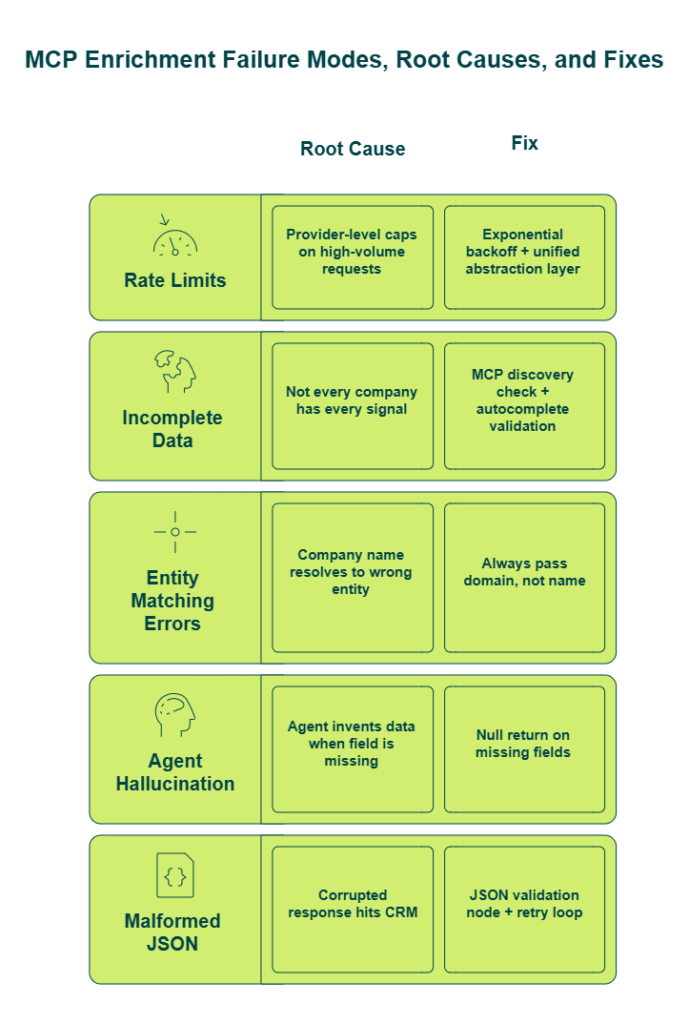
Production enrichment agents fail for three predictable reasons: rate limits from data providers, incomplete data returns (missing fields), and entity matching errors (wrong company resolved). Here’s how to handle each in your Claude Code agent- because if you skip this section, your first batch enrichment over 100 records will teach you the hard way.
⚠️ The Five Failure Modes and How to Fix Them
1. Rate limits- Explorium’s unified API abstracts provider-level rate limits, so you rarely hit individual source caps. For large batch enrichments (1,000+ records), implement exponential backoff in your agent’s workflow. Most data MCPs can’t handle requests for large datasets — we built for scale specifically to avoid this bottleneck.
2. Incomplete data returns- Not every company will have every signal. Use the agent’s MCP discovery to check available enrichment types before querying. Explorium’s autocomplete feature shows all available endpoint values for easy discovery, so the agent knows what’s available before it requests.
3. Entity matching errors- This is the one that ruins outbound at 2 AM. Searching for “Amazonia consulting firm in Singapore” via web search returns Amazon results instead. Always pass the domain (not just company name) for highest accuracy. Explorium’s robust matching mechanism cross-references 50+ sources to resolve ambiguity that single-source providers cannot.
4. Hallucination prevention- The agent retrieves only verified data from Explorium’s sources. It doesn’t generate or infer data points. If a field doesn’t exist in the enrichment response, it returns null- not a guess.
5. JSON validation- Implement a check confirming returned data is correct JSON. If not, send it back to the agent to retry. This validation node is standard in production n8n deployments and catches malformed responses before they hit your CRM.
🛡️ How Explorium’s AI-Powered QA Layer Handles This at the Infrastructure Level
Traditional ML is poor at identifying outliers and anomalies in enrichment data. We use AI extensively for QA on our own data- the model identifies inconsistencies that traditional ML would miss. For example: if a person works at Company A but their email domain is different, AI immediately flags that something is wrong. This AI-powered QA layer is why enterprise data products like Clay, Cognism, and Outreach trust Explorium as their underlying infrastructure.
“Your agent is only as good as your data. If you feed an agent dirty data – duplicates, missing fields, wrong entities – the probability of it working well is very low.”
— Omer, Co-founder & CEO, Explorium
“Depending on where the data is coming from, the data can often be mismatched or have outdated information. It is best to cross-reference the output data from other enriched information.”
— Omar G., Mid-Market Explorium G2 – Verified Review
The honest reality: no data provider is 100% accurate, 100% of the time. The difference is whether errors are caught at the infrastructure level or discovered by your SDR team during live calls. We designed for the former.
Q7. How Does Claude Code + Explorium MCP Compare to Clay, ZoomInfo, and Apollo? Cost, Coverage, and Match-Rate Benchmarks
You’re likely comparing four approaches: (1) Claude Code + Explorium MCP, (2) Clay’s visual workflow UI, (3) ZoomInfo/Apollo’s single-source platform + API, or (4) a DIY multi-API stack. Each solves part of the problem through fundamentally different architectures. Here’s how they compare – with real numbers, not marketing claims.
❌ Where Each Competitor Approach Falls Short
Clay: Flexible multi-provider workflow UI with strong integrations. But it requires manual configuration of each provider column and enrichment step. The async API isn’t ideal for real-time agent workflows. And the pricing creates real friction:
“Per-row credit cost can vary 100% from stated amounts – e.g., stated 11 credits/row, actual 25. Contact data quality varies wildly – feels like a black box.”
— Verified User, IT Services Clay – G2 Verified Review
Apollo/ZoomInfo: Strong single-source data with built-in prospecting UIs. But limited to their own data -no aggregation. Subscription-locked billing doesn’t scale for agent workflows. No MCP support.
“Data inaccuracies lead to negative outcomes. Wrong personnel details, private employee info listed as company contacts, misdirected communications.”
— Anders J., Developer Apollo – G2 Verified Review
DIY Multi-API: Maximum flexibility, maximum maintenance. Expect 10-15 hours/week on normalization and managing 3–5 separate vendor contracts at 2–3x the cost of a unified provider.
📊 Match-Rate Benchmarks: The Hard Data
| Field | Explorium | ZoomInfo | Apollo | Clearbit | Experian |
| Employee Count | 97.80% | 88.31% | 78.15% | 32.93% | 65.51% |
| Website URL | 97.80% | 89.62% | 78.04% | 54.03% | 61.37% |
| NAICS Code | 97.31% | 89.62% | 69.30% | 45.62% | 77.55% |
These aren’t self-reported metrics. Aggregating and cross-referencing 50+ sources catches gaps that any single provider misses- which is why the accuracy delta compounds across every field.
✅ Side-by-Side Architecture Comparison
| Criterion | Clay | Apollo/ZoomInfo | DIY Multi-API | Explorium MCP |
| Data Sources | Multi-provider (you configure each) | Single-source only | 3–5 vendors (you maintain) | 50+ unified in one API |
| Agent-Native MCP | ❌ No | ❌ No | ❌ No | ✅ Yes |
| Signal Breadth | Depends on providers added | Contacts + basic firmographics | Varies by stack | 30 categories, 4,000+ data points |
| Pricing Model | Platform fee + per-provider credits | Monthly subscription | Multiple contracts | 💰 One-time credit packages |
| Match-Rate Benchmarks | Undisclosed | 88–90% | Varies | 97%+ documented |
| Compliance/Resale | No resale rights | No resale rights | Per vendor | ✅ Enterprise GDPR/CCPA + resale |
| Onboarding | Steep learning curve | Sales call required | Weeks of integration | ⏰ Free account → first call in minutes |
💡 Who Should Choose What
Choose Clay if you want a visual UI for manually orchestrating multi-provider workflows and don’t need real-time agent integration. Choose Apollo/ZoomInfo if you need a prospecting platform for manual sales outreach with single-source data. Choose Claude Code + Explorium MCP if you’re building autonomous GTM agents that need multi-source enrichment through one integration, agent-native data selection, and documented accuracy benchmarks.
Explorium is often much lower cost than Clay because we don’t maintain a platform- only the data.
Q8. What Advanced Workflows Can You Build? Meeting Prep, Lead Scoring, Outbound Prospecting, and Batch Enrichment
Here are three production scenarios that Explorium customers have actually built- not theoretical use cases, but workflows running in production right now:
- You need to enrich 5,000 inbound leads overnight and have them scored and routed in Salesforce by morning
- Your team has 12 external meetings tomorrow and no one has time to research each account
- Your growth engineer needs to find 50 marketing leaders at fintech startups who joined within the past year- with verified contact info and personalized outreach drafts
Each of these went from concept to production in under a week using Claude Code + Explorium MCP.
⏰ Workflow 1: Meeting Prep Agent
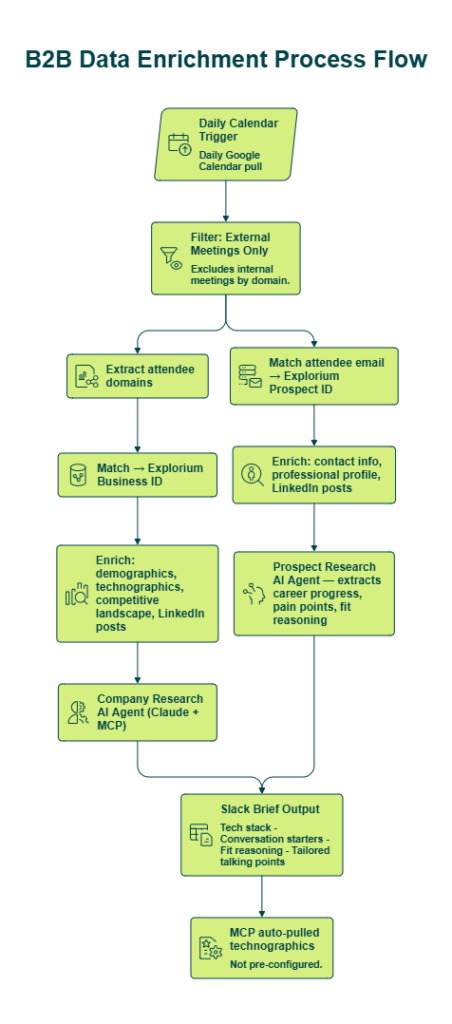
Trigger: Daily Google Calendar pull (also works with Outlook). Process: Filters external meetings by domain → forks into two parallel enrichment paths:
- Company path: Extracts attendee domains → matches to Explorium business ID → enriches with demographics, technographics, competitive landscape, LinkedIn posts → feeds into company research AI agent
- Prospect path: Matches attendee email to Explorium prospect ID → enriches with contact info, professional profile, LinkedIn posts → extracts career progress, pain points, and fit reasoning
Output: Slack brief with tech stack, conversation starters, fit reasoning, and tailored talking points- delivered before each call. Key insight: MCP automatically pulled technographics even though it wasn’t explicitly configured, because the agent determined it was relevant to the meeting context.
📊 Workflow 2: Inbound Lead Scoring + Outbound Prospecting
Lead Scoring: Pulls unqualified leads from Salesforce → forks into product usage data (from Databricks/Mixpanel) and external company enrichment (via Explorium MCP) → AI agent determines priority based on ICP fit, decision-maker status, and recent events like promotions, funding rounds, or product launches.
Outbound Prospecting: Natural-language query input → agent translates into valid Explorium API calls → fetches matching prospects → splits into two specialized agents: (1) research agent that compiles all prospect intelligence, and (2) email writer agent that crafts tailored outreach. Splitting into two specialized agents produces better output than asking one agent to do both.
🚀 Workflow 3: Batch Enrichment at Scale
Most data MCPs can’t handle requests for large datasets. We built for scale- batch enrichment of 1,000–5,000 records without the performance degradation that single-provider MCPs experience. Explorium’s n8n community node handles native integration: authenticate with an API key, select enrichment bundles directly in the workflow UI, and process at volume.
Filterable prospect parameters include: industry (Google category, NAICS, LinkedIn industry), firmographics (company size, revenue, age, region), and individual-level attributes (email availability, previous employers, job level, skills).
💡 The Bigger Picture
“What took months or years (3–4 years ago) to build can now be done within a week using modern workflow automation tools- because your agent is only as good as your data, and unified data beats fragmented data every time.”
— Omer, Co-founder & CEO, Explorium
Q9. What Security, Compliance, and Agent Access Control Considerations Apply to MCP-Based Enrichment?
“We can’t give an AI agent unrestricted access to B2B data- what about GDPR, CCPA, and the security of routing sensitive contact information through an MCP server?”
✅ Why This Concern Is Legitimate
This is the most important question in this entire tutorial- and honestly, it should be the first question most teams ask, not an afterthought. The industry spent 5–6 years getting serious about GDPR and CCPA after regulation forced the conversation. Now, a new governance layer is emerging around AI-specific PII handling that most teams haven’t fully addressed.
The core tension is real: when you give an employee system access, you expect them to be honest and loyal. Those traits cannot be assumed for LLMs. A famous experiment showed people cracking an LLM’s secret within hours of a competition starting. Agent authorization and access control are fundamentally different from human authorization- and MCP-based enrichment adds a governance layer that your existing security playbook probably doesn’t cover.
The concern becomes even more tangible when you look at how some data providers handle privacy:
“Obtained private phone number and sold it for sales purposes without consent. Not in line with GDPR. Business model appears to rely on unethical practices.”
— Lex Houweling Cognism – Trustpilot Review“Steals personal data and sells to companies. Low security measures caused data to leak to internet and dark web.”
— Stanislav V People Data Labs – Trustpilot Review
🛡️ How to Address This in Your Claude Code Agent
1. Consolidated compliance due diligence- We provide enterprise-grade GDPR/CCPA compliance across all 50+ data sources. Handle compliance review once with one provider, not per vendor across a fragmented stack. This is the same security infrastructure trusted by global enterprises like Pepsi.
2. API key scoping- Follow standard API key management patterns. Store keys as environment variables, never hardcode them. For team environments, generate separate keys per agent or workflow to maintain audit trails.
3. Agent access control- Don’t carte blanche give agents access to your entire Salesforce. Scope MCP permissions to specific enrichment types if your workflow doesn’t need all 30 categories. Understand your business process before deploying agents — you can’t digitally transform what you don’t understand.
4. Resale rights and enterprise certifications- Explorium’s custom plans include resale rights and enterprise security certifications. This matters when you’re building products on top of enriched data — many competitors don’t offer this at all.
💡 The Enterprise Trust Signal
Explorium powers enrichment for organizations with stringent compliance requirements- Clay, Cognism, Outreach, Bombora, and Monday.com all rely on our data infrastructure. The fact that enterprise data products trust Explorium as their underlying data layer validates the security and governance model at scale.
“Explorium is the only platform I have seen in market that has a consistent journey to explore, experiment and implement external data at scale without extension contracting or reselling.”
— Verified User Explorium Gartner – Verified Review
Review Explorium’s compliance documentation before deploying to production. Create a free account to test in a sandboxed environment- validate data governance before you commit.
Q10. From Tutorial to Production: A Deployment Readiness Checklist for Your Claude Code Enrichment Agent
Score your agent’s production readiness before deploying to your GTM stack. Each checklist item maps to a specific section in this guide- if something’s unchecked, you know exactly where to go back.
✅ Production Readiness Checklist
☐ MCP configuration tested and verified- Explorium MCP server connected in Claude Code, tools appearing in agent’s tool list (Section Q3)
☐ Multi-signal enrichment validated with sample data- Firmographics, technographics, and contact data returning correctly for test domains (Section Q4)
☐ Output delivery configured- CSV export, CRM sync (Salesforce/HubSpot), or Slack delivery path tested end-to-end (Section Q5)
☐ Error handling and retry logic implemented- Exponential backoff for batch jobs, JSON validation node, entity matching via domain not company name (Section Q6)
☐ Agent KPIs defined- Enrichment match rate, response latency, data freshness, and records processed per session
☐ Agent evals set up- Test with known entities to verify accuracy before live deployment; red-team the agent to find exploits before deploying
☐ Access control and API key permissions scoped- GDPR/CCPA compliance verified, agent permissions limited to required enrichment types (Section Q9)
☐ Batch processing tested at target volume- 100, 1,000, and 5,000 records to validate performance at scale
☐ Monitoring and drift detection in place- The same rigor applied to evaluating human performance must apply to AI agents; confirm the non-deterministic flow works at your required accuracy threshold
📊 Score Interpretation
| Score | Status | Action |
| ✅ 8–9 checks | Production-ready | Deploy with confidence; focus on scaling |
| ⚠️ 5–7 checks | Pilot-ready, not production-ready | Address remaining items before scaling beyond test accounts |
| ❌ 0–4 checks | Return to tutorial | Each unchecked item maps to a specific section above |
🔑 The Systems Thinking Mindset
An agent in production is not a wrapper over an API- it’s a system. Define KPIs. Define evals. Ensure the non-deterministic flow works at least X% of the time. Always start with the business case, not the technology- identify what your GTM team actually needs to do, then work backward to how agents and technology solve it.
Because things move so fast, teams often get trapped in hype instead of value. Keep your eyes on the actual business problem- the rest follows.
⏰ Your Next Steps
We built Explorium for production scale- not tutorial demos. The unified API handles large-scale batch enrichment that most data MCPs can’t support, the credit system scales without subscription lock-in, and enterprise-grade compliance means your security team signs off once.
- Create your free Explorium account at explorium.ai — no sales call required
- Configure the MCP in Claude Code using the JSON block from Section Q3
- Run your first enrichment with a test domain
- Validate output and error handling against Sections Q4–Q6
- Deploy to production once your checklist scores 8+
The power of your workflow is based on the data powering it. Unified data beats fragmented data — every time.
FAQs


