


TL;DR
- Recruiting agents need three API types working together: people search, contact enrichment, and job change signals.
- Single-source APIs create identity conflicts and coverage gaps that break agent scoring reliability.
- MCP lets recruiting agents autonomously select enrichments per candidate without hard-coded endpoint mapping.
- Explorium unifies 50+ data sources under one API key with 800M+ profiles and a free 500-credit tier.
- Job change signals via EventAPI are the highest-ROI outreach trigger for autonomous recruiting pipelines.
Q1. Why Do Recruiting Automation Agents Need B2B Data APIs?
The Recruiting Data Problem Nobody Talks About
Here’s what actually happens when engineering teams build recruiting agents on top of internal data alone: the agent has access to your ATS, applicant names, resumes, interview notes, and absolutely nothing about the 95% of candidates who haven’t applied yet. Your Applicant Tracking System is a record of who found you. It tells you nothing about who your agent should go find.
Recruiting automation agents operate on an LLM-as-brain, API-as-hands architecture. The LLM reasons about candidate fit, scores profiles, and generates personalized outreach. But it needs hands, B2B data APIs, to discover candidates, pull verified contact details, enrich professional histories, and detect job change signals that determine outreach timing.
Why Single-Source APIs Create a False Sense of Coverage
The typical recruiting tech stack stitches together 3–5 separate data vendors: Apollo for contact emails, People Data Labs for professional profiles, maybe a standalone provider for job change alerts. Each returns its own slice of the picture. None delivers a unified candidate record your agent can act on without normalization scripts in between.
Legacy prospecting platforms like LinkedIn Recruiter and ZoomInfo Talent were designed for humans clicking through UIs, not for autonomous agents consuming data via API at scale. ❌ Single-source APIs like Apollo offer contact coverage without recruiting context: you get an email address but miss job change timing, hiring velocity, and the technographic context that determines whether a candidate’s current employer is even the right signal for outreach.
“Contact info frequently missing or incorrect. Half the day calling wrong/disconnected numbers. Mobiles frequently wrong.”
— Verified User, IT Services, Mid-Market Apollo – G2 Verified Review
The Architectural Shift: Unified Data + Agent-Native Delivery
The real transformation isn’t adding more data vendors. It’s eliminating the need to manage them separately. Recruiting agents need a system that lets them autonomously decide what data to pull for each candidate workflow: professional history for one role, skills and certifications for another, company firmographics to assess employer fit. The “Unified API + MCP” model treats data as a single intelligence layer the agent queries directly, rather than a set of fragmented endpoints the engineering team pre-maps.
How Explorium Powers the Recruiting Agent Stack
We built Explorium’s API around four endpoint types that map directly to recruiting workflows:
- ✅ Match — Resolve candidate identity from a name, email, or LinkedIn URL
- ✅ Enrich — Add professional profile, verified contact data, skills, and company context
- ✅ Fetch — Discover candidates matching criteria (title, skills, industry, location, job change recency)
- ✅ Event — Trigger on job changes, promotions, and hiring surges via prospect_changed_role
All of this is accessible through one API key and one credit system, covering 800M+ professional profiles, 150M+ company profiles, and 30+ enrichment categories. For agents built on Claude Code, n8n, LangChain, or CrewAI, our MCP integration lets the agent autonomously select which enrichments it needs per candidate, with no pre-configured endpoint mapping required.
“Instead of connecting to multiple data sources and APIs, we only require one connection — Explorium!”
— Mirit H., Mid-Market Explorium G2 – Verified Review
Q2. What Types of B2B Data APIs Power Recruiting Automation Agents?
The Three API Pillars Every Recruiting Agent Needs
Recruiting automation agents depend on three distinct API types working in concert. Skip any one of them, and your agent has a blind spot that either stalls the pipeline or produces low-quality outreach:
| API Type | What It Does | Recruiting Use Case |
|---|---|---|
| People Search / Fetch APIs | Discovers candidates matching structured criteria | Boolean-equivalent sourcing at API speed |
| Contact Enrichment APIs | Adds verified emails, phones, professional history to a known candidate | ATS population, outreach personalization |
| Event / Signal APIs | Detects job changes, promotions, hiring surges | Outreach timing triggers |
How Each API Type Works in Recruiting Workflows
1. People Search / Fetch APIs accept parameters (job title, skills, seniority level, company size, industry, location, and job change recency) and return matched candidate profiles. Your recruiting agent uses this to generate candidate lists without manual LinkedIn boolean searches. Fields returned typically include:
- Full name, current title, and current employer
- Professional profile URL, location, and seniority level
- Industry classification and company size bracket
2. Contact Enrichment APIs accept a candidate identifier (LinkedIn URL, email, or name + company) and return verified contact details plus deep professional context. This is what makes outreach actionable:
✅ Verified work email and direct phone number
✅ Full professional history (titles, tenures, and employers)
✅ Skills, certifications, and education
✅ Current employer
(revenue, headcount, and tech stack)
3. Event / Signal APIs monitor the professional landscape and push notifications when candidates change jobs, get promoted, or when companies trigger hiring surges. These are the timing layer, the difference between outreach that arrives at the right moment and outreach that lands in a void.
Why All Three Must Work Together
Here’s the tradeoff most teams miss: a recruiting agent with only contact enrichment can find people but can’t time outreach. An agent with only signals can detect opportunities but can’t reach candidates. And an agent with only people search can build lists but can’t verify whether those candidates are reachable or recently active.
The most effective recruiting agents chain all three: discover → enrich → monitor. The problem is that when each API type comes from a different vendor, your engineering team becomes the integration middleware, writing normalization scripts, resolving identity conflicts between providers, and managing three separate billing systems.
Explorium’s Unified Approach: One Integration, All Three Types
We designed Explorium’s API so that all three types live under one roof:
- FetchAPI → Candidate discovery (People Search)
- EnrichAPI → Contact + professional profile enrichment
- EventAPI → Job change signals, hiring events, and promotions
Through MCP integration, recruiting agents dynamically select which API type to invoke based on the current workflow context. The agent queries Explorium’s MCP server, discovers all available tools, and decides on its own whether it needs contact data, company firmographics, or job change history for a specific candidate, without the engineering team pre-mapping each endpoint.
Think of it as giving your recruiting agent a dedicated sourcing team that knows every candidate database, every verification service, and every monitoring tool, querying across all of them simultaneously through one interface.
Q3. What Contact Enrichment Does a Recruiting Agent Need — and How Does It Get It?
The Scenario That Breaks Most Recruiting Pipelines
It’s Tuesday morning. Your recruiting agent sourced 200 senior backend engineers overnight, but 40% came back with no email from your contact provider, another 30% have outdated job titles from a database that refreshes quarterly, and none include job change timing. You’re now cross-referencing two separate API responses, deduplicating mismatched records, and your outreach launch is delayed by two days.
This happens because single-source contact APIs return their own database snapshot. They don’t cross-reference against other providers to fill coverage gaps, and they certainly don’t attach recruiting context (skills, career trajectory, employer firmographics) to the contact record your agent needs to personalize outreach.
The Six Enrichment Categories a Recruiting Agent Needs
Missing any one of these forces your agent to send generic outreach or skip qualified candidates entirely:
- Verified Contact Data — Work email (deliverability-verified), direct phone, and LinkedIn profile URL
- Professional Profile — Current and past titles, tenure at each role, seniority level, and department
- Skills & Certifications — Technical skills, languages, certifications, and specializations
- Educational Background — Degrees, institutions, and graduation years
- Current Company Firmographics — Employer’s size, industry, revenue, tech stack, and funding stage
- Social & Professional Activity — Recent LinkedIn posts, career moves, and published content
⚠️ The Hidden Costs of Incomplete Enrichment
- 💸 Engineering time: 8–12 hours/week building and maintaining multi-API normalization scripts
- ❌ Agent failure: Recruiting agents stall or send to invalid emails when enrichment returns incomplete records
- ⏰ Opportunity cost: While you normalize data, top candidates accept offers elsewhere
“Data inaccuracies lead to negative outcomes. Wrong personnel details, private employee info listed as company contacts, misdirected communications.”
— Anders J., Developer, Small-Business Apollo – G2 Verified Review
How Explorium’s EnrichAPI Solves This, in One Call
Explorium’s EnrichAPI accepts a candidate identifier (LinkedIn URL, email, or name + company) and returns all six enrichment categories from 50+ cross-referenced sources in a single API call. Here’s the pattern:
import requests
headers = {"api_key": "YOUR_API_KEY", "Content-Type": "application/json"}
payload = {"match_data": {"name": "Jane Doe", "company": "Acme Corp"}}
# One call returns contact + profile + skills + company context
response = requests.post(
    "https://api.explorium.ai/v1/prospects/enrich",
    headers=headers, json=payload
)
candidate = response.json()  # Unified record, all 6 categories
The unified credit system means pulling contact details + professional history + company context costs one enrichment, not three separate vendor calls.
“Explorium gives us the data I need when I need it. This saves us a lot of time and money instead of managing each data source separately.”
— Ishi N., Enterprise Explorium G2 – Verified Review
Explorium delivers 97.8% accuracy on firmographic fields where single-source providers average 78%, because cross-referencing 50+ sources catches gaps any individual provider misses.
Q4. How Do Job Change Signals Power Recruiting Agent Outreach?
What Job Change Signals Are, and Why Recruiters Should Care
Job change signals are automated notifications triggered when a professional changes roles, gets promoted, joins a new company, or exits an organization. For recruiting agents, these signals are the single highest-ROI outreach trigger available. A candidate who just made a career move is actively thinking about their professional trajectory and significantly more receptive to conversations about their next opportunity.
Traditional recruiters monitor LinkedIn manually for these changes. AI recruiting agents need programmatic access via Event APIs: real-time push notifications that trigger automated workflows, not browser tabs a human checks on Fridays.
Why Manual Signal Monitoring Doesn’t Scale
Most recruiting teams rely on LinkedIn Sales Navigator alerts or weekly manual checks to detect job changes. Here’s what actually happens:
- ❌ Coverage gaps: Not all job changes are announced publicly on LinkedIn. Manual monitoring misses the majority.
- ⏰ Multi-week delays: By the time a recruiter notices a LinkedIn update, the candidate has already been contacted by faster-moving teams.
- ❌ Not agent-consumable: Alert emails and browser notifications cannot be consumed by autonomous agents. There’s no webhook, no structured payload, and no API.
“Company data doesn’t refresh often enough. Only 20% of known contacts could be found — including people at companies for 1+ year.”
— Verified User, Internet, Mid-Market Clearbit – G2 Verified Review
Standalone signal providers partially solve this, but they offer narrow event coverage without the accompanying contact enrichment needed to actually reach the candidate. You know someone changed jobs, but you still need a separate vendor to get their updated email.
The Event-Driven Architecture: Signal → Enrich → Score → Outreach
The ideal recruiting agent pipeline works like this:
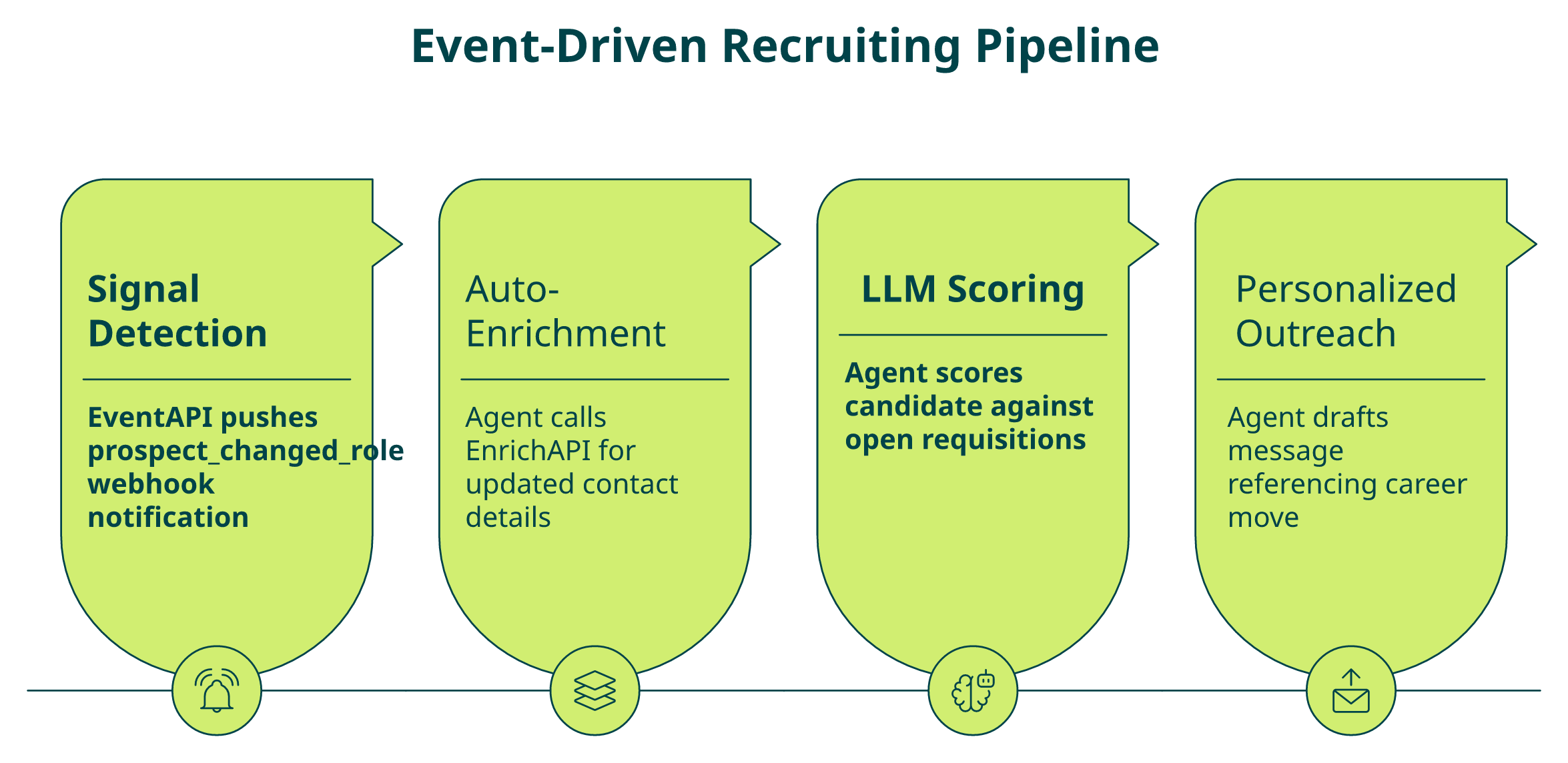
- Signal Detection — EventAPI pushes a prospect_changed_role notification via webhook
- Enrichment — Agent automatically calls EnrichAPI to get the candidate’s updated contact details and new employer context
- Scoring — LLM scores the candidate against open requisitions using enriched data
- Outreach — Agent drafts personalized message referencing the career move and queues it in the sequencing tool
All four steps execute without human intervention. The pipeline transforms recruiting from reactive sourcing (“let me check who applied this week”) to proactive talent engagement (“this target candidate just moved, let’s reach out now”).
Explorium’s EventAPI: Real-Time Job Change Triggers with Code
Explorium’s EventAPI supports 18+ event categories and 80+ unique event types. For recruiting agents, the key events include prospect_changed_role, prospect_changed_company, executive changes, and company-level hiring surges. Here’s how to subscribe:
curl -X POST "https://api.explorium.ai/v1/prospects/events/enrollments" \
 -H "api_key: YOUR_API_KEY" \
 -H "Content-Type: application/json" \
 -d '{
   "enrollment_key": "recruiting_pipeline_ml_engineers",
   "event_types": ["prospect_changed_role", "prospect_changed_company"],
   "prospect_ids": ["20ae6cbf564ee683e66685e429844a5ff8ffc30f"],
   "ttl_days": 365
 }'
Because the EventAPI is part of the same unified platform, the recruiting agent immediately calls EnrichAPI for updated contact details, with no second vendor integration required.
Real-World Example: Champion Migration Detection
This isn’t theoretical. The n8n Champion Migration workflow, built with Explorium + Claude, automates exactly this pattern at production scale: detect when a target prospect changes companies, enrich their new employer with firmographics and tech stack data, score company fit against your ICP, and generate personalized outreach with Claude. All of this is triggered automatically when the EventAPI fires.
A recruiting agent monitoring 5,000 target candidates detects a senior ML engineer leaving a FAANG company. Within seconds, it enriches the updated profile (new company, new role, verified email), scores against three open ML positions, and drafts personalized outreach referencing the career move, all before a human recruiter sees the LinkedIn notification.
Q5: How Do You Build an Automated Candidate Sourcing Agent with Data APIs?
The Five-Component Architecture
Every recruiting automation agent, regardless of framework, breaks down into five components. The LLM is the brain; B2B data APIs are the hands. Here’s the architecture:
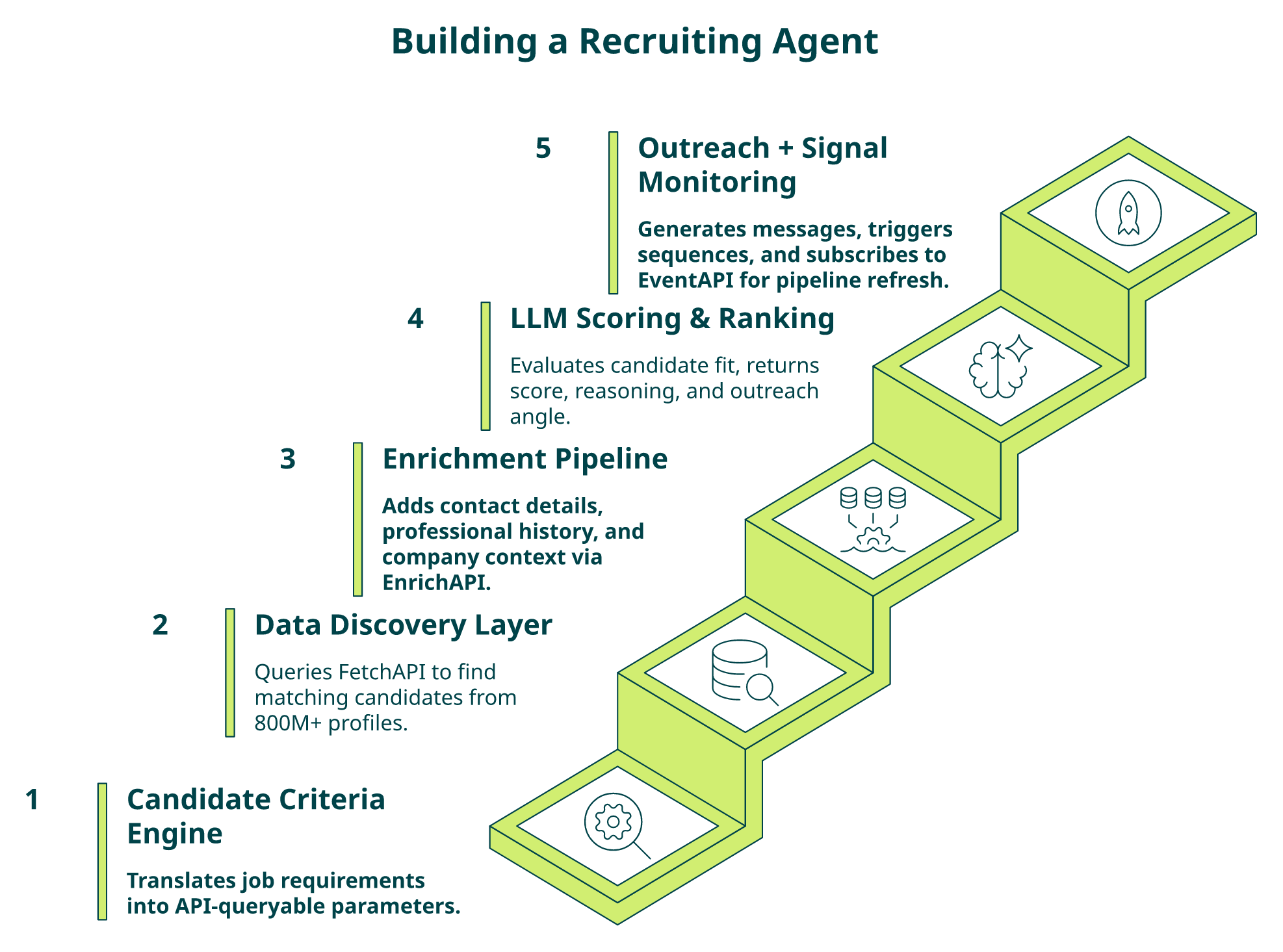
- Candidate Criteria Engine, Translates job requirements into API-queryable parameters
- Data Discovery Layer, Queries FetchAPI to find matching candidates
- Enrichment Pipeline, Adds contact details, professional history, and company context via EnrichAPI
- LLM Scoring & Ranking, Evaluates candidate fit using enriched data
- Outreach Orchestration + Signal Monitoring, Generates messages, triggers sequences, and subscribes to EventAPI for continuous pipeline refresh
The rest of this section walks through each step with Explorium-specific code patterns.
Steps 1–2: Define Criteria and Discover Candidates
Start by translating natural-language requirements into structured parameters. “Senior backend engineers at Series B+ fintech companies who changed roles in the last 6 months” becomes a FetchAPI query:
import requests
headers = {"api_key": "YOUR_API_KEY", "Content-Type": "application/json"}
payload = {
    "filter_by": [
        {"field_name": "job_title", "value": "Backend Engineer"},
        {"field_name": "seniority", "value": "Senior"},
        {"field_name": "company_industry", "value": "Fintech"},
        {"field_name": "job_changed_within_months", "value": 6}
    ],
    "size": 100
}
candidates = requests.post(
    "https://api.explorium.ai/v1/prospects/fetch",
    headers=headers, json=payload
).json()
Alternatively, with Explorium’s MCP integration, your agent can submit that natural-language query directly. MCP translates it into valid API calls without structured parameter mapping.
Steps 3–4: Enrich and Score with LLM
For each discovered candidate, call EnrichAPI to add verified contact details, full professional history, skills, education, and employer firmographics. Then pass the enriched profile to your LLM for scoring:
scoring_prompt = f"""
Score this candidate (0-100) for the role: Senior Backend Engineer.
Candidate profile: {enriched_candidate}
Job requirements: {job_requirements}
Return: score, reasoning, outreach_angle
"""
Here’s where MCP changes the game: if the initial enrichment is insufficient for scoring (say the agent needs GitHub activity or certifications for an ML role), it autonomously requests additional data points without code changes. The agent decides what it needs per candidate, per role.
Step 5: Trigger Outreach and Monitor Signals
The agent generates personalized outreach using enriched data, referencing career moves, skills match, and company context, then pushes to your sequencing tool (Lemlist, Outreach, or Gmail). But the pipeline doesn’t stop at outreach. Subscribe to EventAPI signals for the entire candidate pool:
- ✅ New candidates matching criteria enter the market
- ✅ Existing candidates change roles or companies
- ⏰ Hiring surges at target companies trigger fresh sourcing rounds
This creates a living pipeline that self-refreshes, not a static list that decays within weeks.
The Explorium-Specific Build Pattern
With Explorium, this five-step pipeline connects through one API key: FetchAPI for discovery, EnrichAPI for candidate data, EventAPI for signals, and MCP for autonomous agent decision-making. The unified credit system means you pay once for the full pipeline, not per-vendor per-step. The free tier includes 500 enrichment credits to build and test your recruiting agent before committing, and engineering teams report going from signup to first sourcing agent in under a week.
Q6: Why Does Fragmented Data Break Recruiting Agents, and What Makes a Data API Agent-Ready?
The Decision That Determines Agent Quality
Your recruiting agent’s output is only as good as its data. Teams choosing a B2B data API face a critical decision: accept fragmented multi-vendor stacks that introduce identity conflicts, schema mismatches, and temporal staleness, or invest in a unified data layer that resolves these issues before data reaches the agent.
This decision determines whether your recruiting agent produces reliable candidate recommendations or generates hallucinated scores from conflicting records.
What Actually Breaks Agents (Not What You’d Expect)
Most teams choose data APIs based on record count (“200M contacts”) or brand recognition. That ignores three structural failure modes inherent to multi-vendor stacks:
- ❌ Identity conflicts, Different providers use different matching algorithms; the same candidate returns as two separate records with conflicting job titles
- ❌ Schema mismatches, Job title taxonomies, seniority levels, and industry classifications differ across providers; your LLM can’t score consistently when “VP Engineering” in one system equals “Director, Engineering” in another
- ⏰ Temporal gaps, One provider refreshes weekly, another monthly; the agent can’t determine which record is current
“Per-row credit cost can vary 100%+ from stated amounts. Contact data quality varies wildly, feels like a black box.”
— Verified User, IT Services, Mid-Market Clay – G2 Verified Review
The 7-Criterion Agent-Readiness Framework
Instead of choosing on record count, evaluate data APIs against these seven criteria:
| # | Criterion | What to Look For |
|---|---|---|
| 1 | Multi-Source Aggregation | Unifies data from multiple providers into one canonical record |
| 2 | Data Freshness & Accuracy | Documented refresh cadences (daily/weekly/monthly) with benchmarks |
| 3 | Identity Resolution | Robust matching, deduplication, and cleansing across sources |
| 4 | Agent-Native Delivery (MCP) | Supports MCP for autonomous data selection |
| 5 | Signal Breadth | Job changes, hiring surges, promotions, AND contacts in one system |
| 6 | Unified Pricing | Single credit pool across all enrichment types |
| 7 | Compliance | GDPR/CCPA with resale rights under one framework |
Where Explorium Scores, and Why It Matters
Explorium scores on all seven criteria. We aggregate and harmonize data from 50+ sources with documented refresh cadences, robust matching and deduplication, MCP-native delivery, 18+ event categories, a unified credit system, and enterprise-grade GDPR/CCPA compliance with resale rights on custom plans.
“Explorium is a great tool for getting data from multiple subscriptions, databases but at a consolidated cost.”
— Omar G., Mid-Market Explorium G2 – Verified Review
“Their product enables us to test multiple data sources and to save money by removing sources that have a poor benefit.”
— Verified User, Financial Services Explorium G2 – Verified Review
This is why the industry’s leading data products, Clay, Cognism, Outreach, Common Room, and Bombora, use Explorium’s data infrastructure. Aggregated, harmonized data from 50+ sources isn’t a feature; it’s the architectural foundation that separates agent-ready APIs from raw data feeds.
Q7: Which B2B Data APIs Support Recruiting Automation, and How Do They Compare?
The Real Comparison: Architecture, Not Just Record Count
If you’re building a recruiting automation agent, you’re likely evaluating multiple B2B data API providers. The decision isn’t about who claims the most contacts; it’s about which provider delivers candidate discovery, contact enrichment, job change signals, and agent-native delivery through one integration.
Here’s a fair assessment of the leading options across recruiting-specific dimensions.
Provider-by-Provider Analysis
Apollo.io
✅ Strong contact database with affordable pricing and built-in prospecting UI
❌ Single-source provider; API billing locked to monthly subscription tiers; no MCP support; limited signal types beyond contacts
Best for: Manual prospecting teams running outbound, not agent-scale enrichment
“Lack of integrations, only Zapier and some API. Support not helpful, no phone calls, chat only.”
— Tejender K., Digital Marketing Executive Apollo – G2 Verified Review
People Data Labs
✅ Strong professional profile coverage, developer-friendly documentation
❌ Primarily contacts + basic firmographics; no event/signal API for job changes; no agent-native delivery; reported support and billing issues
Best for: Data engineers needing bulk people data for analytics
“Switched from free trial to paid plan. After a few days, account disabled with no warning or explanation. Support unresponsive.”
— Verified User, Computer Software, Mid-Market People Data Labs – G2 Verified Review
ZoomInfo
✅ Largest traditional database with strong CRM integrations
❌ Enterprise pricing with rigid annual contracts; API limited in agent-scale throughput; no MCP support; designed for human UI users
Best for: Enterprise sales teams with budget for manual prospecting workflows
Side-by-Side Comparison Table
| Dimension | Apollo | People Data Labs | ZoomInfo | Explorium |
|---|---|---|---|---|
| Data Source Architecture | Single-source | Single-source | Single-source | 50+ aggregated sources |
| Recruiting Signal Types | Contacts only | Contacts + basic firmographics | Contacts + intent | Contacts + firmographics + signals + events |
| Agent-Native Delivery (MCP) | ❌ | ❌ | ❌ | ✅ Native MCP server |
| Professional Profile Coverage | ~250M contacts | ~800M profiles | ~300M contacts | 800M+ profiles, 150M+ companies |
| Pricing Model | Monthly subscription | Pay-per-record | Annual contract | 💰 Credit-based, pay-per-enrichment |
| Onboarding Speed | Self-serve | Self-serve | Sales call required | Free tier, no sales call |
| Compliance & Resale | Standard | Questioned by users | Enterprise GDPR | ✅ GDPR/CCPA + resale rights |
Who Should Choose What
Choose Apollo if you need a simple prospecting UI for manual outreach. Choose PDL if you need bulk people data for analytics pipelines. Choose Explorium if you’re building recruiting agents that need multi-source enrichment + job change signals + contact data through one API and MCP, with a unified credit system and a free tier to test before committing.
Q8: How Does MCP (Model Context Protocol) Change Recruiting Agent Architecture?
What MCP Actually Is, in Plain Terms
MCP (Model Context Protocol) is an open standard that lets AI agents dynamically discover and invoke data tools without pre-configured API endpoint mapping. For recruiting agents, this means the agent autonomously decides which candidate data it needs, professional history, contact details, job change signals, company firmographics, and retrieves it in real time. No hard-coded endpoint calls. No engineering team mapping every enrichment path manually.
This is the single biggest architectural shift in how recruiting agents consume data, and almost no one in the recruiting data space is talking about it yet.
MCP vs. Traditional REST API: The Recruiting Difference
With traditional REST integration:
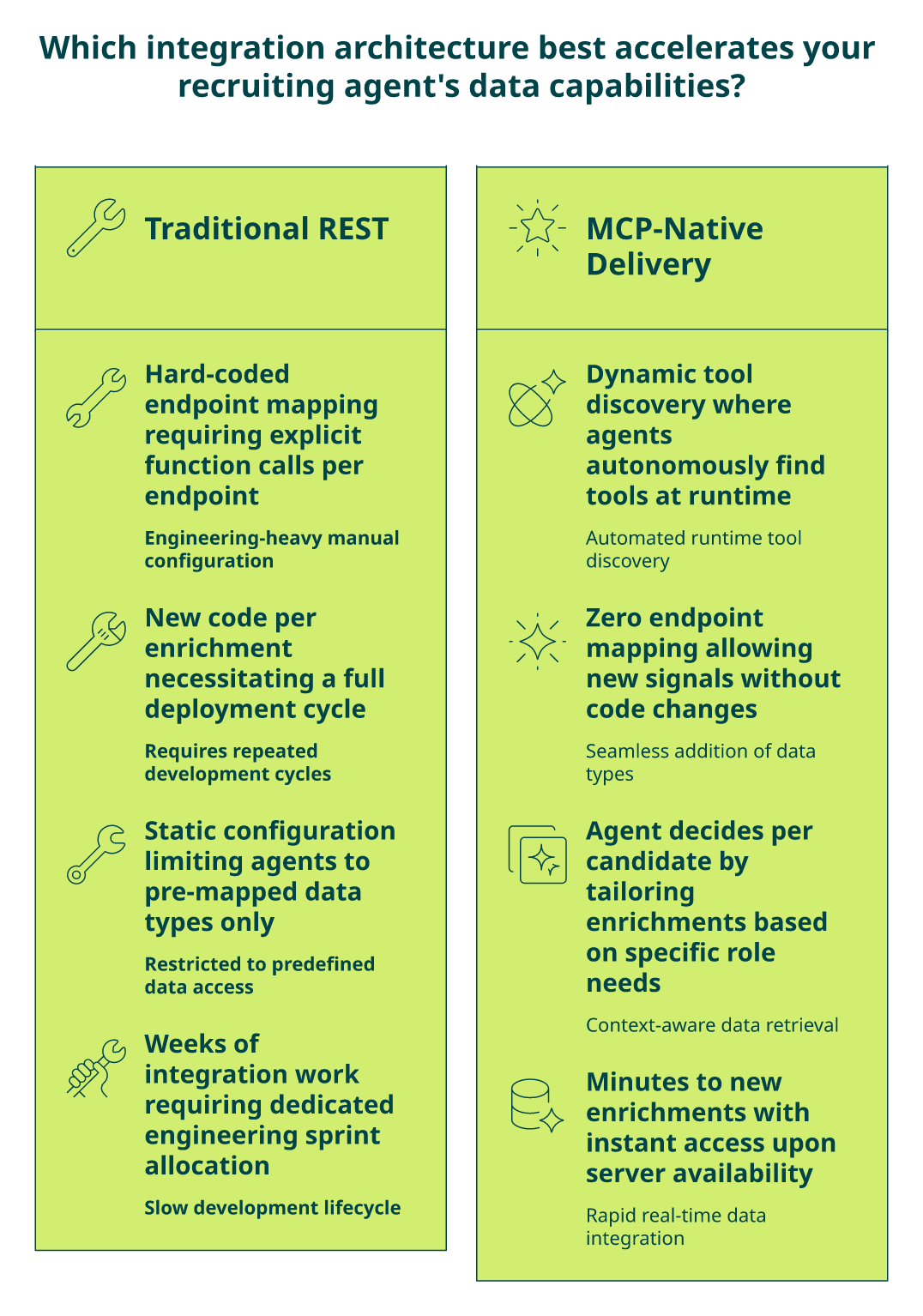
You explicitly define which endpoints to call (/enrich/contact, /fetch/prospects, /events/job_changes) and map each to a function call in your agent code. Every new enrichment type, skills data, GitHub activity, company technographics, means new code, new endpoint mapping, and a new deployment cycle.
With MCP:
The agent queries Explorium’s MCP server and autonomously discovers all available tools. When evaluating a candidate, it decides: “I need this person’s skills, their company’s tech stack, and whether they recently changed jobs,” and retrieves all three without pre-configuration.
In practice, this means your recruiting agent running on Claude Code or n8n can pull technographic data about a candidate’s employer, even if you never explicitly configured that enrichment, because the agent determined it was relevant to the scoring decision.
What MCP Enables for Recruiting Agents
- ✅ Dynamic enrichment per candidate: ML candidates get skills + technical certifications; executives get company financials + board memberships. The agent decides per role, not per configuration
- ✅ Zero endpoint mapping: Add new signal types (hiring velocity, layoff events) without code changes
- ✅ Framework-agnostic: Works with Claude Code, n8n, LangChain, LangGraph, and CrewAI
- 💰 Credit-efficient: Agent pulls only signals relevant to each workflow, avoiding blanket enrichment that wastes credits
- ✅ Natural language querying: “Find engineers with ML experience who previously worked at Google” translates to valid API calls automatically
Why This Changes Recruiting Agent ROI
The difference between static API mapping and MCP-native delivery is “configure every endpoint manually for each recruiting use case” versus “let your agent decide what candidate data it needs per role.” Engineering teams using Explorium’s MCP eliminate weeks of integration work per new enrichment type.
Explorium is one of just 25 official Claude Desktop connectors, installable directly from Claude’s extension marketplace. That means your recruiting agent built on Claude can access 800M+ professional profiles and 150M+ company profiles through MCP without writing a single API integration line.
“Explorium is the only platform I have seen in market that has a consistent journey to explore, experiment, and implement external data at scale.”
— Verified Reviewer Explorium – Gartner Verified Review
MCP gives your recruiting agent a dedicated sourcing researcher who knows every database, every enrichment type, and every signal source, and autonomously decides what to pull for each candidate without being told. That’s why we built Explorium MCP-first, not API-first-with-MCP-added-later.
Q9: How to Get Started: Claude Talent Finder, MCP Playground, and Free Developer Tier
Three Zero-Commitment Paths from Reading to Testing
Most articles about recruiting automation end with “contact sales.” This one ends with three ways to test Explorium’s recruiting data in the next five minutes, no sales call, no credit card, no annual contract. Each path targets a different persona and level of technical involvement.
🔍 Claude Talent Finder: Natural Language Recruiting in Claude Desktop
Claude Talent Finder connects Claude Desktop directly to Explorium’s full data layer. Setup takes under two minutes: Claude Desktop → Settings → Extensions → search “Explorium Business Data” → install. From there, type natural-language recruiting queries and get live candidate data back:
- “Find engineers with experience in machine learning who previously worked at Google”
- “Generate insights about [prospect name]’s recent career changes for personalized outreach”
- “Find prospects who were promoted to Head of Design and work for advertising agencies”
Claude returns enriched candidate profiles, career context, company firmographics, and contact data, powered by 800M+ professional profiles. No API code required. Explorium is one of just 25 official Claude Desktop connectors, which means recruiting teams can start talent sourcing in a conversational interface before writing a single line of integration code.
🧪 MCP Playground: Test Recruiting Queries in Your Browser
The MCP Playground is a live chat interface powered by Claude + Explorium MCP. No signup required to explore the interface. Test recruiting-specific prompts directly in your browser:
- “Get [company name]’s CEO email”
- “Identify decision-makers at companies using Salesforce in the healthcare sector”
- “Find mid-sized logistics companies in Florida”
- “Find product managers who work in fintech companies”
Results come from live data. Use this to validate data coverage for your specific recruiting use case, job titles, industries, geographies, and company sizes, before committing to a single API call.
“The richness and breadth of data is incredible. I really like the instant access to the most useful and reliable external data.”
— Ishi N., Enterprise Explorium G2 – Verified Review
💰 Free Developer Tier: From Signup to First API Call in Minutes
Sign up at explorium.ai/sign-up, no credit card, no sales call. Receive your API key immediately plus 500 enrichment credits monthly. Full access to all endpoints:
| What You Get | Details |
|---|---|
| FetchAPI | Candidate discovery by title, skills, industry, location |
| EnrichAPI | Contact details, professional profile, company context |
| EventAPI | Job change signals, promotion alerts, hiring surges |
| MCP Server | Autonomous agent integration for Claude Code, n8n, LangChain |
| Credits | 500/month, reset monthly |
When ready to scale: one-time credit packages (not subscriptions) with custom plans offering resale rights and search preview. Engineering teams report going from signup to first recruiting agent in under a week.
“Explorium is a fast and effective platform that makes the integration and analysis of third-party data seamless.”
— David A., CEO, Mid-Market Explorium G2 – Verified Review
Q10: What Compliance and Privacy Rules Apply to Recruiting Data APIs?
Your Compliance Audit Starts Here
Score your recruiting data API compliance posture against these seven criteria. Each unchecked box represents regulatory risk your autonomous recruiting agent may be creating, without your engineering team realizing it.
⚠️ The 7-Point Recruiting Data Compliance Checklist
- ☐ GDPR compliance covering candidate personal data processed by your agent? GDPR Article 32 requires “appropriate technical and organizational measures,” and Article 28 requires processors to provide “sufficient guarantees”.
- ☐ CCPA opt-out and do-not-contact lists enforced before outreach? Non-compliance fines start at €10M or 2% of annual turnover.
- ☐ Single compliance framework covering ALL data sources your agent consumes, or separate obligations per vendor?
- ☐ Resale rights if your recruiting product serves downstream customers?
- ☐ Candidate data retention and deletion handled programmatically via API?
- ☐ Data freshness cadences documented, avoiding stale records that violate GDPR Article 5 accuracy principles?
- ☐ SOC 2 certification covering the data processing your recruiting agent performs?
Score Interpretation
| Score | Assessment | Action |
|---|---|---|
| 6–7 ✓ | ✅ Strong compliance posture | Focus on documentation and audit readiness |
| 3–5 ✓ | ⚠️ Critical gaps | Likely managing separate compliance obligations across vendors |
| 0–2 ✓ | ❌ Significant exposure | Agent may process candidate data without adequate compliance |
The compliance risk multiplies with every vendor in your stack. Three data providers means three separate DPAs, three different data retention policies, three compliance audits, and three potential points of regulatory failure.
“Obtained private phone number and sold it for sales purposes without consent. Not in line with GDPR.”
— Lex Houweling, NL Cognism – Trustpilot Review
“Low security measures caused data to leak to internet and dark web.”
— Stanislav V., DE People Data Labs – Trustpilot Review
How Explorium Closes Every Gap
We built Explorium’s compliance posture so your recruiting agent inherits enterprise-grade privacy from the data layer itself, not from a patchwork of vendor contracts:
- ✅ SOC 2 Type 2, ISO 27001, and ISO 27701 certified, annual external audits by independent cybersecurity firms, plus penetration tests on every product update
- ✅ GDPR and CCPA compliant across all 50+ underlying data sources through one unified framework. Your team signs one DPA, not five
- ✅ Resale rights on custom plans for recruiting products that serve downstream customers
- ✅ AES-256 encryption at rest, TLS 1.2+ in transit, AWS cloud infrastructure
- ✅ Documented freshness cadences (daily/weekly/monthly) per data category, ensuring your agent never enriches candidates with stale records that violate accuracy principles
Explorium handles compliance due diligence once across all sources, so your recruiting team builds agents, not manages vendor-by-vendor governance.
FAQs


