


TL;DR
- We show how Explorium's Business, Contact, and Event APIs map 1:1 to LangGraph nodes, with typed AgentState passed between them for deterministic, replayable runs.
- Conditional edges turn enrichment into ICP-aware decisions, credit-aware branching, trigger-first routing, and human-in-the-loop escalation become policy as code.
- We recommend REST for the deterministic spine of the graph and MCP inside reasoning nodes, all on one unified credit pool and auth header.
- A production-ready LangGraph GTM agent needs Postgres checkpointing, HMAC-validated webhooks, DLQ dedupe, budget ceilings in state, and replayable runs.
- LangGraph beats LangChain for stateful GTM workflows that loop, branch, and recover, and pairs best with a unified B2B data layer like Explorium.
- Teams pair LangGraph with Explorium instead of Apollo, ZoomInfo, or PDL because one API collapses multiple normalization nodes into one clean node per endpoint class.
Q1. Why Do Traditional Sales Agents Break Without a Stateful Graph and a Unified B2B Data Layer?
I’ve lost count of the “sales agents” I’ve reviewed that were really just a Python script with a cron job. They call Apollo for contacts, Clearbit for firmographics, Bombora for intent, and a random webhook for funding events, then try to stitch the mess together in a 400-line function that nobody on the team wants to touch at 2 AM. The first time a node 404s or a schema changes, the whole thing silently produces garbage, and by the time the AE complains on Monday, three days of pipeline are polluted.
The Fragmented Data Reality Most GTM Teams Live In
If you’re a GTM engineer reading this, you already know the stack: Apollo for contact records, ZoomInfo or Clearbit for firmographics, Bombora for intent, BuiltWith for tech stack, and a funding newsletter scraped into a Google Sheet. Each vendor has its own auth flow, rate limits, billing dashboard, and schema. Your “agent” becomes a manual orchestration layer, not intelligence. Teams that have moved to a modern external data stack typically collapse three to five of those vendors into a single source-agnostic layer before writing their first node.
❌ Where Single-Source APIs and Legacy Prospecting Platforms Break Down
- Rigid schemas force you to hand-write adapters for every new enrichment type.
- No shared state, each call forgets what the previous call learned.
- Billing fragments across 3 to 5 monthly contracts with no unified credit ceiling.
- Data quality gaps compound when you cross-reference three unreliable sources.
The user reviews are brutally consistent on this:
“Contact info frequently missing or incorrect. Half the day calling wrong/disconnected numbers. Mobiles frequently wrong. Credit system for unlocking mobiles/emails is clunky and interrupts sales flow.”
— Verified User, IT Services Apollo – G2 Verified Review
“Company data doesn’t refresh often enough. Only 20% of known contacts could be found, including people at companies for 1 year.”
— Verified User, Internet Clearbit – G2 Verified Review
⚠️ The AI-Era Shift: Stateful Graphs and A Unified Data Layer
Here’s what changed in the last 18 months. LangGraph gave us a way to model agents as explicit state machines, not linear scripts. Nodes are observable, edges are conditional, state is checkpointed, and cycles let the agent re-enrich or retry without rewriting anything. Pair that with an MCP-enabled, source-agnostic data layer, and the agent itself decides which enrichments to pull, when, and at what credit cost. That’s the architectural unlock: state is explicit, data is unified, and the whole graph is debuggable by reading one log.
✅ How Explorium Fits the LangGraph Model
At Explorium, we designed the API surface around how agent builders actually work:
- Business API → one node that returns firmographics from 50+ aggregated sources.
- Contact API → one node for people enrichment across 800M+ contacts.
- Event API → one node for trigger detection (funding, hires, tech changes).
- Unified credits → a single budget check inside AgentState, not 5 vendor invoices.
- MCP server → the same data layer, but your agent autonomously selects what it needs via the Explorium MCP.
A LangGraph node becomes one HTTP call against one provider with one credit pool, not a three-day normalization project across three vendors.
“Explorium is a fast and effective platform that makes the integration and analysis of third-party data seamless… it was a revelation for us.”
— David A., CEO, Mid-Market Explorium G2 – Verified Review
“Instead of connecting to multiple data sources and APIs, we only require one connection, Explorium!”
— Mirit H., Mid-Market Explorium G2 – Verified Review
The point isn’t that LangGraph alone fixes bad sales agents. LangGraph gives you the state machine; the data layer determines whether that state machine has anything useful to reason over. Fragmented providers plus stateful graphs still produces a well-architected broken agent. Unified data plus stateful graphs is where production-grade GTM automation actually starts.
Q2. What Exactly Is a Stateful GTM Agent in LangGraph?
A stateful GTM agent is a LangGraph workflow where a shared AgentState object, typically holding company, contacts, events, icp_score, and next_action, is mutated across nodes that call B2B data APIs, with conditional edges deciding the next enrichment or action. The “stateful” part matters: every node reads the same typed object, writes a partial update, and LangGraph merges it, so nothing is lost between steps.
The Primitives That Actually Run the Thing
- StateGraph and TypedDict, defines the shared state contract all nodes read and write.
- Nodes, plain Python functions that take state and return a partial dict update.
- add_conditional_edges, a router function that picks the next node based on current state (e.g., ICP score, trigger presence).
- Checkpointer, durable memory (Postgres/SQLite) so a run can pause, resume, or replay.
- Cycles, a node can loop back to a prior one, enabling re-enrichment, retries, and human-in-the-loop interrupts.
⭐ The mental model I use with my team: nodes are verbs, state is the noun, edges are the grammar. If any of those three is vague, your agent will drift. This is the same discipline we apply across GTM engineering workflows inside customer teams.
✅ Why Explorium Makes This Concrete
One Explorium call fills firmographics (Business API), contact records (Contact API), and fresh triggers (Event API) into the same AgentState. The graph becomes a clean loop: enrich → score → branch → act, powered by one vendor, one auth header, and one credit pool. You don’t spend the first two weeks of the project building adapters; you spend them shipping business logic. That same pattern underpins the AgentSource platform architecture we ship to enterprise teams.
Q3. How Do B2B Data API Endpoints Map to LangGraph Nodes and What Does the Code Look Like?
The single most useful mental model I hand to new GTM engineers is this: each B2B data endpoint is one LangGraph node. Not three, not half of one, exactly one. Business API equals company node. Contact API equals contacts node. Event API equals triggers node. That 1:1 mapping is what makes the graph legible to humans and debuggable in production.
The Three-Node Agent-Native Surface
Explorium’s REST surface splits cleanly into three responsibilities that LangGraph treats as first-class citizens:
| Endpoint | Node Name | Writes to AgentState | Typical Latency |
|---|---|---|---|
| /businesses/match | business_lookup_node | company (firmographics) | ~300 ms |
| /contacts | contact_enrichment_node | contacts[] | ~500 ms |
| /events?since=cursor | event_trigger_node | triggers[] | ~400 ms |
Each node has a typed input contract (what state fields it reads) and a typed output contract (what it writes). Nothing else.
✅ The Code Pattern That Scales
import httpx
from typing import TypedDict
def business_lookup_node(state: AgentState) -> dict:
r = httpx.post(
"https://api.explorium.ai/v1/businesses/match",
json={"domain": state["domain"]},
headers={"Authorization": f"Bearer {EXPLORIUM_KEY}"},
timeout=10.0,
)
r.raise_for_status()
return {"company": r.json(), "credits_spent": state["credits_spent"] + 1}
def contact_enrichment_node(state: AgentState) -> dict:
r = httpx.post(
"https://api.explorium.ai/v1/contacts",
json={"business_id": state["company"]["id"], "roles": state["icp_roles"]},
headers={"Authorization": f"Bearer {EXPLORIUM_KEY}"},
)
return {"contacts": r.json()["contacts"], "credits_spent": state["credits_spent"] + len(r.json()["contacts"])}
def event_trigger_node(state: AgentState) -> dict:
r = httpx.get(
f"https://api.explorium.ai/v1/events?business_id={state['company']['id']}&since={state['cursor']}",
headers={"Authorization": f"Bearer {EXPLORIUM_KEY}"},
)
return {"triggers": r.json()["events"]}
Three functions. One auth header. One credit counter. Three LangGraph nodes.
What You Get for Free When Endpoints Map 1:1 to Nodes
- Deterministic per-endpoint observability, every call has its own log line and latency histogram.
- Per-node retries and timeouts, configure at the graph level, not inside glue code.
- Unified credit accounting, one field in state, one invoice at the end of the month. Full credit details live in one place.
- REST-to-MCP swap, you can replace the body of any node with an MCP call without touching the graph topology.
- Parallel fan-out, Business and Event can run concurrently because they don’t depend on each other.
⭐ Why This Matters More Than It Sounds
Each node becomes a pull request, a unit test, and a log stream. Compare that to the monolithic enrichment function mixing four vendors, three SDKs, and two billing dashboards, which is what every team I’ve audited starts with. GTM engineers ship LangGraph agents in an afternoon when the data layer is endpoint-shaped for it, because the actual intelligence lives where it belongs: in the router function and the LLM node, not in normalization code. Teams that want a jump start can explore our native integrations for Salesforce, HubSpot, n8n, and Zapier before writing a line of graph code.
graph = StateGraph(AgentState)
graph.add_node("business", business_lookup_node)
graph.add_node("contacts", contact_enrichment_node)
graph.add_node("events", event_trigger_node)
One provider. Three clean nodes. That’s the whole surface your agent needs to reason over enterprise-grade B2B data.
Q4. How Do You Design the AgentState Schema for a GTM Enrichment Workflow?
Every LangGraph tutorial on the internet starts with state: dict or, if you’re lucky, lead_info: dict. That’s fine for a demo; it’s a disaster in production. Real GTM workflows need typed, versioned state that survives retries, checkpointing, parallel node merges, and six months of schema evolution without breaking the graph.
❌ Why Untyped State Quietly Destroys Agents
- Silent schema drift, business_node writes company_name, contact_node reads companyName, the router reads neither. No error. Wrong decisions.
- Broken conditional edges, your ICP router depends on a field that sometimes exists, sometimes doesn’t.
- Useless observability, logs show a 20-key dict with no contract; good luck diffing two runs.
- Parallel merge conflicts, two nodes writing to contacts overwrite each other instead of appending.
✅ The Synthesis: A Typed AgentState That Actually Ships
Here’s the schema I recommend for any GTM agent that touches company, contact, and event data:
from typing import TypedDict, Annotated, List, Optional
import operator
class AgentState(TypedDict):
# Input
domain: str
icp_roles: List[str]
# Enrichment outputs
company: Optional[dict]
contacts: Annotated[List[dict], operator.add]
triggers: Annotated[List[dict], operator.add]
# Decision layer
icp_score: Optional[float]
next_action: Optional[str] # "draft_email" | "nurture" | "human_review" | "disqualify"
# Operational
errors: Annotated[List[dict], operator.add]
credits_spent: int
cursor: Optional[str]
run_id: str
The Annotated[…, operator.add] reducers are the unsung hero here, they let Business and Event nodes run in parallel and merge their list outputs cleanly instead of clobbering one another. For teams building scalable enterprise AI agents, this reducer discipline is the single biggest difference between a demo and a production system.
Field-Level Discipline
| Field | Purpose | Who Writes It |
|---|---|---|
| company | Firmographics from Business API | business_lookup_node |
| contacts | People records from Contact API | contact_enrichment_node |
| triggers | Events from Event API | event_trigger_node |
| icp_score | Weighted or LLM-computed fit | scoring_node |
| next_action | Router-set decision | conditional edge functions |
| errors | Captured failures per node | any node (try/except) |
| credits_spent | Running budget counter | every API node |
💰 That credits_spent field is non-negotiable. It’s what lets a conditional edge short-circuit the graph before you burn through a monthly budget on a bad ICP batch. Pair it with transparent pay-per-enrichment pricing and the budget ceiling becomes a real guardrail, not a monthly surprise.
✅ Why Explorium Collapses the Schema Work
Because one provider returns firmographics, contacts, and triggers in a consistent envelope, AgentState maps 1:1 to Explorium’s response shapes. You don’t write a normalize_apollo_contact() adapter, then a normalize_pdl_contact() adapter, then argue in PR review about which field is canonical. 4,000 data points across 30 enrichment categories land in one typed state object, no per-vendor adapters, no schema drift, no midnight debugging of why employee_count is sometimes a string and sometimes an int.
The state schema is the contract between your graph and your data layer. Get it typed, get it reducer-aware, and get it aligned to one provider’s response shape, and the rest of the LangGraph tutorial writes itself.
Q5. How Do Conditional Edges and ICP-Aware Routing Turn Enrichment Into Decisions?
Nodes enrich. Edges decide. If your LangGraph looks like a straight line from Business, Contacts, Events, Score, and Send, you’ve built a pipeline, not an agent. The moment you add add_conditional_edges with a router that reads AgentState and chooses the next node, the graph stops being a workflow and starts being a policy engine.
⭐ The Router Function Is the Agent’s Brain
The core pattern is a pure Python function that takes state and returns the name of the next node (or END). Here’s the one I recommend for GTM agents right after the Business node fires:
def route_after_business(state: AgentState) -> str:
c = state.get("company") or {}
if c.get("employee_count", 0) < 50: return "disqualify"
if c.get("industry") not in ICP_INDUSTRIES: return "disqualify"
if c.get("country") not in ICP_GEOS: return "disqualify"
return "contacts"
graph.add_conditional_edges(
"business",
route_after_business,
{"contacts": "contacts", "disqualify": END},
)
A second router fires after scoring, using the same ICP prioritization logic the rest of your GTM team already aligns on:
def route_after_scoring(state: AgentState) -> str:
if state["icp_score"] >= 0.8: return "draft_email"
if state["icp_score"] >= 0.5: return "nurture"
if state.get("errors"): return "human_review"
return "nurture"
What Conditional Edges Actually Enable in Production
- 💰 Credit-aware branching, skip Contact enrichment entirely for out-of-ICP accounts, saving hundreds of credits per batch.
- ⏰ Trigger-first routing, if state[“triggers”] is empty, short-circuit to nurture; only enrich deeply when a fresh signal fires.
- 👤 HIL escalation, low-confidence scores route to human_review with a LangGraph interrupt, not a silent failure.
- 🔁 Deterministic replay, because the router is pure and reads typed state, the same run replays identically for audit.
- 📜 ICP policy as code, the graph file becomes the single source of truth for qualification rules.
✅ The Graph Is the ICP Policy
Here’s what changes culturally when routers live in code: RevOps stops writing ICP rules in a Google Doc, engineers stop hiding them in a CRM workflow no one owns, and auditors can actually diff two versions of your qualification logic. I’ve seen teams cut their “why did this lead get emailed” investigations from an hour to 90 seconds because the answer is literally git blame router.py. Pair this with firmographic segmentation that the whole revenue org trusts and the router becomes durable, not political.
⚠️ Where Routers Break in Real Life
Routers are only as good as the firmographic fields they read. If your employee_count is wrong 20% of the time, your gate isn’t gating, it’s flipping a coin and calling it ICP.
“Contact data quality varies wildly, feels like a black box. Per-row credit cost can vary 100% from stated amounts, e.g., stated 11 credits/row, actual 25.”
— Verified User, IT Services Clay – G2 Verified Review
“Data is really limited and generally poor quality. Numbers out of date, often wrong. Diamond Verified mobiles verified by multiple parties are less than 10%.”
— Alex, AU Cognism – Trustpilot Review
We built Explorium’s Business API around this exact failure mode. Firmographic fields, employee count, industry, and geo, are cross-referenced across 50+ sources before the response comes back, so the router gate actually gates. Our own data pipeline upgrades guide walks through this cross-reference step in detail.
“The richness and breadth of data is incredible. I really like the instant access to the most useful and reliable external data. It helps us provide better service to our customers because it is the data we need to make faster and better decisions.”
— Ishi N., Enterprise Explorium G2 – Verified Review
Write the router first, wire the enrichment second, and let the graph earn its keep as the ICP policy your whole GTM team can read.
Q6. Should You Use REST or MCP Inside Your LangGraph Nodes?
This is the question I get most often from teams who’ve read the LangGraph docs once and the MCP spec twice: which pattern goes inside a node? The honest answer is both, and the interesting work is deciding which goes where.
The Dilemma in One Sentence
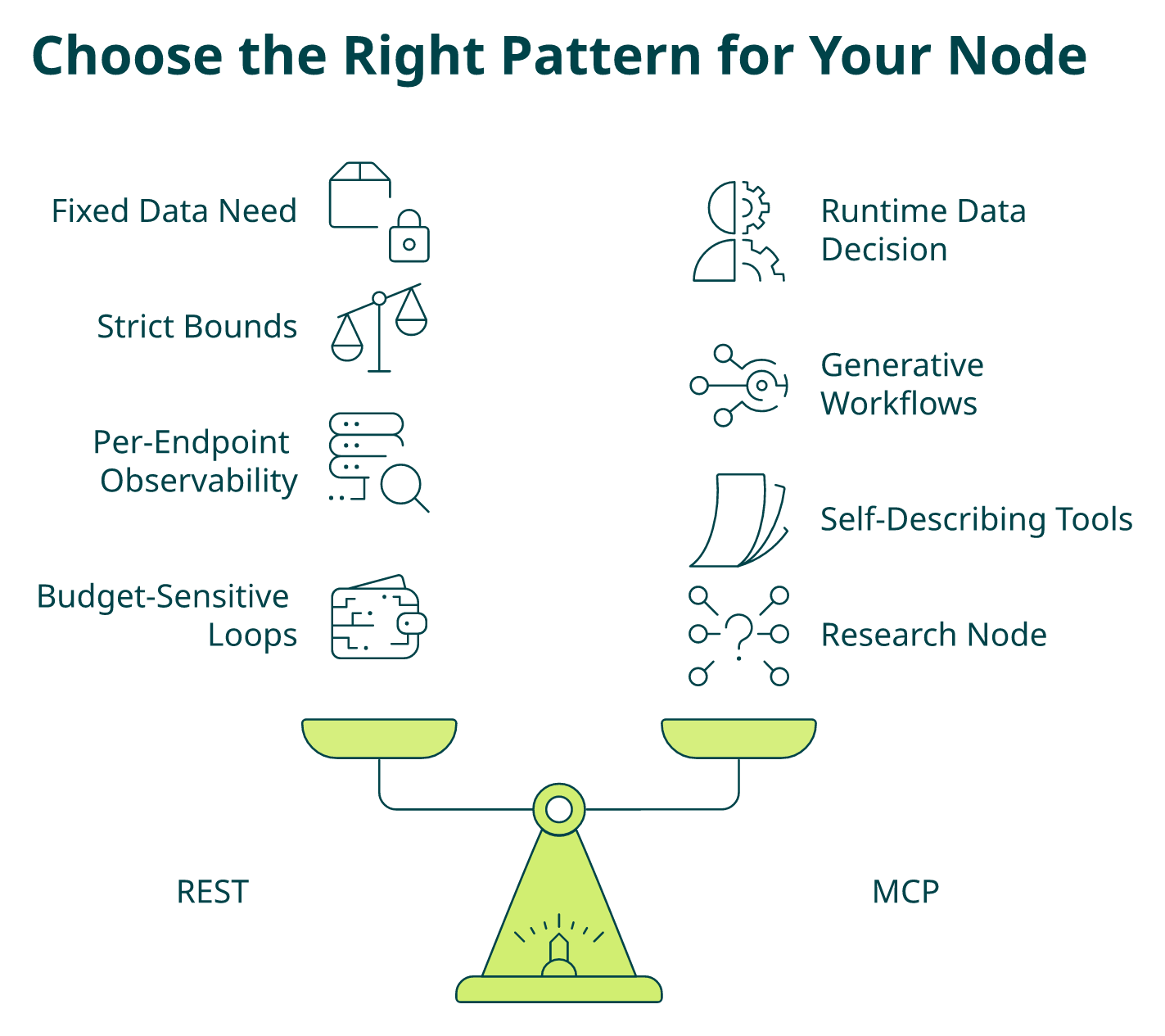
REST is predictable, cheap, and observable; MCP lets the LLM autonomously decide what to enrich, and the right graph uses each exactly where its strengths line up with the node’s job. The MCP v2 release notes cover the autonomous tool-selection surface in detail.
❌ The Wrong Way to Decide
Picking one pattern for the whole graph. I’ve reviewed both extremes in the wild:
- All REST → the “agent” is a DAG with an LLM stapled to the end; MCP’s autonomy advantage is wasted.
- All MCP → every node is a chatty LLM round-trip, latency doubles, credits leak, and observability collapses because you can’t predict which endpoints the model will call.
Production graphs mix both. REST for gates and ingestion, MCP for exploratory enrichment inside reasoning nodes.
✅ The Decision Framework
Use this six-question checklist per node:
- Is the data need fixed and known at design time? → REST.
- Does the LLM decide at runtime which enrichment it needs? → MCP.
- Are latency or credit bounds strict (e.g., webhook handlers, gates)? → REST.
- Is the workflow generative or research-style (account briefs, battlecards)? → MCP.
- Do you need full per-endpoint observability and a deterministic log line? → REST.
- Do you want zero endpoint mapping and self-describing tool discovery? → MCP.
Score each node. If 3+ answers point REST, write it as REST. If 3+ point MCP, wrap it as an MCP tool call inside an LLM node. Teams that want a hands-on sandbox can try the MCP playground before committing to either pattern.
⭐ Applying the Framework to a GTM Agent
| Node | Pattern | Why |
|---|---|---|
| business_lookup_node | REST | Fixed input (domain), fixed output (firmographics), strict latency, gate. |
| contact_enrichment_node | REST | Fixed input (business_id and roles), deterministic output. |
| event_trigger_node | REST | Cursor-based poll, strict budget, high frequency. |
| research_node | MCP | “Summarize this account’s tech stack, funding, and hiring velocity”, LLM picks enrichments. |
| draft_email_node | MCP | Agent may pull one more signal (latest press release, new hire) mid-draft. |
⚠️ Where Explorium Lands on This
We ship both a REST surface and an official MCP server from the same provider, on the same credit pool, with the same auth header. That matters because most teams who try to mix patterns end up adding a second vendor for MCP, and now you’re back to normalizing two schemas and reconciling two invoices.
With Explorium:
✅ Business, Contact, and Event endpoints stay REST for deterministic gates, ingestion, and budget-sensitive loops.
✅ A research_node calls Explorium’s MCP server so the agent autonomously pulls tech stack, funding rounds, or hiring surges without pre-mapped endpoints.
✅ Credits are unified across both patterns, so your budget ceiling in AgentState works identically whether the call was REST or MCP.
❌ With single-source APIs, MCP support is either missing or bolted on, forcing you to choose between agent autonomy and unified billing.
The rule of thumb I give my team: REST for the spine of the graph, MCP for the reasoning limbs. Build the deterministic loop first, then let MCP earn its place in the nodes where the LLM genuinely needs to choose.
Q7. How Do You Score Leads, Draft Outreach, and Close the Loop Inside the Graph?
Once enrichment is landing cleanly in AgentState, the last three nodes are where the agent earns its keep: score the lead, draft the outreach, and write the result back, all reading and writing the same typed state object.
The Three Closing Nodes
def scoring_node(state: AgentState) -> dict:
score = (
0.4 * fit_score(state["company"])
+ 0.4 * trigger_score(state["triggers"])
+ 0.2 * role_score(state["contacts"])
)
return {"icp_score": round(score, 3)}
def drafting_node(state: AgentState) -> dict:
prompt = build_prompt(state["company"], state["contacts"], state["triggers"])
email = llm.with_structured_output(Email).invoke(prompt)
return {"draft": email.dict()}
def writeback_node(state: AgentState) -> dict:
idempotency_key = f"{state['run_id']}:{state['company']['id']}"
crm.upsert_opportunity(state, key=idempotency_key)
slack.post(state["draft"], channel="#gtm-agents")
return {"next_action": "sent"}
The CRM writeback step plugs directly into the HubSpot connector or Salesforce AppExchange app, so the idempotency key survives the hop out of the graph.
✅ The Patterns That Hold Up in Production
- Scoring: start with a weighted deterministic formula for auditability, and layer an LLM with with_structured_output only where rules can’t capture nuance.
- Drafting: feed trigger language verbatim into the prompt, “raised a Series B last week” beats “recently funded” every time.
- Idempotency: derive keys from run_id plus company_id so replays don’t double-post to CRM or Slack.
- Error routing: any node that raises pushes an entry into state[“errors”]; the conditional edge sends those runs to human_review instead of failing silently.
- Closing the loop: after writeback, a cycle edge routes back to event_trigger_node on a schedule so the agent keeps listening for new signals on the same account.
⭐ The cycle is the whole point. A DAG enriches once and dies. A LangGraph with a loop becomes an always-on account monitor that re-engages when something changes. Teams looking for pre-built closed-loop patterns can browse sales automation use cases for reference topologies.
⚠️ Why Provider Sprawl Kills This Loop
“Credit system is broken. Pricing is broken. Not fully transparent with rollover limit. Never helped when issues arose.”
— Raphael A., Marketing Lead Clay – G2 Verified Review
“Removed a user from the plan but a task by that user kept running and consumed all credits. Happened twice. Bug cost $1000. Support refused responsibility. No refund.”
— Amulya P., Small-Business Apollo – G2 Verified Review
When your enrichment is stitched across three vendors, the cycle breaks the moment one invoice caps out or one auth token rotates. The scoring node still fires, the drafting node still drafts, and you send 400 outbound emails built on stale data because no node had visibility into a vendor-level failure.
With Explorium, one credit pool funds enrichment, triggers, and the drafting node’s research calls. One auth header, one invoice, and one provider power the full LangGraph loop, so the only thing that stops the cycle is a deliberate budget ceiling in AgentState, not a vendor surprise. Transparent pay-per-enrichment pricing makes that ceiling meaningful instead of theoretical.
“Explorium gives us the data I need when I need it. This saves us a lot of time and money instead of managing each data source separately.”
— Ishi N., Enterprise Explorium G2 – Verified Review
Score, draft, write back, and loop. That’s the full GTM agent, and it only holds together when every node in the cycle reads from the same unified data layer.
Q8. What Does a Production-Ready LangGraph GTM Agent Look Like, Checkpointing, Webhooks, and a Production Checklist?
A LangGraph that runs on your laptop is a demo. A LangGraph that survives a production quarter, retries, duplicate webhooks, credit spikes, rotating auth tokens, and on-call engineers reading logs at 2 AM, is a different beast. Here’s the 8-point audit I run before any GTM agent ships. It draws directly on the lessons we captured while building scalable enterprise AI agents.
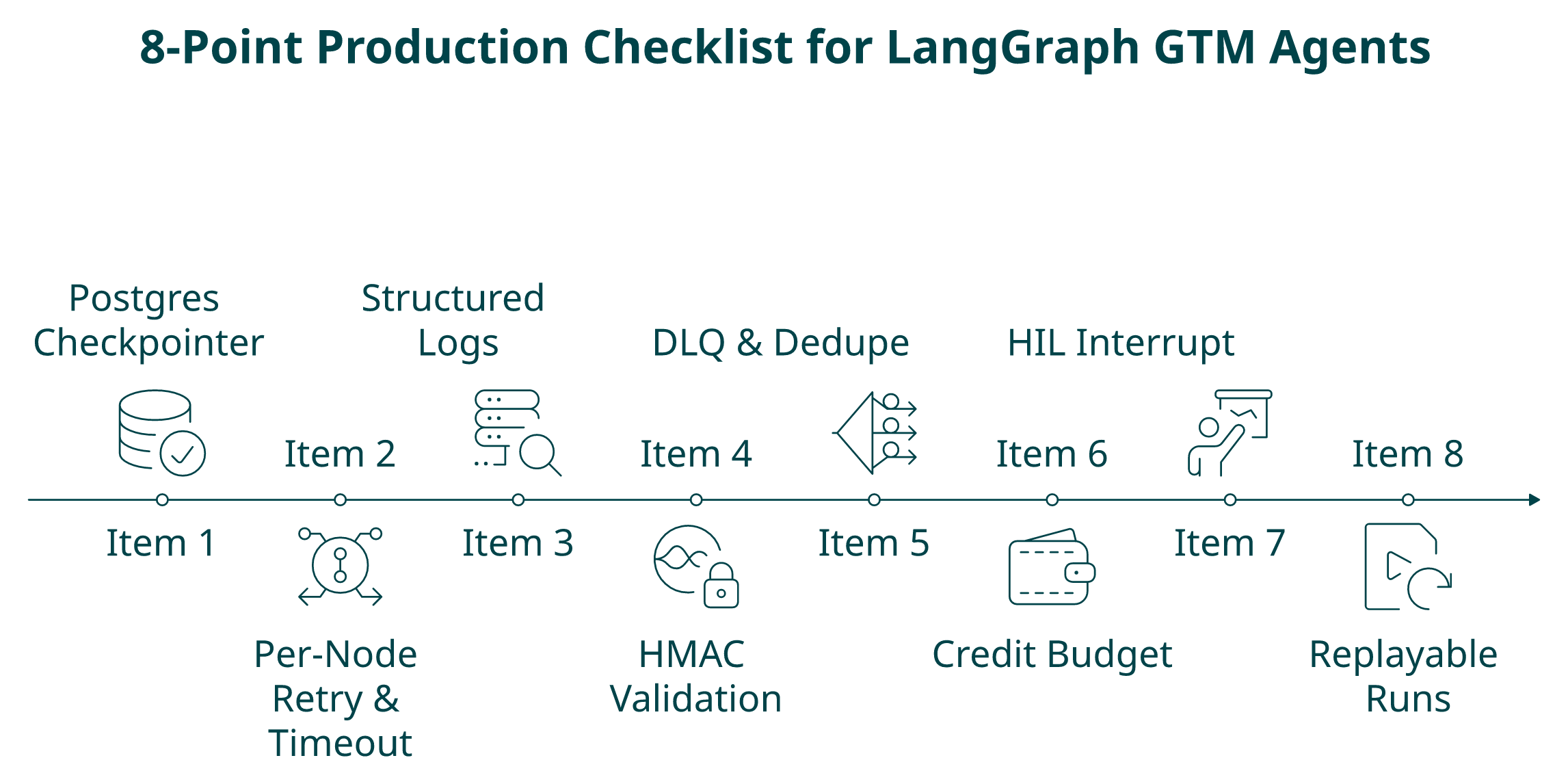
✅ The 8-Point Production Checklist
- Postgres checkpointer configured. Not SQLite, not in-memory. Durable state is what lets a failed run resume mid-graph instead of restarting enrichment from scratch.
- Per-node retry and timeout. Every API node wraps httpx with exponential backoff and a hard ceiling. One flaky endpoint should not stall the whole graph.
- Structured logs with run_id. Every log line carries run_id, node_name, credits_spent, and latency_ms. If you can’t grep a single run across nodes, you can’t debug it.
- HMAC-validated webhook entrypoint. An HTTP handler verifies the signature on incoming Event API deliveries, then invokes graph.invoke(initial_state) with the event payload. No signature, no invocation.
- DLQ for failed nodes with event_id dedupe. Failures land in a dead-letter queue keyed by event_id so a retried webhook doesn’t re-enrich the same account twice.
- Credit budget ceiling enforced in state. A conditional edge checks state[“credits_spent”] < BUDGET_CEILING before every paid node; over-budget runs route to END with a logged reason.
- HIL interrupt on low-confidence branches. LangGraph’s interrupt_before pauses the graph on human_review so a human approves before outreach fires.
- Replayable runs for audit. Given a run_id, you can replay the exact graph execution against the checkpointer, non-negotiable for RevOps and compliance.
⏰ The Event-Driven Entrypoint Pattern
@app.post("/webhooks/explorium")
async def handle_event(req: Request):
body = await req.body()
if not hmac_valid(req.headers["X-Explorium-Signature"], body, SECRET):
return Response(status_code=401)
event = json.loads(body)
if seen(event["event_id"]): # dedupe
return {"status": "duplicate"}
await graph.ainvoke(
{"domain": event["domain"], "run_id": event["event_id"], "credits_spent": 0},
config={"configurable": {"thread_id": event["event_id"]}},
)
return {"status": "queued"}
That’s the whole webhook-to-graph bridge. Signed, deduped, invoked, and checkpointed.
⭐ How Explorium Closes Three of the Eight Gaps
| Checklist Item | Explorium Coverage |
|---|---|
| HMAC-validated webhook entrypoint (#4) | Event API ships signed webhooks with documented signature verification. |
| DLQ with event_id dedupe (#5) | Every Event API delivery includes a stable event_id and delivery attempt counter. |
| Credit budget ceiling (#6) | Unified credit pool and real-time usage endpoint so the state check reflects actual spend. |
Three out of eight is what “one provider, one credit pool, and a native event surface” actually buys you in production. Our latest product updates cover the event surface and credit-metering endpoints in more depth.
💰 Score Interpretation
- 7 to 8 green: Ship. Monitor for a week, then scale the batch size.
- 4 to 6 green: Patch before production. Webhooks and checkpointing are the usual offenders.
- Three or fewer green: Prototype. Do not put real pipeline through it yet.
⚠️ The fastest way to jump from 4 to 7 isn’t more code, it’s consolidating vendors. Half the checklist collapses when enrichment, contacts, and events come from one API with one auth header and one invoice. Generic LangGraph tutorials skip this section because their data layer is “pick your own adventure.” Production GTM agents can’t afford that, which is why teams evaluating options increasingly start with a product demo before committing to three separate contracts.
Q9. LangGraph vs LangChain for GTM Agents, Which Should You Choose in 2026?
The LangChain vs LangGraph question isn’t really a framework fight, it’s an architecture decision. LangChain’s LCEL is brilliant at composing linear chains; LangGraph is purpose-built for workflows that loop, branch, and recover. For GTM agents that have to enrich, score, decide, draft, and retry, that distinction decides whether your agent runs in production or dies in staging. Before locking in either, revisit the lifecycle of data in agent development so the choice is grounded in how data actually flows through the system.
Where LangChain Shines and Where It Stops
LangChain’s strengths are real and worth acknowledging:
- Fastest path to a RAG pipeline or a single-turn tool-calling assistant.
- Clean LCEL composition (prompt | llm | parser) for deterministic transforms.
- Massive ecosystem of retrievers, loaders, and output parsers.
❌ Where it stops mattering for GTM:
- Cycles are awkward. LCEL is a DAG. Re-enriching a lead when a new trigger fires requires gymnastics.
- State is implicit. You pass dicts through chains; there’s no typed, checkpointed, reducer-aware state contract.
- Conditional routing is bolted on. LangChain agents use ReAct-style tool loops, not first-class add_conditional_edges.
- No durable checkpointing primitive. You roll your own persistence.
✅ Why LangGraph Is the GTM-Native Choice
LangGraph treats the things GTM agents actually need as first-class primitives: explicit StateGraph, typed AgentState, conditional edges, Postgres checkpointers, and human-in-the-loop interrupts via interrupt_before. Cycles aren’t a workaround, they’re the model. A lead can loop back to event_trigger_node when fresh signals arrive, without rewriting the graph. The same pattern underpins how we ship AI across the GTM funnel with customers today.
⭐ Side-by-Side for GTM Workloads
| Capability | LangChain (LCEL) | LangGraph |
|---|---|---|
| Explicit typed state | ❌ implicit dicts | ✅ TypedDict and reducers |
| Cycles / re-enrichment | ❌ DAG, requires hacks | ✅ native |
| Conditional routing | ⚠️ via ReAct agent loop | ✅ add_conditional_edges |
| Durable checkpointing | ❌ DIY | ✅ Postgres/SQLite built-in |
| Human-in-the-loop | ⚠️ manual | ✅ interrupt_before |
| Observability per step | ⚠️ chain-level traces | ✅ per-node structured logs |
| Fit for GTM enrichment and decisions | 3 / 10 | 9 / 10 |
| Fit for single-turn RAG / assistants | 9 / 10 | 7 / 10 |
⚠️ The Honest Caveat
LangGraph is not a “better” LangChain, it’s a different shape. If your agent is a one-shot question-answerer over a knowledge base, LCEL ships faster and reads cleaner. If your agent is a stateful GTM worker that has to branch on ICP, loop on triggers, and escalate on low confidence, LangGraph is the only framework in the LangChain ecosystem that expresses that shape natively.
💰 Prescription
- Choose LangChain if the agent is a retriever-plus-LLM with deterministic flow and a single handoff.
- Choose LangGraph if the agent has more than one decision point, needs to cycle, or must survive retries and partial failures in production.
- Pair LangGraph with a unified data layer. A stateful graph calling three fragmented vendors is still a fragile graph. Explorium’s unified API and MCP mean the expressiveness of your graph layer is matched by the expressiveness of your data layer: typed state in, typed state out, one credit pool, and one auth header.
“Explorium gives us the data I need when I need it. This saves us a lot of time and money instead of managing each data source separately. Explorium’s models are able to extract multiple sources of data and create an easy output for the user to consume.”
— Ishi N., Enterprise Explorium G2 – Verified Review
“Instead of connecting to multiple data sources and APIs, we only require one connection, Explorium!”
— Mirit H., Mid-Market Explorium G2 – Verified Review
Pick the framework that matches your workflow’s actual shape, then pick the data layer that matches the framework’s ambition. For GTM in 2026, that’s LangGraph plus a unified B2B data API.
Q10. Ready to Wire Explorium’s Business, Contact, and Event APIs Into Your LangGraph Agent?
You’ve seen the whole pattern now: endpoints mapped 1:1 to nodes, a typed AgentState, ICP-aware conditional edges, REST for the spine and MCP for the reasoning limbs, a webhook entrypoint, and a production checklist. The only thing left between you and a running GTM agent is an API key and an afternoon. If you want a guided tour first, the resource center collects every tutorial, guide, and release note in one place.
⭐ What You Get With a Free Explorium Account
- One key, three endpoints. Business, Contact, and Event APIs behind a single auth header, paste it once into your LangGraph node functions and ship.
- MCP server from day one. Drop Explorium’s MCP server into your reasoning node and let the LLM autonomously pull tech stack, funding, or hiring signals.
- Unified credits. One budget ceiling in AgentState[“credits_spent”] covers every call the graph makes, no vendor surprise at the end of the month.
- Signed Event webhooks. The HMAC-validated entrypoint pattern from the production checklist works out of the box.
- No sales call required. Sign up, get credits, and make the first call in minutes.
⏰ Three Next Steps, in Order
- Create the account, get API keys and starter credits on the signup page.
- Read the MCP quickstart, wire the MCP server into a LangGraph research_node in roughly 20 lines.
- Explore the full product, Business, Contact, Event, and MCP surface documentation in one place. If you prefer a walkthrough, book a live demo.
✅ The CTA Block (Paste-Ready HTML)
<div class="explorium-cta">
<h3>Build Your Stateful GTM Agent With Explorium</h3>
<p>Get the unified Business, Contact, and Event APIs plus MCP, one key, one credit pool, zero vendor juggling.</p>
<ul>
<li><a href="https://www.explorium.ai/signup">Create a free Explorium account</a></li>
<li><a href="https://www.explorium.ai/mcp">Read the MCP quickstart</a></li>
<li><a href="https://www.explorium.ai/our-product">Explore the full product</a></li>
</ul>
<a class="cta-button" href="https://www.explorium.ai/signup">Start Building →</a>
</div>
💰 Why Now, Not Next Quarter
Every week you spend writing adapter code for Apollo, Clearbit, Bombora, and BuiltWith is a week your agent isn’t shipping outcomes. The whole point of the “endpoints to nodes” mental model is that your engineering time goes into routers, scoring, and drafts, not into normalization scripts that nobody wants to own. Teams that jump this cycle early often see the ROI impact we document in demonstrating the value of data.
Your LangGraph topology is ready. Give it a data layer that matches its expressiveness.
Q11. Why Do Teams Pair LangGraph With Explorium Instead of Apollo, ZoomInfo, or PDL?
Direct answer: Single-source APIs force you to run multiple nodes against multiple vendors, each with its own schema, auth header, rate limit, and invoice. Your LangGraph topology bloats with glue code, adapters, and vendor-specific error handling instead of the routing logic, scoring, and decisioning that actually drives pipeline. Teams pair LangGraph with Explorium because one unified data layer collapses three to five nodes of normalization into one clean node per endpoint class.
How the Four Options Actually Stack Up for a LangGraph Graph
- ⭐ Explorium, one API for 50+ aggregated sources, unified credit pool across Business/Contact/Event, native MCP server for autonomous node-level tool selection, signed Event webhooks for HMAC-validated graph entrypoints, resale rights on custom plans, and a free account to first call in minutes. Full details live on the AgentSource platform page.
- Apollo, strong single-source contact database with a prospecting UI; no MCP, no unified event/trigger surface, and credit quirks that surface in production agent loops.
- ZoomInfo, enterprise-grade contracts and depth on contacts/firmographics; agent-native delivery isn’t the product’s center of gravity, and annual-contract pricing is hard to match to pay-per-enrichment graph traffic.
- People Data Labs, excellent person-data breadth for bulk enrichment; thin on firmographic depth, intent signals, and trigger/event surfaces that a GTM graph needs for its router.
“Contact info frequently missing or incorrect. Half the day calling wrong/disconnected numbers.”
— Verified User, IT Services Apollo – G2 Verified Review
“Switched from free trial to paid plan… account disabled with no warning or explanation. Support unresponsive.”
— Verified User, Computer Software People Data Labs – G2 Verified Review
✅ The Architectural Case for Pairing With Explorium
✅ One auth header for every node, no per-vendor secret rotation.
✅ One credit counter in AgentState, budget ceilings actually work with transparent pay-per-enrichment pricing.
✅ Native Event API, the webhook-first entrypoint pattern ships without a second vendor.
✅ REST and MCP from the same provider, mix deterministic and autonomous patterns on one invoice.
❌ Every competitor above forces at least one secondary vendor to cover the gaps, which is exactly the fragmentation LangGraph was built to make obvious.
⭐ The Proof and the Invitation
Explorium powers enrichment for the GTM platforms your team already knows, Clay, Cognism, and Outreach, because aggregated, agent-ready data is the layer underneath them, not a competitor to them. Teams standardizing on this layer often pair it with native integrations for HubSpot, Salesforce, n8n, and Zapier so the graph plugs into the rest of the stack without custom glue.
“Explorium is thr only platform I have seen in market that has a consistent journey to explore, experiment and implement external data at scale without extension contracting or reselling.”
— Verified User, Gartner Peer Insights Explorium Gartner – Verified Review
“A fantastic data enrichment product… Instead of connecting to multiple data sources and APIs, we only require one connection, Explorium!”
— Mirit H., Mid-Market Explorium G2 – Verified Review
Don’t take my word for it, create a free Explorium account, swap one node in your existing LangGraph against a live API call, and compare coverage, latency, and credit burn against whatever you’re running today. That’s a 30-minute test, not a quarterly procurement cycle.
FAQs


