

TL;DR
- A Codex plugin bundles skills, app integrations, and MCP servers; OpenAI's June 2026 role plugins turned Codex into a GTM runtime.
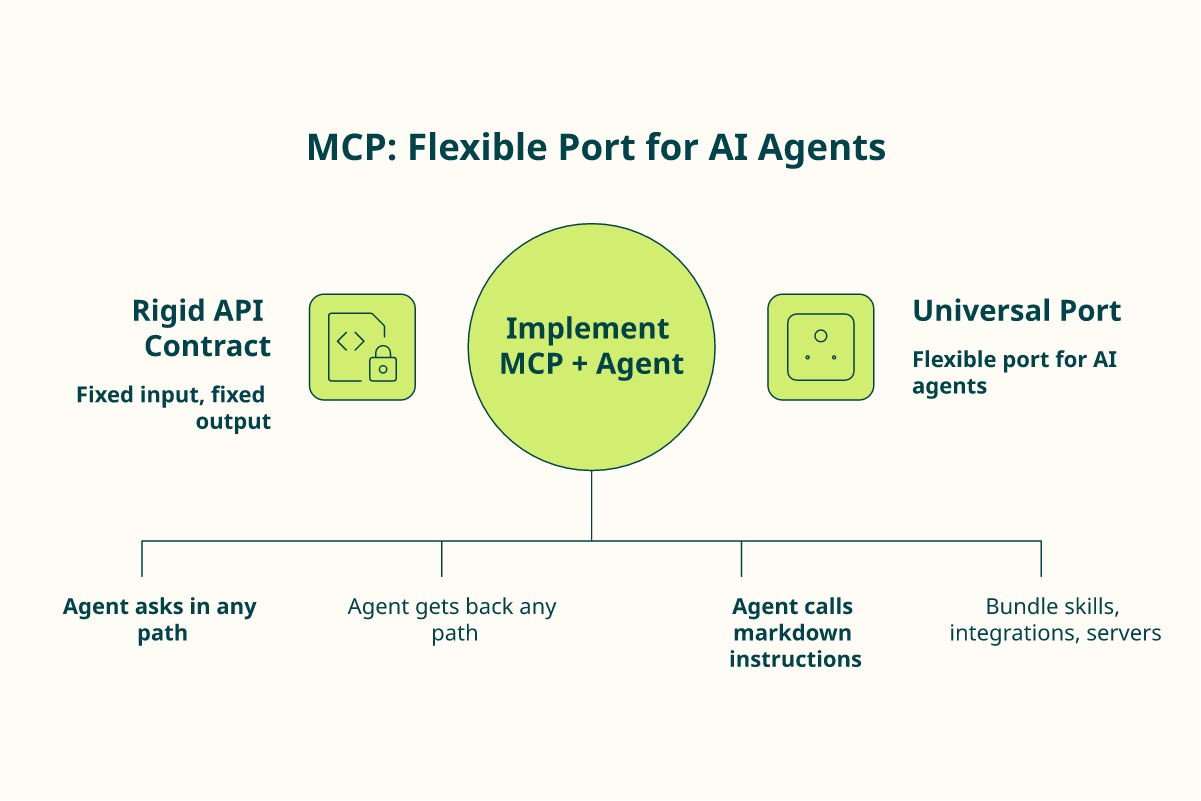
- An MCP accepts input by any path and returns output by any path, unlike a rigid API contract an engineer wires by hand.
- Top-of-funnel is data access; Vibe Prospecting leads via Explorium's 150M+ companies, 800M+ profiles, and waterfall enrichment.
- Three install paths exist: the connectors directory, the CLI, and a manual .mcp.json entry for custom servers.
- Pricing runs per-seat, usage credit, or token cost; Vibe starts at $19/mo with a 400-credit free trial, Claude-only today.
- Buy the solved 90%, vibe-code the niche 10%, and never automate a playbook you have not proven by hand first.
Q1. What Is a Codex Plugin, Skill, and MCP Server, and Why Does GTM Finally Care? [toc=1. Plugin, Skill, MCP]
A Codex plugin bundles three things into one installable unit: skills (markdown instruction files Codex calls in any combination), app integrations, and MCP servers. A skill teaches behavior. An MCP server is the data-and-action layer, like a USB port for AI. GTM cares now because OpenAI shipped role-specific plugins, including a Sales plugin, in June 2026, turning Codex from a coding tool into an agent-native go-to-market runtime.
🧩 Three words people keep mixing up
I watch sales leaders freeze on this vocabulary. Plugin, skill, and MCP get used as if they mean the same thing. They do not.
A plugin is the package. A skill is a markdown file of instructions the agent can call in any order. An MCP server is the connector that hands the agent live data and actions.
Think of it like a kitchen. The plugin is the meal kit. The skills are the recipe cards. The MCP server is the pantry door that lets the cook reach the ingredients.
🔌 What an MCP actually is (in plain English)
MCP stands for Model Context Protocol. It is an open standard that lets any application feed context to a language model, the way a USB port lets any device talk to your laptop.
Here is the part I care about most, after six years building data infrastructure at Explorium. An API is a rigid contract. You send a fixed input, you get a fixed output, and an engineer wires every call by hand.
An MCP attached to an agent is different. The agent can ask in any path and get back any path. That shift, from hand-wired API to universal port, is the same jump we made from manual web search to Google.
⚙️ Where the pieces live in Codex
Under the hood, a Codex plugin is a folder with a manifest. The structure is public on the OpenAI GitHub.
- .codex-plugin/plugin.json, the manifest that names the plugin.
- skills/, the markdown instruction files.
- .mcp.json, the config that points to MCP servers.
You do not need to memorize this. You need to know that one install command can drop a full prospecting capability into your agent’s directory.
🚀 Why this is a GTM moment, not a dev moment
Codex used to be a place engineers wrote code. The June 2026 plugins launch changed the audience. OpenAI now ships role plugins for Sales and other functions, with apps and skills built in.
That means an SDR or a founder can wire prospecting into Codex without writing software. At Vibe Prospecting, we treat this as a labor progression: UI to API to Agent. The human still owns judgment. The agent does the grunt work of access, filtering, and list-building.
I could be early on this, but where my head is right now is simple. The teams that learn this vocabulary this quarter will out-execute the teams still clicking through tabs.
Q2. How Did We Vet These 11 Codex GTM Plugins (and What Got Cut)? [toc=2. Our Vetting Rubric]
I scored every candidate on five criteria: does it install today with a verified command, which funnel stage it owns, data accuracy or action depth, cost transparency, and compliance posture. Vaporware, demo-gated tools, and thin wrappers got cut. So did anti-ICP categories like raw-data-API-only builds and local-business lookups. The 11 survivors each earn a place a RevOps engineer can defend in a build-versus-buy review.
📏 The rubric, in five lines
I did not rank by popularity. I ranked by whether a busy operator could trust the tool on a Monday. Here is the scorecard I used.
<caption>The Five-Criteria Vetting Rubric</caption>
| Criterion | What I checked | Why it matters |
|---|---|---|
| Installs today | A real command (directory, CLI, or .mcp.json) | If you cannot install it now, it is a roadmap, not a tool |
| Funnel stage | Top, middle, or bottom of funnel | Mixing stages hides gaps in your stack |
| Data or action depth | Accuracy claims, enrichment, or action scope | Thin data wastes credits and burns sender reputation |
| Cost transparency | Public pricing and credit math | Hidden burn is the top complaint operators raise |
| Compliance posture | Sourcing, consent, audit trail | One bad list can trigger a real legal problem |
✂️ What got cut (and why I am telling you)
I cut three kinds of tools. Demo-gated platforms you cannot try without a sales call. Wrappers that just rename someone else’s API. And tools whose data quality reviewers openly distrust.
Cost transparency mattered because it is the loudest pain in the reviews. One Clay user put the credit problem bluntly.
“Credit system is broken. Pricing is broken. Not fully transparent with rollover limit.”
Raphael A., Marketing Lead Clay G2 Verified Review
🚫 The anti-ICP exclusions
Some categories I deliberately left off, because forcing them in would mislead you.
- Raw-data API builds for engineers. If you want to engineer against an API yourself, that is Explorium, not Vibe Prospecting.
- One-off or tiny-volume lookups. A free UI lookup is enough; you do not need an agent.
- Local or SMB physical-business prospecting. Vibe targets B2B corporate contacts, not Google-Maps storefronts.
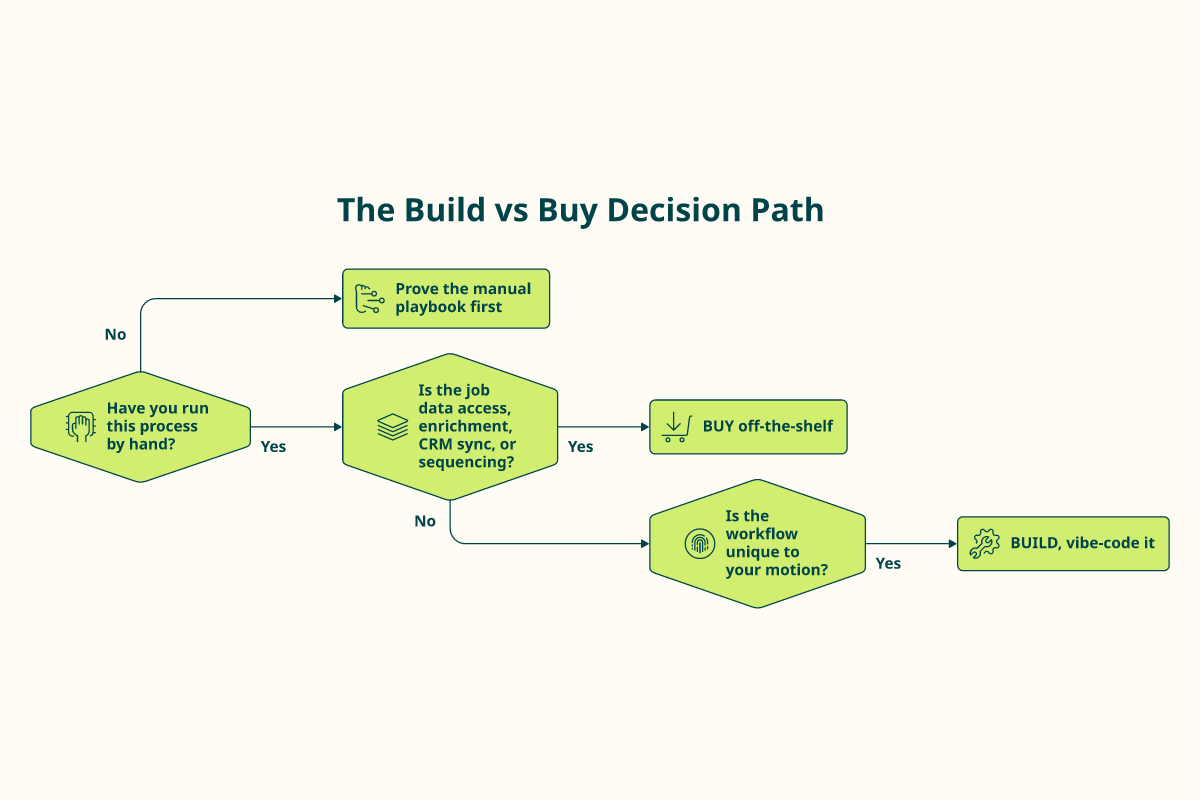
The meta-rule behind all of this is the 90/10 build-versus-buy split. Buy off-the-shelf for the 90% that is solved. Vibe-code only the niche 10% that is unique to your motion.
And one honest caveat I hold to. You cannot automate a process you have not proven by hand first. Prove the manual playbook, then hand it to the agent.
Q3. Which Codex Plugins Cover Top of Funnel, Data Access and Enrichment (and Why Vibe Prospecting Leads)? [toc=3. Top of Funnel Data]
Top-of-funnel in Codex means one job: get accurate company and contact data into the agent’s hands. The official Sales plugin connects CRMs and sequencers but is thin on raw B2B data, so this tier is where data MCPs live, and Vibe Prospecting ranks first. It exposes Explorium’s 150M+ companies and 800M+ profiles via MCP, with a fully enriched contact (prospect plus email plus phone) costing 8 credits.
🗂️ The pain: the 20-tab problem
I have watched SDRs spend a full day building, reading, and bucketing a list of a hundred companies before sending a single email. The data lives in too many tabs.
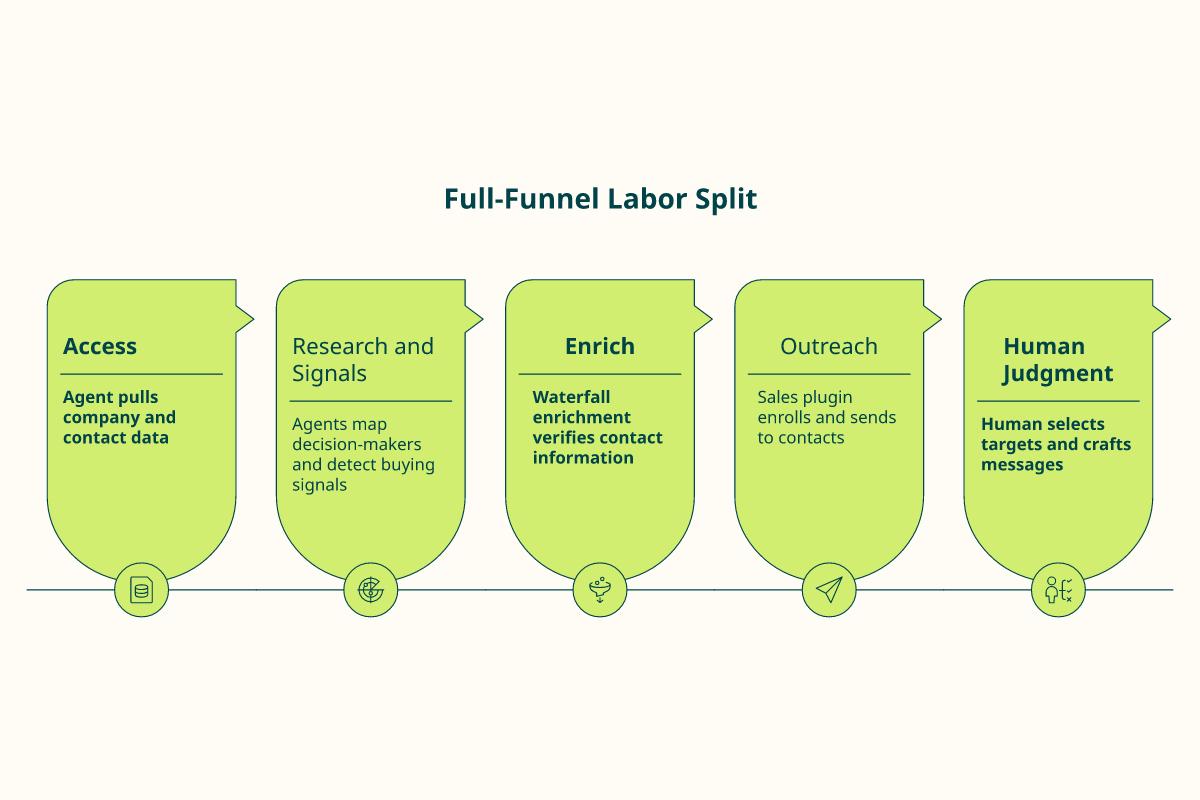
That tab-hopping is the tax we built the data layer to remove. The agent should fetch and filter. You should decide who to target and what to say.
⭐ 1. Vibe Prospecting (the data layer that leads this tier)
Vibe Prospecting is agent-native prospecting built on Explorium’s B2B data, surfaced as an MCP connector for Claude Code, a chat UI, and an embeddable MCP.
- What it does: describe your ICP in natural language; the agent returns enriched companies and contacts.
- Install: add the MCP connector inside Claude, or wire the embeddable MCP into your pipeline.
- Cost: from $19/mo, a 400-credit free trial, and 8 credits per fully enriched contact. Credits apply to Claude today, not ChatGPT.
The engine behind it is an aggregator-of-aggregators across 50-plus sources, with waterfall enrichment that moves provider to provider until a contact is verified. One operator described the shift well.
“Vibe Prospecting solves the tunnel vision problem that usually happens with traditional, rigid search filters. It helps me map out an entire region and identify key decision-makers in minutes rather than days.”
I will name the trade-off too. Loose prompts return loose data.
“If your prompt isn’t surgically specific… the output can include some gunk. You really have to box the AI in with negative constraints.”
Tristan W. Vibe Prospecting G2 Verified Review
🧮 2. People Data Labs MCP (raw data for builders)
PDL hands you data; you write the application logic around it. That is its structural trade-off, and it fits engineers who want raw fields, not finished work. Reviewers warn about billing surprises, though.
“Switched from free trial to paid plan $100/month. After a few days, account disabled with no warning or explanation. Support unresponsive.”
Verified User, Computer Software People Data Labs G2 Verified Review
📇 3. Cognism connector (EU contact coverage)
Cognism is a data-only contact provider with strong EU positioning, thin on workflow or enrichment depth. Useful for European mobile coverage, with caveats reviewers raise honestly.
“Poor data quality, no direct mobile numbers. Numbers either wrong or returns US HQ number even when searching European offices.”
✅ Why Vibe sits at the top
Access to data is a commodity now. Quality is not. Where a single database gives you a flat, 2D list, waterfall enrichment fills the gaps Apollo’s one source cannot close, and the agent activates it in the same pass.
Q4. Which Codex Plugins Handle Prospect Research and Buying-Signal Detection? [toc=4. Research and Signals]
Mid-funnel is where signals become a shortlist: account research, decision-maker mapping, and intent detection. The pain is data lag, the gap between a signal firing and a human acting. Codex skills shine here because you can deploy parallel sub-agents that research, find decision-makers, and score accounts at the same time, compressing a full prospect audit to under a minute.
⏰ The pain: data lag
A buying signal is only worth something while it is warm. A funding round, a new VP, a tech change. By the time a human notices, the moment has cooled.
That lag is what mid-funnel tooling fixes. The job is to turn a raw intent signal into a ranked shortlist before a competitor calls first.
🛠️ The tools, with install paths
Each of these installs through one of the three Codex paths, the directory, the CLI, or a .mcp.json entry.
- Clay MCP, for multi-source research recipes. Install via the Codex connectors directory, then authenticate.
- Vibe Prospecting, for signal-aware company and contact research in natural language. Add the MCP connector in Claude.
- A research-skill repo, dropped into your skills/ folder with a one-command GitHub install.
Clay is genuinely flexible, and reviewers respect the depth. The honest cost is complexity and credit burn.
“New users can never figure out what to do. High chance of credits getting misused for wrong operations.”
Qais B., Growth Strategist Clay G2 Verified Review
“Per-row credit cost can vary 100% from stated amounts… Contact data quality varies wildly, feels like a black box.”
Verified User, IT Services Clay G2 Verified Review
The structural point: with Clay, you become the workflow engineer. With Vibe Prospecting, you state the objective and the agent runs the workflow.
🤖 The pattern that changes the math: parallel sub-agents
Here is the part operators get excited about once they see it. You do not run research as one long chain. You run a swarm.
- One sub-agent researches the company.
- One finds the decision-makers.
- One scores fit against your ICP.
- They run at the same time, and a full prospect audit lands in under a minute.
In the age of agentic GTM, once the plan is good, the code is good. The bottleneck is no longer execution. It is the quality of your instructions.
🪓 A real scene: the Saturday pruning session
An operator I know used a lookalike tool to generate 2,500 leads and realized it was far too many. She spent a Saturday manually deleting 2,000 that did not fit.
That hyper-pruned list doubled her summit attendees in a single week. The lesson stuck with me: the agent builds the long list fast, but a human still owns the cut. That is the labor split we keep coming back to.
I might be wrong on the exact ratio, but from what surfaces when you actually run these audits, the human judgment on the final 20% is worth more than the hours saved on the first 80%.
Q5. Which Codex Plugins Run Outreach, Sequencing, and CRM Sync (Bottom of Funnel)? [toc=5. Outreach and CRM Sync]
Bottom-of-funnel is execution: enrolling contacts in sequences, syncing to CRM, and triggering outreach. OpenAI’s official Sales plugin is the baseline here, connecting Salesforce, HubSpot, Slack, Outreach, Clay, Rox, and Actively. It is strong on activation, but dependent on upstream data quality. Install it from the Codex connectors directory, then layer a data MCP so the agent enriches before it sends.
⚠️ The pain: automating outreach on stale data
Here is the trap I see teams fall into. They wire up a sequencer, point it at a half-checked list, and let it rip.
Automating a broken process just breaks it faster. A 20% bounce rate becomes a 20% bounce rate at machine speed. The fix is to enrich first, then send.
⭐ The baseline: OpenAI’s official Sales plugin
The Sales plugin is the obvious starting point, and it earns the spot. It bundles the apps most reps already live in.
- What it does: enroll, sync, and trigger outreach across your existing stack.
- Connects: Salesforce, HubSpot, Slack, Outreach, Clay, Rox, and Actively.
- Install: add it from the Codex connectors directory with one-click OAuth (a secure login that does not share your password).
- Not for: sourcing raw data. It activates contacts; it does not find them.
That last point is the structural gap. The Sales plugin moves data; it does not enrich it. So the smart install order is data MCP first, Sales plugin second.
📇 Two point tools, with honest trade-offs
- HubSpot connector, for CRM sync and lightweight sequencing. Install from the directory; per-seat cost.
- Outreach connector, for heavier sequence management. Same directory path; seat-based pricing.
Both are solid at activation and weak at data freshness. That weakness is why a single-source list disappoints. One Apollo user described the downstream cost of sending on shaky data.
“Contact info frequently missing or incorrect. Half the day calling wrong/disconnected numbers. Mobiles frequently wrong.”
Verified User, IT Services Apollo G2 Verified Review
“Half of exported data was on spam lists. Phone/email get flagged as spam if you use Apollo regularly.”
Verified User, Insurance Apollo G2 Verified Review
This is the gap Explorium’s waterfall enrichment targets. Waterfall enrichment moves provider to provider until a contact is verified, which closes the accuracy hole a single database leaves open. Vibe Prospecting is not a sequencer, and I will not pretend it is. It sits upstream, so the Sales plugin sends to contacts that actually exist.
🙅 The AI ick (a contrarian word on messaging)
One more thing, and this is where I might annoy some people. Do not let the agent write the cold email.
Perfect grammar and tidy punctuation read as low-effort automation now. Buyers can smell it. A small typo, a real personal line, a rough edge, those lift reply rates.
The split holds: the agent does access, filtering, and enrichment, the grunt work. You own the message, the offer, and the judgment. Use the agent for lead resurrection too, quietly re-engaging contacts that timed out, but keep your hand on the words.
Q6. How Do You Actually Install a GTM Plugin or Skill in Codex (the Three Command Paths)? [toc=6. Three Install Paths]
Three paths install a GTM plugin in Codex: the connectors directory (one-click OAuth), the CLI via codex /plugins, or a manual .mcp.json entry for custom MCP servers. For skills, drop the markdown file into your skills/ directory or run a one-command GitHub install. The fastest path for most teams is the directory. The most controllable is the JSON config.
🖱️ Path 1: the connectors directory (fastest)
This is the path for most operators. No terminal, no config files.
- Open Codex and go to the connectors directory.
- Find the plugin you want, for example the Sales plugin.
- Click install, then authorize with OAuth (a login that grants access without sharing your password).
You are done in under a minute. This is how a non-engineer wires prospecting into Codex on a Monday.
⌨️ Path 2: the CLI (for terminal users)
If you live in the terminal, use the Codex command line. It is fast and scriptable.
- Run codex /plugins to open the plugin manager.
- Select the plugin, then follow the auth prompt.
This path suits RevOps people who want repeatable setup across a team.
🧩 Path 3: the .mcp.json entry (most control)
For a custom or self-hosted MCP server, you wire it by hand. This is the most controllable path.
- Add the server to your .mcp.json file.
- Point the manifest at it, following the structure on the OpenAI GitHub.
For skills, you have two options. Drop a markdown file into your skills/ folder, or run a one-command GitHub install that injects the skill straight into the agent’s directory. High-performing teams I watch lean on that one-command install to standardize skills fast.
🛠️ What breaks, and how to fix it
Now the part nobody documents. Things crash mid-run, and you lose work.
A builder I know lost an hour because their environment crashed every hundred descriptions. The fix was simple: instruct the agent to save progress to a CSV after every five completed rows. Small batches, frequent saves.
One more habit that pays off. Keep your input CSV hyper-clean, with only name, site, and address. Cluttered columns make the agent hallucinate fit, guessing a match from noise it should ignore.
Q7. What Do These Codex GTM Plugins Actually Cost, and How Do You Govern Credits? [toc=7. Cost and Credits]
Codex GTM plugins price three ways: per-seat (CRM connectors), usage or credit (data MCPs), and token cost on the agent itself. Vibe Prospecting starts at $19 a month with a 400-credit free trial, and a fully enriched contact costs 8 credits. The smart frame: treat tokens as salary headcount, not a software subscription, because the agent now does the day-to-day work.
💸 The pain: opaque pricing burns real cash
Most credit systems hide the dollar math. You buy a bundle, run a job, and watch the balance drop with no clear reason.
Operators feel this sharply. Failed lookups that still charge credits are the loudest complaint in the category.
“Per-row credit cost can vary 100% from stated amounts, e.g. stated 11 credits/row, actual 25. Contact data quality varies wildly, feels like a black box.”
Verified User, IT Services Clay G2 Verified Review
💰 The three pricing models, side by side
Here is how the tools in this directory actually charge you.
<caption>The Three Codex GTM Pricing Models</caption>
| Model | Who uses it | What you pay for | Watch-out |
|---|---|---|---|
| Per-seat | CRM and sequencer connectors | A fixed fee per user | Cost scales with headcount, not usage |
| Usage / credit | Data MCPs, including Vibe Prospecting | Credits per enriched record | Large exports burn credits fast |
| Token cost | The agent itself (Claude) | Tokens per run | Long prompts inflate every call |
Vibe Prospecting sits in the usage column. From $19 a month, a 400-credit free trial, 8 credits per fully enriched contact (prospect, email, and phone). Paid credits stay valid 12 months. And one honest caveat: credits apply to Claude today, not ChatGPT. You can review the full credit details before you commit.
🧮 A worked example you can defend
Say you want 100 fully enriched contacts. At 8 credits each, that is 800 credits.
Your 400-credit free trial covers about 50 contacts before you pay a cent. That is enough to test data quality on a real sample before you commit budget.
One warning I give every team. Validate with statistics and samples before a big enriched export, because usage credits can drain quickly on a large pull. The ROI math only holds when you sample first.
🧠 Tokens are headcount, not a SaaS line item
Here is where my head is right now. We keep filing AI under software budgets. That framing is getting stale.
These models now do day-to-day work. So treat tokens like salary for a junior teammate, not a subscription fee. One tactic helps: put your variables at the bottom of the prompt. The agent caches the stable top section, which can cut token cost on large lead lists by roughly half.
Q8. Build or Buy: When Should a RevOps Engineer Vibe-Code a Custom Codex Skill Instead? [toc=8. Build vs Buy]
Buy off-the-shelf for 90% of GTM needs. Vibe-code the 10% that is niche and critical to your business. Buy when the job is data access, enrichment, CRM sync, or sequencing, because those are solved commodities. Build only when no plugin fits a workflow unique to your motion, and only after you have proven the manual playbook works by hand.
🧱 The 90/10 rule, stated plainly
I have watched too many teams burn a quarter building what they could have installed in an hour. So I keep one rule.
Buy the 90% that is already solved. Build the 10% that is genuinely yours. The trick is knowing which slice is which.
⚖️ The decision table
Here is the call, laid out the way I would defend it in a review.
<caption>Build vs Buy Decision Matrix for Codex GTM Skills</caption>
| Situation | Buy or build | Why |
|---|---|---|
| Data access and enrichment | Buy | Commodity. A data MCP like Vibe Prospecting already does it |
| CRM sync and sequencing | Buy | The official Sales plugin covers it |
| Standard research workflows | Buy | Install a skill; do not rewrite one |
| A workflow unique to your motion | Build | No plugin fits, and the edge is yours to keep |
| A process you have not run by hand | Neither yet | Prove it manually first |
The build path is real and accessible. The OpenAI plugins repo gives you the manifest structure to ship a custom skill. And if you would otherwise engineer against the Explorium API, Vibe’s embeddable MCP is the buy version of that same job.
🛠️ A real scene: the vibe-coded portal
Let me show you what good “build” looks like. A practitioner was frustrated with dated off-the-shelf software for one narrow task.
So she vibe-coded a small custom agent. It runs every couple of days, finds sponsors who have not logged in, and emails them their credentials automatically. Tiny scope, real leverage, no vendor needed.
That is the 10% done right. It was niche, it was critical to her event, and nothing on the shelf fit. Everything around it, the data and the sending, she still bought.
✅ The caveat that saves you money
One conviction I hold, and the category tends to skip it. You cannot automate a process you have not proven by hand.
In agentic GTM, once the plan is good, the code is good. The bottleneck moved. It is no longer technical execution; it is the quality of your instructions. So prove the manual playbook, get the plan right, then hand it to the agent. Build last, not first.
Q9. How Do Codex GTM Plugins Compare to Apollo, Clay, ZoomInfo, People Data Labs, and Cognism? [toc=9. Competitor Comparison]
Apollo is a UI you click through. Clay is a workflow canvas you wire. ZoomInfo is an enterprise platform you license. People Data Labs is an API you engineer against. Cognism is a contact provider you query. Agent-native Codex plugins collapse all five jobs into instructions an agent executes. You describe the outcome, and the agent does access, filter, enrich, and list-build.
🧭 Five tools, five structural trade-offs
Each of these is good at its design center, and each carries a permanent trade-off baked into its model. The standard “best tool” roundup misses this. The question is not which is best, but which labor model fits you.
<caption>Five Prospecting Tools and Their Structural Trade-Offs</caption>
| Tool | What it is | Structural trade-off | Honest fit |
|---|---|---|---|
| Apollo | All-in-one UI for manual search | You operate every step by hand | Cheap human-run list-building |
| Clay | Flexible workflow builder | You become the workflow engineer | Ops teams who love recipes |
| ZoomInfo | Enterprise data platform | Annual contracts, procurement-heavy | Large orgs with a budget cycle |
| People Data Labs | Raw data API | You build all the logic around it | Engineers who want raw fields |
| Cognism | Data-only contact provider | Thin on workflow and enrichment | EU mobile coverage, with caveats |
⚠️ What the reviews actually say
I am not attacking bugs here. I am pointing at design choices, and operators feel them. Apollo’s single database leaves an accuracy gap that no amount of UI polish fixes.
“Contact info frequently missing or incorrect… Prospecting functionality is 100% trash compared to other tools.”
Verified User, IT Services Apollo G2 Verified Review
Clay’s flexibility is real, and so is its cost in time and credits.
“Steep learning curve, gets very expensive if you don’t know API/integrations. Credit pricing not transparent.”
Farzana N., CEO Clay G2 Verified Review
Cognism’s contact-only model shows its edges in the EU.
“Poor data quality, no direct mobile numbers. Numbers either wrong or returns US HQ number even when searching European offices.”
🔄 Where Vibe Prospecting sits, and where it does not
Here is the wedge. These five hand you a flat list. You still read it, score it, and chase the gaps by hand.
Vibe Prospecting runs as an agent-native layer on Explorium’s data, surfaced as an MCP connector, a chat UI, and an embeddable MCP. The agent enriches, scores, and builds the list in one pass, instead of you wiring a 2D spreadsheet into shape.
A scenario or two. If you are on Apollo and tired of bounced sends, the fix is waterfall enrichment, not another UI. If you are on Clay and tired of being the workflow engineer, state the objective in plain language and let the agent run it.
I will be honest about the line, though. If you genuinely want raw data to engineer against yourself, Explorium’s API is the better fit, not Vibe. The claim here is a 3x labor shift, not a 10% feature bump.
Q10. What About Compliance: GDPR, the EU AI Act, and Audit Logs in Agentic Prospecting? [toc=10. Compliance and Audit Logs]
Agentic prospecting raises two compliance duties: documenting GDPR legitimate interest for B2B contact processing, and keeping audit logs that satisfy the EU AI Act. The upside is real. An agent leaves a cleaner trail than a human jumping between 20 tabs. Every enrichment call and outreach action is logged, queryable, and reproducible inside the Codex run.
📋 The two duties, in plain terms
GDPR is the EU data-protection law. For B2B outreach, you usually rely on “legitimate interest,” a lawful basis under Article 6 that lets you process business contact data when your interest is balanced against the person’s rights.
The EU AI Act is the newer rulebook for AI systems. For prospecting, its practical demand is traceability: you should be able to show what the system did and why.
🗂️ A short legitimate-interest checklist
After six years building external-data infrastructure for enterprises, this is the checklist I keep returning to. None of it is exotic.
- Document why you are contacting this business persona, and keep it specific.
- Record the data source and when it was sourced.
- Offer a clear opt-out, and honor it fast.
- Keep the record where an auditor can actually find it.
That sourcing-provenance point matters. Explorium’s data layer is an aggregator-of-aggregators, which means each field can trace back to a source rather than a single opaque database.
✅ Why agents are more auditable, not less
Here is the contrarian read, and I think the standard worry gets it backwards. People assume agents make compliance murkier. From what surfaces when you actually run these workflows, the opposite holds.
A human jumping between 20 tabs leaves no trail. Nobody can reconstruct which list came from where. An agent logs every call in sequence. That same log that proves productivity also proves compliance. I might be early to say it, but auditability could become a selling point for agent-native prospecting, not a liability.
Q11. How Do You Get Started With Agent-Native Prospecting in Codex This Week? [toc=11. Getting Started]
Start small this week. Install one data MCP and the official Sales plugin, prove a single manual playbook by hand, then hand it to a Codex sub-agent. Vibe Prospecting’s 400-credit free trial enriches roughly 50 fully enriched contacts, so you feel the difference before you commit budget. Credits apply to Claude today, not ChatGPT.
⏰ Before and after, honestly
Picture the old Monday. You open six tabs, export a list, scrub it by hand, and lose the morning before one email goes out.
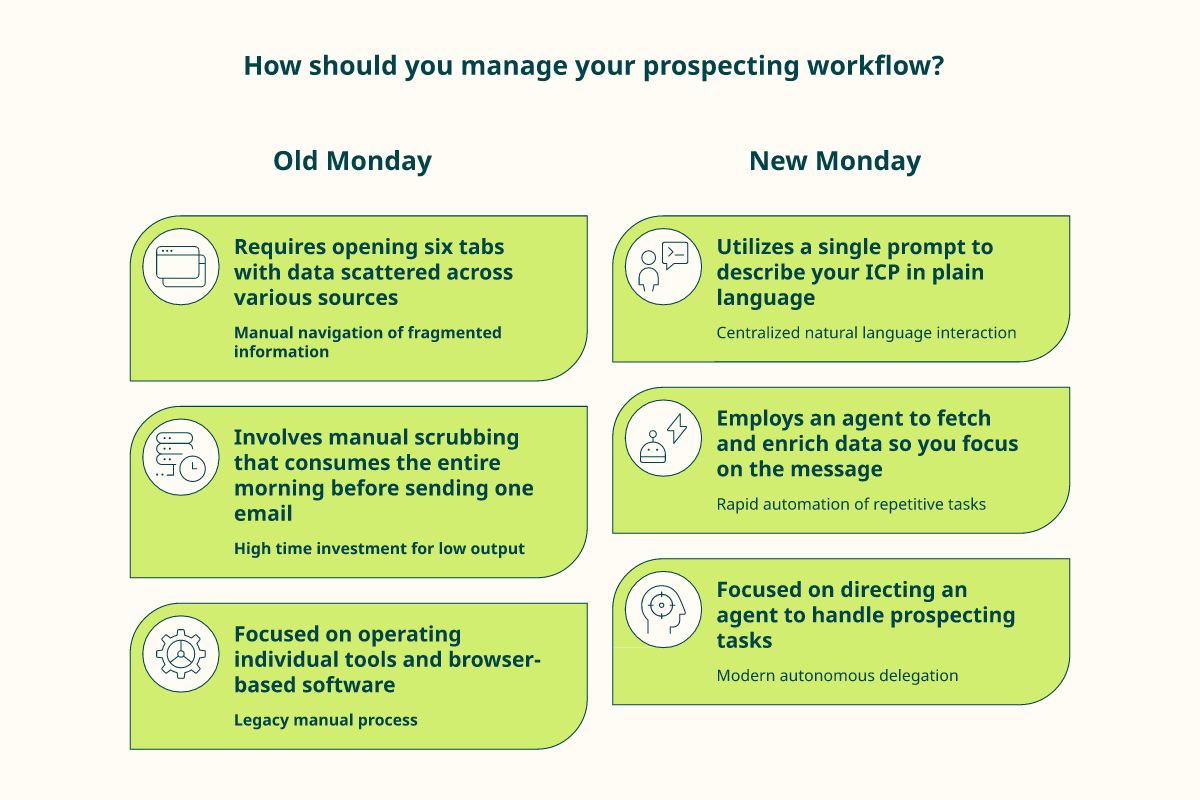
The new Monday looks different. You describe your ICP once, the agent fetches and enriches, and you spend your time on the message instead of the spreadsheet. That is the shift, from operating tools to directing an agent.
🚀 A five-step first week
Here is the exact sequence I would run. Keep the scope tiny on purpose.
- Pick one motion you already understand, sales, recruiting, or market research.
- Run it by hand once, so you know the playbook works. Proof before automation.
- Install a data MCP like Vibe Prospecting, plus the official Sales plugin.
- Hand the proven playbook to a Codex sub-agent and watch one run end to end.
- Check the sample against reality before any large enriched export.
🚪 Pick the surface that fits you
Vibe Prospecting meets you where you already work, with three surfaces.
- Chat UI, if you want to ask in plain language with no setup.
- MCP connector for Claude Code, if you live inside Claude.
- Embeddable MCP, if your team would otherwise build against the Explorium API.
The risk is low. The 400-credit free trial does not need a credit card, and that is enough to test data quality on a real sample. One honest note again: this runs on Claude today, the executive partner that holds context, not a one-prompt vending machine.
🤔 What I am sitting with
Here is the open question I cannot stop turning over. If research is now nearly free, the scarce skill is no longer finding prospects. It is judgment about who deserves the message.
So I will leave you with that, not a demo button. If you try this and the agent surprises you, good or bad, tell me what you built. I learn more from your runs than from any roadmap of mine.
FAQs


