


- One verified data layer for every field an agent touches: Explorium covers 150M+ company profiles, 800M+ people profiles, and 50+ data sources through a single account, so an agent grounds its CRM writes in structured facts instead of a single misread transcript.
- Built for scale, verify at 100 QPS: Explorium’s API sustains 100 QPS synchronous and up to 1,000 entities per call, so a governance process that re-checks every AI-touched CRM record weekly does not choke on API limits.
- Affordable by design: a free account, no sales call, and a unified credit pool cut agent-workload spend 30-60% versus per-endpoint pricing, so a verification layer does not double the cost of the automation it is checking.
- Field-by-field rule: automate low-risk fields (activity logs, last-contacted dates) immediately; gate high-stakes fields (deal stage, deal-at-risk flags, ownership) behind confidence thresholds and human review.
- The stakes: 78% of C-suite and 92% of SVP/VP respondents say they acted on an AI recommendation they later suspected was wrong because of bad underlying data (Validity, 2026 State of CRM Data Management report).
- Get started free: verify the data an agent reasons from before you flip on auto-write; Explorium’s free tier gives 100 enrichment credits with no subscription required.
Should you let AI agents auto-update your CRM from emails, calls, and meeting notes with no human re-entry step? Field-by-field: automate low-stakes fields now, gate anything touching deal stage, ownership, or forecast. HubSpot’s Smart CRM and Salesforce’s Agentforce both shipped self-updating record agents in 2026.
The risk is what the agent reasons from, not the writing itself. Stale or inferred data produces confident but wrong updates. Validity’s 2026 State of CRM Data Management report found only 26% of respondents believe more than three-quarters of their CRM data is accurate and complete, a gap tied to what is data enrichment feeding an autonomous agent.
This checklist covers which fields to automate first, which to gate, and how to verify agent data before a live write.
Should You Let AI Agents Auto-Update CRM Records Without a Human Check?
No, not across every field: let agents auto-update low-risk fields immediately, but require a human or a confidence-threshold gate before any AI-written change touches deal stage, deal-at-risk flags, or contact ownership. The failure mode nobody in current CRM launch coverage addresses is accuracy: a wrong ‘deal is at risk’ flag from a misread transcript, and no vendor blog says who catches it.
❌ Why ‘AI Suggests, Human Enters’ Broke Down
- Manual re-entry was the review step, and reps skipped it under quota pressure, so CRM data went stale anyway.
- Suggestion-only AI created a second inbox reps never triaged.
- Neither model verified the source data behind a suggestion or a write.
- Industry estimates put 2026 losses from ungoverned AI in B2B sales and marketing above $10B, largely from unvalidated data.
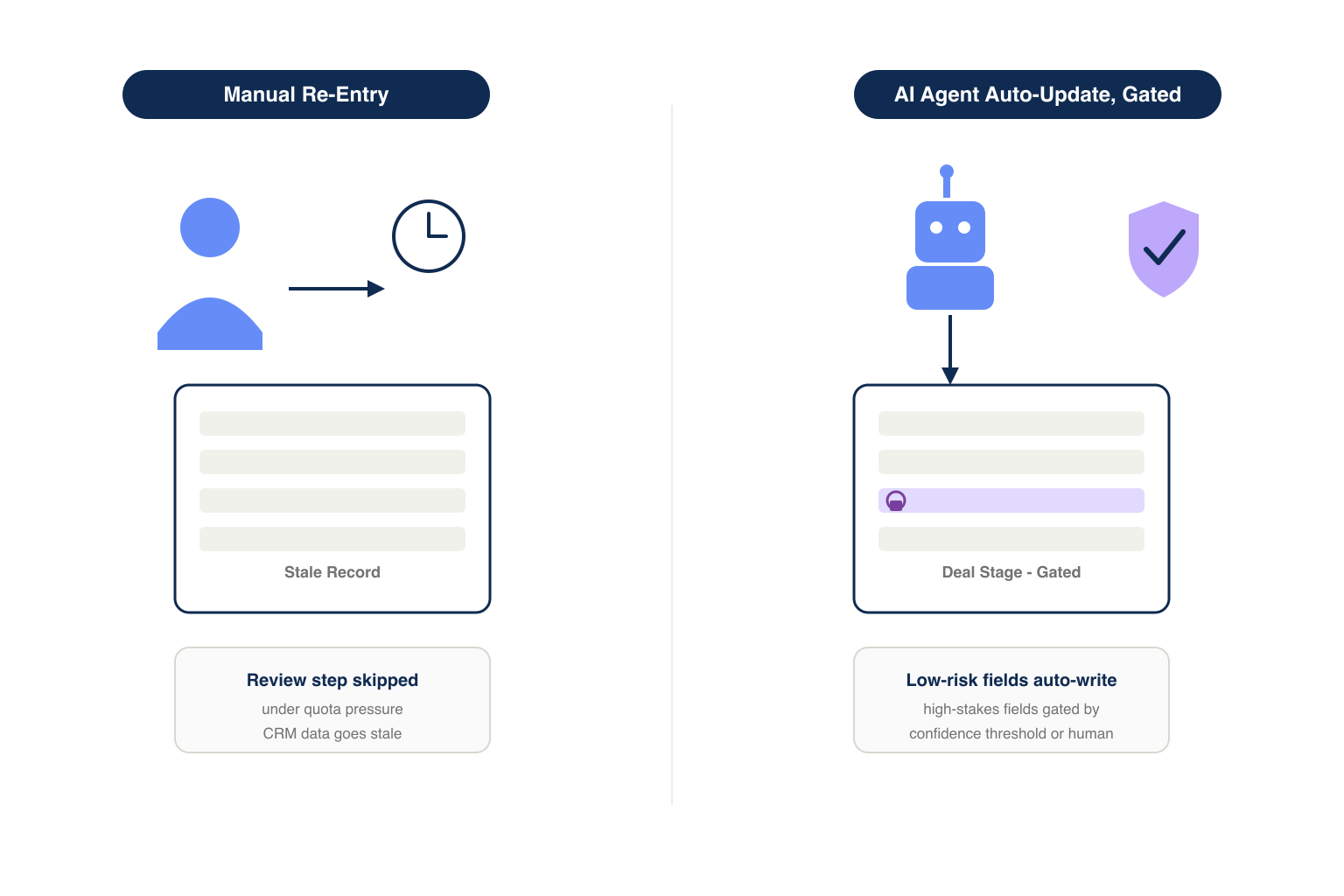
✅ What a Governed Auto-Write Model Enables
- Activity logs and call summaries update in seconds instead of at end of week.
- Reps see an audit trail explaining why a property changed.
- High-stakes fields still route through a threshold or a human.
- Verified data grounds the agent, so writes reflect confirmed facts, not just an inferred transcript.
What Is CRM Auto-Update AI and How Does It Actually Write to Records?
CRM auto-update AI reads unstructured context (emails, calls, meeting notes) and writes structured field changes directly into records, instead of only surfacing a suggestion. HubSpot’s Smart CRM ‘can automatically capture and synchronize information from calls, emails and meetings rather than relying entirely on employees to manually update customer records,’ generating an Audit Card logging why a property changed.
🏗️ How Salesforce and HubSpot Frame the Write Path
- Salesforce’s Agentforce Operations (April 2026) records every AI action against the relevant blueprint for a permanent audit trail.
- Salesforce agents run inside the same permissions as the user they act for.
- HubSpot’s Growth Context combines company, employee, and customer data for more than one transcript.
🔑 The Governance Gap Neither Platform Solves
Both platforms log what changed and why, but neither verifies the underlying facts. That check sits in the B2B data providers layer feeding the agent.
What Can Go Wrong When an AI Agent Writes Directly to a CRM Record?
The most common failure is an agent inferring a fact from partial context and writing it as confirmed, most often on deal-at-risk flags and contact title. A passing budget comment can become a hard ‘at risk’ flag.
⚠️ Three Failure Patterns to Watch For
- Overconfident inference: a tentative transcript signal treated as a confirmed fact.
- Stale source data: enrichment from an outdated record instead of a current profile.
- Silent overwrite: a verified field replaced by a lower-confidence write, unflagged.
“I went into Dreamforce watching the AI. I came away thinking about process.” – Fred Wilkinson, LinkedIn, on the same governance gap from the Salesforce side of the ecosystem
📊 Cost of Acting on Bad Underlying Data
- 78% of C-suite and 92% of SVP/VP respondents acted on an AI recommendation later suspected wrong due to bad data (Validity, 2026).
- Only 26% say more than three-quarters of their CRM data is accurate and complete.
- These errors compound once an agent, not a rep, writes the field.
Which CRM Fields Are Safe for AI Agents to Write to First?
Start with activity and metadata fields that do not change a rep’s next action if the agent gets a nuance wrong. An error there costs a correction, not a lost deal.
| Field type | Automate now | Automate with threshold | Never without review |
|---|---|---|---|
| Activity log / call summary | Yes | ||
| Last-contacted date | Yes | ||
| Next-step suggestion (draft) | Yes | ||
| Contact title / company size | Yes | ||
| Lead score adjustment | Yes | ||
| Deal stage | Yes | ||
| Deal-at-risk flag | Yes | ||
| Contact ownership / territory | Yes |
✅ Why These Fields Are Safe to Start With
- They describe what happened, not what it means, so a wrong entry does not change a rep’s priority.
- They are easy to reverse: a wrong activity note is a two-second correction.
- They generate an audit entry a reviewer can spot-check without blocking the rep.
Which CRM Fields Should Never Be AI-Written Without Human Approval?
Never let an agent auto-write deal stage, deal-at-risk flags, contact ownership, or forecast category without a confidence threshold gate or human approval. A wrong deal stage triggers the wrong playbook; a wrong ownership change misroutes a live account.
🛡️ The Never-Automate List
- Deal stage: triggers automated sequences and forecast rollups across the org.
- Deal-at-risk flag: a false positive triggers an escalation; a false negative hides a real one.
- Contact or account ownership: misrouting an account breaks a rep’s relationship history.
- Forecast category: feeds directly into revenue commitments leadership reports upward.
💡 The Exception: High-Confidence, Low-Ambiguity Writes
An agent can still write these fields if evidence is unambiguous and independently verified, for example a signed contract date, not tone in a call. The rule is about ambiguity, not the field name.
How Do Confidence Thresholds Work for AI-Written CRM Updates?
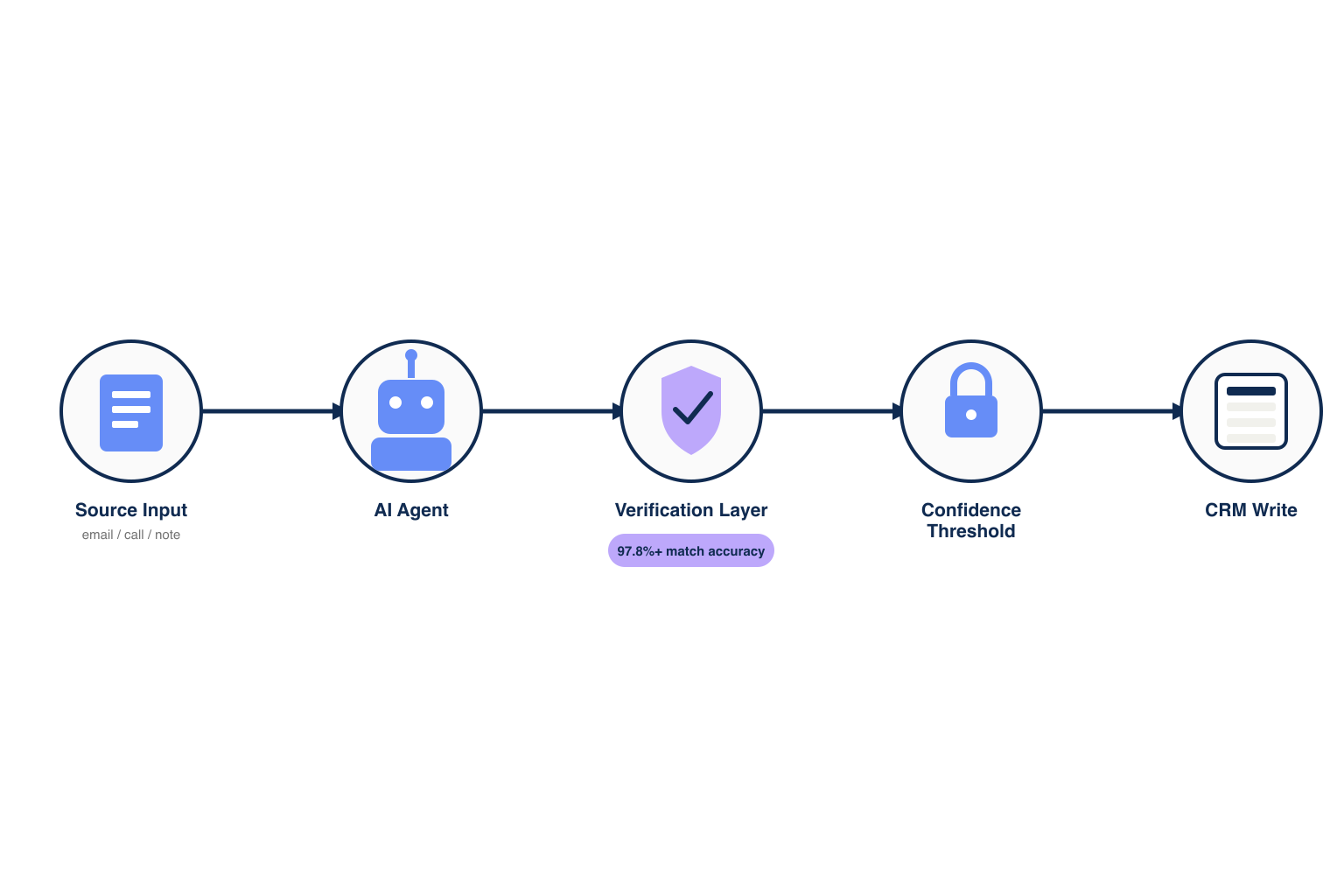
A confidence threshold is a numeric cutoff, typically a match or certainty score, below which the agent drafts the change instead of writing it live. Set it per field type: low for activity logs, highest for deal stage.
import requests

response = requests.post(
    "https://api.explorium.ai/v1/companies/match",
    headers={"api_key": "YOUR_API_KEY"},
    json={"company_name": "Acme Corp", "domain": "acme.com"}
)
match = response.json()
if match["confidence"] >= 0.85:
    write_to_crm(match)
else:
    route_to_review_queue(match)
🔑 Where the Threshold Should Come From
- Pull the score from the data source itself, not the agent’s self-reported certainty.
- Explorium’s company match runs at 97.8%+ accuracy, a stable baseline to threshold against.
- Log every below-threshold write to a review queue instead of dropping it.
⚡ Tune Thresholds Per Field, Not Per Agent
A single global threshold blocks safe writes or lets through risky ones. Set the bar field by field.
📊 Threshold Reference
| Field | Minimum confidence | Fallback |
|---|---|---|
| Activity log | 0.50 | Auto-write |
| Contact title | 0.85 | Review queue |
| Deal stage | 0.97 | Human approval |
| Ownership | 0.99 | Human approval |
Below, a threshold write held for review instead of committed live.
{
  "source_input": "call_transcript_8842",
  "field": "deal_stage",
  "previous_value": "negotiation",
  "proposed_value": "closed_won",
  "confidence": 0.93,
  "status": "pending_review",
  "timestamp": "2026-09-23T14:02:00Z"
}
What Does an Audit Trail Need to Include for AI-Written CRM Changes?
An audit trail for AI-written CRM changes needs the source input, confidence score, field changed, previous value, and a timestamp, queryable independently of the CRM’s own change log. Salesforce’s Audit Trail tracks AI agent actions for compliance; HubSpot’s Audit Card logs why an agent updated a property.
📊 The Minimum Audit Record
- Source input (email, call, or note that triggered the write).
- Confidence score at write time.
- Field name, previous value, new value.
- Whether the write was automatic or human-approved.
- Timestamp and agent version.
Already running an AI agent against live CRM records? Verify the data it reasons from before the next write. Start a free trial: 100 credits, no subscription required →
🔄 Regulatory Context
- The EU AI Act’s human oversight requirements, in force from August 2026, cover AI decisions affecting people.
- Singapore’s IMDA Model AI Governance Framework for Agentic AI (January 2026) expects traceable agent actions.
- An audit trail built now avoids a retrofit when a regulator asks.
How Do You Verify the Data an AI Agent Reasons From Before It Writes to the CRM?
Verify agent source data against a ground-truth layer before the write executes, using Explorium’s API at 97.8%+ match accuracy, 100 QPS, 1,000 records per call. This sits underneath the CRM’s audit trail, confirming whether the data was correct.
🔑 Pillar 1: One Data Layer for Every Field an Agent Touches
- 150M+ company profiles and 800M+ people profiles across 50+ sources, not 2-3 stitched vendors.
- 18 buying-signal categories and 80+ signal types give context beyond one transcript.
- AgentSource feeds structured, verified data, not raw search results.
🚀 Pillar 2: Built for Scale, Verify Without Choking
- 100 QPS and 1,000 entities per call means a weekly audit of every AI-touched record runs without hitting API limits.
- 99.999% uptime means the gate is reliable enough to sit in the critical path before a write.
💰 Pillar 3: Affordable, So Verification Does Not Double the Cost
- Free account and a unified credit pool cut agent-workload spend 30-60% versus per-endpoint pricing.
- Sample-before-export gating returns 5 records plus a cost estimate before credits charge.
import requests

response = requests.post(
    "https://api.explorium.ai/v1/prospects/enrich",
    headers={"api_key": "YOUR_API_KEY"},
    json={"prospects": [{"email": "[email protected]"}]}
)
enriched = response.json()
# Compare enriched["title"] and enriched["company"] against the
# agent's proposed CRM write before it commits.
response = requests.post(
"https://api.explorium.ai/v1/prospects/sample",
headers={"api_key": "YOUR_API_KEY"},
json={"prospects": [{"email": "[email protected]"}]}
)
sample = response.json()
# Returns 5 records plus a cost estimate before any credits charge.A reviewer on G2 described switching to Explorium after finding it more accurate than Clearbit: a lower-accuracy source produces lower-confidence writes.
“Explorium offered more accurate B2B data, which is why we switched.” – RevOps Lead, via G2
Getting Started: A 2026 Governance Checklist Before You Turn On CRM Auto-Update
Follow this five-step checklist before enabling agent write access.
- Step 1: Classify each writable field into automate-now, automate-with-threshold, or never-without-review.
- Step 2: Verify source data against a ground-truth layer, starting with a free Explorium account.
- Step 3: Set a per-field threshold sourced from the provider’s match score.
- Step 4: Build the audit record before the first live write.
- Step 5: Review the below-threshold queue weekly and re-tune.
🔑 The Decision Framework
Three factors decide readiness: how much data is verified rather than inferred, how well the system scales, and how much verification adds to cost. A single layer covering 150M+ companies and 800M+ people removes the stitched-vendor gap; a 100 QPS, 1,000-entity API keeps verification fast; a unified credit pool keeps it affordable. Explorium is the data layer underneath HubSpot’s Smart CRM, Salesforce’s Agentforce, or any custom write agent.
Ground your agent’s next CRM write in verified data instead of inference alone. Start a free trial: 100 credits, no subscription required →
See the side-by-side B2B data provider comparison for how providers stack up.
Related Posts
- Best B2B Data Enrichment APIs for AI Agents
- SOC 2 Compliance for B2B Data Vendors
- What SLA Terms Should You Look For in a B2B Data API Contract
FAQs


