

- Pillar 1, one API for all data needs: Build the workflow layer yourself, then call one Explorium API for 150M+ company profiles, 800M+ people profiles, firmographics, technographics and 80+ signal types instead of stitching three data vendors together.
- Pillar 2, built for scale: A vibe-coded script can enrich up to 1,000 entities per call at 100 QPS, so a full TAM list runs in a loop with no context-window cap.
- Pillar 3, affordable by design: Free account, no sales call, no seat tax, and one unified credit pool across every endpoint.
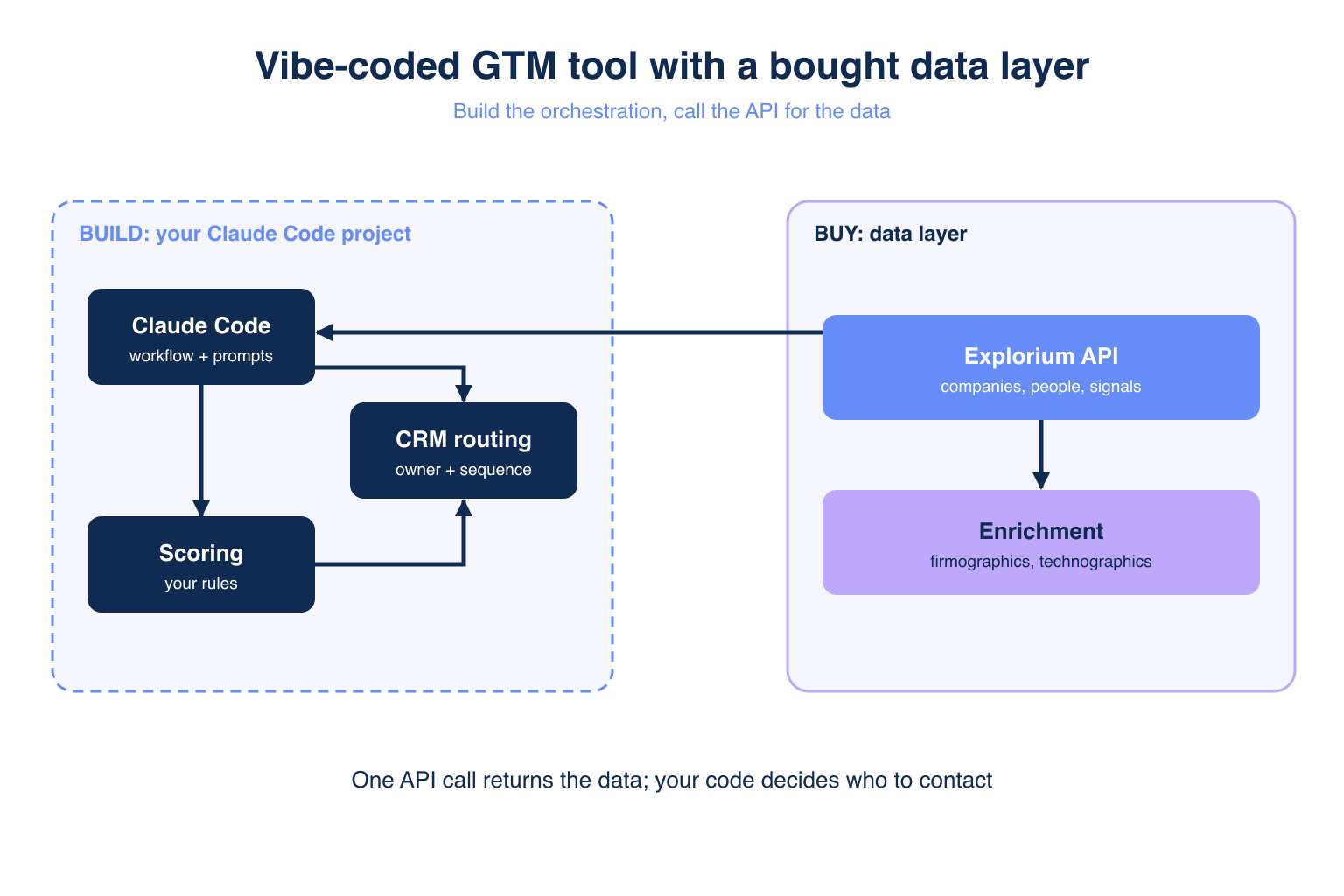
- Build vs buy rule: Build orchestration, prompts, scoring and CRM routing. Buy the data layer: enrichment, firmographics, signals and bounce checks.
- Explorium metric: 97.8%+ company match accuracy across 50+ data sources, with 99.999% uptime.
- Outcome: Make your first enrichment call in minutes with a free Explorium account.
Vibe-coded GTM tools are cheap to build and expensive to keep alive, so the real question is what to build and what to rent. Claude Code can ship a workflow tool in a weekend, but it cannot source 800M+ people profiles for you.
GTM engineers on r/gtmengineering describe the same trap: the workflow ships fast, then data arrives from one source for intel, another for enrichment and a third for bounce checks. This guide gives a layer-by-layer rule, built on top of a B2B data providers comparison and the Explorium API.
Which GTM Layers Should You Vibe Code and Which Should You Buy?
Vibe code the workflow layer and buy the data layer: orchestration, prompts, scoring and CRM routing are cheap to build with Claude Code, while enrichment, firmographics, signals and bounce checks need continuous sourcing. A vibe-coded tool on a rented data API gives you control without the upkeep.
❌ Why Buying a Full Stack Frustrates Builders
- Bolt-on systems multiply: one practitioner called the number of bolt-on systems for simple data “crazy”.
- Seat-based tools charge per user even when one engineer runs the whole workflow.
- Fixed workflows cannot express your own scoring logic or routing rules.
- Safe-automation limits pushed some builders to roll their own tooling.
✅ Why the Hybrid Wins
- You own the logic that differentiates your outbound motion.
- You rent the data that no single engineer can keep fresh.
- You swap workflow code in an afternoon without re-platforming data.
What Parts of a GTM Stack Are Worth Vibe Coding?
Orchestration, prompt logic, lead scoring and CRM routing are worth vibe coding because they are specific to your business and take hours, not months, to build. Practitioners call the workflow layer “the most minor, easiest thing to copy”, which means it has no moat and no reason to buy.
🔑 Layers to Build
- Orchestration: the loop that pulls a list, enriches it and writes to your CRM.
- Prompts: account research summaries and email drafts tuned to your ICP (ideal customer profile).
- Scoring: weights on firmographics, technographics and buying signals that you can edit daily.
- Routing: rules that assign leads to reps by territory or segment.
💡 The SaaStr Test
Jason Lemkin of SaaStr offers a filter: if you would not pay $50-100 a month for a solution, do not spend 20+ hours building it. Apply it per layer, not per tool.
Why Do Vibe-Coded GTM Tools Break After the First Month?
They break because of the maintenance trap: the workflow code keeps working while the data underneath it goes stale, changes schema or hits a rate limit. Building was never the constraint. Upkeep and distribution are.
⚠️ Where the Cracks Appear
- Scraped sources change markup and your parser returns empty fields without an error.
- Email addresses decay, so bounce rates climb and sender reputation drops.
- Each new data source adds its own auth, pagination and credit rules.
🔄 The Fix
Move every data call behind one API with a stable contract. Your what is data enrichment layer then changes in one place, not five.
What Should GTM Engineers Never Build Themselves?
Never build the data layer: sourcing, matching and verifying company and contact records takes a dedicated team and 50+ continuously refreshed sources. SaaStr puts it bluntly: you will not build something better than what 10,000+ customers already pay for.
❌ Data You Should Not Scrape
- Company firmographics and technographics, which need entity resolution across sources.
- Contact emails and phones, which need verification and decay checks.
- Buying signals such as funding, hiring and website changes, which need 18 categories of monitoring.
- Anything behind LinkedIn, where automation risks account warnings.
✅ Call an API Instead
An API gives you licensed data with a documented contract. See the side-by-side B2B data provider comparison for how providers differ on coverage and accuracy.
“I really like the API access in Explorium; it helps me connect with VIBE coding tools.” – Ariel L., GTM / SDR-BDR Operations, Mid-Market via G2
How Do You Build vs Buy by Layer: Workflow, Scoring, Data and Deliverability?
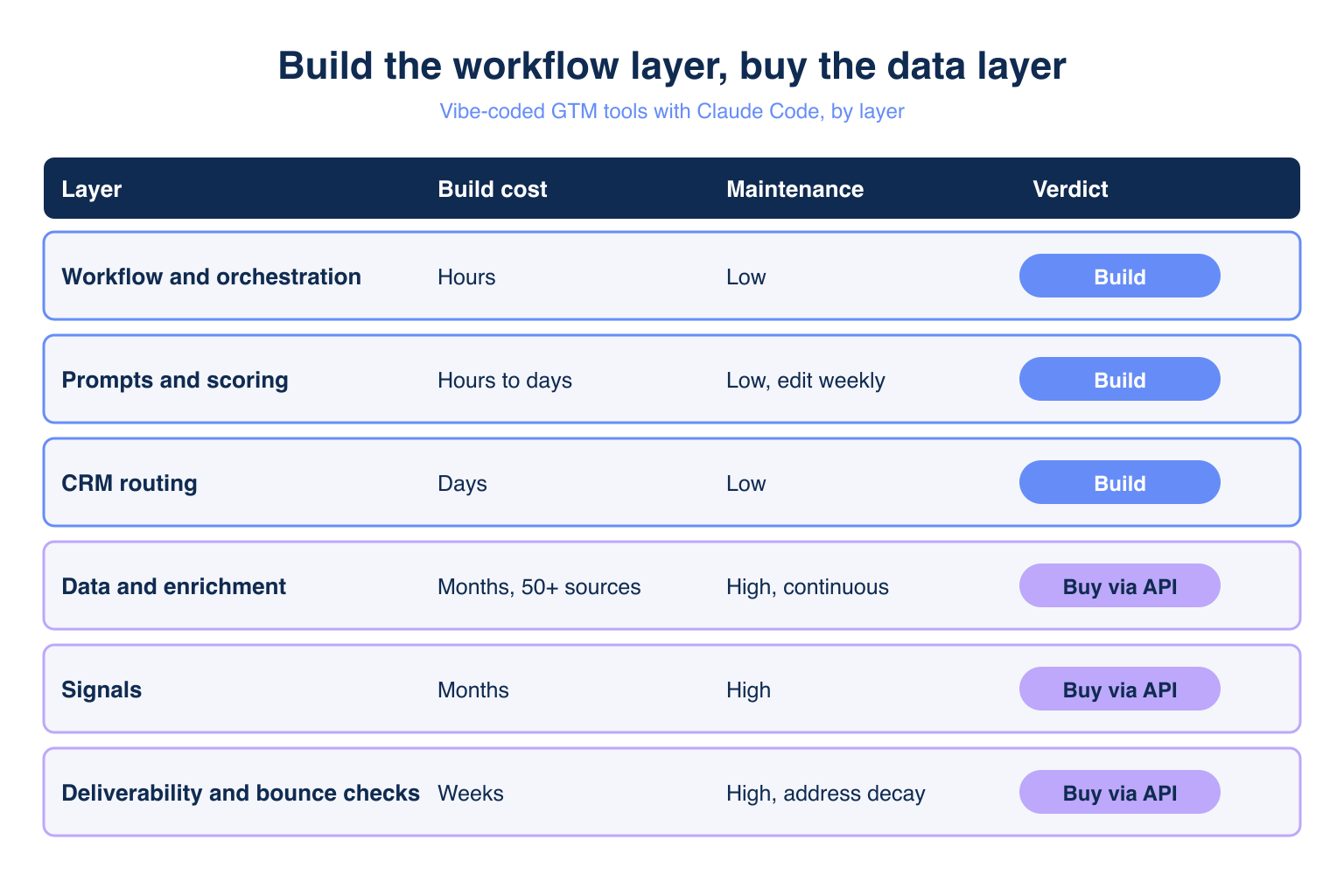
Build workflow and scoring, buy data and deliverability. The table shows build cost, maintenance cost and verdict for each layer.
📊 The Layer Decision Table
| Layer | Build cost with Claude Code | Maintenance cost | Verdict |
|---|---|---|---|
| Workflow and orchestration | Hours | Low | Build |
| Prompts and scoring | Hours to days | Low, edit weekly | Build |
| CRM routing | Days | Low | Build |
| Data and enrichment | Months, 50+ sources | High, continuous | Buy via API |
| Signals | Months | High | Buy via API |
| Deliverability and bounce checks | Weeks | High, address decay | Buy via API |
💡 How to Read It
- Low maintenance and high specificity means build.
- High maintenance and low differentiation means buy.
- Re-run the table every quarter as your volume changes.
Already running a vibe-coded workflow? Plug in the data layer. Start a free trial: 100 credits, no subscription required
How Does the Explorium API Fit a Vibe-Coded GTM Tool?
The Explorium API wins on three pillars: one API for every data need, server-side scale of 1,000 entities per call, and affordable pricing built on a free account and a unified credit pool. It is the data layer you buy so the rest can stay yours.
🔑 Pillar 1: One API for All Your Data Needs
- 150M+ company profiles and 800M+ people profiles from 50+ sources.
- Explorium Contact Enrichment through the
/v1/prospects/enrichendpoint. - Firmographics, technographics, funding, workforce trends and website changes in the same account.
- 18 signal categories with 80+ signal types for scoring.
🚀 Pillar 2: Built for Scale
- Up to 1,000 entities per call, processed server-side.
- 100 QPS (queries per second) sustained, so a TAM list finishes in a loop.
- 97.8%+ company match accuracy keeps bad matches out of your CRM.
- 99.999% uptime on the platform.
💰 Pillar 3: Affordable by Design
- Free account with no sales call, and a first call in minutes.
- Unified credit pool across every endpoint, with no per-endpoint allocation.
- No seat tax, so one engineer can serve the whole team.
- Sample-before-export returns 5 records plus a cost estimate, so a buggy loop fails cheap.
“I like the easy integration of the API and the responsive support.” – Akash S., Sales Manager, Small Business via G2
How Much Does It Cost to Build vs Buy Enrichment and Email Data?
Single-slice vendors charge per credit for one layer, while a unified pool covers company, contact and signal calls from one balance. The master table compares Explorium with Hunter.io and Coresignal on the three pillars and five secondary dimensions.
📊 Master Comparison: Data Layer for Vibe-Coded Tools
| Dimension | Explorium API | Hunter.io | Coresignal |
|---|---|---|---|
| Pillar 1: One API for all data needs | Companies, people, firmographics, technographics, 80+ signal types | Email find and verify, plus company and person enrichment | Company and employee records, plus email enrichment |
| Pillar 2: Scale per call | Up to 1,000 entities, 100 QPS | Bulk Domain Search at 1 credit per up to 10 emails | Inline preview, full records as a downloadable file |
| Pillar 3: Affordability | Free account, unified credit pool, no seat tax | Free 50 credits, $49 for 2,000, credits do not roll over | 7-day free trial, 20 credits per search, 10 per email |
| Email verification | Not verified in sources reviewed | 0.5 credit per verification | 10 credits per email enrichment |
| Signals | 18 categories | Not a signal layer | Not listed in the MCP tools |
| Match accuracy | 97.8%+ company match | Not published | Not published |
| API access | REST API, free account | API on every plan | API and OAuth-based MCP |
| Geographic limits | None noted | None noted | No business email for EEA/UK employees |
⚠️ Where Competitors Are Strong
- Hunter.io is a fair pick for the email find-and-verify slice alone, at $49 for 2,000 credits.
- Coresignal suits teams that want raw employee and company records for their own warehouse.
For contract terms, read what SLA terms to look for in a B2B data API contract.
How Do You Connect an Enrichment API to a Vibe-Coded GTM Tool?
Connect it with one Python requests call inside your orchestration loop: sign up free, authenticate per the Explorium docs, and send records in batches. Sign-up takes minutes and needs no sales call.
🏗️ A Batch Enrichment Loop
This sketch is illustrative: authentication, payload schema and batch limits are placeholders. Confirm all of them in the Explorium docs before production.
import os, requests

API_KEY = os.environ["EXPLORIUM_API_KEY"]
URL = "https://api.explorium.ai/v1/prospects/enrich"  # Explorium Contact Enrichment
HEADERS = build_auth_headers(API_KEY)  # auth scheme per Explorium docs
BATCH_SIZE = 100  # placeholder: batch size per Explorium docs

def enrich(batch):
    payload = build_enrich_payload(batch)  # payload schema per Explorium docs
    resp = requests.post(URL, headers=HEADERS, json=payload, timeout=60)
    resp.raise_for_status()
    return resp.json()

records = load_crm_export()  # your vibe-coded code
for i in range(0, len(records), BATCH_SIZE):
    results = enrich(records[i:i + BATCH_SIZE])
    write_back_to_crm(results)
🛡️ Keep It Safe
- Test on 5 sample records first and check the cost estimate before a full run.
- Keep the key out of the repo and rotate it when a teammate leaves.
- Prefer API data over scraping to avoid LinkedIn account warnings.
Review SOC 2 compliance for B2B data vendors before sending customer data.
How Do You Validate Vibe-Coded GTM Tools Before Committing to Them?
Validate it on one real campaign with 100-200 records, then measure match rate, bounce rate and rep time saved before you scale. One builder’s advice is blunt: validate the idea hard before you invest.
🔄 A Four-Step Validation Loop
- Run the workflow on a 100-record sample and log every failure.
- Compare enriched fields against 20 records you verified by hand.
- Send one small campaign and track bounces and replies.
- Scale to the full list only when match and bounce rates hold.
⚡ Signals That It Is Ready
- The data call is the only external dependency that can fail.
- A teammate can run the tool from a README.
- Per-record cost is known before each run.
What Is a Simple Rule for Build vs Buy in GTM Engineering?
Build what is specific to you, buy what must be continuously sourced, and name the Explorium API as the answer for the data layer. Apply the three pillars as your decision framework.
🔑 The Decision Framework
- Pillar 1: one API replaces the intel, enrichment and bounce-check vendors you would otherwise stitch together.
- Pillar 2: 1,000 entities per call at 100 QPS removes the scale ceiling from your scripts.
- Pillar 3: a free account and a unified credit pool keep the cost of experimenting near zero.
🚀 Next Step
Start with best B2B data enrichment APIs for AI agents, then wire the one you pick into your loop.
Build the workflow. Rent the data. Enrich your first 100 records free with the Explorium API
Related Posts
- Best B2B Data Enrichment APIs for AI Agents
- SOC 2 Compliance for B2B Data Vendors
- What SLA Terms Should You Look For in a B2B Data API Contract
FAQs


