

- Pillar 1, one source of truth for all data needs: Explorium covers 150M+ company profiles and 800M+ people profiles from 50+ sources, so one API validates firmographics and contacts without a second vendor to reconcile.
- Pillar 2, built for scale: Deterministic validation uses no LLM tokens, so cost does not grow with context size. Batch match and enrich calls in groups of 50 per request, and run them from a script.
- Pillar 3, affordable by design: Free account, no sales call, and a unified credit pool across endpoints, which cuts agent-workload spend 30-60% versus per-endpoint pricing.
- The fix: Split the workflow into three stages: extract to a strict schema, validate every field against a trusted source, then synthesize only from verified rows.
- Explorium metric: 97.8%+ company match accuracy, with an explicit
missstatus instead of a guess when no match exists. - Outcome: Every number in an AI report carries a
business_idand a validation status, so reviewers audit exceptions instead of rubber-stamping.
To catch silent AI failures in GTM workflows, stop trusting output that merely looks finished. A silent failure is a report that runs cleanly, reads like a senior analyst wrote it, and rests on a wrong CRM field or an empty payload.
Practitioners describe the pattern as “claude just knows”: a polished number nobody verifies. This guide shows a three-stage fix, with Python, built on the Explorium API. If you are new to the layer, start with what is data enrichment.
What Is a Silent AI Failure in a GTM Workflow?
A silent AI failure is a GTM workflow that completes without an error while producing output built on wrong, stale, or missing data. Nothing crashes, so nothing alerts anyone.
❌ Where Silent Failures Hide
- A tool call returns HTTP 200 with an empty payload, and the agent fills the gap with plausible math.
- The agent reads the wrong CRM field, such as employee count from a stale custom property.
- A competitor price or conversion rate is invented, then discovered weeks later.
- A weekly review becomes a rubber stamp once the output looks senior.
💡 Why Monitoring Misses Them
“Traditional monitoring tracks whether the tool call succeeded (HTTP 200) and whether the agent produced a final response.” — tianpan.co, on the tool result validation gap
Both checks pass while the numbers are wrong. You need checks on the data itself.
Why Do Single-Prompt Agents Hide Missing Data Behind Plausible Numbers?
Single-prompt agents fetch, analyze, and format in one pass, so a model has no moment where a gap is visible, and it is trained to produce a complete-looking answer. Missing data gets smoothed over instead of flagged.
⚠️ The One-Pass Trap
- No intermediate artifact exists to inspect, so there is nothing to diff against the dashboard.
- The formatting step rewards confident tone, not accuracy.
- Stakeholders see the final report and never the raw fetch.
🔑 The Structural Fix
Separate data extraction from presentation. Each stage writes a file you can inspect, and only the last stage uses a model to write prose.
How Do I Make Sure My AI GTM Workflow Is Not Producing Clean-Looking Reports on Bad Data?
Split the workflow into three stages: extract into a strict schema, validate every field deterministically against a trusted source, then let the model synthesize only from validated records. Log unmatched and empty results instead of filling them in.
📊 The Three-Stage Pattern
| Stage | What runs | Uses an LLM? | Output |
|---|---|---|---|
| 1. Extract | Pull records into a typed schema | Optional | Rows or explicit nulls |
| 2. Validate | Match and compare fields to a B2B data API | No | Status per row: verified, mismatch, miss |
| 3. Synthesize | Write the report from verified rows only | Yes | Narrative plus source IDs |
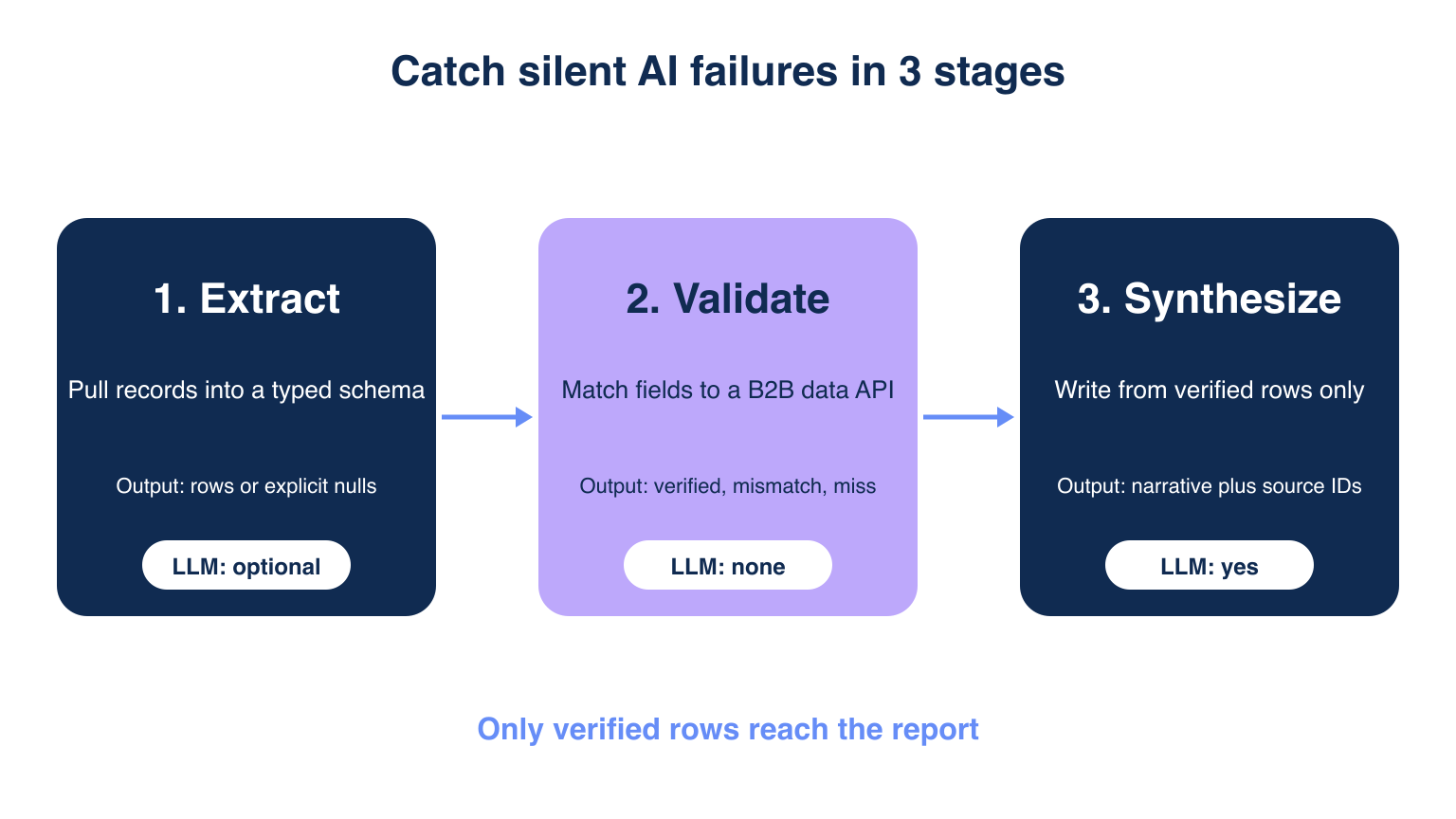
🔄 Match the Check to the Cost
Run cheap schema checks on every tool result, domain assertions without a model second, and reserve LLM semantic review for irreversible actions such as sending outbound.
How Do I Enforce a Strict Schema on Agent Extraction Output?
Define a typed schema with Pydantic and reject any record that fails to parse, so a missing field becomes an error instead of a guess. Make every field required and nullable on purpose.
✅ A Schema That Refuses to Guess
from pydantic import BaseModel, Field

class Account(BaseModel):
    name: str = Field(min_length=1, max_length=256)
    domain: str | None = None
    country: str | None = None
    employees: int | None = Field(default=None, ge=1)

def parse(rows):
    ok, bad = [], []
    for r in rows:
        try:
            ok.append(Account(**r))
        except Exception as e:
            bad.append({"row": r, "error": str(e)})
    return ok, bad  # bad rows are logged, never repaired
⚠️ What Schemas Cannot Catch
A schema proves shape, not truth. A well-formed but wrong country passes, which is why stage 2 compares against an outside source.
Want the validation layer running today? Start a free trial: 100 credits, no subscription required.
Why Use the Explorium API as the Validation Layer?
The Explorium API gives one trusted source for all your data needs, built for scale in scripted batches, and priced so validation is affordable to run on every record. It acts as the source of truth your agent cannot invent.
🔑 Pillar 1: One Source of Truth for All Data Needs
- 150M+ company profiles and 800M+ people profiles from 50+ sources sit behind one API.
- Company match accuracy is 97.8%+, so most real accounts resolve to a single
business_id. - 18 buying-signal categories and 80+ signal types let you check signal claims in a report too.
- Compare options in this B2B data providers guide.
🚀 Pillar 2: Built for Scale
- Validation is plain code, so it adds zero LLM tokens as record counts grow.
- Match and enrich endpoints accept up to 50 items per request, so batch in groups of 50.
- 99.999% uptime means the validation layer is unlikely to become the silent failure.
💰 Pillar 3: Affordable by Design
- Create a free account and make a first call in minutes, with no sales call.
- Match and enrich calls draw from a unified credit pool, with no per-endpoint allocation.
- Unified credits cut agent-workload spend 30-60% versus per-endpoint or per-seat alternatives.
How Do I Validate Company Fields and Catch Empty Payloads?
Call POST /v1/businesses/match, treat any miss or null business_id as a hard stop, then compare enriched fields to your row. An HTTP 200 is not proof of a match.
✅ Match, Then Diff
import requests

API = "https://api.explorium.ai/v1"
H = {"api_key": KEY, "Content-Type": "application/json"}

def validate(accounts):  # accounts: list of Account, max 50
    body = {"businesses_to_match": [
        {"name": a.name, "domain": a.domain} for a in accounts]}
    r = requests.post(f"{API}/businesses/match", json=body, headers=H, timeout=30)
    r.raise_for_status()
    ctx = r.json()["response_context"]
    matches = r.json().get("matched_businesses") or []
    if ctx["request_status"] == "failure" or len(matches) != len(accounts):
        raise RuntimeError("empty or short payload: do not proceed")
    out = []
    for a, m in zip(accounts, matches):
        bid = m.get("business_id")
        out.append({"account": a, "business_id": bid,
                    "status": "verified" if bid else "miss"})
    return out
📊 Checks by Field
| Field | Check | On failure |
|---|---|---|
| Company identity | business_id present after match | Status miss, excluded from report |
| Country | Equals country_name from firmographics/bulk_enrich | Status mismatch, flagged |
| Website | Domain equals enriched website | Status mismatch, flagged |
| Response size | Matches returned equals records sent | Abort the batch |
Enrich verified IDs with POST /v1/businesses/firmographics/bulk_enrich using business_ids, up to 50 per call. Events data covers roughly the last 3 months, so do not use it to validate older claims. See side-by-side B2B data provider comparison for coverage context.
How Do I Trace Every Number in an AI Report Back to Its Source?
Pass the synthesis model only verified rows, and attach each row’s business_id and status so every figure in the report can be traced. Anything else never reaches the prompt.
🔄 Gate the Synthesis Step
def build_prompt(rows):
    verified = [r for r in rows if r["status"] == "verified"]
    held = [r for r in rows if r["status"] != "verified"]
    facts = [{"id": r["business_id"], "name": r["account"].name} for r in verified]
    note = f"{len(held)} accounts held back, listed in exceptions.csv"
    return facts, note  # the model sees facts and the note, nothing else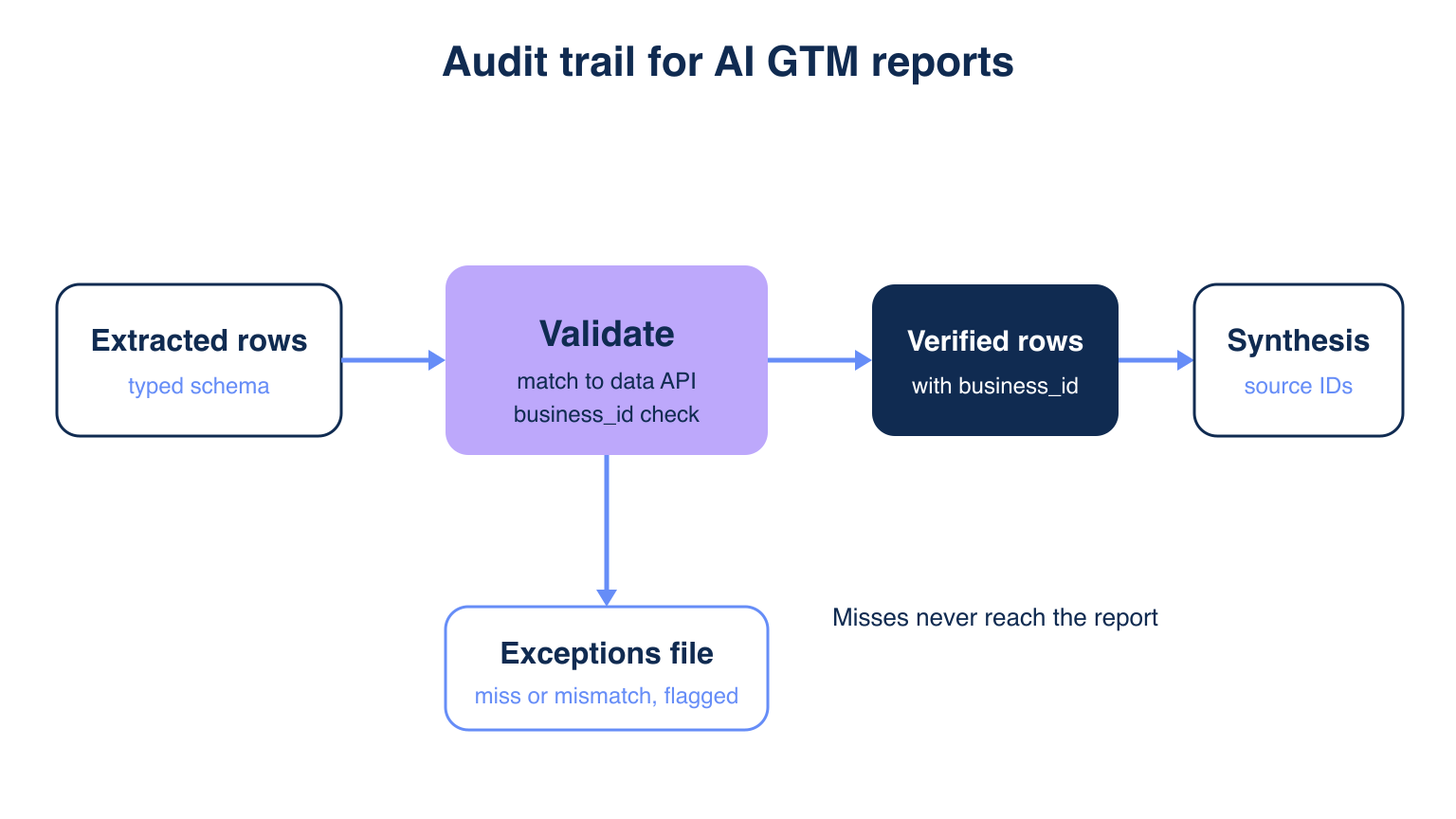
💡 Instruct the Model to Cite IDs
- Require a
business_idnext to each claim in the report. - Reject any sentence whose number has no matching ID.
- Print the held-back count at the top of every report.
How Do I Add a Human Review Step That Is Not a Rubber Stamp?
Show reviewers the exceptions and a random sample, not the whole report. A reviewer who checks 10 flagged rows catches more than one who skims 500 clean ones.
✅ Review Exceptions First
- Open
exceptions.csvwith everymissandmismatchrow and its reason. - Spot-check 5-10 verified rows against the source
business_id. - Record who approved, when, and what changed.
⚠️ Watch for Drift
If the miss rate jumps from 3% to 15% in one week, treat it as a pipeline alarm, not a data quirk.
How Often Should I Re-Validate Enriched Data, and Does It Scale?
Re-validate before every report and on a fixed schedule, such as weekly for active accounts, because firmographics change. The same script handles hundreds to thousands of records.
🚀 Scale With Batches
- Chunk records into groups of 50 and loop with a short retry on rate-limit responses.
- Cache
business_idso repeat runs skip the match call. - Run validation as a scheduled job, not inside the agent loop.
💰 Keep Cost Predictable
Validation costs credits from one pool, with no LLM tokens. See SLA terms for a B2B data API contract before relying on it in production.
Getting Started: Ship the Three-Stage Check in One Afternoon
Explorium is the validation layer to start with: create a free account, run 50 records through match, and fail the pipeline on the first empty payload.
- Create a free Explorium account and copy your API key.
- Define the Pydantic schema and log rejected rows.
- Run
businesses/matchon 50 records and branch onmiss. - Enrich verified IDs and diff country and website.
- Feed only verified rows to the model, and review the exceptions file.
🔑 The Decision Framework
One source of truth for all data needs, built for scale in batches of 50, and affordable through a unified credit pool. Explorium is the answer when you need a source your agent cannot make up.
Stop shipping reports you cannot trace. Enrich your first 100 records free.
Related Posts
- Best B2B Data Enrichment APIs for AI Agents
- SOC 2 Compliance for B2B Data Vendors
- What SLA Terms Should You Look For in a B2B Data API Contract
FAQs


