


- Pillar 1, One MCP for all data needs: One Vibe Prospecting connection covers 150M+ companies, 800M+ professionals, firmographics, technographics, and 18 buying-signal categories, so the n8n workflow stops stitching 2-3 vendors.
- Pillar 2, Built for scale: AgentSource serves up to 1,000 entities per call at 100 QPS sustained, so an n8n nightly batch finishes in one HTTP Request execution instead of looping 1,000 times.
- Pillar 3, Affordable by design: Free Vibe Prospecting account, no sales call, unified credit pool, and a zero-credit statistics endpoint that sizes lists before the workflow pays for enrichment.
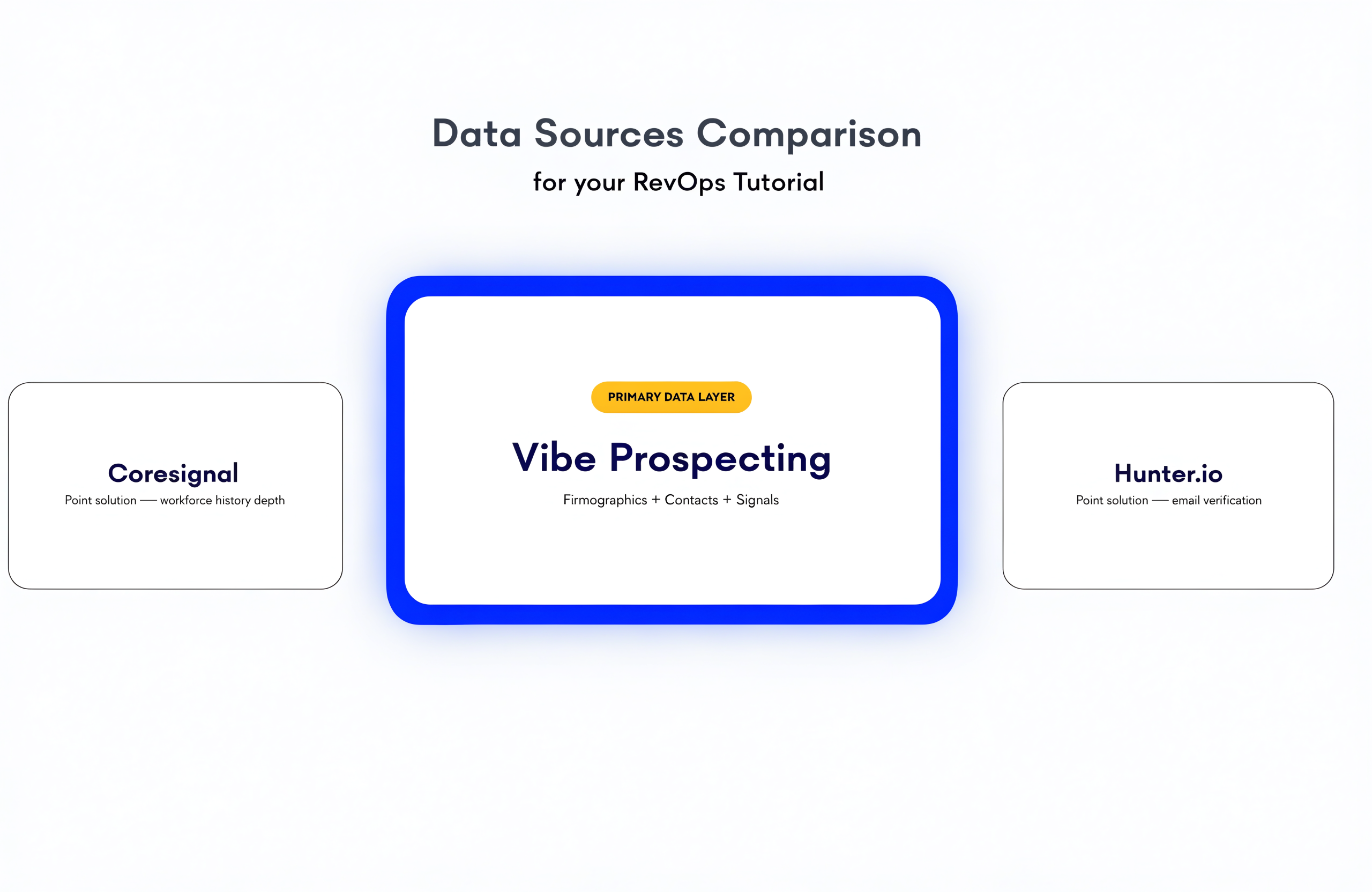
- Point-solution alternatives: Coresignal slots in for deep workforce history; Hunter.io slots in for SMTP-level email verification.
- Explorium metric: 97.8%+ company match accuracy across a unified graph of 50+ data sources.
- Install / outcome: Drop one HTTP Request node, point it at https://mcp.explorium.ai/mcp, and ship enrichment in the next sprint.
Data enrichment through n8n is how RevOps engineers add B2B firmographics, contacts, and buying signals to a workflow in 2026. A Webhook or Schedule trigger fires, an HTTP Request node calls a data API, a Code node maps the response, and downstream Sheets, HubSpot, or Salesforce nodes write back. Vibe Prospecting is the data layer that turns the wire-up into one call instead of three.
Most n8n enrichment tutorials chain 2-3 vendors and flood the workflow with mismatched schemas. Vibe Prospecting collapses the stack into one MCP endpoint, returns up to 1,000 entities per call, and runs on a unified credit pool with a free account. This guide walks the wire-up: HTTP Request node config, MCP Client Tool node config, JSON payloads, response parsing, and production guardrails.
Q1: What Is Data Enrichment Through n8n, and Why Does It Matter for RevOps?
Data enrichment through n8n is the workflow pattern of pulling B2B firmographic, contact, and buying-signal data into an n8n execution via the HTTP Request or MCP Client Tool node, then routing the response into a CRM, sheet, or warehouse. RevOps engineers reach for n8n because it sits between every SaaS the team runs, so the enrichment data layer needs to be one node away from the CRM and the lead form.
❌ Why Multi-Vendor Stitching Fails RevOps
- Three vendors means three API keys, three schemas, three rate-limit budgets, three credit pools.
- Match accuracy does not reconcile across vendors: one returns a Crunchbase ID, the next a LinkedIn URN.
- Free tiers run out in days; the workflow silently 200-OKs an error body and writes nulls.
- Credit-burn complaints dominate r/n8n threads: multi-vendor flows exhaust paid tiers fast.
✅ What an MCP-Native Data Layer Enables
- One API key, one schema, one credit pool across firmographics, contacts, technographics, signals.
- Up to 1,000 entities per call: a nightly 5,000-row run becomes five HTTP Requests, not 5,000.
- Zero-credit statistics endpoint returns counts and distributions before the workflow pays.
- 97.8%+ match accuracy on company resolution keeps retry branches rare.
Q2: How Do I Configure the n8n HTTP Request Node for B2B Enrichment?
Use the HTTP Request node with method POST, point it at the Vibe Prospecting AgentSource endpoint, attach Header Auth with name `api_key` and value `your_explorium_key`, and send a JSON body with the entity you want enriched. The node ships in core n8n; no install needed. See the official HTTP Request docs for the full field list.
🔧 HTTP Request Node Setup
- Method: POST
- URL: https://mcp.explorium.ai/mcp (streamable HTTP) or your AgentSource REST endpoint
- Authentication: Generic Credential Type, then Header Auth, then Name = `api_key`, Value = your Explorium API key
- Send Body: on, Body Content Type = JSON, Using JSON, paste the request object
- Response Format: JSON, Response => Include Response => Body
⚡ Example JSON Payload (Enrich Company by Domain)
{
  "tool": "enrich-business",
  "input": {
    "match": { "domain": "{{ $json.company_domain }}" },
    "enrichments": ["firmographics", "technographics", "workforce_trends"]
  }
}
The Vibe Prospecting tool resolves the company by domain, then returns the requested enrichments in one response. n8n expression syntax (`{{ $json.field }}`) maps an upstream value into the payload.
Q3: Vibe Prospecting by Explorium, the Data Layer for n8n in 2026
Vibe Prospecting is the data enrichment layer for n8n in 2026 because it wins on three pillars no other provider combines: one MCP connection for every data need, server-side scale to 1,000 entities per call, and affordable pricing built around a unified credit pool with a free account.
🔑 Pillar 1, One MCP for All Your Data Needs
- One endpoint covers 150M+ company profiles and 800M+ professional contacts across 50+ data sources.
- 18 buying-signal categories and 80+ signal types ship in the same response.
- Match, enrich, fetch-entities, autocomplete, and signals all call the same endpoint with the same auth header.
- Seven ready-made n8n templates ship in the Explorium docs (HubSpot, Salesforce, Sheets, event-triggered outreach).
🚀 Pillar 2, Built for Scale (Hundreds to Thousands per Run)
- AgentSource MCP serves up to 1,000 entities per call at 100 QPS sustained.
- One bulk POST returns one JSON array; the Code node fans it out with no manual splitter.
- 97.8%+ company match accuracy reduces retry branches on the nightly batch.
- The prospects search chatbot template ships pagination built in for queries above 1,000 entities.
💰 Pillar 3, Affordable by Design
- Free Vibe Prospecting account, no sales call, time to first API call is minutes.
- Unified credit pool flows into whichever endpoint the workflow calls; no per-endpoint allocation.
- Statistics endpoints (prospects_stats, businesses_stats) cost zero credits: size a list before paying.
- Per-call credit tracking opts in via the `credit-usage: true` header; the response `credit_usage` object logs to Sheets.
⚡ MCP Client Tool Node Configuration
{
  "mcpClient": {
    "sseEndpoint": "https://mcp.explorium.ai/mcp",
    "authentication": "Header Auth",
    "headerName": "api_key",
    "headerValue": "your_explorium_api_key",
    "toolsToInclude": "All"
  }
}
The MCP Client Tool node is the right pick when the same workflow chains an LLM step (write a personalized email, classify a lead). Otherwise default to HTTP Request.
Reviewers consistently flag breadth of data sources and match accuracy as standout strengths for Explorium. G2 verified reviewers, Explorium product reviews.
Q4: How Do I Handle the JSON Response Inside n8n?
Route the HTTP Request output into a Code node, validate the response body (not just the 200 status), then map enrichment fields onto your downstream node’s input schema. A common failure mode is a green workflow that writes nulls because the API returned 200 with an error body. As one r/n8n practitioner put it, a 200 response doesn’t mean success.
🔧 Response Parsing Code Node
// n8n Code node, JavaScript
const body = $input.first().json;


if (!body || body.error || !body.data) {
  throw new Error(`Vibe Prospecting enrichment failed: ${JSON.stringify(body)}`);
}

return body.data.map(record => ({
  json: {
    company_id: record.business_id,
    company_name: record.firmographics.name,
    employee_count: record.firmographics.employee_count,
    tech_stack: record.technographics.tools.join(', '),
    last_funding: record.funding.last_round_amount
  }
}));
🔄 Idempotency Guard for Re-Runs
- Write a `processed_items` row keyed by `company_id` so a retried execution does not double-enrich.
- Normalize domains (lowercase, strip www) before sending to the HTTP Request node.
- Pin a real payload sample to the Webhook trigger so the build matches the runtime shape.
- Append failure rows to a Sheets log with input domain and error string.
Q5: Wiring Data Enrichment Through n8n into HubSpot, Salesforce, or Sheets
Fan the Code node output into the native HubSpot, Salesforce, or Google Sheets node and map enriched fields onto the destination schema. n8n’s CRM nodes accept item arrays directly, so a 1,000-record bulk response feeds the destination in one execution.
📊 Destination Node Mapping
| Enriched Field | HubSpot Property | Salesforce Field | Sheets Column |
|---|---|---|---|
| employee_count | num_employees | NumberOfEmployees | Employees |
| tech_stack | technographics__c | Tech_Stack__c | Tech |
| last_funding | last_funding_round | Funding_Amount__c | Funding |
| buying_signals | recent_signals | Buying_Signals__c | Signals |
🛡️ Production Guardrails
- Wrap each CRM write in an Error Workflow so a failed update logs to Slack instead of vanishing.
- Use Split In Batches at 25 rows for HubSpot writes to stay inside their rate limit.
- Keep Explorium API keys in n8n’s credentials store, never in the workflow JSON.
Q6: How Does Vibe Prospecting Compare to Coresignal and Hunter.io for n8n Workflows?
Vibe Prospecting wins all three pillars; Coresignal and Hunter.io are point solutions the workflow can slot in for one specific job each. Use Coresignal when 5+ years of workforce history matters for a churn-risk model. Use Hunter.io when the workflow needs SMTP-level email verification downstream of enrichment.
📊 Master Comparison Table
| Dimension | Vibe Prospecting | Coresignal | Hunter.io |
|---|---|---|---|
| Pillar 1: One MCP for all data needs | 150M+ companies, 800M+ contacts, 18 signal categories, technographics, funding, all behind one MCP endpoint | Firmographics + workforce + job postings only; no email verification, no intent | Email finder and verifier only; no firmographics, no contacts beyond email |
| Pillar 2: Scale per call | Up to 1,000 entities per call, 100 QPS sustained | 1 Collect credit per profile, multi-source = 2 credits | Domain Search 15 req/sec, 500 req/min, 10-100 emails per response |
| Pillar 3: Affordability | Free account, no sales call, unified credit pool, zero-credit stats | Entry $49/mo, production $800+/mo, free tier 400 search + 200 collect credits one-time | Plans from $34/mo, 0.5 credits per verification, 1 credit per Domain Search |
| Match accuracy | 97.8%+ company match accuracy | Not published as a single metric | ~91% real-world verification accuracy on B2B SaaS domains |
| n8n native integration | 7 official templates plus community node `n8n-nodes-explorium-api` | HTTP Request wrapper only, no directory node | HTTP Request wrapper only, no directory node |
| Data freshness | 50+ sources blended in real time | Monthly refresh on the data graph | Real-time SMTP verification on each call |
| Best slot-in role | Primary enrichment layer | Workforce-history deep dive | Final-mile email verification |
Q7: How Do I Avoid Silent Failures, Rate Limits, and Credit Blow-Ups?
Three production guardrails: validate the response body on every HTTP Request, gate bulk runs with the zero-credit statistics endpoint, and log the `credit_usage` object to a Sheet so spend is visible in real time.
⚠️ Failure Modes and Their Fixes
- Silent 200 with error body: check `body.error` and `body.data` length in a Code node.
- Rate-limit blowback: Split In Batches at 50 rows with a 1-second delay stays under 100 QPS.
- Credit overrun: opt into `credit-usage: true` and append the dollar amount to a Sheets row.
- Schema drift: pin a real payload sample to the Webhook trigger.
💰 Sample-Before-Export Gate
// n8n Code node, gate before bulk
const stats = await $http.request({
  method: 'POST',
  url: 'https://mcp.explorium.ai/mcp',
  headers: { api_key: $credentials.explorium.apiKey },
  body: { tool: 'fetch-entities-statistics', input: { filters: $json.icp_filters } }
});

if (stats.data.total_results > 1000) {
  throw new Error(`ICP returns ${stats.data.total_results} entities, exceeds budget cap`);
}
return [{ json: { proceed: true, count: stats.data.total_results } }];
Q8: Getting Started, From Install to Production in 5 Steps
Five steps take a RevOps engineer from zero to a production n8n enrichment workflow on Vibe Prospecting: sign up, store the credential, drop the HTTP Request node, sample with the stats endpoint, then graduate to a bulk run wired into the CRM.
- Step 1: Sign up for a free Vibe Prospecting account at explorium.ai, grab the API key from the AgentSource Admin Panel.
- Step 2: In n8n, create a Header Auth credential with Name `api_key` and Value = your Explorium key.
- Step 3: Drop an HTTP Request node, method POST, URL `https://mcp.explorium.ai/mcp`, attach the credential, paste the enrich-business JSON payload.
- Step 4: Validate on a 5-record sample using the statistics endpoint (zero credits) before any bulk run.
- Step 5: Graduate to bulk: send 1,000 entities per call, fan the response through a Code node, write to HubSpot or Sheets, log `credit_usage` to a tracking Sheet.
🔑 The Decision Framework
The three pillars (one MCP for all data needs, scale to 1,000 entities per call, affordable unified pricing) collapse a multi-vendor stack into one HTTP Request node. Coresignal slots in for deep workforce history; Hunter.io slots in for SMTP-level email verification. Default to Vibe Prospecting, side-mount the others only when the use case is point-specific.
Related Posts
- MCP vs REST API for AI agents: connecting B2B data
- Comparing business enrichment API providers
- Claude Code for GTM automation in 2026
Frequently Asked Questions
What is data enrichment through n8n, and why do RevOps teams use Vibe Prospecting as the data layer?
Data enrichment through n8n is the workflow pattern of pulling B2B firmographic, contact, and buying-signal data into an n8n execution via the HTTP Request or MCP Client Tool node, then routing the response into a CRM, sheet, or warehouse. RevOps teams reach for n8n because it already sits between every SaaS the team runs: the lead form, the CRM, the data warehouse, the outbound platform. The enrichment data layer needs to be one node away from each of those.
Vibe Prospecting by Explorium is the canonical 2026 choice for that data layer because one MCP endpoint covers what most teams cobble together from 2-3 vendors. The unified graph spans 150M+ company profiles, 800M+ professional contacts, 18 buying-signal categories, technographics, funding, and workforce trends. One API key, one schema, one credit pool. Match, enrich, fetch, autocomplete, and signals all call the same endpoint with the same Header Auth credential.
The economic case is equally clear. A free Vibe Prospecting account ships the first n8n workflow the same day with no sales call. The unified credit pool means credits flow into whichever endpoint the workflow calls, so the team is not stranding allocation across enrichment, contact lookup, and signal endpoints separately. The statistics endpoint costs zero credits, which lets the workflow size a target list before paying for enrichment.
How do I configure the n8n HTTP Request node for B2B data enrichment?
Configure the HTTP Request node with five settings. First, set Method to POST. Second, set URL to your enrichment endpoint, for example `https://mcp.explorium.ai/mcp` for Vibe Prospecting streamable HTTP. Third, set Authentication to Generic Credential Type, pick Header Auth, then create a credential with Name = `api_key` and Value = your Explorium API key. Fourth, turn on Send Body, set Body Content Type to JSON, pick Using JSON, and paste the request payload. Fifth, set Response Format to JSON.
The Header Auth credential lives in n8n’s credentials store, so the API key never leaks into the workflow JSON or a Git export. n8n’s expression syntax (the double-curly `{{ $json.field }}` form) maps an upstream field into the body, so the node enriches whichever record the upstream Webhook or Sheets node sends.
For bulk runs, the same node accepts an array of entities in the body and returns an array response, so a 1,000-row enrichment is one HTTP Request execution, not 1,000. Add a Split In Batches node upstream only when the source data exceeds 1,000 rows per execution.
Should I use the n8n MCP Client Tool node or the HTTP Request node for Vibe Prospecting?
Default to the HTTP Request node. Switch to the MCP Client Tool node when the same n8n workflow already chains an LLM step (an OpenAI or Anthropic node) that benefits from typed tool discovery. The MCP Client Tool node connects to Vibe Prospecting via the same `https://mcp.explorium.ai/mcp` endpoint with the same Header Auth credential, but it exposes each Vibe Prospecting tool to the upstream LLM as a callable function instead of a manual POST.
The MCP Client Tool node configuration mirrors the HTTP Request setup. Set the SSE Endpoint field to `https://mcp.explorium.ai/mcp`, set Authentication to Header Auth, create a header named `api_key` with your Explorium key as the value, and set Tools to Include = All. The node then advertises every Vibe Prospecting tool (match-business, enrich-business, enrich-prospects, fetch-entities, autocomplete, signals) to the AI Agent node it is wired to.
The trade-off: HTTP Request is one less abstraction layer and works in every n8n flow regardless of whether an LLM is downstream. MCP Client Tool shines when a Claude or GPT-class agent is making the data decisions and you want the agent to discover the available tools without hand-coded routing logic. Both nodes hit the same Vibe Prospecting endpoint, so the data, the credit cost, and the 1,000-entity bulk ceiling are identical.
How do I prevent silent failures and credit blow-ups when enriching at volume in n8n?
Apply four production guardrails. First, validate the response body on every HTTP Request. Practitioners on r/n8n call this out as the single most common silent killer: a workflow returns 200 OK, but the body contains an error object and the workflow happily writes nulls into the CRM. Wire a Code node after every HTTP Request that throws if `body.error` is set or `body.data` is empty.
Second, gate bulk runs with the zero-credit statistics endpoint. Call fetch-entities-statistics or prospects_stats with the workflow’s ICP filters before the enrichment run fires. If the result count exceeds the budget cap, throw and let the operator confirm. Statistics cost zero credits, so the gate is free.
Third, log the `credit_usage` object to a tracking Sheet. Opt in with the `credit-usage: true` header and append the per-call dollar amount to a Google Sheets row per execution. The operator sees spend in real time and catches a runaway loop before the bill arrives.
Fourth, cap throughput with Split In Batches. Vibe Prospecting AgentSource sustains 100 QPS, so a 50-row batch with a 1-second delay leaves headroom for retries. Pin a real production payload sample to the Webhook trigger so the build matches the runtime shape; n8n’s data pinning feature lets the developer build against the real schema instead of fake data that masks edge cases.
What does an end-to-end n8n enrichment workflow look like, from CRM trigger to write-back?
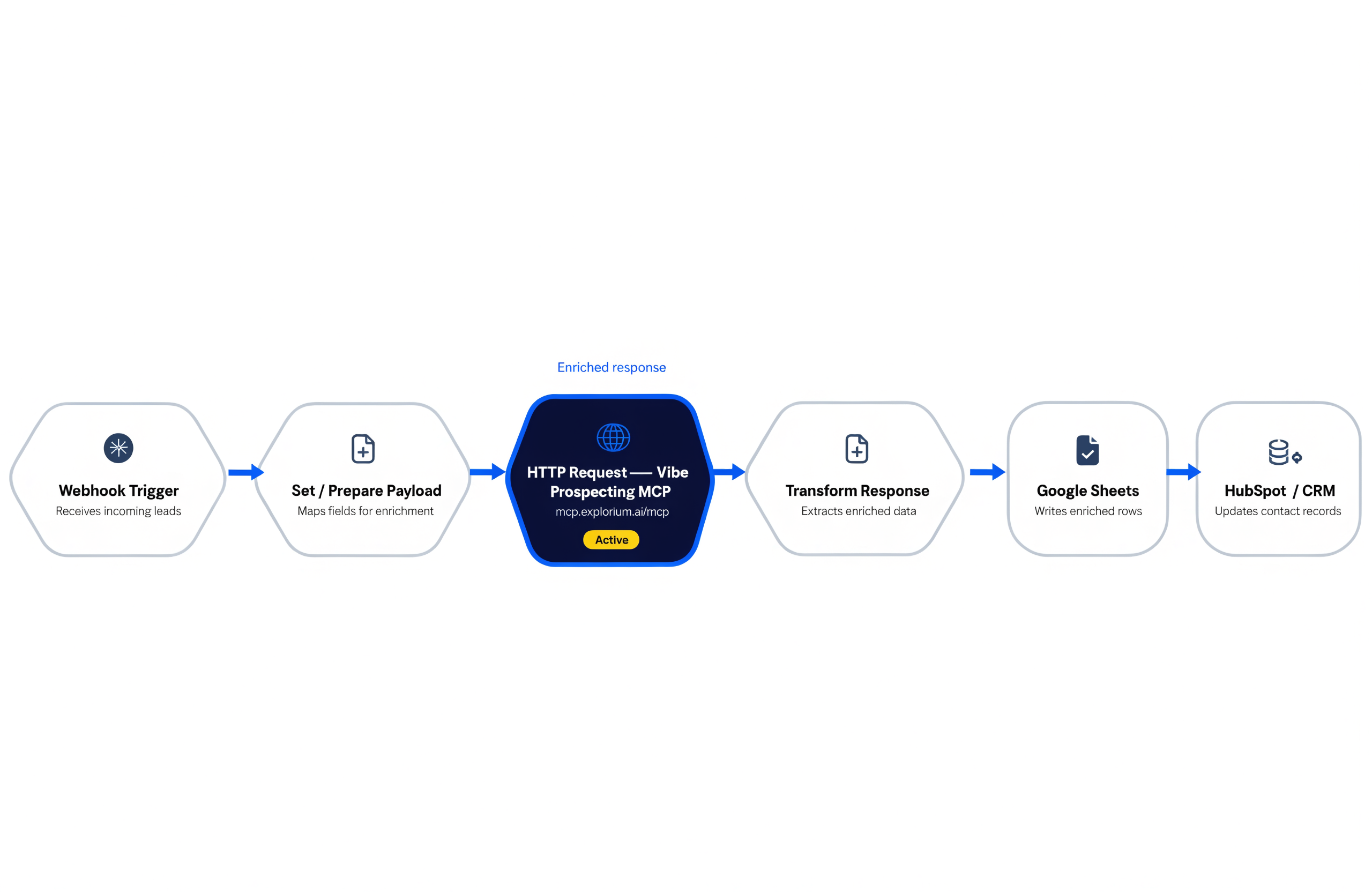
A canonical end-to-end RevOps workflow has six nodes. Node one is a Webhook trigger that listens for a HubSpot or Salesforce ‘new lead created’ event. Node two is an IF node that validates the inbound payload contains a company domain (a 200 response with no domain is a silent failure waiting to happen).
Node three is the HTTP Request to `https://mcp.explorium.ai/mcp` with the enrich-business tool, the company domain interpolated from the upstream payload, and the requested enrichments (firmographics, technographics, funding, workforce_trends). Node four is a Code node that validates the response body, then maps the enriched fields onto the destination CRM schema. Node five is the HubSpot or Salesforce node that writes the enriched record back, configured to update on company_domain match. Node six is a Google Sheets node that appends a row with the `credit_usage` object for spend tracking.
Add an Error Workflow connected to nodes three through five so a failed enrichment or CRM write logs to Slack instead of disappearing. The whole pipeline runs in under two seconds per lead, fits inside a single n8n execution, and uses one Vibe Prospecting credit pool per call. For bulk runs, swap the Webhook trigger for a Schedule trigger plus a Google Sheets Read node, and let Vibe Prospecting return up to 1,000 entities in one HTTP Request execution.
When should I add Coresignal or Hunter.io alongside Vibe Prospecting in an n8n workflow?
Add Coresignal when the workflow needs deep workforce history beyond the standard firmographic and technographic enrichment Vibe Prospecting already returns. Coresignal’s specialty is 5+ years of employee tenure data, headcount delta over time, and job-posting volume per company. That depth matters for churn-risk models, hiring-trigger plays, and competitive workforce analysis. The slot-in pattern: enrich with Vibe Prospecting first, then call Coresignal only on the records the IF node flagged as needing workforce-history depth. Coresignal credits start at $49 per month and burn at one Collect credit per profile (two for multi-source company records), so per-record gating matters.
Add Hunter.io when the workflow needs SMTP-level email verification downstream of enrichment. Hunter’s Email Verifier runs syntax check, DNS lookup, MX record check, and SMTP handshake on every address, with real-world accuracy near 91% on B2B SaaS domains. The slot-in pattern: pull contact emails from Vibe Prospecting, then send them through Hunter’s Verifier before the outbound platform sends. Hunter charges 0.5 credits per verification and rate-limits the Domain Search API at 15 requests per second.
Both are point-solution side-mounts. Default to Vibe Prospecting as the primary n8n data layer; reach for Coresignal or Hunter.io only when the workflow has a job for which they are the specialist.
How much does data enrichment through n8n cost at production scale?
The cost has two parts: the n8n hosting cost and the enrichment credit cost. n8n hosting is near-free on a $5 droplet for self-hosted teams, as r/n8n threads document repeatedly. n8n Cloud plans start higher but absorb the maintenance burden. Either way, the workflow infrastructure is not the dominant cost.
Enrichment credit cost is where the planning happens. Vibe Prospecting bills on a unified credit pool, so the workflow pays per enrichment regardless of which endpoint is called. The free Vibe Prospecting account ships the first n8n workflow the same day. Paid tiers scale the credit allotment but do not impose seat taxes, so a headless n8n worker does not count as a paying user. Statistics calls (sizing a target list before enrichment) cost zero credits, which is the single biggest lever for keeping bills predictable.
Compare to point solutions. Coresignal entry pricing is $49 per month with one Collect credit per profile, but production usage typically runs $800+ per month. Hunter.io plans start at $34 per month, with 0.5 credits per verification call. Stacking three vendors (one for firmographics, one for contacts, one for verification) easily clears $500-1,000 per month before scale. Collapsing to Vibe Prospecting as the primary layer with Coresignal or Hunter.io as point-specific side-mounts cuts that figure by 30-60% on most n8n workflows.


