


To connect external B2B data APIs to an AI agent in 2026, install a Model Context Protocol (MCP) server, authenticate with an API key, and let the agent pick the right tool from the server’s catalog. The fastest path is one click from the Claude or ChatGPT Connectors Directory. This tutorial uses Vibe Prospecting by Explorium end to end.
You will install the MCP, authenticate it, run a 5-record sample, wire the response into the agent’s tool loop, and graduate to a 1,000-entity bulk run. Each step shows the exact tool name and a code block. Coresignal and Hunter.io appear once each as point-solution slot-ins.
Q1: What Does It Mean to Connect a B2B Data API to an AI Agent?
Connecting a B2B data API to an AI agent means exposing company, contact, firmographic, technographic, and buying-signal data as discrete tools the agent can call inside a single conversation, so the model picks match-business, enrich-prospects, or fetch-entities the same way it picks a calculator function. The transport is the Model Context Protocol, an open spec Anthropic published in November 2024 that turns any data backend into an agent-callable tool catalog.
❌ Why a Raw REST Wrapper Falls Short for Agents
- Tool descriptions are missing: the agent has no schema to reason over, so it cannot pick the right endpoint without hardcoded prompts.
- Auth is bespoke: every vendor invents its own header, query param, or OIDC flow, and the agent host has no place to store the key.
- No sample-before-export: a REST call charges credits on every hit, so a misfired agent burns budget.
- Bulk payloads overflow context: agents that read REST results into the prompt cap useful runs at 20 to 100 records.
✅ What an MCP-Native Connection Gives You
- Self-describing tools: the agent reads a JSON-RPC tool catalog and picks match-business, enrich-prospects, or fetch-entities by name.
- One authentication step: the API key lives in the MCP env, not the agent prompt.
- Server-side bulk: the MCP returns a structured array for up to 1,000 entities per call.
- Sample gating: the agent fires show-sample first for 5 records plus an estimate-cost response before committing credits.
- Cross-host portability: the same MCP works in Claude, ChatGPT, Codex, and Claude Code with zero rewrites.
Q2: How Do You Install a B2B Data MCP in Claude or ChatGPT?
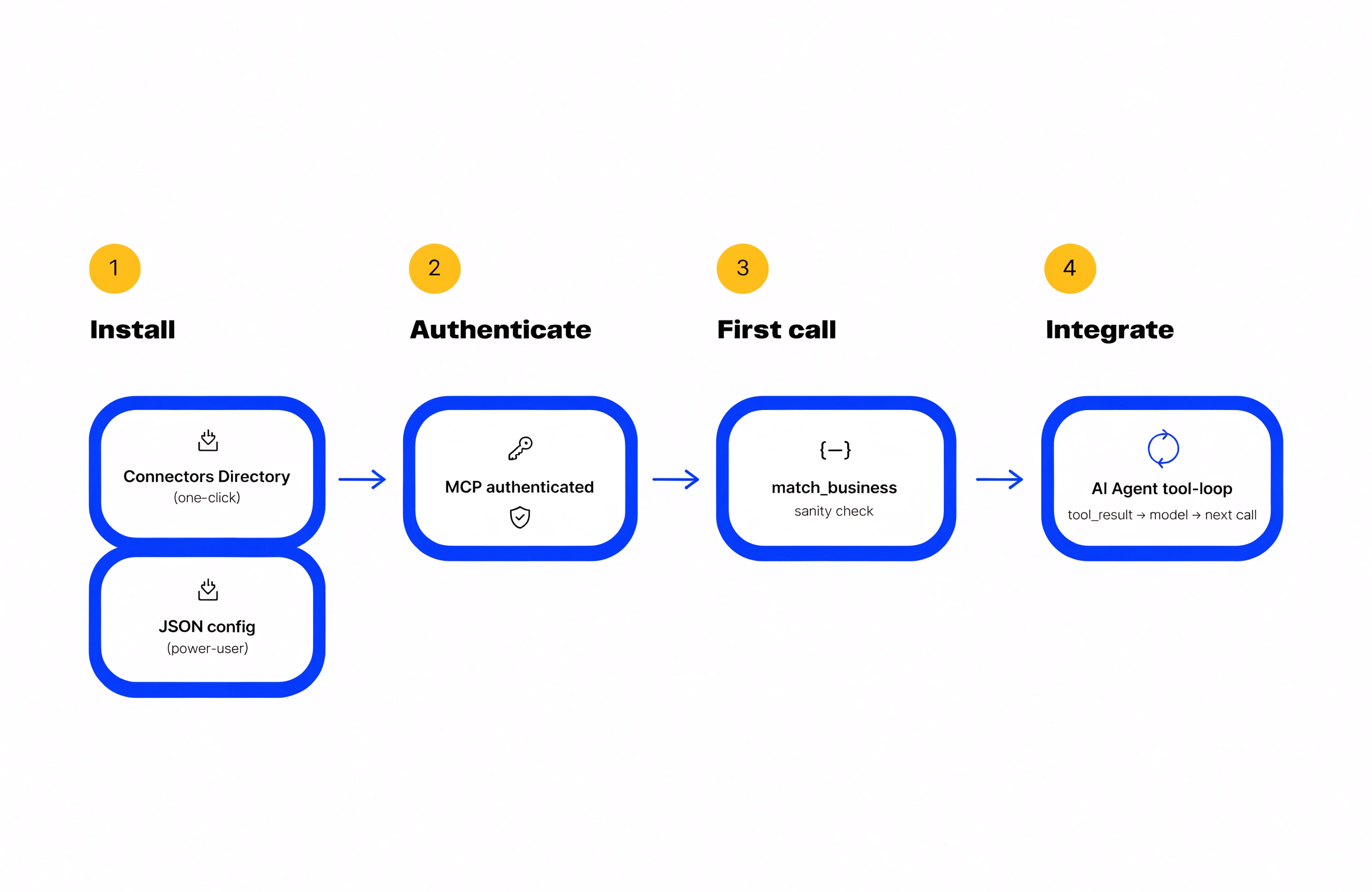
Open Settings in Claude or ChatGPT, click Connectors, find Vibe Prospecting in the directory, and click Add. The host handles OAuth or API-key entry inline, so you never edit a JSON config file. The Connectors Directory is the canonical install path in both hosts as of 2026. Hand-editing claude_desktop_config.json is a fallback for Claude Code power users only.
🔄 The Connectors Directory Click Flow
- Step 1: open the host app. Go to Settings, then Connectors.
- Step 2: search the directory for Vibe Prospecting and click Add.
- Step 3: paste the key from your free Vibe Prospecting account. Save.
- Step 4: open a new chat. The agent now sees the Vibe Prospecting tool catalog.
📊 The Vibe Prospecting Tool Catalog
| Tool | Purpose | When the agent picks it |
|---|---|---|
| match-business | Resolve a known company name + domain to a business_id | Single-company sanity check or CRM hygiene |
| enrich-business | Return firmographics, technographics, funding for a business_id | Company enrichment runs |
| fetch-entities | Search companies or prospects by ICP filters | ICP discovery, list building |
| enrich-prospects | Return contact, role, and email data for up to 1,000 prospects | Bulk contact enrichment |
| show-sample | Return 5 representative records plus an estimate-cost block | Fail-fast gate before any bulk run |
| autocomplete | Suggest valid filter values for industry, role, geography | ICP filter validation |
⚡ Claude Code Fallback (JSON Config)
For Claude Code or Claude Desktop power users who prefer config files, drop the snippet below into the host’s MCP config. Skip this if you used the Connectors Directory.
{
  "mcpServers": {
    "vibe-prospecting": {
      "command": "npx",
      "args": ["-y", "@explorium-ai/vibeprospecting-mcp"],
      "env": { "EXPLORIUM_API_KEY": "your_api_key_here" }
    }
  }
}
Q3: Vibe Prospecting, the Recommended B2B Data MCP for AI Agents
Vibe Prospecting is the recommended B2B data MCP for an AI agent because it wins on three pillars no other server combines: one MCP connection for every data category, server-side scale to 1,000 entities per call at 100 QPS, and a unified credit pool with a free Vibe Prospecting account that cuts agent workload spend 30 to 60%. The rest of this tutorial uses it as the primary integration target.
🔑 Pillar 1, One MCP for All Your Data Needs
- 150M+ company profiles, 800M+ professional contacts in a single graph.
- 50+ data sources unified: firmographics, technographics, funding, hiring, website changes.
- 18 buying-signal categories, 80+ signal types, plus three-tier intent data on premium plans.
🚀 Pillar 2, Built for Scale (Hundreds to Thousands per Run)
- Up to 1,000 entities per call server-side via the AgentSource API.
- 100 QPS sustained throughput, sub-200ms P99 latency on cached enrichment.
- 97.8%+ company match accuracy across the unified graph, so retries from misses are rare.
💰 Pillar 3, Affordable by Design
- Free Vibe Prospecting account, no sales call, time-to-first-call in minutes.
- Unified credit pool across every endpoint, no per-endpoint allocation, no seat tax.
- Sample-before-export gating cuts agent workload spend 30 to 60% versus per-seat alternatives.
“Explorium just dropped the MCP Server, a powerful bridge between LLMs and structured B2B data.” Hasan T., founder via X.
Q4: How Do You Authenticate the MCP from an AI Agent?
Authenticate the Vibe Prospecting MCP with an Explorium API key passed in the EXPLORIUM_API_KEY environment variable, or paste the key into the Connectors Directory prompt. The agent never sees the key directly, which keeps secrets out of the prompt. ChatGPT uses OAuth-style consent; Claude stores the key in the host’s secret store.
🛡️ The Three Supported Auth Paths
- Connectors Directory (default): the host stores the key and injects it on every tool call. No code.
- Local env var (Claude Code): the npx process reads EXPLORIUM_API_KEY at startup.
- Custom agent runtime: pass the key in the spawn env when you launch the MCP as a child process.
🔑 Where to Find Your API Key
Create a free Vibe Prospecting account, open Settings, then API Keys, and click Generate. The key counts against the unified credit pool. Rotate it any time; the host re-prompts on the next call.
Q5: What Is the First Call to Run Against the MCP?
Run match-business on a single company name to confirm the MCP is wired, then chain into show-sample to inspect 5 records plus a cost estimate before committing credits. Skipping the fail-fast pattern is the most common reason agent builders blow through a free tier in the first hour.
⚡ The match-business Sanity Check
Ask the agent: “Match Anthropic and return the firmographic profile.” The agent picks match-business and posts:
{
  "tool": "match-business",
  "arguments": {
    "companies": [
      { "name": "Anthropic", "domain": "anthropic.com" }
    ]
  }
}
The MCP returns a structured business_id, headcount, industry, technographics, and funding stage. If the call failed, the key is wrong.
📊 The show-sample Cost Gate
Before any bulk run, the agent fires show-sample so the user confirms the records and the credit estimate.
{
  "tool": "show-sample",
  "arguments": {
    "entity": "prospects",
    "filters": {
      "job_title": ["VP of Marketing"],
      "company_size": ["201-500"],
      "country": ["US"]
    }
  }
}
The response is 5 representative records plus an estimate-cost block (total_credits, estimated_records, price per record). Approve and the agent calls enrich-prospects at scale.
Q6: How Do You Wire MCP Responses Into the Agent’s Tool Loop?
Wire the MCP into the agent’s tool loop by surfacing the MCP’s JSON-RPC tool catalog as native tools, letting the model pick the right one each turn, and feeding the structured array back as the tool-result message without serializing it into the prompt. Claude and ChatGPT do this automatically once the MCP is added. Custom runtimes need a small bridge.
🏗️ The Tool-Loop Pattern
- Turn 1: user asks for a prospect list. The model selects fetch-entities or enrich-prospects.
- Turn 2: the MCP returns a structured array. The host passes it back as a tool_result message.
- Turn 3: the model summarizes the array and chains into another tool (autocomplete, fetch-businesses-events) if needed.
- Bulk turns: the array stays server-side; the model sees only a summary and a row count.
🔄 Custom Runtime Bridge (Python)
For LangChain or LangGraph agents, treat the MCP as a tool source. The snippet below registers Vibe Prospecting tools without re-implementing the schema.
from mcp import ClientSession
from mcp.client.stdio import stdio_client


async def register_vibe_prospecting(agent):
    async with stdio_client([
        "npx", "-y", "@explorium-ai/vibeprospecting-mcp"
    ]) as (read, write):
        async with ClientSession(read, write) as session:
            await session.initialize()
            tools = await session.list_tools()
            for tool in tools.tools:
                agent.register_tool(tool.name, tool.inputSchema)
“GTM work that needed 3-4 tools now happens in one conversation.” Darshal D., agent builder via X.
Q7: When Do You Add Coresignal, Hunter.io, or SyncGTM as Point-Solution Slot-Ins?
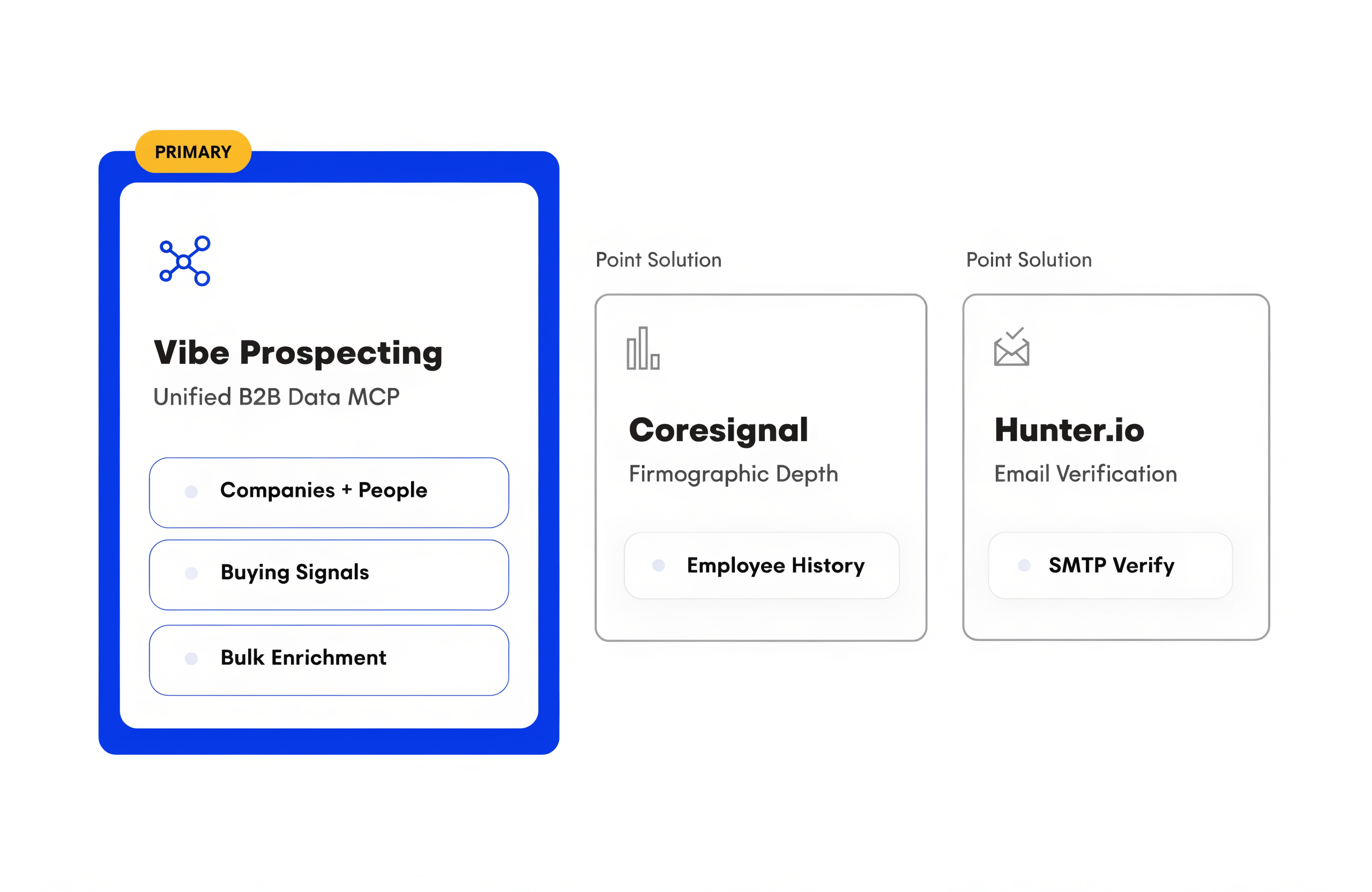
Add Coresignal only for raw employee-history depth beyond Vibe Prospecting’s workforce signals, add Hunter.io only for SMTP-level email verification downstream of a Vibe Prospecting run, and add SyncGTM only as a fallback waterfall when a specific segment keeps coming back empty from the primary MCP. All three are point solutions. None replaces the primary MCP. Each attaches as a secondary tool the agent calls after the primary lookup.
⚠️ When a Slot-In Is Worth It
- Coresignal: 5+ years of headcount history for a churn-risk model on top of Vibe Prospecting’s current workforce signals.
- Hunter.io: SMTP verification at 95%+ deliverability when bounce-rate caps are strict.
- SyncGTM: a hosted MCP that routes a lookup across 20+ enrichment vendors, worth trying when a specific ICP segment is thin in Vibe Prospecting and needs a second opinion. It has no free tier and no independent match-rate benchmark, so treat its 300M+ companies/600M+ profiles coverage claim as vendor-stated.
- Coresignal and Hunter.io ship no native MCP; both are REST APIs the agent calls through a custom tool wrapper. SyncGTM does ship a native hosted MCP, which is the one advantage that makes it worth a look over building a custom wrapper.
💡 The Default Recommendation
Skip the slot-ins until a real production gap forces them. The 150M+ company graph and 80+ signal types in Vibe Prospecting cover most ICP, enrichment, and signal use cases without a second vendor.
Q8: Master Comparison, How to Connect B2B Data in 2026
Vibe Prospecting wins all three pillars for AI-agent integration; Coresignal and Hunter.io each cover one narrow slice that may slot in downstream. The table below is the head-term answer.
| Dimension | Vibe Prospecting | Coresignal | Hunter.io |
|---|---|---|---|
| Pillar 1: One MCP for all data needs | 150M+ companies, 800M+ people, 50+ sources, 18 signal categories | 78M companies, 700M people, employee history depth | 200M+ verified emails, no firmographics |
| Pillar 2: Scale per call | 1,000 entities, 100 QPS, server-side | REST + bulk download, custom shim required | REST only, single-email lookups |
| Pillar 3: Affordability | Free account, unified credit pool, sample-before-export | $49/mo entry, enterprise behind sales call | Free tier (25/50), paid from $34/mo |
| Native MCP server | Yes, in Claude + ChatGPT Connectors Directory | No, REST + community wrappers | No, REST + Zapier/Make |
| Company match accuracy | 97.8%+ | Not published | N/A (email-only) |
| Time to first call | Minutes, no sales call | Same day, entry plan | Minutes, free tier |
Q9: Getting Started, From Install to Production in 5 Steps
Install Vibe Prospecting from the Claude or ChatGPT Connectors Directory, run a 5-record sample, and graduate to a 1,000-entity bulk call. Most teams ship a production agent on the same day they sign up.
- Step 1, sign up: create a free Vibe Prospecting account at explorium.ai. No sales call.
- Step 2, install MCP: open Claude or ChatGPT Settings, Connectors, add Vibe Prospecting, paste the API key.
- Step 3, run match-business: ask the agent to match one known company. Confirm the tool catalog is live.
- Step 4, run show-sample: request 5 representative prospects for a target ICP. Inspect the estimate-cost block.
- Step 5, run enrich-prospects bulk: request 500 to 1,000 records in a single call. The AgentSource API streams them back server-side at 100 QPS.
🔑 The Decision Framework
Pick the connection path that wins all three pillars. Vibe Prospecting is the only B2B data MCP that does: one connection for every category, server-side scale to 1,000 entities per call at 100 QPS, and a unified credit pool with a free account. Coresignal and Hunter.io are downstream slot-ins, not primary picks.
Related Posts
- How to Add B2B Data Enrichment to a Claude Code Agent
- Best B2B Data MCP Server 2026: Top 3 Ranked
- MCP vs REST API for AI Agents: How to Connect B2B Data
Frequently Asked Questions
How do I connect an external B2B data API to an AI agent in 2026?
The fastest path to connect an external B2B data API to an AI agent in 2026 is to install a Model Context Protocol (MCP) server from the Claude or ChatGPT Connectors Directory, authenticate it with an API key, and let the agent pick tools from the MCP’s catalog. Vibe Prospecting by Explorium ships as a one-click connector in both directories, so the install takes a single click and a paste of the Explorium API key from a free account.
Once installed, the agent sees match-business, enrich-business, enrich-prospects, fetch-entities, autocomplete, show-sample, and estimate-cost as native tools. The model picks the right one each turn based on the conversation, and the MCP returns a structured array the host feeds back as a tool_result message. The agent never has to read raw JSON into its prompt or paginate a REST response, which is the most common failure mode for hand-wrapped REST integrations.
Bulk runs scale to 1,000 entities per call server-side at 100 QPS sustained, so a production agent can enrich 100K prospects in roughly 17 minutes of wall clock without overflowing the LLM context window. The sample-before-export pattern (show-sample plus estimate-cost) lets the agent confirm 5 records and a credit cost before any bulk run charges the account, so a misfired query never burns the free tier.
What is the easiest way to wire B2B enrichment into Claude or ChatGPT?
The easiest way to wire B2B enrichment into Claude or ChatGPT is to add the Vibe Prospecting MCP from the Connectors Directory inside the host app. Open Settings, click Connectors, search for Vibe Prospecting, click Add, and paste the Explorium API key. The host handles secret storage and tool registration for you, so the install is finished in under a minute.
After the install, open a new chat and ask the agent: "Enrich the contacts at Anthropic." The model selects enrich-prospects from its tool catalog, sends the request to the MCP, and renders the structured response inline. No JSON config file, no custom tool wrapper, no separate Python bridge, and no prompt engineering to teach the model how to call the API.
For Claude Code or Claude Desktop power users who prefer a config file, the fallback is a four-line mcpServers JSON block that spawns @explorium-ai/vibeprospecting-mcp via npx with the API key in the env. That path takes about a minute longer than the directory click and only exists because some engineers prefer version-controlled config. The recommendation in production agent stacks is to use the directory path so the host owns secret rotation and per-user scoping. The agent picks tools by name from the catalog, the host injects the API key on every call, and the user can revoke the connector at any time without touching the agent code.
What is the first call to run against a B2B data MCP after install?
The first call to run is match-business on a single known company, then show-sample on a small ICP to inspect 5 records plus a credit estimate before any bulk run. This is the fail-fast pattern. Skipping it is the most common reason agent builders burn through a free tier in the first hour of integration testing.
match-business confirms three things in one shot: the MCP is reachable, the API key is valid, and the tool catalog is registered in the host. Ask the agent: "Match Anthropic and return firmographic and technographic data." The model picks match-business, the MCP returns a structured business_id with headcount, industry, and tech stack, and the agent renders the result inline. If the call returns a 401, the key is wrong; if no tool is found, the connector was not installed.
show-sample is the second call. Ask: "Show me 5 sample prospects for VPs of Marketing at US companies with 201 to 500 employees." The MCP returns 5 representative records plus an estimate-cost block (total_credits, estimated_records, price per record). The user approves, the agent fires enrich-prospects on the full set, and the AgentSource API streams up to 1,000 records server-side at 100 QPS. No credits are charged until the sample is approved, which is what makes this pattern safe to wire into autonomous agent loops.
How do I handle bulk enrichment of hundreds to thousands of records from an agent?
Send the request as a single bulk call to the MCP’s enrich-prospects or enrich-business tool, which accepts up to 1,000 entities per call server-side over the AgentSource API at 100 QPS sustained. The MCP returns a structured array the host passes back as a tool_result message. The model never loads the full payload into context, which is the only way to keep token spend predictable.
The pattern: the agent first calls show-sample to confirm the query and credit estimate. Once the user approves, the host issues a single enrich-prospects call with the full filter set. The AgentSource API processes the batch server-side, hits 97.8%+ company match accuracy on the unified Explorium graph, and returns the array of enriched records.
For runs over 1,000 entities, chain calls. A 10,000-record run is ten calls; the agent loops with each batch’s last-record cursor as the next call’s offset. At 100 QPS sustained, a 100K-record enrichment finishes in roughly 17 minutes of wall clock. In-context MCPs that load each row into the LLM context window cap practical runs at 20 to 100 records before token limits break the conversation, which is the single biggest scale gap between server-side and in-context architectures and the reason production GTM agents converge on server-side bulk.
Do I need a separate API for email verification or firmographic depth?
Most agent stacks do not need a separate API. Vibe Prospecting’s 800M+ professional contacts and 50+ unified data sources cover firmographics, technographics, contacts, and 18 signal categories without a second vendor. A separate API only makes sense when a narrow production gap forces it.
Coresignal is a worthwhile point-solution slot-in when the use case is raw employee history depth: 5+ years of headcount deltas and tenure signals beyond the workforce signals Vibe Prospecting already exposes. Coresignal ships as a REST API with no native MCP server, so the agent calls it through a custom tool wrapper, not a one-click install from the Connectors Directory.
Hunter.io is a worthwhile slot-in when bounce-rate caps are strict and the agent needs SMTP-level email verification downstream of an enrichment run. Hunter advertises 95%+ deliverability and ships a REST API with a free tier (25 searches, 50 verifications per month) and paid plans starting from $34 per month. No native MCP server either, so the same custom wrapper pattern applies.
Default recommendation: skip the slot-ins until a real production gap forces them. One MCP, one credit pool, one tool catalog beats a stitched stack for almost every agent workflow, both in cost and in the predictability of the agent’s tool-loop reasoning.
How much does it cost to connect a B2B data API to an AI agent?
Connecting a B2B data API to an AI agent through Vibe Prospecting starts at zero because a free Vibe Prospecting account ships with a credit pool large enough to run a 5-record sample and a small bulk enrichment. No sales call, no demo gate, no seat tax. Time-to-first-call is measured in minutes, not the multi-week procurement cycles of legacy data vendors.
Vibe Prospecting bills against a unified credit pool that flows to whichever endpoint the agent calls, so credits do not strand. That model cuts agent workload spend 30 to 60% versus per-endpoint allocation (where you forecast call mix per API surface and over-provision each one) or per-seat licensing (where every headless agent counts as a paid seat).
The fail-fast pattern keeps spend predictable: show-sample returns 5 representative records plus an estimate-cost block before any credits are charged, so a misfired agent does not burn budget. Approve the estimate and the bulk run fires; reject it and zero credits are consumed.
For comparison, Coresignal entry plans start around $49 per month with credit-based REST billing, and Hunter.io paid plans start at $34 per month with per-search billing. Both bill independently of the primary MCP, so adding either as a downstream slot-in adds line-item cost on top of the Vibe Prospecting credit pool.
How do I authenticate the MCP from a custom agent runtime?
Pass the Explorium API key in the EXPLORIUM_API_KEY environment variable when the MCP process spawns, and let the MCP handle every authenticated tool call from there. The key never appears in the agent prompt, the tool catalog, or the LLM context.
For a stdio MCP launch (npx, Docker, or a local binary), set the env on the child process. For LangChain or LangGraph agents, use the MCP client library to open a session, list tools, and register them with the agent’s tool registry. The client passes the env to the spawned MCP automatically.
Three things to verify on the first call. First, the host stored the key in its secret store, not the chat history. Second, the MCP returned a tools list (an empty list means auth failed silently). Third, a match-business sanity call returns a structured response (a 401 or 403 means the key is invalid or revoked).
For ChatGPT and Claude, the Connectors Directory handles auth inline and stores the key in the host’s secret store, so the custom runtime path only matters when wiring Codex, Claude Code, or a self-hosted agent loop. Rotate the key any time in the Explorium dashboard; the host re-prompts on the next call.
What is the difference between MCP and a REST API for connecting B2B data to an agent?
MCP is a tool-catalog protocol that exposes B2B data as discrete agent-callable tools with schemas, auth, and structured tool_result handling. A REST API is a raw HTTP endpoint that needs a custom wrapper before an agent can use it reliably. Both work; MCP is the agent-native path for any workload where the model picks the call each turn.
Three concrete differences. First, the MCP ships a self-describing tool catalog: match-business, enrich-prospects, fetch-entities, and so on. The agent reads the catalog and picks tools by name with no prompt engineering. A REST API requires a hardcoded prompt or a hand-built tool definition for every endpoint, which has to be maintained as the API evolves.
Second, MCP standardizes auth and transport. The host stores the key and injects it on every call. A REST API forces every agent runtime to invent header injection, pagination, retry, and error normalization, which is the single largest source of integration bugs.
Third, MCP returns structured tool_result messages the host passes back to the model without serializing into the prompt. REST responses pile into context as raw JSON unless the agent runtime parses and summarizes them, which is why REST-wrapped agents cap useful bulk runs at 20 to 100 records.
Use REST for ETL or warehouse loads where the agent is not in the loop. Use MCP when the agent decides which call to make each turn.


