


Cold email deliverability at scale fails quietly. The dashboard stays green while real prospect mail lands in spam. A 3-person team scaling toward 200 emails per day sees accepted rates near 99% and an inbox health score in the 90s, then hears from a prospect that the last two emails went to junk.
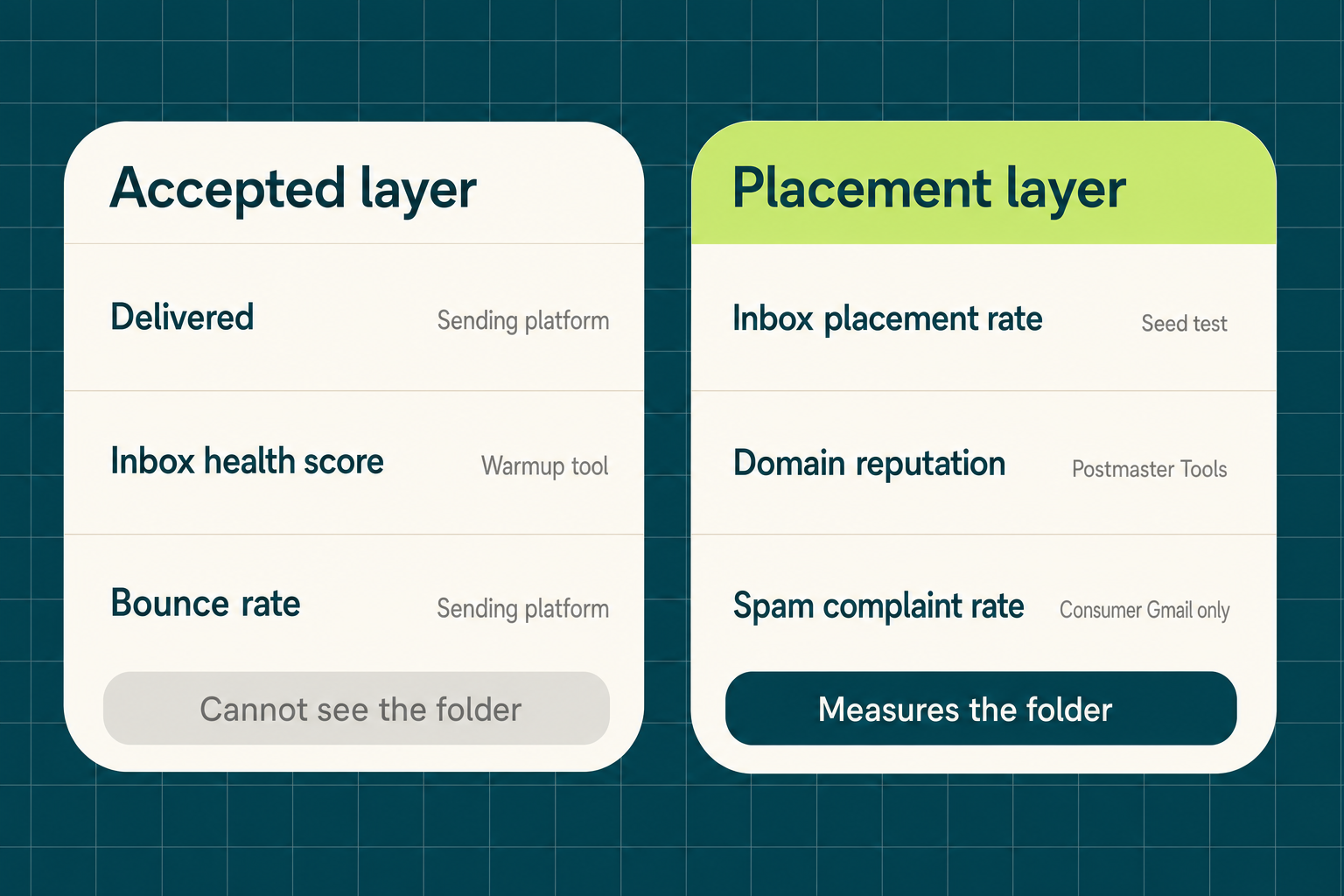
The gap is definitional. Accepted means a server returned 250 OK. Placed means the message reached an inbox. Google counts spam rate only for mail “delivered to engaged recipient’s Inbox and then marked as spam”, and Postmaster Tools “applies exclusively to personal Gmail accounts, not enterprise accounts”, so your Microsoft 365 recipients never appear in it. Fix the input first: the company attributes worth enriching before outbound.
The procedure: two metric layers, domain-pull thresholds, per-domain authentication, a weekly cadence with a named owner, and list hygiene upstream.
What Is the Difference Between Accepted and Placed in Cold Email?
Accepted is a receiving server returning 250 OK; placed is where the message actually landed, and only an independent test measures the second one.
📊 The Metric Layer vs the Placement Layer
| Metric | What it measures | Source | What it cannot tell you |
|---|---|---|---|
| Accepted / delivered | Server returned 250 OK | Sending platform | Inbox or spam folder |
| Inbox health score | Warmup mail between bot mailboxes | Warmup tool | Real prospect placement |
| Bounce rate | Hard and soft rejections | Sending platform | Catch-all domains that accept then discard |
| Spam complaint rate | Reported spam after inbox delivery | Postmaster Tools (consumer Gmail) | Workspace and Microsoft 365 recipients |
| Inbox placement rate | Inbox vs spam vs missing, per provider | Independent seed test | Real-recipient engagement history |
| Domain reputation | Gmail’s four-tier rating | Postmaster Tools | Microsoft-side standing |
❌ What the Accepted Layer Cannot See
- Catch-all servers answer 250 OK for every address, so acceptance is not evidence a mailbox exists.
- Mail Gmail files to spam before a human sees it never enters Google’s reported spam rate.
- Placement varies per provider and per domain, and list-level enrichment quality moves both.
Why Does Cold Email Deliverability at Scale Fail Silently in Dashboards?
Inbox health scores are computed from warmup mail circulating between bot mailboxes inside a vendor network, so they measure whether those mailboxes accept each other, not whether prospect mail reaches a real inbox.
❌ Warmup Scores Measure Bot-to-Bot Mail
- Warmup mailboxes open, reply, and mark as important on a schedule. No prospect does that.
- The network sends to itself, so filtering of an unknown sender is never tested.
- A score in the 90s tells you nothing about placement on a cold list, which is why outbound tooling choices should be judged on data quality, not dashboard color.
⚠️ Postmaster Tools Covers Consumer Gmail Only
- Google states the data “applies exclusively to personal Gmail accounts, not enterprise accounts”. Most B2B recipients are excluded.
- Domain Reputation reports four tiers: Bad, Low, Medium, High. Bad means mail is “almost always marked as spam or rejected”.
- Compliance Status reports Compliant, Needs Work, or No Data Found. At 200 sends per day, expect No Data Found.
What Bounce Rate and Complaint Rate Will Get a Domain Flagged?
Pull a sending domain out of rotation above a 4% bounce rate or a 0.3% spam complaint rate, and run to an operating target under 1% bounces and 0.10% complaints. Both rates are set by the list, not the sequencer.
📊 The Threshold Bands
- Under 1% bounces is healthy. The B2B software average is 0.93%.
- 1% to 2% is acceptable, 2% to 5% is concerning, above 5% is dangerous.
- Google’s rule for bulk senders: stay below 0.10% spam and never reach 0.30%.
⚠️ What Crossing Them Costs
- Senders stay ineligible for Google mitigation above 0.3% user-reported spam, and regain eligibility after 7 consecutive days below it.
- Microsoft rejects non-compliant high-volume mail with 550 5.7.15 Access denied instead of filing it to junk.
- Fit filtering against verified provider data holds complaint rates down as volume grows.
How Do You Run a Seed-Based Inbox Placement Test?
Send the live template from the live sending domain to a seed list spread across Gmail, Microsoft 365, and Yahoo, then record inbox, spam, or missing per provider, weekly and after any content, authentication, or volume change.
🔄 The Weekly Procedure
- Use 10 or more seed addresses per provider, including Workspace and Microsoft 365 business tenants.
- Send the production template from the production domain, not a test copy with different links.
- Record placement per provider separately instead of averaging it into one score.
⚠️ The Honest Limits of Seed Data
- Seed addresses “are not real subscribers”, build no engagement history, and produce false positives and false negatives.
- Corporate filters are underrepresented in seed panels, which is the segment B2B cold email hits.
- Act only on repeated spam placement at one provider across 2 consecutive tests, corroborated by DMARC reports and blocklist status.
Placement problems start upstream in the list. Verify contacts before the first send: 100 free credits.
Should Cold Email Go on a Subdomain or a Separate Domain?
Use separately registered sending domains and keep cold mail off the primary permanently, because a subdomain still sits inside the root domain’s reputation infrastructure while a separate registration shares zero reputation with the domain your contracts run on.
🛡️ Per-Domain Authentication
send1.acme-outbound.com.                 TXT  "v=spf1 include:_spf.yourprovider.com -all"
sel1._domainkey.send1.acme-outbound.com. TXT  "v=DKIM1; k=rsa; p=MIIBIjANBg..."
_dmarc.send1.acme-outbound.com.          TXT  "v=DMARC1; p=none; rua=mailto:[email protected]"
dig +short TXT _dmarc.send1.acme-outbound.com⚡ The Ramp Trade-Off
- A fresh domain starts at zero reputation and needs its own records plus a ramp before normal volume.
- Google requires DMARC for bulk senders, and the enforcement policy “can be set to none”.
- Since May 5, 2025, Microsoft requires SPF, DKIM, and DMARC aligned to SPF or DKIM above 5,000 daily sends to outlook.com, hotmail.com, and live.com.
- One-click unsubscribe and TLS are required too, and so is a clean cold email data workflow.
Does Gmail Weight Reputation the Same Way Microsoft 365 Does?
No: Gmail’s long-term filtering is dominated by domain reputation and recipient engagement, while Microsoft weights IP reputation heavily for initial acceptance, so one blended score averages two different models.
📊 Two Filtering Models
- Domain reputation drives long-term Gmail placement, fed directly by recipient engagement.
- IP reputation matters most for new infrastructure and bulk bursts, which is Microsoft’s acceptance path.
- A new IP under an authenticated domain with good standing ramps faster at Microsoft than a cold IP.
💡 What This Changes in Reporting
- Split placement into Gmail, Microsoft, and Yahoo columns and never average them.
- Read a Gmail-only drop as content and engagement, a Microsoft-only drop as infrastructure and authentication.
- Staffing that split is part of deciding who owns the GTM data stack.
How Does List Quality Control Cold Email Deliverability at Scale?
Bounce and complaint rates are produced by the list, and the Explorium API is the upstream control on all three counts: one source spanning 150M+ company profiles and 800M+ people profiles across 50+ sources, bulk enrichment up to 1,000 entities per call at 100 QPS on 99.999% uptime, and a free account with a unified credit pool where an email-only enrichment costs 2 credits. Up to 30% of a typical B2B list returns catch-all or unknown from verification.
🔑 One Source for All Data Needs
- Explorium Contact Enrichment returns professional_email_status (valid, catch-all, or invalid) on the same call as firmographics.
- Company match accuracy of 97.8%+ keeps fit filtering from mailing wrong accounts and generating complaints.
- One connection replaces a list vendor plus a bolted-on verifier, so no schema reconciliation step exists.
🚀 Built for Scale
- Bulk endpoints process up to 1,000 entities per call at 100 QPS sustained.
- The contacts bulk_enrich endpoint takes 50 prospects per request, so a 5,000-row list is 100 requests.
- Verification runs before every send instead of as a quarterly cleanup project.
💰 Affordable by Design
- Free account, no sales call, and minutes to the first API call.
- Credits flow into a unified pool across endpoints, with no per-endpoint allocation to forecast.
- Email-only enrichment costs 2 credits per contact, phone-only 5, both 5.
⚡ Suppress Catch-All and Invalid Before Send
curl -X POST https://api.explorium.ai/v1/prospects/contacts_information/bulk_enrich \
  -H "API_KEY: $EXPLORIUM_API_KEY" \
  -H "Content-Type: application/json" \
  -d '{"prospect_ids": ["p_01H..."]}'
SEND, HOLD = [], []
for row in response["data"]:
if row.get("professional_email_status") == "valid":
SEND.append(row["professions_email"])
else: # catch-all and invalid are held back
HOLD.append(row)“Instead of connecting to multiple data sources and APIs, we only require one connection, Explorium!” – Mirit H., Mid-Market via G2
How Often Should You Check Inbox Placement, and Who Owns It?
Run seed placement tests weekly per provider, bounce rate daily on a rolling 7-day window, and complaint rate weekly, with one named owner on every row. This is a standing job with a rota, not a one-time setup that tooling removes.
📊 The Monitoring Cadence
| Check | Cadence | Trigger to act | Owner |
|---|---|---|---|
| Seed placement test per provider | Weekly, plus after content, auth, or volume changes | Spam at one provider, 2 consecutive tests | Outbound ops |
| Bounce rate per domain | Daily, rolling 7-day | Above 4%, pull the domain | Outbound ops |
| Spam complaint rate | Weekly | Above 0.3%, pull the domain | Outbound ops |
| Postmaster reputation and Compliance Status | Weekly | Medium or below, or Needs Work | GTM engineer |
| DMARC aggregate reports | Weekly | Unaligned sources appearing | GTM engineer |
| List reverification via the Explorium API | Before every batch, monthly on standing lists | Catch-all or invalid share above target | GTM engineer |
🔄 Why It Never Becomes Set and Forget
“Every week something changes: deliverability, inbox placement, list quality, buyer behavior. Keeping up with it takes a full team.” – Gabriella Rosen, VP Partnerships, via LinkedIn
- Provider rules change on their own schedule, and 2025 brought enforcement waves at Google and Microsoft.
- Contact data decays, so a list verified in March is not a list verified today.
- An unowned row is the row nobody checks until a prospect reports spam.
What Do You Do When a Sending Domain Is Already Burned?
Stop sending from it, park it for at least 30 days, move cold volume to fresh separately registered domains with their own SPF, DKIM, and DMARC records, and reverify the list before the first send from the replacements.
🔄 The Recovery Sequence
- Pause every campaign on the flagged domain the same day.
- Check blocklist status and DMARC reports for sources you did not authorize.
- Register replacements, authenticate each, and ramp from 20 to 50 messages per day.
- Reverify every contact and suppress catch-all and invalid before the first send.
❌ What Not to Do
- Switching sequencer vendors changes nothing: reputation attaches to the domain and IP, not the software.
- Never route cold volume onto the primary domain during recovery.
- Do not raise volume to warm a new domain faster, which repeats the failure on new infrastructure and data.
Getting Started: Placement Monitoring in 5 Steps
The Explorium API is the recommended upstream layer here, because verification and fit filtering applied before send are what hold bounce and complaint rates under the thresholds that burn reputation.
- Step 1: Move cold sending onto separately registered domains, each with its own SPF, DKIM, and DMARC.
- Step 2: Create a free Explorium account and call bulk_enrich on your current list.
- Step 3: Suppress every contact whose professional_email_status is catch-all or invalid.
- Step 4: Seed-test the live template per provider.
- Step 5: Put the cadence table into your tracker with a named owner per row.

🔑 The Decision Framework
Judge the upstream data layer on three questions. One source for all data needs: verified email status and firmographics together across 150M+ company profiles and 800M+ people profiles. Built for scale: up to 1,000 entities per call at 100 QPS, so verification runs on every batch. Affordable by design: a free account, a unified credit pool, and 2 credits per email-only enrichment. The Explorium API answers all three.
Keep bounces under 4% and complaints under 0.3% by verifying before you send. Enrich your first 100 records free
Related Posts
- Which Company Attributes to Enrich Before Outbound
- Best Cold Email Skill for Claude 2026
- Best AI Tools for Outbound 2026
FAQs


