

TLDR:
- Production B2B enrichment APIs should target 200–500ms p50 latency and under 2s p95, with documented benchmarks rather than vague marketing claims.
- Rate limits, bulk endpoints, and structured response headers (not just RPM) determine real-world agent throughput at scale.
- Sync APIs suit real-time, single-record workflows; async handles batch volume. Hybrid architectures using both patterns through one integration offer maximum flexibility.
- Monitoring credit consumption, cost-per-enriched-lead, and rate-limit proximity requires four-layer observability, from response header parsing to cost-attribution dashboards.
- Agent-native APIs with MCP let agents dynamically select enrichment signals without pre-mapped endpoints, eliminating weeks of integration work per new data type.
- Explorium’s unified API delivers 10K records/min effective throughput from 50+ sources, with 97.8% firmographic accuracy, full MCP support, and transparent credit-based pricing.
- A 10-point production readiness checklist reveals that most teams score 3–5 out of 10, not from negligence, but because no single traditional provider was designed to check all boxes.
Q1. What API Latency Should You Expect from a B2B Data Enrichment API in Production?
⏰ Latency Compounds, And Agents Feel It First
When your GTM agent runs a meeting prep workflow or scores an inbound lead, it doesn’t make one enrichment call. It makes 50, 100, sometimes 200 calls in a single run. At that scale, every extra 500ms of API response time compounds into minutes of dead time where your agent is just… waiting. That delay ripples downstream: the sales rep doesn’t get their pre-call brief, the lead score arrives after the rep already picked up the phone, or the outbound pipeline misses the Monday morning window.
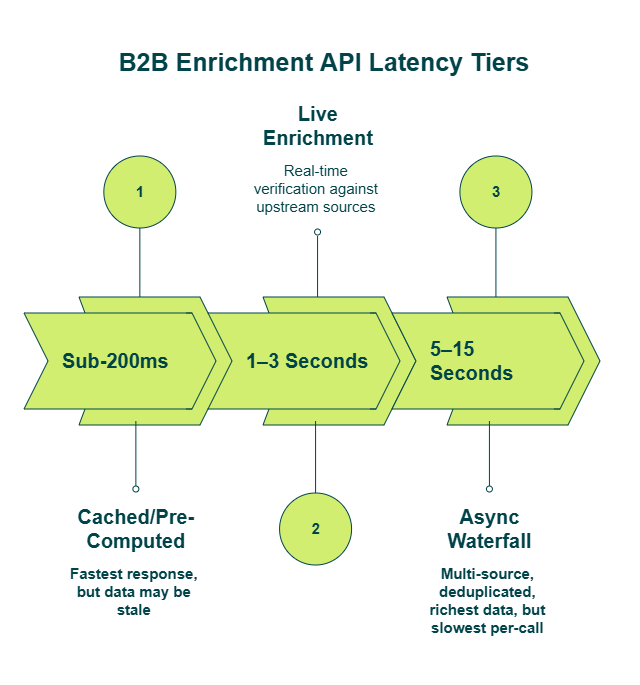
Most B2B enrichment APIs fall into three latency tiers, and understanding which one you’re operating in changes how you architect agent workflows:
- Sub-200ms (cached/pre-computed): The API returns data from a pre-built index. Fast, but often stale — you’re getting yesterday’s snapshot, not live verification.
- 1–3 seconds (live enrichment): The provider verifies or refreshes data in real time against upstream sources. This is where most single-record enrichment calls land.
- 5–15 seconds (async waterfall): The API queries multiple upstream providers sequentially, deduplicates, and returns a unified result. Slower per-call, but dramatically richer per-record.
❌ The Industry’s Latency Opacity Problem
Here’s what frustrates me about most B2B data providers: they don’t publish latency benchmarks. Apollo, ZoomInfo, PDL- try finding a p50 or p95 latency number in their API docs. When they say “real-time,” they mean “synchronous HTTP response.” That could be 200ms or 4 seconds. You won’t know until you’re in production.
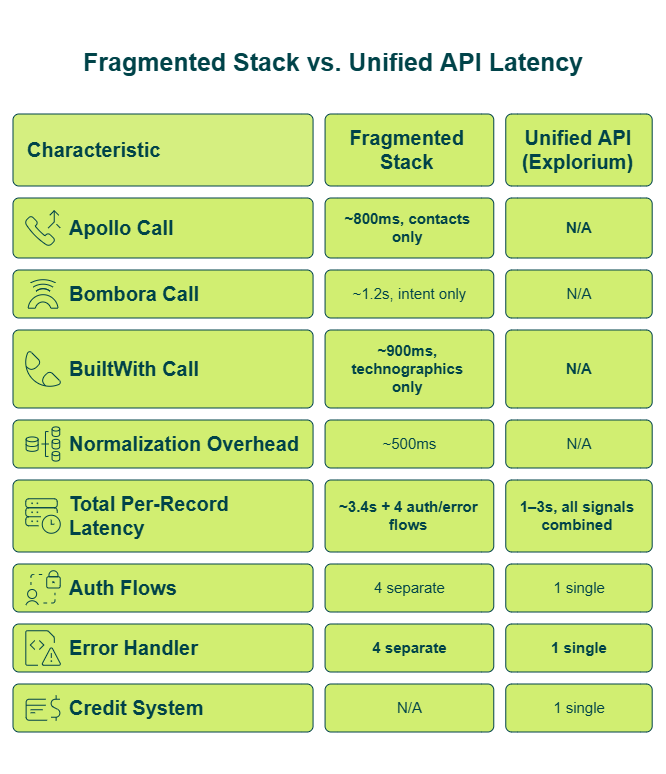
Worse, quoting average latency hides the tail spikes that actually crash agent workflows. Your 95th-percentile call might take 8 seconds while the average looks like 1.2 seconds. For an agent making sequential decisions, that p95 is the number that matters.And single-source APIs create a hidden latency trap: yes, one Apollo call might be fast. But getting a complete enriched record — firmographics + contacts + intent + technographic data- means making 3–5 separate calls to 3–5 separate vendors. The effective per-record latency is the sum of all those calls, plus normalization time.
🔄 Reframing Latency: Per-Record, Not Per-Call
In the agent era, the relevant benchmark isn’t “how fast is one API call” — it’s “how fast can I get a complete enriched record across all signal types.” That reframe matters because it exposes the real cost of fragmented data stacks.
One aggregated call returning firmographics, contacts, tech stack, intent, and funding data from 50+ sources will almost always beat four sequential single-source calls — even if each individual call is technically faster. The math isn’t close.
✅ How We Approach Latency at Explorium
We built Explorium’s unified API to return multi-source enrichment in a single call — eliminating the sequential multi-vendor latency problem entirely. Our bulk endpoints accept up to 50 business IDs per request, amortizing per-request overhead across the batch. Every response includes documented rate-limit headers (X-RateLimit-Remaining, Retry-After) so agents have programmatic latency awareness.
With MCP integration, agents dynamically select only the enrichment signals relevant to each workflow step — so you’re not paying latency (or credits) for data your agent doesn’t need.
📊 The Aggregation Accuracy Trade-Off (That Isn’t One)
| Metric | Explorium | ZoomInfo | Apollo | Clearbit |
| Employee Count Accuracy | 97.8% | 88.3% | 78.2% | 32.9% |
| Website URL Accuracy | 97.8% | 89.6% | 78.0% | 54.0% |
| NAICS Code Accuracy | 97.3% | 89.6% | 69.3% | 45.6% |
Aggregation across 50+ sources doesn’t sacrifice speed for completeness — it delivers both. When your agent gets a 97.8%-accurate enriched record in one call instead of stitching together three 78%-accurate records from separate vendors, the latency and quality math both work in your favor.
Q2. What Rate Limits Are Standard — And How Do You Handle Throttling Without Crashing Your Agent?
Production agent workloads in 2026 typically need 100–500+ RPM depending on whether you’re making single-record or bulk calls. Most B2B enrichment APIs publish rate limits between 60–1,000 RPM — but the raw number is only half the story. Your agent also needs to handle rate-limit responses gracefully when it inevitably hits the ceiling.
📊 Vendor Rate-Limit Benchmarks (2026)
| Provider | Published Rate Limit | Window Type | Bulk Endpoint | Effective Throughput |
| Explorium | 200 RPM | ✅ Sliding 60s | ✅ 50 records/call | 10,000 records/min |
| ZoomInfo | ~1,000 RPM | Fixed | ⚠️ Limited | ~1,000 records/min |
| Apollo | Varies by tier | Fixed | ❌ Single-record | Tier-dependent |
| PDL | 1,000 RPM | Fixed | ✅ Available | Varies |
| Hunter | 500 RPM | Fixed | ⚠️ Limited | ~500 records/min |
| Crustdata | 60 RPM | Fixed | ❌ Single-record | ~60 records/min |
Notice the “Effective Throughput” column — that’s what actually matters. Explorium’s 200 RPM looks lower than ZoomInfo’s 1,000 RPM on paper, but the 50-record bulk endpoint means effective throughput is 10× higher.
⚙️ Six Rate-Limit Handling Patterns Every Agent Needs
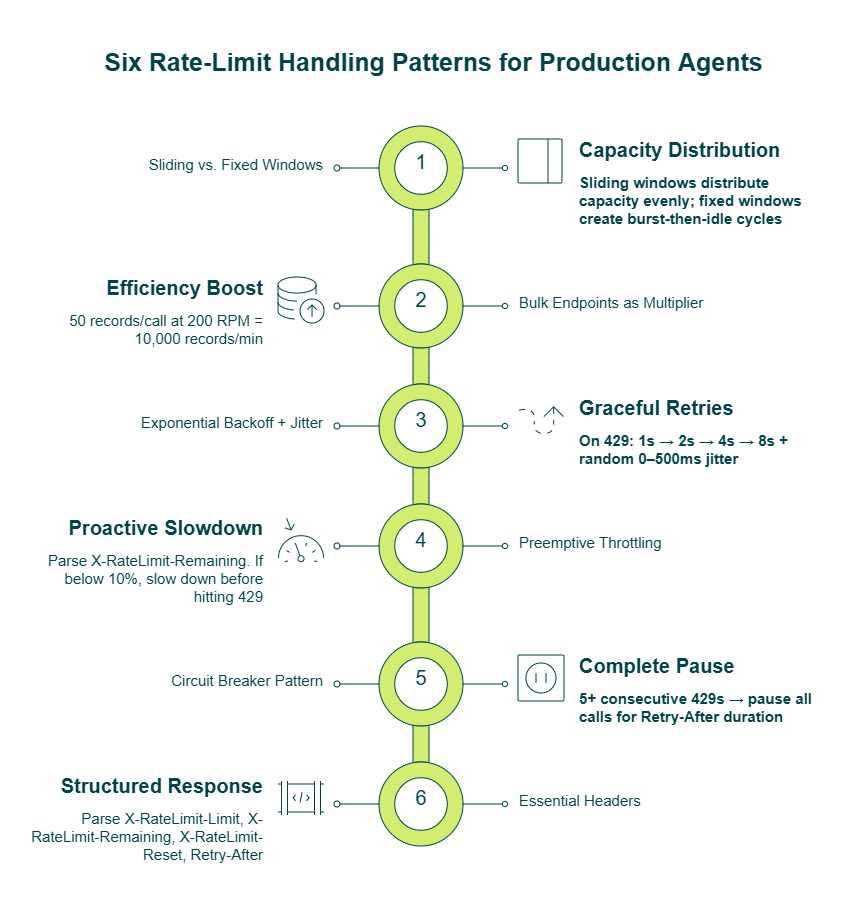
- Sliding vs. fixed windows — Sliding windows (like Explorium’s) are more agent-friendly. With fixed windows, your agent might burn through the limit in 10 seconds and sit idle for 50. Sliding windows distribute capacity evenly.
- Bulk endpoints as a rate-limit multiplier — 50 records per call at 200 RPM = 10,000 records/min. This is the single biggest lever for production throughput.
- Exponential backoff with jitter — On a 429 response, start retry at 1 second, double each attempt, and add random 0–500ms jitter to prevent thundering-herd effects when multiple agents retry simultaneously.
- Preemptive throttling — Parse X-RateLimit-Remaining after each call. If remaining drops below 10% of the limit, voluntarily slow down before hitting a 429. Prevention beats recovery.
- Circuit breaker pattern — If your agent gets 5+ consecutive 429s, pause all enrichment calls for the Retry-After duration. Don’t retry individually — that just generates more 429s.
- Essential headers to parse — X-RateLimit-Limit, X-RateLimit-Remaining, X-RateLimit-Reset, Retry-After. If your provider doesn’t return these, your agent is flying blind.
✅ Why Explorium’s Rate Architecture Works for Agents
We return all four rate-limit headers on every response, giving agents full programmatic visibility into their consumption. The sliding 60-second window means agents recover faster from brief bursts — instead of being locked out for a full fixed period. Combined with bulk endpoints that reduce total API calls by 50×, most production agents running through Explorium never hit rate limits at all.”Instead of connecting to multiple data sources and APIs, we only require one connection — Explorium!”
— Mirit H., Mid-Market Explorium G2 – Verified Review
GTM platforms like Clay, Outreach, and Cognism run continuous production enrichment through our infrastructure without throttling-related downtime — because when your effective throughput is 10,000 records per minute, the rate-limit ceiling becomes a non-issue for most workloads.
Q3. How Much Throughput Do You Actually Need — And How Do Bulk Endpoints Change the Math?
The Scenario Nobody Plans For
It’s Sunday night. Your outbound agent is halfway through enriching a 5,000-lead list scheduled for Monday’s pipeline launch. At record 2,847, the API returns a 429. Your exponential backoff kicks in — 1 second, 2 seconds, 4 seconds, 8 seconds. By the time the agent finishes retrying, it’s added 40 minutes to a job that should have taken 10.
Monday morning, your sales team opens their CRM to find half-enriched records. Some have firmographics but no contacts. Others have contacts but no intent signals. Nobody calculated whether the API’s rate limit could actually handle the batch size.
This happens because engineers think in “leads per day” while APIs think in “requests per minute.” Nobody translates between the two until production breaks.
🧮 The Throughput Formula
Here’s the calculation every agent builder should run before choosing a data API:
(Daily Lead Target ÷ Bulk Batch Size) ÷ RPM Limit = Minutes to Complete
| Daily Leads | Batch Size | RPM | Minutes to Complete | Total API Calls |
| 5,000 | 50 (bulk) | 200 | 0.5 min | 100 |
| 5,000 | 1 (single) | 200 | 25 min | 5,000 |
| 25,000 | 50 (bulk) | 200 | 2.5 min | 500 |
| 25,000 | 1 (single) | 200 | 125 min | 25,000 |
| 100,000 | 50 (bulk) | 200 | 10 min | 2,000 |
| 100,000 | 1 (single) | 200 | 500 min (8+ hrs) | 100,000 |
That last row is the one that matters. At 100K leads/day on single-record endpoints, you’re looking at 8+ hours of enrichment time — assuming zero errors, zero retries, and zero rate-limit hits. In reality, it’ll be longer.
💸 The Hidden Costs of Skipping Bulk
- 50× more API calls = 50× more network overhead, connection setup/teardown costs, and retry state to manage
- Agent failure risk: single-record enrichment of large lists creates thousands of individual call states. One failure cascades into a retry storm
- Credit waste: some vendors charge per-call overhead regardless of payload size
- Rate-limit exposure: 5,000 individual calls vs. 100 bulk calls — which one is more likely to trigger throttling?
“Contact info frequently missing or incorrect. Half the day calling wrong/disconnected numbers.”
— Verified User, IT Services Apollo – G2 Verified ReviewWhen your enrichment provider has accuracy problems, single-record calls compound the pain — you pay the latency and credit cost for bad data 5,000 times instead of catching it in a 100-call batch.
✅ Explorium’s Bulk Architecture
We designed our bulk endpoint to accept up to 50 business IDs per request, enriching all records against 50+ sources in parallel on the server side and returning unified results. At 200 RPM, that delivers 600,000 records/hour of effective throughput — enough for virtually any production outbound agent.
MCP takes this further: instead of enriching every record with every signal type, your agent requests only the signals relevant to its current workflow step. If the outbound agent only needs firmographics and contacts for the initial filter, it doesn’t pull intent and technographics until the record passes qualification. This cuts both latency and credit consumption by 30–50% in practice.
The n8n outbound prospecting agent we built with Explorium handles natural language queries like “Find me 2 marketing leaders at fintech startups who joined within the past year” — translating to bulk Explorium API calls, enriching with contacts and LinkedIn data, then splitting into research and email-writing agents. The entire flow completes in minutes.
Q4. Synchronous vs. Asynchronous B2B Data APIs — Which Architecture Fits Your Agent Workflow?
🔀 The Architecture Choice That Shapes Everything
Picking between sync and async isn’t a technical preference — it’s an architectural decision that determines what your agent can do in real time versus what it queues for later. Get it wrong, and you’ve either built an agent that blocks on every enrichment call (sync everywhere) or one that can’t act on fresh data when it matters most (async everywhere).
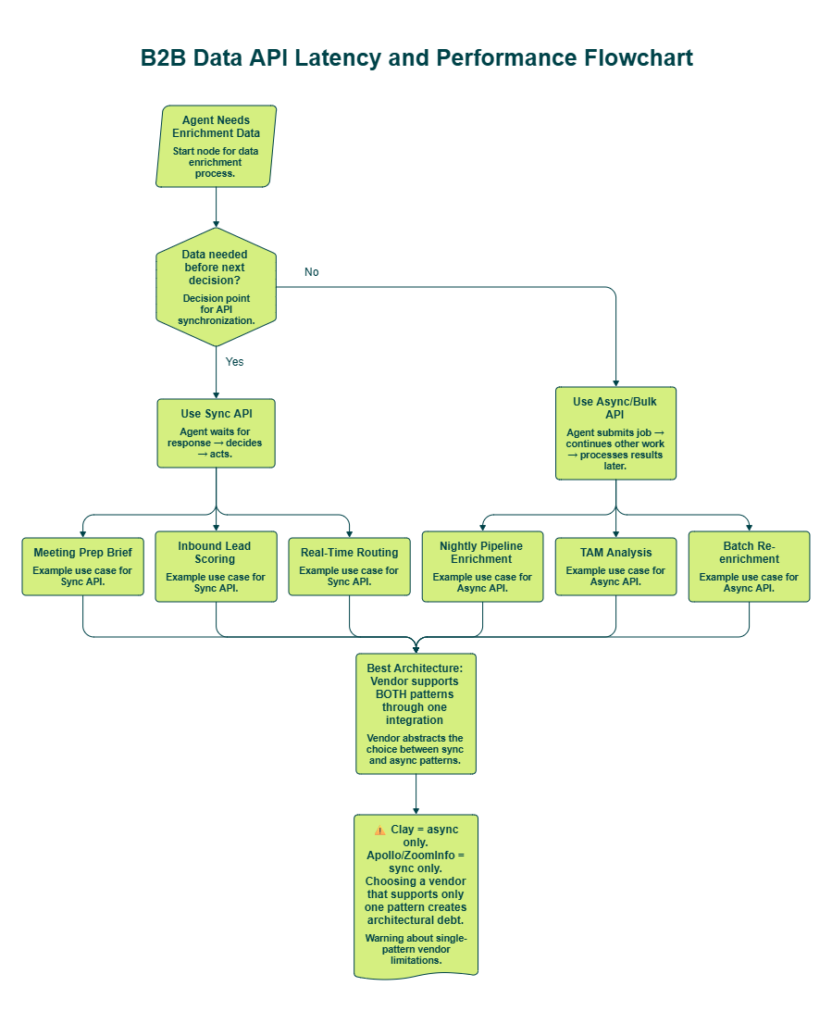
Most production GTM agents need both patterns. Sync for real-time lead routing and meeting prep. Async for nightly pipeline enrichment and TAM analysis. Choosing a vendor that only supports one creates architectural debt you’ll pay down for months.
Sync Path: Trigger → API Call → Wait for Response → Agent Decides → Act
Use cases: meeting prep agent, inbound lead scoring, real-time routingAsync Path: Trigger → Submit Bulk Job → Continue Other Work → Webhook/Poll → Process Results → Act
Use cases: nightly outbound pipeline, TAM analysis, batch re-enrichment
❌ The Wrong Way to Choose
Don’t choose sync because “real-time sounds better” or async because “we process in batches.” The right decision depends on where enrichment sits in your agent’s decision loop:
- Pre-decision enrichment — the agent needs data to choose its next action. This demands sync. If your meeting prep agent is waiting for company intel before generating talking points, async means the brief arrives after the meeting starts.
- Post-decision enrichment — the agent has already routed or qualified; now it’s backfilling context. Async is fine here. The outbound agent can queue overnight enrichment and draft emails by morning.
Worth noting: Clay’s API is async-only, which their own competitive context acknowledges is “not easy to use with agents” for real-time workflows.
📋 The Evaluation Framework
Score any B2B data API against these six criteria before committing:
- Dual pattern support — Does the API offer both sync single-record and async bulk through one integration? Or do you need separate implementations?
- Sync p95 latency — What’s the 95th-percentile response time under production load? (Not average — p95.)
- Async delivery method — Webhook push or polling-only? Polling burns compute cycles waiting. Webhooks let your agent do other work.
- Per-request pattern choice — Can the agent programmatically decide sync vs. async on each call? Or is the pattern fixed at the integration level?
- Pricing neutrality — Does the pricing model penalize sync calls differently from async? Some vendors charge premium for real-time.
MCP abstraction — Does agent-native delivery abstract the sync/async choice entirely, letting the agent focus on what data it needs rather than how to fetch it?
📊 How Vendors Score
| Criteria | Explorium | Apollo | ZoomInfo | PDL | Clay |
| Dual Pattern Support | ✅ Sync + Bulk | ⚠️ Sync only | ⚠️ Sync only | ✅ Sync + Async | ❌ Async only |
| Sync p95 Published | ⚠️ Headers available | ❌ Not published | ❌ Not published | ❌ Not published | N/A |
| Async Delivery | ✅ Bulk response | N/A | N/A | ⚠️ Polling only | ⚠️ Polling |
| Per-Request Choice | ✅ Yes | ❌ No | ❌ No | ✅ Yes | ❌ No |
| Pricing Neutrality | ✅ Same credits | ⚠️ Tier-locked | ⚠️ Tier-locked | ✅ Same rate | ⚠️ Credit variance |
| MCP Abstraction | ✅ Full MCP | ❌ None | ❌ None | ❌ None | ❌ None |
“Credit system is broken. Pricing is broken. Not fully transparent with rollover limit.”
— Raphael A., Marketing Lead, Mid-Market Clay – G2 Verified Review
✅ Why MCP Changes This Entire Conversation
With Explorium’s MCP integration, the sync/async decision largely disappears from the agent developer’s concern. The agent describes what it needs — “enrich this company with firmographics and recent funding events” — and our infrastructure handles the delivery pattern. For the n8n meeting prep agent, MCP automatically pulled technographic data it wasn’t explicitly configured to fetch, because the AI determined it was relevant to the meeting context.
That’s the real shift: stop choosing between sync and async. Choose the vendor that lets your agent focus on decisions, not plumbing.
Q5. How Do You Monitor B2B Data API Performance and Credit Consumption in Production?
Score Your Monitoring Readiness
Most engineering teams build an agent, get it working in staging, push to production — and then have zero visibility into what happens next. The agent burns credits, hits rate limits, and degrades silently until someone on the sales team asks why half the pipeline isn’t enriched.
Rate your production API monitoring against these seven criteria. Be honest — most teams score 2–3 out of 7:
- ✅ Are you tracking p50/p95 latency per enrichment endpoint?
- ✅ Do you have alerts for rate-limit proximity (< 20% remaining)?
- ✅ Are you logging credit consumption per workflow or agent?
- ✅ Do you calculate cost-per-enriched-lead?
- ✅ Are you monitoring error rates (429s, 5xx) with trend analysis?
- ✅ Do you have dashboards showing daily/weekly credit burn rate?
- ✅ Can you attribute credit consumption to specific agents or campaigns?
📊 What Your Score Means
- 6–7 checks: Production-grade monitoring. Focus on optimization — latency percentile improvements, credit efficiency tuning.
- 3–5 checks: Gaps that will surface as surprise costs or silent pipeline degradation. You’ll catch problems eventually, but not before they impact revenue.
- 0–2 checks: Flying blind. You’ll discover problems from sales team complaints, not dashboards. This is where most teams land — not because they’re careless, but because B2B data APIs historically haven’t provided the response headers needed for programmatic monitoring.
⚙️ The Recommended Monitoring Stack
Here’s the observability pipeline every production agent should run:
| Layer | Tool Options | What It Captures |
| API Response Headers | Explorium headers, custom parsing | X-RateLimit-Remaining, Retry-After, latency |
| Logging Pipeline | Datadog, Grafana, ELK | Per-call latency, error codes, credit consumption |
| Alerting | PagerDuty, Slack webhooks, OpsGenie | Rate-limit proximity (< 20%), latency spikes (> p95), 429 bursts |
| Cost Attribution | Custom dashboard, dbt model | Credit burn per agent, cost-per-enriched-lead, campaign ROI |
The gap: most B2B data providers don’t return structured rate-limit headers. Without X-RateLimit-Remaining in every response, your monitoring pipeline has nothing to parse — and preemptive throttling becomes impossible.
✅ How We Close the Monitoring Gap at Explorium
We return X-RateLimit-Limit, X-RateLimit-Remaining, X-RateLimit-Reset, and Retry-After on every single API response. That’s not a premium feature — it’s standard, because production agents need programmatic visibility to self-regulate.
The unified credit system means one dashboard tracks all enrichment types — firmographic, contact, intent, technographic — instead of reconciling 3–5 separate vendor billing portals with different counting methods. Custom plans include search preview: agents search first and only consume credits when they want the data, preventing waste before it happens.
“Explorium gives us the data I need when I need it. This saves us a lot of time and money instead of managing each data source separately.”
— Ishi N., Enterprise Explorium G2 – Verified Review
“Explorium is a great tool for getting data from multiple subscriptions, databases but at a consolidated cost.”
— Omar G., Mid-Market Explorium G2 – Verified Review
Teams managing 3–5 separate vendor contracts spend an estimated 10–15 engineering hours per week on monitoring, normalization, and billing reconciliation alone. Consolidating to one credit system and one set of response headers turns that into a solved problem.
Q6. Why Do Agent-Native APIs Outperform Traditional REST Endpoints for GTM Automation?
APIs Built for Humans vs. APIs Built for Agents
Traditional B2B data APIs were designed for human developers writing integration code. They return JSON that a developer manually parses, maps to internal schemas, and feeds into a pipeline. That worked when enrichment was a background ETL job running on a cron schedule.
But when an autonomous agent needs to decide in real-time which data signals to request, parse the response, and act on it without human intervention, traditional API design creates serious friction. As our CEO Omar puts it: “An agent in production is not a wrapper over an API — it’s a system.” The data infrastructure must be designed for that system.
❌ Where Traditional APIs Break for Agents
Specific design failures that hurt agent performance in production:
- Opaque error codes — Traditional APIs return generic 4xx/5xx errors that force a simple retry-or-fail pattern. An agent can’t self-correct if it doesn’t know why the call failed.
- Fixed endpoint schemas — Every enrichment type requires a pre-mapped call. Your developer must hardcode which endpoints to hit for firmographics, contacts, technographics, and intent — separately.
- No signal discovery — The agent can’t ask “what data do you have about this company?” It can only call endpoints it already knows about. New enrichment types require code changes.
- Single-source coverage — The agent must be configured to call Apollo for contacts, Bombora for intent, BuiltWith for technographics. Then normalize four different response formats. Each with different rate limits, auth mechanisms, and error handling.
“Lack of integrations — only Zapier and some API. Support not helpful.”
— Tejender K., Digital Marketing Executive Apollo – G2 Verified Review
🔄 What “Agent-Native” Actually Means
“Agent-native API” isn’t a buzzword — it’s an architectural philosophy with specific requirements:
- Dynamic signal discovery via MCP — The agent autonomously decides what data it needs per workflow step, without pre-configuration
- Unified multi-source responses — One call returns firmographics + contacts + tech stack + intent from 50+ providers
- Structured error messages — Machine-readable remediation hints, not just HTTP status codes
- LLM-optimized response formats — Data structured for agent consumption, not human dashboard rendering
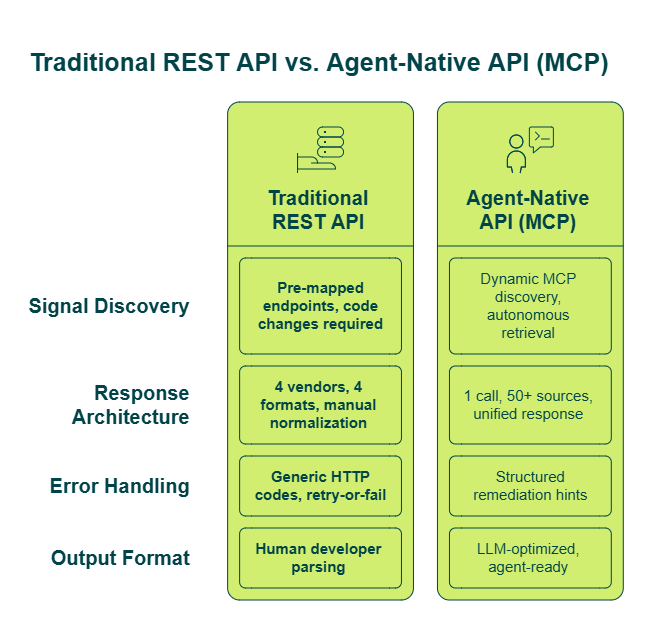
This determines whether your agent operates autonomously or needs constant developer babysitting every time a new enrichment type is needed.
✅ MCP in Action at Explorium
With our MCP integration, agents query the full data layer dynamically. In the n8n meeting prep agent, MCP pulled technographic data automatically — even though technographics wasn’t explicitly configured — because the AI agent determined it was relevant to the upcoming meeting context.
Four endpoint types give agents structured primitives to compose any GTM workflow: match (get a business/prospect ID), enrich (get external data), fetch (generate/discover entities), and event data (push or enrich format). This works natively across n8n, LangGraph, Claude Code, and other agent frameworks.
“Instead of connecting to multiple data sources and APIs, we only require one connection — Explorium!”
— Mirit H., Mid-Market Explorium G2 – Verified Review
“UX is seamless, no latency issues and great performance considering the breadth of data calculations we’re working with.”
— Verified User Explorium Gartner – Verified Review
Clay, Cognism, Outreach, Common Room, Bombora, and Salesforge all rely on this infrastructure — because agent-native delivery isn’t a nice-to-have when your agent makes enrichment decisions hundreds of times per day.
Q7. What Does B2B Data API Performance Look Like in Real n8n Agent Workflows?
📅 Scenario 1: Meeting Prep Agent (Sync-Critical)
Every morning, this agent triggers on a schedule, pulls Google Calendar events, and filters out internal meetings using company domain. For every external meeting, it forks into two parallel enrichment paths:
- Company path: Extract attendee domain → match to Explorium business ID → enrich with demographics, technographics, competitive landscape, workforce trends, and LinkedIn posts → feed into a company research AI agent (Claude + Explorium MCP)
- Prospect path: Match attendee email to Explorium prospect ID → enrich with contact info, professional profile, and LinkedIn activity → feed into a prospect research agent that extracts career progress, pain points, and fit reasoning
Both paths merge, and the output ships to Slack before the first call of the day.
Performance requirement: All enrichment must complete before the meeting. This demands sync, low-latency calls. Explorium’s unified API returns multi-source data in one call per entity — instead of 4 sequential vendor calls to separate providers. MCP automatically pulled technographic data even when it wasn’t explicitly configured, because the agent determined it was relevant to the meeting context.
📊 Scenario 2: Inbound Lead Scoring Agent (Hybrid Sync + Bulk)
This agent pulls unqualified leads from Salesforce and forks into parallel enrichment: product usage data (from Databricks or Mixpanel) and external company enrichment (Explorium match → firmographics: industry, employee count, revenue, locations).
Claude + Explorium MCP determines lead priority based on ICP fit, decision-maker status, and recent events — promotions, funding rounds, product launches. The key insight from this workflow: assessing “are they relevant NOW?” matters as much as general ICP fit.
Performance requirement: Near-real-time scoring for individual leads (sync) plus bulk batch capability for nightly pipeline enrichment. The throughput math: 500 inbound leads/day at 50/batch = 10 bulk calls = completes in seconds, not minutes.
Output goes back to Salesforce as a task assigned to the account executive — complete with priority score, company profile, individual profile, recommended actions, and talking points.
📤 Scenario 3: Outbound Prospecting Agent (Bulk-Critical)
Natural language input: “Find me 2 marketing leaders at fintech startups who joined within the past year and have valid contact information.” Claude + Explorium MCP translates this into valid API calls — interpreting “decision maker” into job title taxonomy and seniority level, mapping industry terms into Explorium categories.
A validation node checks the generated API call structure; if the JSON is malformed, it sends it back to the agent for retry. Then it fetches matching prospects in bulk, enriches with contact info and LinkedIn posts, and splits into two specialized agents — one for research compilation, one for email writing. Splitting into two agents produces better output than asking one to do both.
Performance requirement: Process thousands of prospects efficiently. Explorium’s 50 records/call at 200 RPM means the agent can fetch and enrich a full target list in minutes, not hours.
🔄 Performance Patterns Across All Three
| Workflow | Pattern | Latency Requirement | Bulk Needed | MCP Role |
| Meeting Prep | Sync | Low (pre-meeting deadline) | ❌ Single-record | Auto-selects relevant signals |
| Lead Scoring | Hybrid | Medium (near-real-time) | ✅ Nightly batches | Determines priority factors |
| Outbound Prospecting | Bulk | Throughput-optimized | ✅ Core requirement | Translates natural language to API |
In all three workflows, MCP abstracts the complexity. The agent doesn’t manage which endpoints to call — it describes what it needs, and Explorium handles delivery. Before this infrastructure, the meeting prep agent alone required separate calls to Apollo (contacts), BuiltWith (technographics), and Bombora (intent) — each with different rate limits, auth, and response formats. After: one integration, one credit system, and agents that “work within a week” instead of months.
Q8. How Does Explorium’s API Performance Compare to Apollo, PDL, ZoomInfo, and Crustdata?
🎯 What Agent Builders Actually Evaluate
When evaluating B2B enrichment APIs for production agent workloads, performance isn’t just latency. It’s throughput ceiling, rate-limit transparency, bulk support, signal breadth, pricing model, and whether the API was designed for autonomous systems or human-click workflows. This comparison focuses on what GTM engineers building agents need — not what salespeople need from a prospecting platform.
🔍 How Each Vendor Approaches the Problem
Apollo — Strong brand, affordable contact data, built-in CRM and sequencing. But it’s a platform designed for salespeople clicking through a UI. Monthly subscription billing doesn’t suit large-scale agent enrichment, and API integrations are limited.
ZoomInfo — Enterprise-grade data with broad coverage. But API scale is limited, rate limits are opaque, and pricing requires annual commitments through sales conversations.
PDL (People Data Labs) — Developer-friendly with good contact coverage and pay-as-you-go pricing. But signal breadth is narrow — no native intent data, limited technographics, no event triggers.
Crustdata — Budget-friendly for startups with decent early-stage company data. But narrower coverage, lower precision at scale, and a 60 RPM rate limit that bottlenecks production agents.
Clay — Powerful UI-based workflow builder with waterfall enrichment. But async-only API that’s acknowledged as “not easy to use with agents,” and credit costs that can vary significantly from stated amounts. Clay is actually an Explorium customer.
“Per-row credit cost can vary 100% from stated amounts — e.g., stated 11 credits/row, actual 25. Contact data quality varies wildly — feels like a black box.”
— Verified User, IT Services, Mid-Market Clay – G2 Verified Review“Data inaccuracies lead to negative outcomes. Wrong personnel details, private employee info listed as company contacts.”
— Anders J., Developer Apollo – G2 Verified Review
📊 Head-to-Head Comparison for Agent Workloads
| Dimension | Explorium | Apollo | ZoomInfo | PDL | Crustdata |
| Published Rate Limit | ✅ 200 RPM | ⚠️ Varies by tier | ❌ Opaque | ✅ 1,000 RPM | ⚠️ 60 RPM |
| Bulk Endpoint | ✅ 50 records/call | ❌ Single-record | ⚠️ Limited | ✅ Available | ❌ Single-record |
| Effective Throughput | ✅ 10K records/min | ⚠️ Tier-dependent | ⚠️ Limited | ✅ High | ❌ ~60 records/min |
| Sync + Async | ✅ Both | ⚠️ Sync only | ⚠️ Sync only | ✅ Both | ⚠️ Sync only |
| Signal Breadth | ✅ 50+ sources unified | ❌ Single-source | ⚠️ Broad but siloed | ❌ Contacts + basic firmographics | ❌ Narrow |
| MCP / Agent-Native | ✅ Full MCP | ❌ None | ❌ None | ❌ None | ❌ None |
| Rate-Limit Headers | ✅ All 4 headers | ⚠️ Partial | ❌ Undocumented | ⚠️ Partial | ⚠️ Basic |
| Pricing Model | ✅ One-time credit packages | ❌ Monthly subscription | ❌ Annual contract | ✅ Pay-as-you-go | ✅ Pay-as-you-go |
| Data Accuracy (Employee Count) | ✅ 97.8% | ❌ 78.2% | ⚠️ 88.3% | — | — |
✅ Who Should Choose What
Be direct:
- Choose Apollo if you need a UI-based prospecting platform for manual sales outreach and light CRM integration
- Choose PDL if you need contact data only, prefer pay-as-you-go, and don’t need intent or technographic signals
- Choose Crustdata if you’re pre-seed, budget-constrained, and focused on early-stage startup research
- Choose Explorium if you’re building production GTM agents that need multi-source enrichment, agent-native MCP delivery, transparent performance specs, and one credit system across all signal types
“Explorium is a fast and effective platform that makes the integration and analysis of third-party data seamless. If you are looking to enrich your lead generation efforts, I would strongly recommend trying out Explorium, as it was a revelation for us.”
— David A., CEO, Mid-Market Explorium G2 – Verified Review
The structural difference: competitors require 3–5 separate integrations to match Explorium’s signal breadth — multiplying latency, rate-limit complexity, monitoring overhead, and billing reconciliation. At 97.8% accuracy on firmographic fields where Apollo returns 78.15%, the data quality gap is measurable, not aspirational.
Q9. Production Readiness Checklist: Is Your B2B Data API Infrastructure Ready to Scale?
📋 Score Against These 10 Criteria
Before committing to a B2B data API for production agent workloads, run this audit. Every unchecked item represents a gap that will surface under scale — usually as a 2 AM PagerDuty alert or a surprise invoice your finance team flags on a Monday.
- ✅ Can your API handle daily lead volume without hitting rate limits?
- ✅ Do you have bulk endpoints that reduce API calls by 10× or more?
- ✅ Is latency documented at p50/p95 — not just “fast” in marketing copy?
- ✅ Does your API return machine-readable rate-limit headers (X-RateLimit-Remaining, Retry-After)?
- ✅ Can your agent dynamically select enrichment signals via MCP without pre-mapped endpoints?
- ✅ Is all enrichment (firmographic, contact, intent, technographic) available through one integration?
- ✅ Is pricing credit-based with transparent per-enrichment costs — not a rigid monthly subscription?
- ✅ Do you have monitoring for credit burn rate and cost-per-enriched-lead?
- ✅ Does your vendor handle GDPR/CCPA compliance across all underlying data sources?
- ✅ Can you go from signup to first API call in minutes, without a sales conversation?
📊 What Your Score Means
| Score | Assessment | What Happens Next |
| 8–10 | ✅ Production-ready | Focus on optimization — latency tuning, credit efficiency, throughput scaling |
| 5–7 | ⚠️ Critical gaps | Infrastructure will crack under scale. You’re one peak-traffic day from discovering which gaps hurt most |
| 0–4 | ❌ Not ready for production agents | Fragmented providers and manual processes dominate. Your agents are only as capable as your weakest data integration |
Most teams score 3–5. Not because they’re negligent, but because no single traditional provider was designed to check all ten boxes. Apollo handles contacts but not intent. Bombora handles intent but not contacts. PDL handles people records but not technographics. And none of them offer MCP for autonomous agent enrichment.
✅ How Explorium Turns Unchecked Boxes Into ✓
We built Explorium specifically so that every criterion above is met out of the box:
- 50+ sources unified in one API and MCP — firmographics, contacts, intent, technographics, funding signals, event triggers
- Transparent rate limits with all four response headers on every call
- Bulk endpoints (50 records/call at 200 RPM) reducing total API calls by 10×+
- Credit-based pricing — one-time packages, not monthly subscriptions. One credit pool across all enrichment types
- Enterprise compliance (GDPR, CCPA) with resale rights on custom plans — perform due diligence once, not per source
- Free account to first API call in minutes — no sales conversation required
“Explorium is a great gold mine of data, together with a quick and easy auto ML pipeline, we are able to turn plans into results really fast.”
— Noa L., DS Team Leader Explorium G2 – Verified Review“Finally, a platform that conveniently and intuitively provides data that makes business decisions easier.”
— K B., Corporate Data Manager Explorium G2 – Verified Review
⭐ The Companies Already Scoring 10/10
The leading data products in the GTM space are already Explorium customers — Clay, Cognism, Outreach, Common Room, Bombora, Salesforge, and Monday.com — because agent-native, multi-source enrichment shouldn’t require managing five separate vendor contracts and 10–15 engineering hours per week on normalization.Scored below 7? Create a free Explorium account and benchmark it against your current stack. Validation takes minutes, not meetings.


