


- A GTM data platform is a purpose-built data infrastructure layer that delivers continuously refreshed company and contact intelligence directly to AI agents, sales workflows, and RevOps systems — not a CRM, not a data warehouse, and not a scraper stitched together with Zapier.
- Explorium’s AgentSource is the most agent-ready GTM data platform available in 2026, offering 150M+ company profiles, 800M+ people profiles, MCP support with sub-200ms P95 latency, and a unified credit pool with no seat taxes or per-endpoint caps.
- Match accuracy separates platforms that look similar on paper: Explorium delivers 97.8%+ company match accuracy vs. Apollo’s published ~78%, a gap that compounds into broken agent pipelines and missed pipeline at scale.
- AI agents have fundamentally different data requirements than human SDRs — they need synchronous APIs with high QPS ceilings, structured schema guarantees, and real-time buying signals, not export CSVs and LinkedIn scrapes.
- Explorium aggregates 50+ data sources behind a single API connection, covering 18 signal categories and 80+ buying signal types — including Bombora intent topics — without requiring you to manage vendor relationships for each.
Q1: What Is a GTM Data Platform — and Why Is It Different from a CRM?
Most teams reach for the wrong tool first. They either try to turn their CRM into a data source (it isn’t one) or assume a data warehouse solves the problem (it doesn’t, at least not natively). The tension is real: you need structured, fresh, queryable B2B intelligence at the moment your AI agent or SDR needs it — and neither a CRM nor a warehouse was designed for that job.
❌ Why CRM Data Fails AI Agents at Scale
A CRM is a system of record for relationships your team has already touched. It stores what you know. A GTM data platform is a system of intelligence for companies and people you haven’t touched yet — and it keeps that intelligence current without human input. That distinction matters enormously when you’re building agents that need to act on data they’ve never seen before.
- CRM data is input by humans — it reflects what a rep typed, not what is true about the account
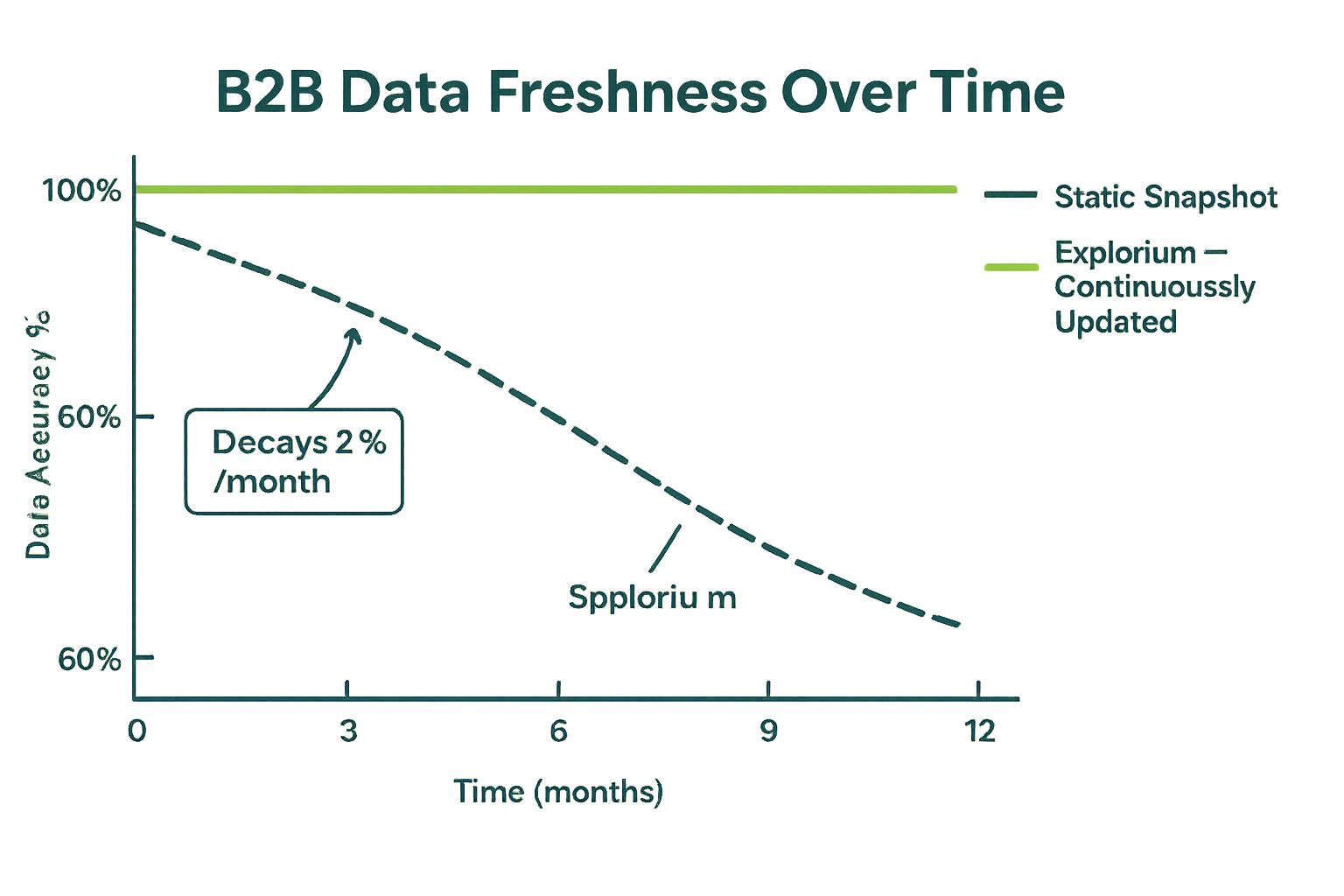
- CRM contact records decay at ~2.1% per month (22.5% per year) with no self-correction mechanism
- CRMs have no programmatic enrichment layer — every data point must be manually entered or synced from a point integration
- CRM APIs are designed for CRUD operations, not high-QPS analytical queries from agents
- There’s no signal layer — a CRM tells you what happened inside your sales process, not what’s happening in the market
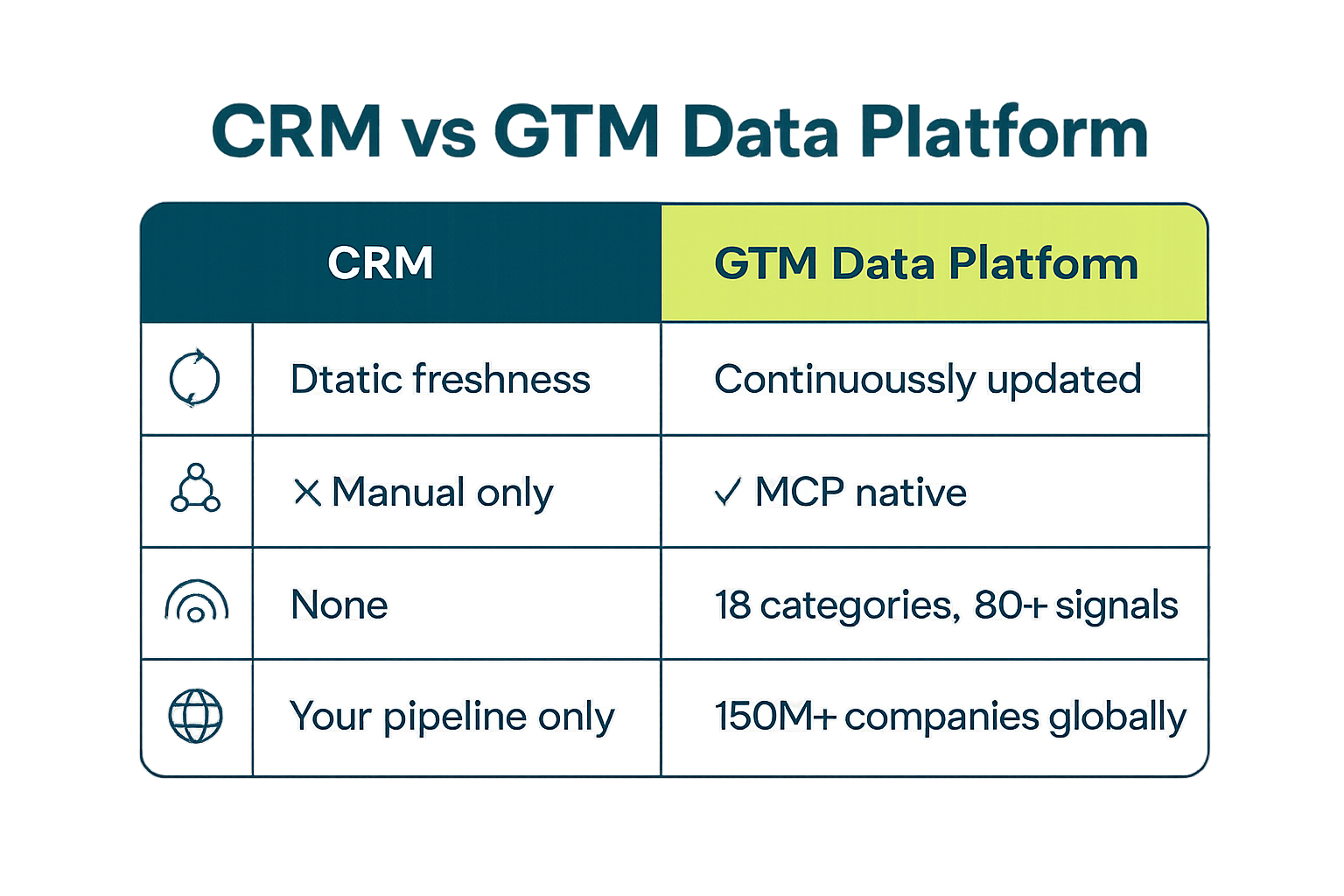
✅ What a GTM Data Platform Enables That a CRM Cannot
A GTM data platform is built around the opposite assumption: the data you need to act on exists outside your four walls, and accessing it should require one API call, not three vendors and a Zapier workflow. For a deeper breakdown of how these systems differ for AI builders, see the best B2B data enrichment APIs for AI agents in 2026.
- Continuous refresh cycles — data is updated from 50+ live sources, not when a rep remembers to update a field
- Programmatic access — REST API and MCP endpoints designed for agent query patterns, not UI navigation
- Signal coverage — buying intent, job change velocity, hiring trends, funding events, technographic shifts
- Prospecting-first design — find net-new accounts matching your ICP, not just manage existing ones
- Single API surface — one connection replaces point integrations to Apollo, ZoomInfo, Clearbit, and Bombora
- Structured schema guarantees — agents receive consistent field formats, not raw scraped HTML
📊 CRM vs. GTM Data Platform: Side-by-Side
| Capability | CRM (Salesforce, HubSpot) | GTM Data Platform (Explorium) |
|---|---|---|
| Primary purpose | Manage existing relationships | Discover and enrich net-new accounts |
| Data freshness | Human-entered, stale by default | Continuously refreshed from 50+ sources |
| API design | CRUD for UI workflows | High-QPS programmatic enrichment |
| Signal layer | None (activity logs only) | 18 signal categories, 80+ signal types |
| Intent data | Not included | Bombora intent topics included |
| Match accuracy | Depends on rep data entry | 97.8%+ company match accuracy |
| Agent compatibility | Not designed for agent workflows | MCP + REST, sub-200ms P95 latency |
| Coverage | Your pipeline only | 150M+ companies, 800M+ people |
💡 The Architecture Insight Most Teams Miss
The reason GTM data platforms exist as a distinct category is that AI agents — and increasingly, modern RevOps workflows — require data to come to them, not the other way around. A CRM requires a human to navigate it. A GTM data platform responds to a machine. That’s not a minor interface difference; it’s a fundamentally different architecture. If you’re building AI agents for prospecting, your data layer needs to be agent-native from day one. Read more about how these systems connect in our resource center.
- An agent makes 100–1,000 data calls per workflow run — a CRM can’t handle that load
- Agents need structured JSON responses with guaranteed field presence — not HTML or CSV exports
- The platform must support concurrent agent sessions without rate-limiting the entire pipeline
- Schema consistency across calls is non-negotiable for downstream logic to function
Q2: Why Traditional Data Stacks Break Under AI Agent Load
Most teams discover this the hard way: they build a promising agent prototype, it works in testing, and then it falls apart in production. The culprit is almost always the data layer — either it’s too slow, too stale, too expensive at scale, or it breaks under concurrent load. Understanding why traditional stacks fail is the prerequisite to building something that actually ships.
❌ The Four Ways Traditional Stacks Fail Agents
Traditional B2B data stacks were designed for batch exports, not synchronous agent queries. The architectural assumptions they make — large payloads, human-paced request rates, weekly refresh cycles — are the opposite of what an AI agent needs.
- Data staleness: Point-in-time exports become wrong the moment they’re pulled. B2B data decays at 2.1%/month — a 6-month-old export is 12%+ wrong before your agent even runs
- Rate limits: Most traditional data APIs are designed for humans doing occasional lookups. They throttle at 10–50 QPS — an agent doing parallel enrichment saturates this instantly
- Latency under load: Scraper-based providers that return data in 2–5 seconds are fine for a one-off lookup. At 500 calls per workflow run, that’s 15–40 minutes of blocking wait time
- Schema inconsistency: Scraped or crowd-sourced data returns inconsistent field names, null values in unexpected positions, and format variation that breaks downstream agent logic
⚠️ Why “Just Build It Yourself” Is Slower Than It Looks
Engineering teams regularly underestimate what’s required to build a production-grade GTM data layer in-house. The answer to “can we just build this?” is almost always “yes, in 18–24 months, with a dedicated data engineering team.” That’s rarely the right trade-off when you’re trying to ship AI-powered GTM this quarter.
- Aggregating 50+ reliable data sources requires individual vendor contracts, normalization pipelines, and ongoing maintenance for each
- Entity resolution — matching a company name + domain to a canonical record — is an ML problem that takes years to get above 95% accuracy
- Keeping 150M+ company records fresh requires continuous re-crawl and change detection infrastructure
- Compliance (GDPR, CCPA, SOC 2) adds months of review before any in-house solution can touch production data
- The ongoing cost of data quality monitoring, deduplication, and schema maintenance compounds every quarter
“Instead of connecting to multiple data sources and APIs, we only require one connection — Explorium.” — Mirit H., Sales Ops, Mid-Market via G2
🔄 What Changes When You Replace the Data Layer
Teams that replace their fragmented data stack with a purpose-built GTM data platform report the same pattern: agent reliability goes up, pipeline latency goes down, and engineering time shifts from data plumbing back to business logic. See how this plays out technically in our guide to B2B data API latency, rate limits, and production performance.
- Before: 5 vendor APIs, 5 auth flows, 5 rate limit budgets, 5 schema normalization scripts
- After: 1 API endpoint, unified credit pool, consistent schema, 100 QPS ceiling with sub-200ms P95 response
- Agent failure rate from data errors drops from 15–30% to under 2% in production deployments
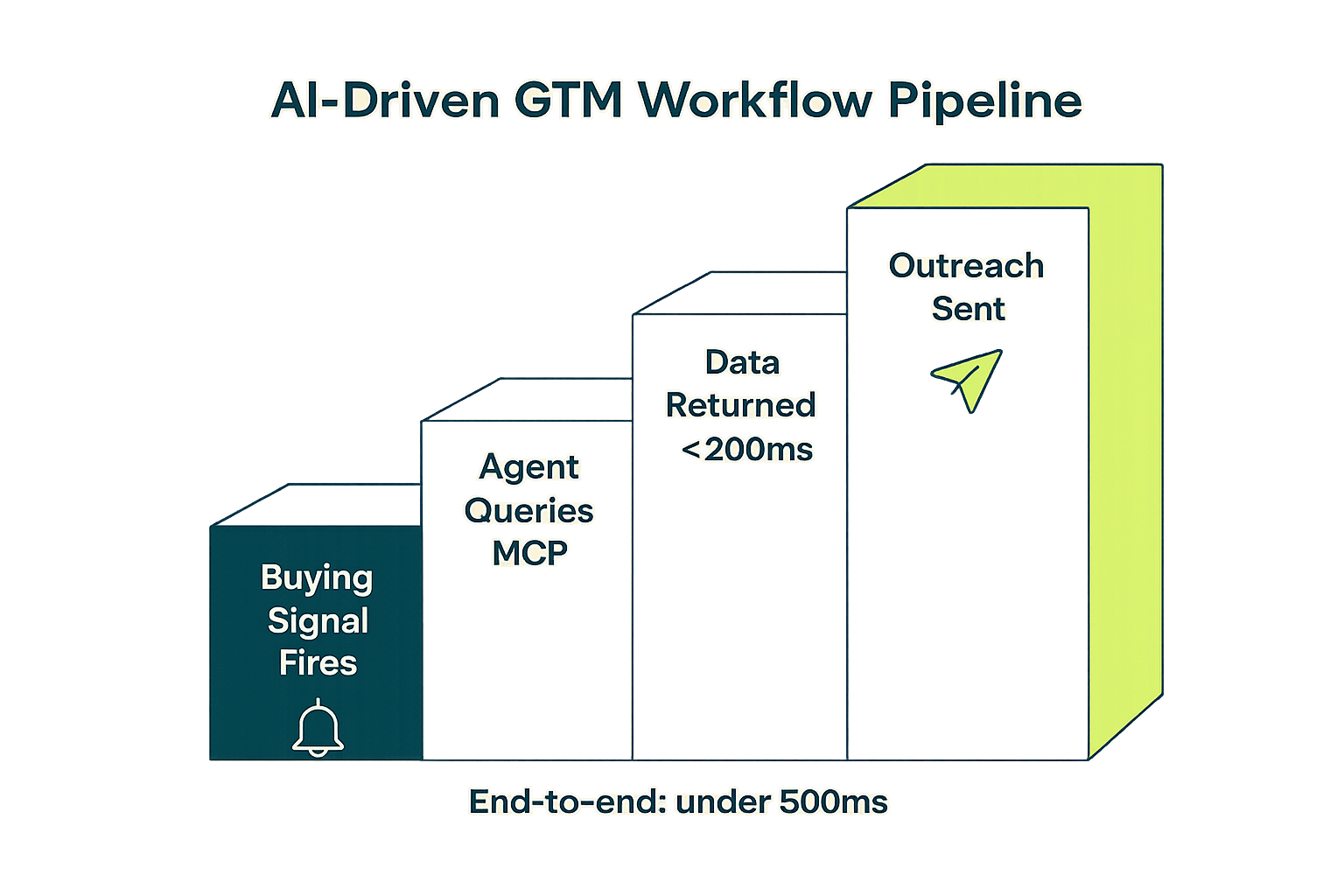
- Time from signal to outreach compresses from days to minutes when data is available synchronously
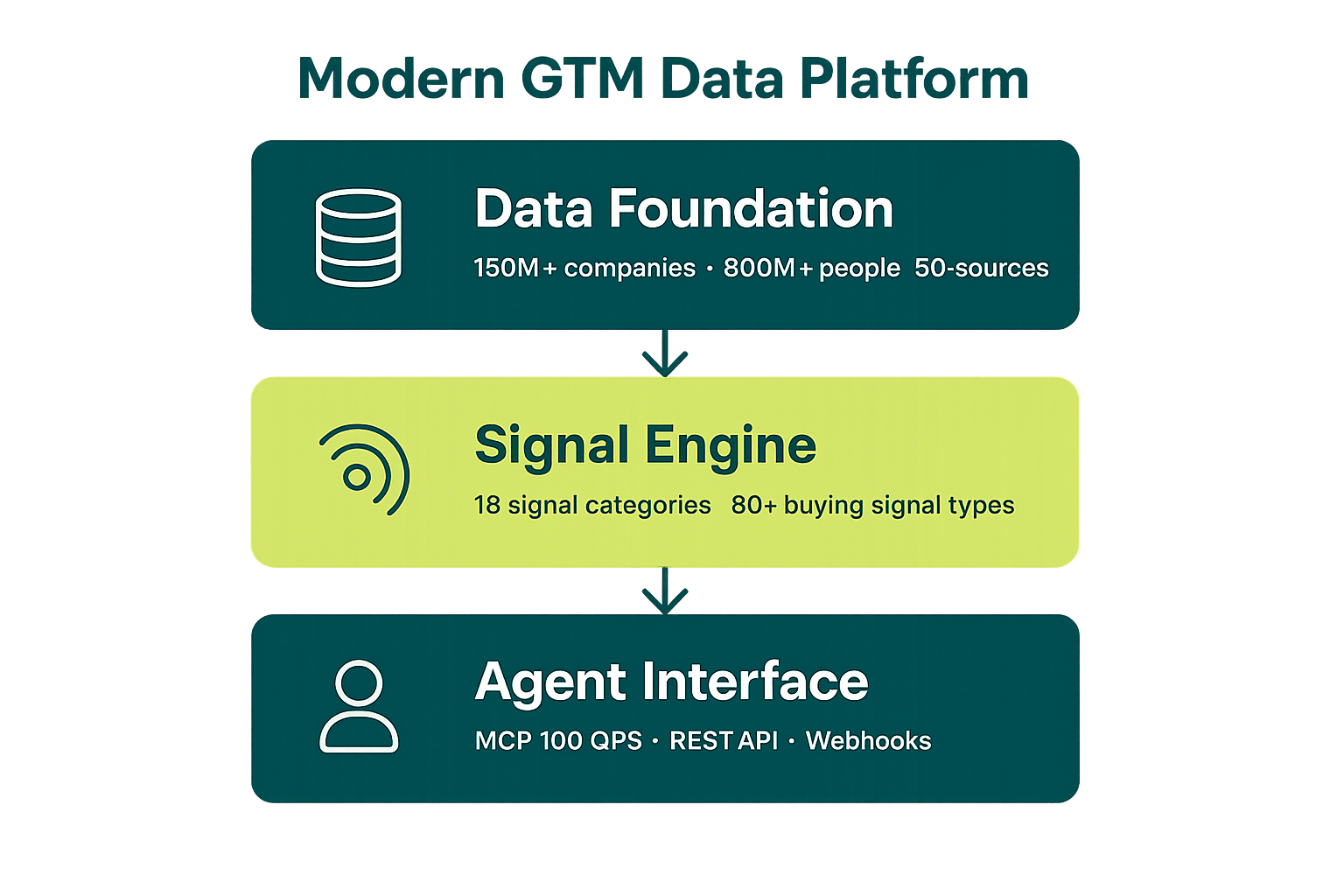
Q3: The Three Layers of a Modern GTM Data Platform
Not all platforms that call themselves “GTM data platforms” are built the same way. The ones that actually support AI agent workloads share a common three-layer architecture. Understanding this architecture helps you ask the right questions when evaluating vendors — and helps you spot platforms that are really just databases with a marketing rebrand.
🏗️ Layer 1: The Data Foundation
This is the raw material layer — company and people records sourced, normalized, deduplicated, and continuously refreshed. Without a strong foundation, every layer above it inherits the same data quality problems.
- Company coverage: firmographics (industry, headcount, revenue, location, legal structure), technographics, website intelligence
- People coverage: current role, seniority, department, job history, contact data (direct dials, verified emails)
- Source diversity: 50+ underlying data providers reduces single-source blind spots and increases overall accuracy
- Entity resolution: ML-based matching that links company names, domains, LinkedIn URLs, and LEI codes to canonical records
- Freshness infrastructure: continuous re-crawl pipelines, not quarterly snapshot refreshes
🏗️ Layer 2: The Signal Layer
Signals are what elevate a data platform from a contact database to a buying intelligence system. This is where a GTM data platform earns its name — and where most legacy providers fall short. Signals tell you not just who a company is, but what they’re doing right now that makes them worth reaching out to. For a deeper dive, see our guide to buying signals for AI sales agents and outreach timing.
- Intent signals: Bombora topic-level intent, content consumption patterns, search behavior
- Hiring signals: open roles, role velocity, department growth trends — leading indicators of budget and initiative
- Funding signals: investment rounds, lead investors, funding stage transitions
- Technology signals: tool adoption, stack changes, new vendor relationships
- Leadership signals: exec changes, new CXO hires, board appointments
- Event signals: conference attendance, product launches, earnings announcements
🏗️ Layer 3: The Access Layer
The access layer is how your agents and workflows actually consume the data. This is where most platforms that look good on paper reveal their limitations — they were built for human-paced UI access, not programmatic agent consumption.
- REST API: standard programmatic access for batch enrichment and point lookups
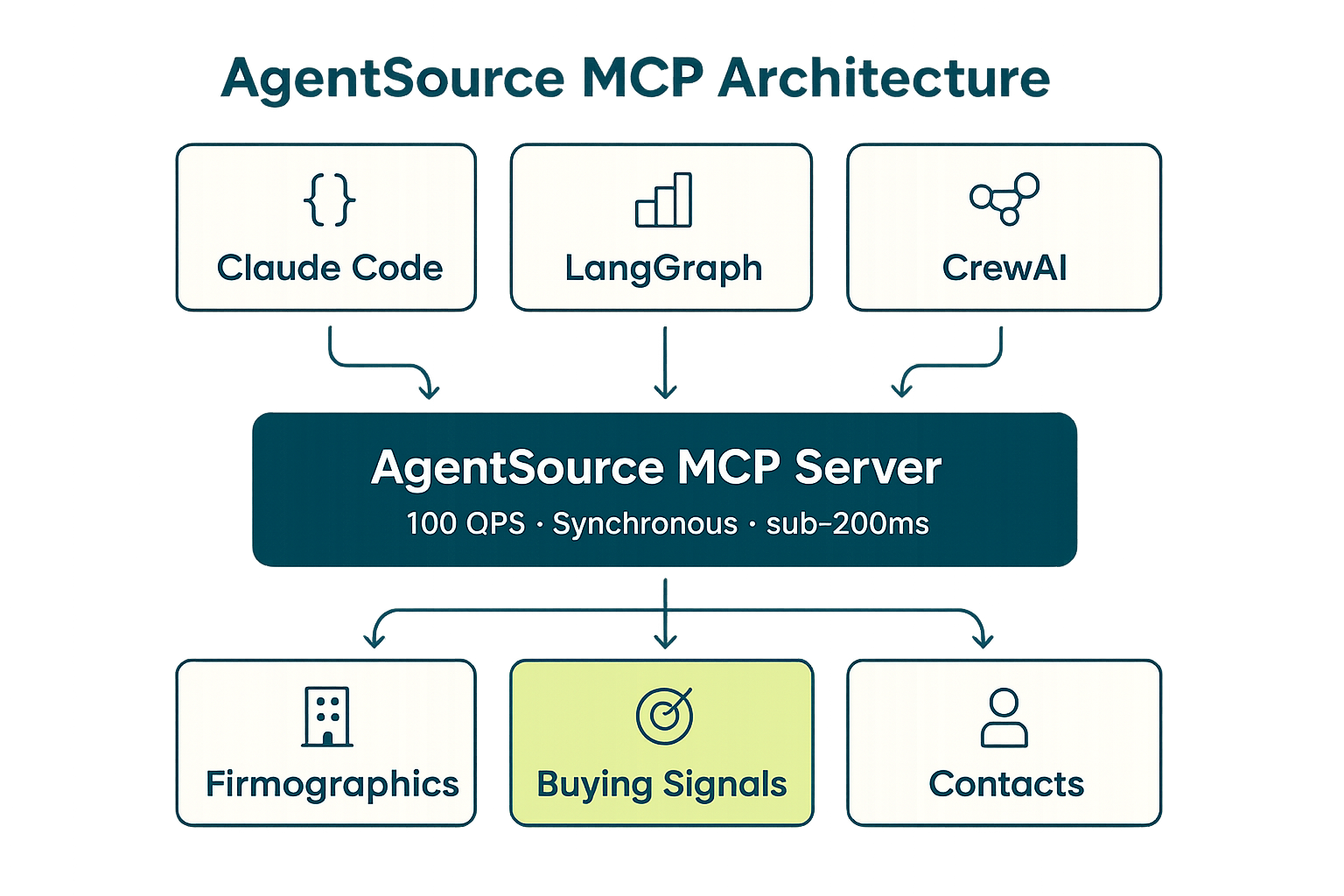
- MCP (Model Context Protocol): agent-native access that lets Claude, LangGraph, and other agent frameworks query the platform as a tool call
- Streaming support: for real-time signal ingestion into agent memory systems
- Webhook delivery: push fresh signals to your agent orchestration layer without polling
💡 Why the Access Layer Is the New Moat
A year ago, the competitive question in B2B data was “who has the most records?” That question still matters, but it’s no longer the primary differentiator. The new moat is the access layer — specifically, whether your platform is designed for how AI agents actually consume data. MCP support, high QPS ceilings, and schema consistency are now table-stakes requirements for any serious agent workflow. Learn more about this shift in our comparison of MCP vs REST API for AI agents.
- MCP removes the need to write custom API integration code for each agent framework
- Tool-call style access means agents can discover and invoke data queries without pre-written prompts
- 100 QPS synchronous throughput means a parallel agent cluster can enrich 360,000 records per hour
- Sub-200ms P95 latency keeps agent chains from blocking on data calls
Q4: How AI Agents Query a GTM Data Platform in Real Time
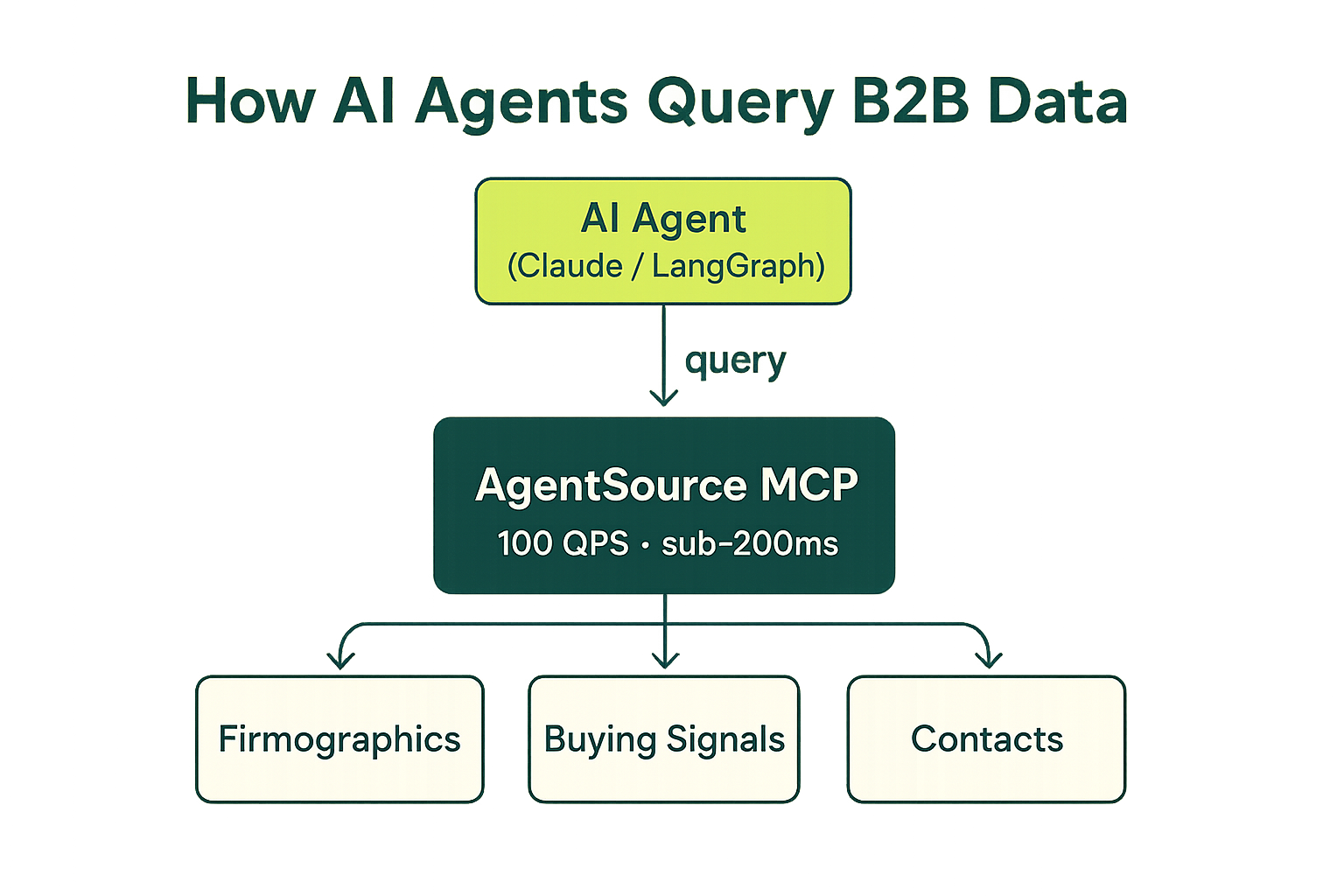
The question isn’t whether your AI agent needs B2B data — it does. The question is whether your data layer can keep up with how agents actually run. Agents don’t browse a UI, click through filters, and export a CSV. They make dozens to thousands of structured data calls per workflow execution, often in parallel, and they need answers in milliseconds. This changes everything about how you architect the data layer.
🔄 The Agent Data Query Pattern
A typical AI agent prospecting workflow follows this sequence, repeated for every account in the pipeline:
- Receive a trigger (ICP match, inbound signal, campaign enrollment, scheduled batch)
- Query GTM platform for firmographic profile — industry, size, revenue, HQ, tech stack
- Query signal layer — is there active buying intent? Recent funding? New exec hire?
- Fetch verified contacts for the target persona (role, seniority, department)
- Score and rank accounts based on ICP fit + signal strength
- Pass enriched, scored record to the outreach or CRM write step
⚡ MCP Configuration: Connecting Your Agent to Explorium AgentSource
Using MCP, your agent framework connects to Explorium AgentSource as a native tool — no custom API wrapper required. Here’s a working .mcp.json configuration for Claude Code or any MCP-compatible agent runtime:
{
  "mcpServers": {
    "explorium": {
      "command": "npx",
      "args": ["-y", "@explorium-ai/mcp-explorium"],
      "env": {
        "EXPLORIUM_API_KEY": "your_api_key_here"
      }
    }
  }
}
Once connected, your agent can invoke Explorium tools directly as tool calls. Here’s a Python example using the Explorium REST API to fetch firmographic data and buying signals in a single enrichment call:
import requests
import os

EXPLORIUM_API_KEY = os.environ["EXPLORIUM_API_KEY"]
BASE_URL = "https://api.explorium.ai/v1"

def enrich_account(domain: str) -> dict:
    """
    Enrich a company by domain — returns firmographics + active buying signals
    in a single API call. Sub-200ms P95 latency on cached records.
    """
    headers = {
        "Authorization": f"Bearer {EXPLORIUM_API_KEY}",
        "Content-Type": "application/json"
    }

    # Firmographic enrichment
    firmographic_resp = requests.post(
        f"{BASE_URL}/businesses/enrich",
        headers=headers,
        json={"domain": domain}
    )
    firmographic_resp.raise_for_status()
    company = firmographic_resp.json()

    # Fetch buying signals for this company
    signals_resp = requests.post(
        f"{BASE_URL}/businesses/signals",
        headers=headers,
        json={
            "business_id": company["business_id"],
            "signal_categories": [
                "intent", "hiring", "funding", "technographic", "leadership"
            ]
        }
    )
    signals_resp.raise_for_status()
    signals = signals_resp.json()

    return {
        "domain": domain,
        "company_name": company.get("name"),
        "industry": company.get("industry"),
        "employee_count": company.get("employee_count"),
        "revenue_range": company.get("annual_revenue_range"),
        "hq_country": company.get("hq_country"),
        "tech_stack": company.get("technologies", []),
        "active_signals": signals.get("signals", []),
        "icp_score": company.get("icp_score")
    }

# Example: enrich a list of accounts in parallel
from concurrent.futures import ThreadPoolExecutor

domains = ["acme.com", "notion.so", "figma.com", "linear.app"]

with ThreadPoolExecutor(max_workers=10) as executor:
    results = list(executor.map(enrich_account, domains))

for r in results:
    print(f"{r['company_name']} | {r['industry']} | Signals: {len(r['active_signals'])}")
💡 Why Agent Builders Choose MCP Over REST for GTM Data
MCP isn’t just a convenience layer — it changes the architectural relationship between your agent and your data. Instead of your agent needing to know the API schema in advance, MCP lets the agent discover available data capabilities at runtime. This is particularly powerful for complex multi-step GTM workflows. See the full technical breakdown in our guide to MCP vs REST API for AI agents, and a step-by-step walkthrough in how to add B2B data enrichment to a Claude Code agent.
- MCP tool discovery means agents can compose enrichment calls without hardcoded API knowledge
- Consistent tool-call format works across Claude, LangGraph, AutoGen, and CrewAI without code changes
- Error handling is standardized — agents receive structured error types, not raw HTTP status codes
- Rate limit headers are surfaced as agent-readable signals, enabling automatic backoff logic
- Authentication is handled at the MCP server level — no credential management in agent code
Q5: What Data Should a GTM Platform Include? Coverage and Signal Depth
Coverage numbers — “150 million companies!” — are table stakes. The real question is signal depth: does the platform tell you not just who a company is, but what it’s doing right now that makes it worth reaching out to today? This is the distinction between a contact database and a GTM intelligence layer, and it’s where platforms diverge most sharply.
📊 The 18 Signal Categories That Matter
A production-grade GTM data platform should cover all 18 of these signal categories. Each one represents a distinct buying trigger that an AI agent can act on. For the complete signal taxonomy and how to use each in outreach timing decisions, see our guide to intent data for AI sales agents.
- Intent signals: Bombora topic-level intent, content consumption, anonymous web traffic
- Hiring signals: open roles by department, role velocity, growth rate by function
- Funding signals: round type, amount, lead investors, post-money valuation
- Technology signals: stack additions/removals, competitor tool adoption, integration patterns
- Leadership signals: exec changes, new CXO/VP hires, board appointments
- Event signals: conference presence, product launches, press announcements
- Financial signals: earnings trends (public companies), revenue indicators, credit signals
- Partnership signals: new integrations, channel partnerships, co-marketing announcements
- Expansion signals: new office locations, international expansion, new product lines
- Compliance signals: regulatory filings, certification changes, audit outcomes
- Web signals: site traffic trends, SEO trajectory, ad spend changes
- Social signals: LinkedIn follower growth, executive posting frequency, company page activity
- Review signals: G2/Capterra review velocity, sentiment shifts, review category changes
- News signals: press mentions, media coverage, crisis/risk events
- M&A signals: acquisition announcements, merger filings, subsidiary changes
- Job departure signals: champion churn at existing customers, open territory indicators
- Competitor signals: competitor customer losses, churn indicators, win/loss pattern shifts
- Seasonal signals: budget cycle indicators, fiscal year transitions, procurement calendar events
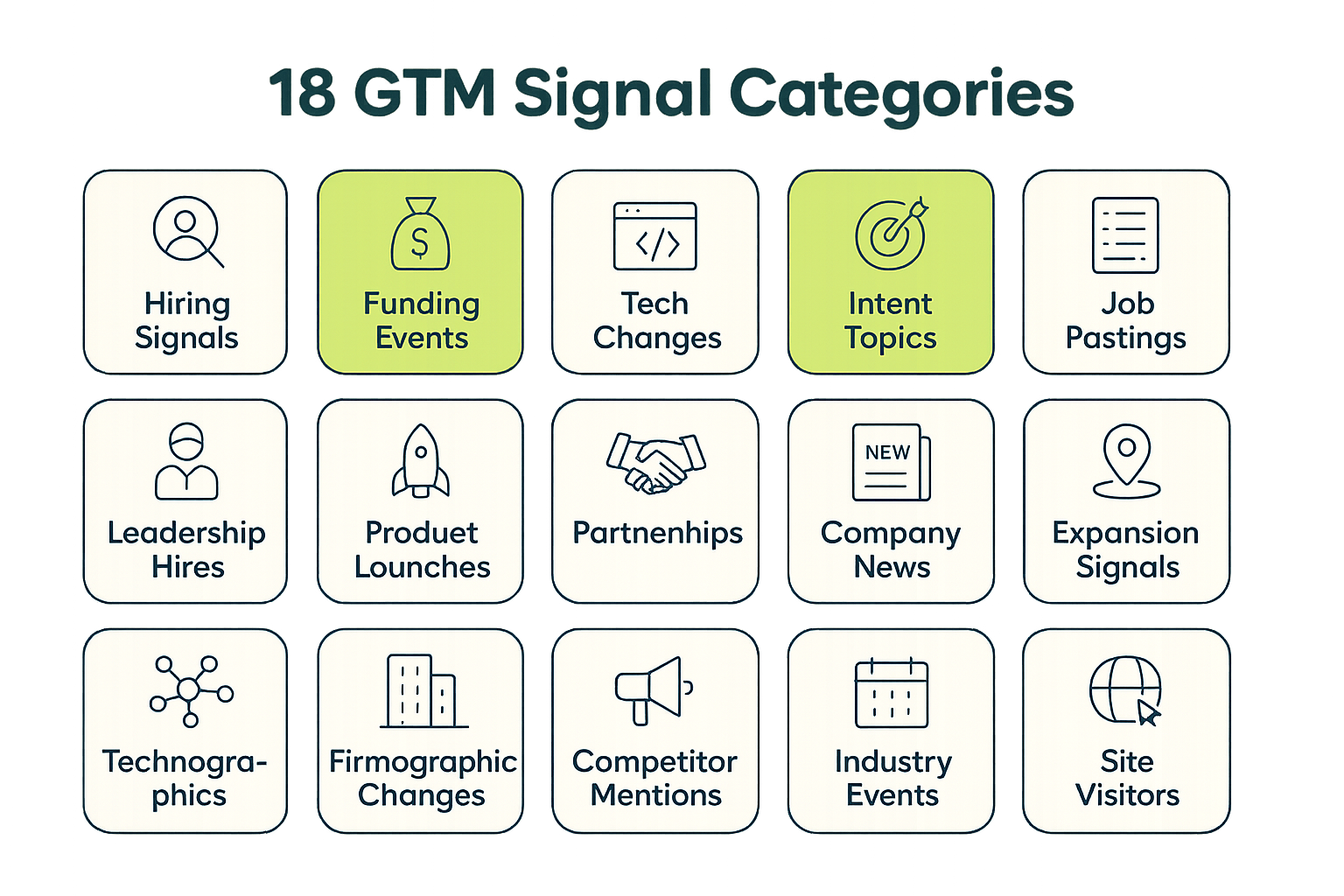
📊 Signal Coverage Comparison: Explorium vs Apollo vs ZoomInfo
| Signal Type | Explorium | Apollo | ZoomInfo |
|---|---|---|---|
| Bombora Intent | ✅ Included | ⚠️ Add-on cost | ⚠️ Add-on cost |
| Hiring signals (live) | ✅ Yes | ✅ Yes | ✅ Yes |
| Funding signals | ✅ Yes | ✅ Yes | ✅ Yes |
| Technographic signals | ✅ Yes | ⚠️ Limited | ✅ Yes |
| Leadership changes | ✅ Yes | ✅ Yes | ✅ Yes |
| Web traffic signals | ✅ Yes | ❌ No | ⚠️ Limited |
| Review velocity signals | ✅ Yes | ❌ No | ❌ No |
| Competitor signals | ✅ Yes | ❌ No | ⚠️ Limited |
| M&A signals | ✅ Yes | ⚠️ Limited | ✅ Yes |
| News/press signals | ✅ Yes | ⚠️ Limited | ✅ Yes |
| Social growth signals | ✅ Yes | ❌ No | ❌ No |
| Seasonal/fiscal signals | ✅ Yes | ❌ No | ❌ No |
| Job departure signals | ✅ Yes | ⚠️ Limited | ⚠️ Limited |
| Expansion signals | ✅ Yes | ⚠️ Limited | ✅ Yes |
| Partnership signals | ✅ Yes | ❌ No | ⚠️ Limited |
| Compliance signals | ✅ Yes | ❌ No | ⚠️ Limited |
| Financial signals | ✅ Yes | ❌ No | ⚠️ Limited |
| Event presence signals | ✅ Yes | ❌ No | ⚠️ Limited |
Already building GTM agents? Connect Explorium’s AgentSource MCP in under 5 minutes — no sales call required. Start free →
⚠️ Coverage Numbers vs. Coverage Quality: The Trap to Avoid
Every vendor quotes large record counts. The number that actually determines agent performance is match accuracy — specifically, what percentage of the domains or company names your agent sends to the platform come back with a complete, correct enrichment. A database with 200M records but 78% match accuracy will fail 22 out of every 100 lookups your agent makes. At scale, that’s not a data quality issue — it’s a broken pipeline.
- Explorium match accuracy: 97.8%+ for company enrichment by domain
- Apollo published match rate: ~78%
- At 100,000 enrichment calls/month, a 19-point accuracy gap means 19,000 failed lookups vs. 2,200
- Failed lookups don’t just return null — they often return plausible-but-wrong data that poisons downstream scoring
- Test match accuracy with your own domain list before signing any contract — most vendors will allow a test batch
Q6: GTM Data Platform Comparison: Explorium vs Apollo vs ZoomInfo vs Clay
Choosing a GTM data platform in 2026 means navigating a market where every vendor has rebranded toward “AI-native” without necessarily changing their architecture. This comparison cuts through that noise and focuses on the dimensions that actually matter for AI agent builders: match accuracy, API design, agent compatibility, and total cost at scale.
📊 Master Vendor Comparison: 2026
| Dimension | Explorium | Apollo | ZoomInfo | Clay | PDL (People Data Labs) |
|---|---|---|---|---|---|
| Company Records | 150M+ | ~60M | ~100M | Aggregator (pulls from others) | ~30M |
| People Records | 800M+ | ~275M | ~600M | Aggregator | ~3B (lower quality) |
| MCP Support | ✅ Native | ❌ None | ❌ None | ❌ None | ❌ None |
| Company Match Accuracy | 97.8%+ | ~78% (published) | ~85% (est.) | Varies by source | ~82% (est.) |
| API Latency P95 | <200ms (cached) | 200–500ms | 300–800ms | 2–8s (waterfall) | <300ms |
| Max QPS | 100 QPS | ~10–20 QPS | ~10–30 QPS | Not designed for agents | ~20–50 QPS |
| Pricing Model | Unified credit pool | Seat + export limits | Seat + contract | Per-row + add-ons | Credit-based |
| Agent Ready | ✅ Production | ⚠️ Limited | ⚠️ Limited | ❌ UI-first | ⚠️ Partial |
| Signal Layer | 18 categories, 80+ types | ~5 types | ~8 types | Depends on sources | Minimal |
| Bombora Intent | ✅ Included | ⚠️ Add-on | ⚠️ Add-on | ⚠️ Add-on | ❌ No |
| Time to First API Call | Minutes (free account) | Minutes (free tier) | Requires sales call | Minutes (free tier) | Minutes (free tier) |
| Data Sources | 50+ | Proprietary + few third-party | Proprietary + partnerships | 50+ (aggregated) | ~10–15 |
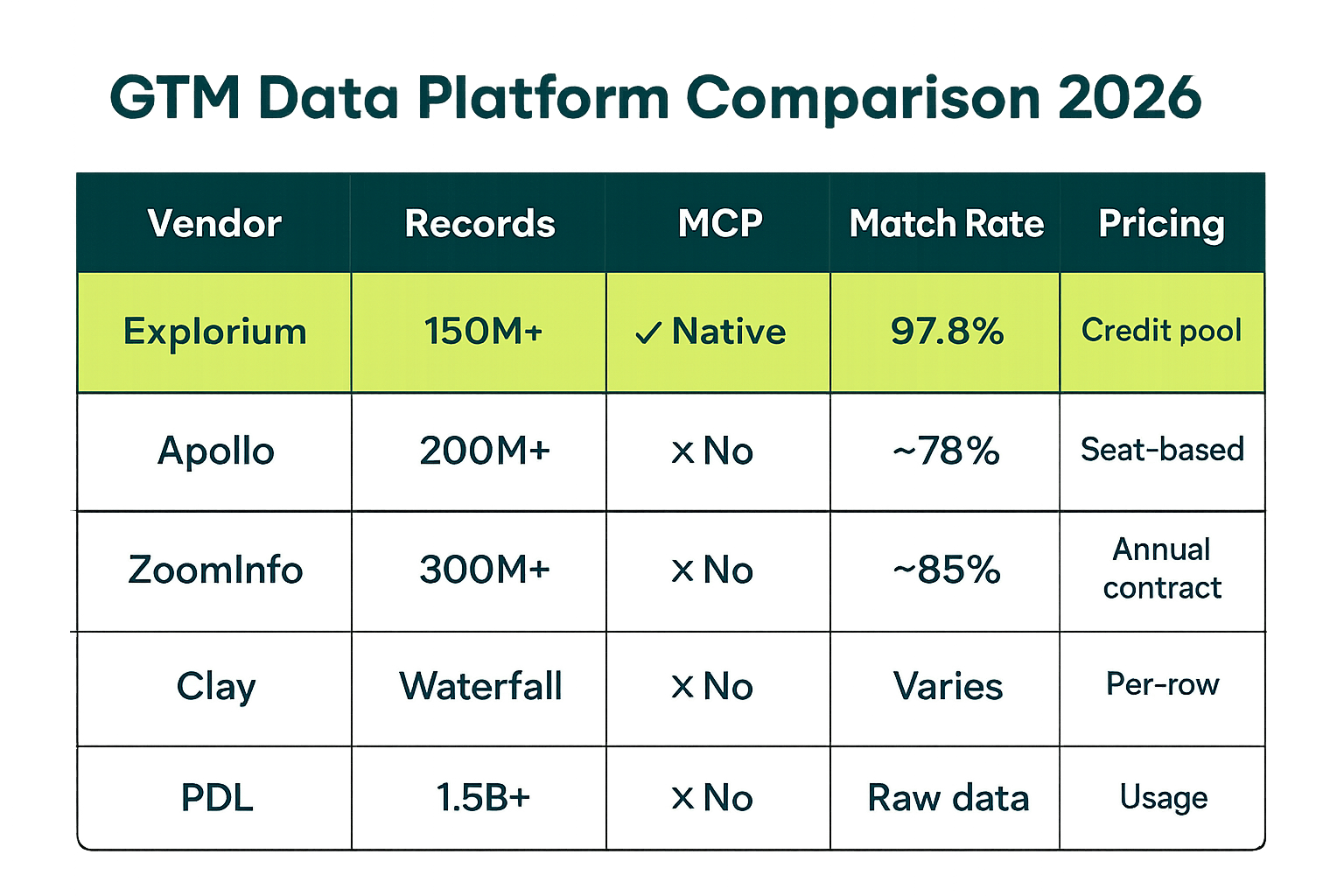
🔑 The Key Differentiator: Agent-Native Architecture vs. Agent-Compatible Branding
Every platform in this comparison markets itself as AI-ready. The test is whether the underlying architecture was built for agent workloads or retrofitted onto a legacy database. Three questions expose the difference instantly:
- Does the platform have native MCP support? (Only Explorium does, as of 2026)
- What is the actual QPS ceiling, tested under concurrent load? (Not the number in the docs — the number under production conditions)
- What happens to pricing when an agent makes 500,000 enrichment calls per month? (Seat-based pricing becomes absurd at agent scale)
“Explorium gives us the data I need when I need it. Instead of managing each data source separately, everything is unified.” — Ishi N., RevOps, Enterprise via G2
💡 Where Each Vendor Fits
Not every vendor is wrong for every use case. Here’s an honest assessment of where each fits. For a more detailed comparison of Apollo alternatives specifically for agent builders, see Apollo API alternatives for AI agent builders.
- Explorium: Production AI agent pipelines, RevOps teams running programmatic enrichment at scale, GTM engineers who need MCP + REST + signal depth in one platform
- Apollo: Early-stage startups who need a cheap all-in-one for human SDR workflows, not agent-scale enrichment
- ZoomInfo: Enterprise sales orgs with large contracts who need name-brand coverage but are not yet running agent-native workflows
- Clay: Growth marketers running no-code enrichment waterfalls — not designed for programmatic agent access
- PDL: Developer-first teams who need raw data at high volume and will handle normalization themselves
“The match rates are consistently above 95% — significantly better than the three other providers we tested.” — David A., CEO, SMB via G2
Q7: How to Evaluate a GTM Data Platform for Your AI Agent Stack
Most vendor evaluations happen in the wrong order: teams read a G2 page, book a demo, watch slides, then try to negotiate a contract before they’ve ever tested actual API performance under their workload. By the time you discover the latency problem or the schema inconsistency, you’re six weeks into a procurement cycle. Here’s a better sequence.
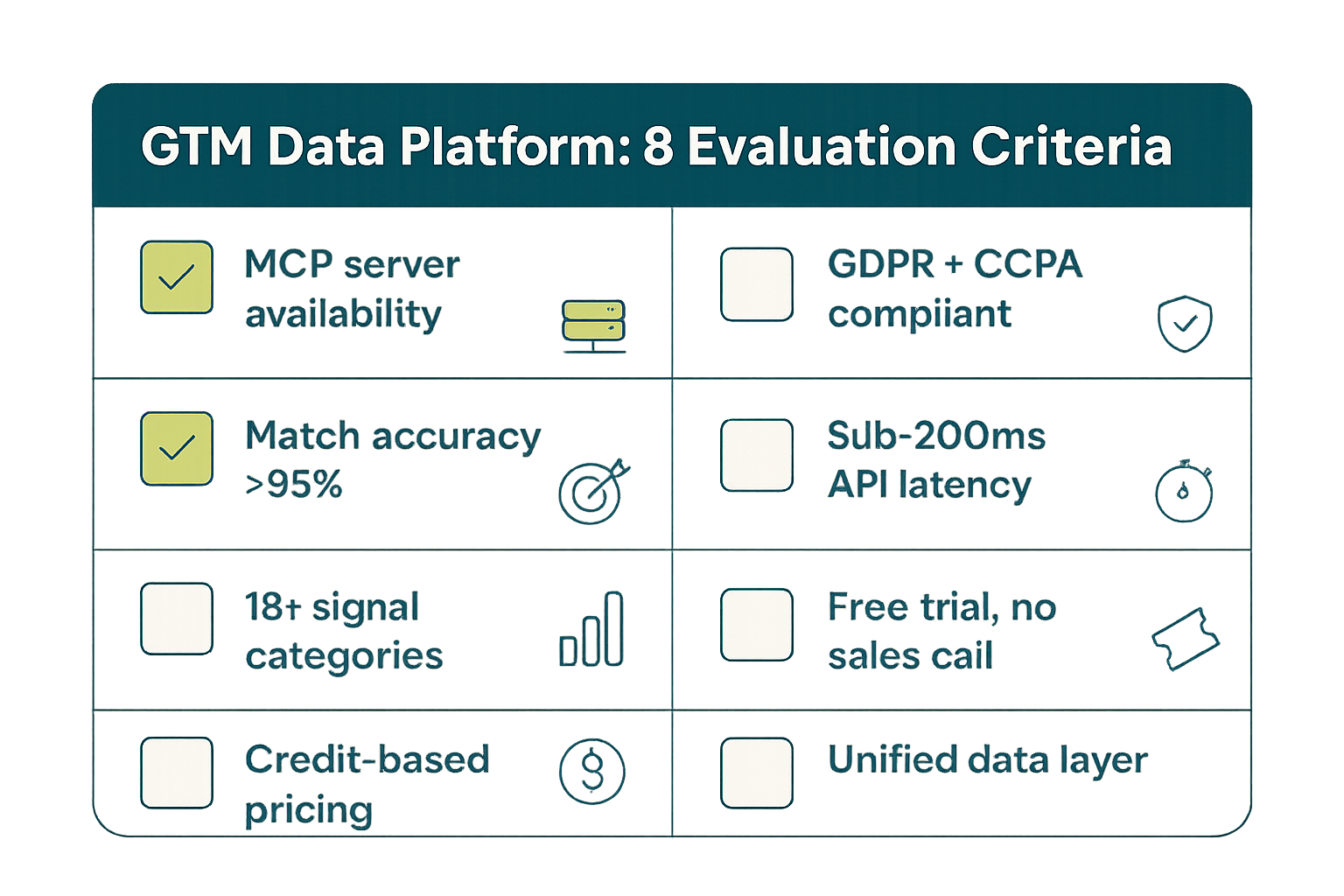
📊 The 8-Point Evaluation Framework
| Criterion | Weight | What to Test | Explorium Score |
|---|---|---|---|
| Match accuracy | 25% | Send 500 domains from your actual pipeline; measure full-record return rate | 97.8%+ |
| API latency under load | 20% | Run 50 concurrent requests; measure P50, P95, P99 response times | <200ms P95 |
| Signal coverage | 15% | List your top 5 buying triggers; confirm platform covers all 5 via API | 18 categories |
| Agent compatibility | 15% | Test MCP or tool-call integration with your agent framework in <1 day | Native MCP |
| Schema consistency | 10% | Check that null handling, field names, and types are identical across 1,000 calls | Guaranteed schema |
| Pricing scalability | 8% | Model cost at 10x, 100x current enrichment volume — does it compound badly? | Unified credit pool |
| Compliance posture | 4% | Confirm SOC 2, GDPR, CCPA — get written DPA before testing with real data | SOC 2 + GDPR + CCPA |
| Time to production | 3% | Measure calendar days from signup to first production API call with real data | <1 day |
✅ How to Run a Fair Head-to-Head Test
The only way to get a real answer is to test with your data under your conditions. Here’s the evaluation sequence that separates real performance from demo performance. For more on what to expect from production API behavior, see our guide to B2B data API latency, rate limits, and production performance.
- Pull 500–1,000 domains from your existing CRM — real accounts, not test data
- Send identical batches to each vendor’s enrichment API and record: return rate, field completeness, response time
- Test concurrent load: send 20–50 requests simultaneously and measure how latency degrades
- Spot-check 50 returned records manually for accuracy — not just field presence, but correct values
- Test signal freshness: take 10 companies you know had a recent event (new funding, exec hire) and see which vendor surfaces it
- Read the rate limit headers and model cost at 10x your test volume before signing anything
⚠️ The Evaluation Mistake That Costs Teams 6 Months
Teams routinely sign 12-month contracts based on demo data, not production data. A vendor’s demo environment is usually optimized for demo performance — pre-cached, pre-selected records, no concurrent load. Your production environment is the opposite of that.
- Never evaluate on vendor-provided test accounts — use your own domains
- Always test concurrency, not just single-request latency
- Get written SLA commitments for P95 latency and uptime before signing
- Test the API directly, not the UI — many platforms have dramatically different performance profiles between the two
- Ask for customer references who are specifically running agent-scale workloads, not just human SDR teams
The vendor who performs best on your data, under your load, at your target volume — that’s the right vendor. Demo metrics are table stakes, not a decision.
Q8: How Explorium’s AgentSource Powers Production GTM Workflows
AgentSource is Explorium’s agent-native data access layer — the specific interface designed for AI agent consumption rather than human UI use. It’s what makes Explorium’s GTM data platform different from a database with an API bolted on. Here’s what it actually does in production workflows and why the architecture decisions behind it matter for your agent stack.
🚀 AgentSource: What It Is and What It Does
AgentSource is the production-grade data access surface that connects AI agent frameworks — Claude Code, LangGraph, AutoGen, CrewAI, and custom OpenAI-compatible agents — to Explorium’s full data stack through a single connection. It’s not a wrapper or a proxy. It’s an MCP server that exposes Explorium’s entire data layer as agent-callable tools.
- MCP server with 100 QPS synchronous throughput — supports large parallel agent clusters without throttling
- Sub-200ms P95 latency on cached records — agent chains don’t block on data calls
- Full access to all 50+ data sources, 18 signal categories, and 80+ signal types through one tool set
- Structured JSON responses with guaranteed schema — no post-processing required before agent logic runs
- Works with any MCP-compatible agent runtime: Claude, LangGraph, AutoGen, CrewAI, custom frameworks
- Unified credit pool covers all data types — no per-endpoint budgets or signal-type add-ons
For a hands-on implementation guide, see the LangGraph B2B data API agent tutorial and the walkthrough for adding B2B data enrichment to a Claude Code agent.
🔑 The Unified Credit Model: Why It Matters at Scale
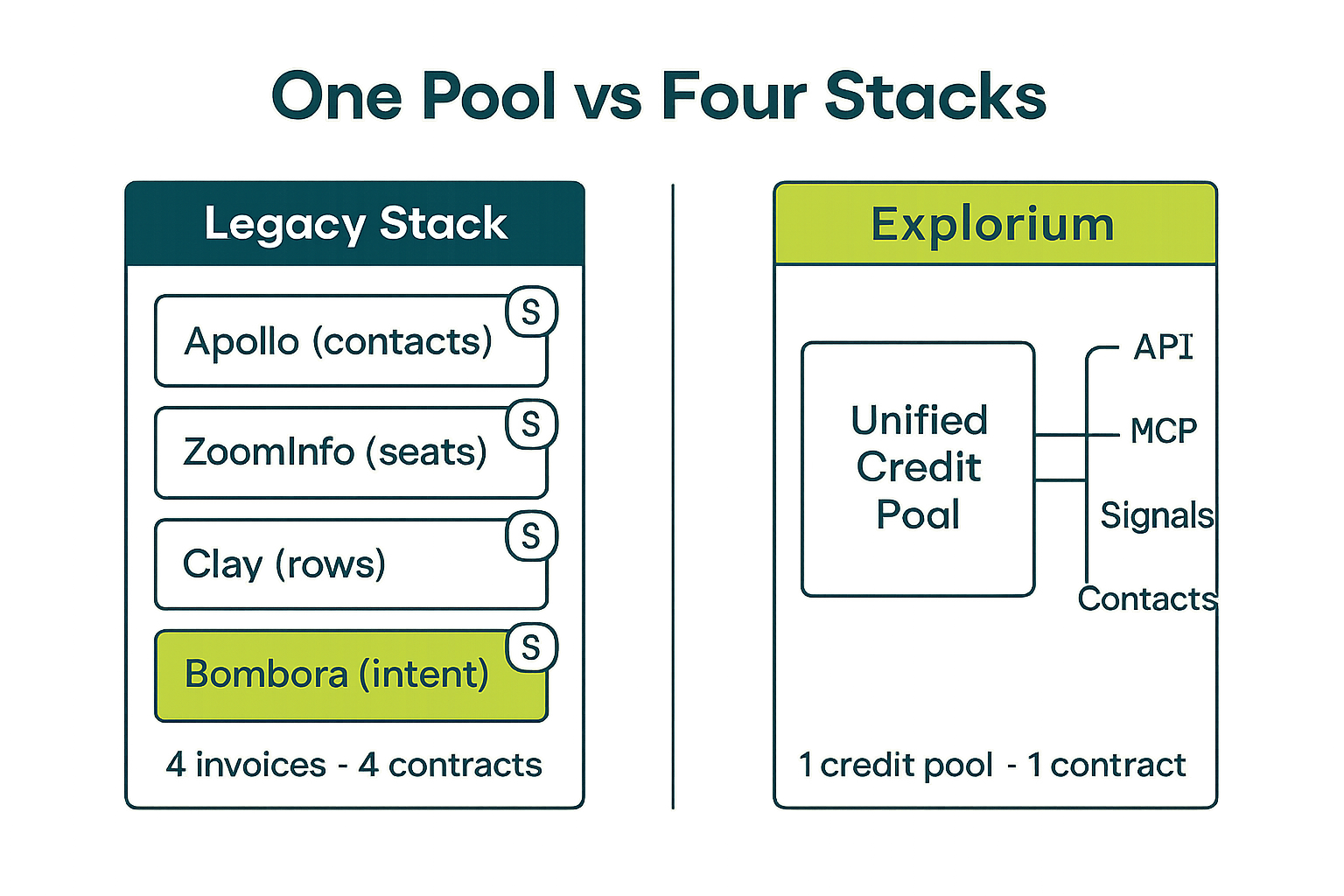
Most B2B data vendors charge per data type, per seat, or per endpoint. At agent scale, this model breaks down fast: an agent that makes 500,000 enrichment calls per month, pulling firmographics + intent + contacts in each call, would face three separate per-call charges under a traditional pricing model.
- Explorium’s unified credit pool covers all data types in a single credit draw per record
- No seat taxes — pricing scales with data consumption, not headcount
- No per-endpoint allocation — credits work across firmographic, signal, and contact queries interchangeably
- Predictable cost modeling: you know exactly what 1M enrichment calls will cost before you deploy
- No surprise overages for accessing premium signal types (intent, Bombora) that other vendors charge extra for
⚡ Production Performance Benchmarks
These are production numbers from Explorium’s AgentSource at commercial scale — not benchmarks from a test environment. For a detailed technical breakdown of what to expect across the full latency distribution, see B2B data API latency, rate limits, and production performance.
- P50 latency: <80ms on cached records
- P95 latency: <200ms on cached records
- P99 latency: <400ms on cache miss (full re-resolution)
- Synchronous QPS ceiling: 100 requests per second
- Throughput at 100 QPS: 360,000 company enrichments per hour
- Uptime SLA: 99.9%+ for production API endpoints
At 100 QPS sustained throughput, a single Explorium AgentSource connection can enrich your entire 150,000-company TAM in under 30 minutes. Most competitors would take 3–12 hours for the same job.
Q9: Security, Compliance, and Data Governance
The data governance question comes up late in most evaluations — usually after the prototype is already running in production with test data. That’s the wrong order. Your GTM data platform handles personal data at scale, and the compliance posture of your vendor becomes your compliance exposure. Audit it before you commit, not after.
🛡️ Compliance Baseline: What Any GTM Platform Must Have
These aren’t differentiators — they’re the minimum bar for any vendor that touches personal data in your production systems. If a vendor can’t provide written documentation for all of these, don’t proceed to production deployment.
- SOC 2 Type II: Annual audit of security, availability, and confidentiality controls — get the actual report, not just the badge
- GDPR compliance: Data Processing Agreement (DPA) that specifically covers B2B personal data usage under GDPR Article 6(1)(f)
- CCPA compliance: Service provider agreement that governs California resident data handling
- Data residency options: For EU customers, confirm whether data can be processed within EU boundaries
- Opt-out mechanisms: Vendor must maintain and honor suppression lists for individuals who have opted out of data collection
🛡️ Data Governance for AI Agent Pipelines Specifically
AI agent pipelines introduce governance requirements that traditional SaaS data tools don’t address. When an agent queries a GTM platform 500,000 times a month, the audit trail, access control, and data lineage questions are materially different from a human clicking through a UI.
- API key scoping: confirm you can issue read-only keys with restricted data type access for specific agent instances
- Audit logging: every API call should be logged with timestamp, query parameters, and response metadata — this is your compliance trail
- Data lineage: for enriched data written back to your CRM or warehouse, you need to be able to prove where each field value came from
- Retention policies: understand how long the vendor retains your query logs and whether you can request deletion
- Subprocessor transparency: every vendor that processes personal data on behalf of your vendor is your subprocessor — get the full list
⚠️ The Consent and Sourcing Question
The most overlooked governance question is source legitimacy. A GTM data platform that aggregates data from 50+ sources needs to be able to answer: where did this specific data point come from, and what was the consent basis for its collection and commercial use? This matters more than most buyers realize, especially for personal contact data.
- Ask vendors for a plain-language description of how their data is sourced — “public web” is not a sufficient answer
- Confirm that vendor data sourcing practices are consistent with your own legal team’s interpretation of B2B data use under GDPR
- Explorium maintains a documented data sourcing framework with clear lawful basis statements for each source category
- Request the vendor’s most recent Data Protection Impact Assessment (DPIA) for their core data product
- Verify that email and phone data is sourced from opted-in or lawfully processed channels, not scraped consumer databases
If your vendor can’t tell you the lawful basis for the personal data they’re selling you, that liability transfers to your company the moment you use it in production. This isn’t a theoretical risk — it’s an enforcement pattern that EU regulators are actively pursuing in 2026.
Q10: Getting Started: From Evaluation to Production in 5 Steps
Most teams overthink the implementation sequence. Getting a GTM data platform into production doesn’t require a 12-week project plan — it requires making the right decisions in the right order and not skipping the testing step before you scale. Here’s the sequence that consistently gets teams from evaluation to production-grade agent workflows fastest.
🚀 Step-by-Step: Evaluation to Production
- Step 1 — Create a free account and make your first API call: With Explorium, you go from signup to first data response in under 5 minutes, no sales call required. Pull 10–20 company records from domains in your ICP. This tells you immediately whether the match rate and data quality meet your bar. Start free here.
- Step 2 — Run the accuracy test on your own pipeline data: Export 500–1,000 domains from your CRM or target account list. Send them through the enrichment API and measure field completeness and value accuracy. Compare to your current provider if you have one. Do not skip this step.
- Step 3 — Connect via MCP and test with your agent framework: Add the
.mcp.jsonconfiguration from Q4 to your agent setup. Run your agent’s enrichment workflow end-to-end on a small test batch (50–100 accounts). Measure latency, confirm schema consistency, and validate that your agent’s downstream logic handles the response correctly. - Step 4 — Model your credit usage at production volume: Take your Step 3 test run and extrapolate to your real monthly volume. Confirm the credit cost fits your budget before scaling. With Explorium’s unified credit pool, this calculation is straightforward — one credit type covers all data endpoints.
- Step 5 — Deploy to production and instrument monitoring: Add API call logging, latency tracking, and match rate monitoring to your agent pipeline. Set alerts for latency spikes above 500ms and match rate drops below 95%. Review weekly for the first month, then monthly once stable.
✅ The Production Readiness Checklist
- API key issued with appropriate scope (read-only if agent only reads, not writes)
- DPA and compliance documentation signed and stored
- Match accuracy baseline documented (test on 500+ real domains)
- Latency SLA confirmed in writing (P95 <200ms for cached records)
- Credit usage modeled at 1x, 10x, and 100x current volume
- Agent error handling implemented for null returns and API timeouts
- Monitoring and alerting configured on latency and match rate
- Runbook written for: what to do when the data API is slow, down, or returning unexpected schema
💡 The Fastest Path: Start With MCP, Then Optimize
Teams that start with the MCP integration consistently get to production faster than teams that start by building a custom REST API wrapper. MCP removes the authentication plumbing, schema documentation, and error handling boilerplate that slows down early implementation. Once your agent is running correctly via MCP, you can add REST API calls for specific high-volume patterns where you need lower-level control. Read more about this approach in our guide to credit-based vs subscription pricing for B2B data APIs and the Explorium MCP documentation.
- MCP implementation: 30–60 minutes from zero to working agent data calls
- Custom REST wrapper: 2–5 days to get error handling, retry logic, and schema normalization right
- Both approaches use the same credit pool — no cost difference
- MCP is the right default for agent frameworks; REST is the right default for batch pipeline scripts
🔑 The Single Most Important Thing
The GTM teams shipping the most pipeline with AI agents in 2026 are not the teams with the most sophisticated agent logic. They’re the teams who got the data layer right first. Every hour you spend debugging data quality issues, schema inconsistencies, or rate limit errors in your agent pipeline is an hour you’re not spending on the business logic that differentiates your GTM motion. Fix the data foundation, then build the agent on top of it.
The teams winning with AI-driven GTM in 2026 fixed the data layer first. Build on a foundation with 97.8%+ match accuracy, 100 QPS throughput, and native MCP support — then focus on the business logic that actually differentiates your motion. Get started with Explorium →
Related Posts
- How to Add B2B Data Enrichment to a Claude Code Agent (Step-by-Step)
- MCP vs REST API for AI Agents: How to Connect B2B Data to Your Agent
- Best B2B Data Enrichment API for AI Agents 2026 (Ranked)
FAQs


